One Cool Tip Newsletter

April 5, 2026

Your daily dose of tech-savvy brilliance!

😀Greetings! Happy Easter Sunday, Cool Tipper!


Get ready to streamline your digital life with simple, actionable tips delivered straight to your inbox.


Cool Tip Theme: 🐥🐣🐰Easter Fun with Google


New here? Subscribe to the One Cool Tip Newsletter for daily updates. It's FREE!

3️⃣

If you enjoy the One Cool Tip newsletter, please forward this newsletter to THREE friends or colleagues or share it on social media using the links below.


Leave a $$$ Tip!


Share this One Cool Tip Newsletter!

X Share This Email
LinkedIn Share This Email
Pinterest Share This Email

🚨FBI: Major Breach of Surveillance System🚨


A cyber intrusion into an FBI surveillance system has been officially classified as a “major incident” under federal law, prompting mandatory notification to Congress.


What Happened


  • The FBI detected anomalous activity on an unclassified network used for surveillance operations.
  • Attackers accessed the system through a third‑party provider, a tactic consistent with sophisticated nation‑state operations.
  • Multiple outlets report that China‑linked hackers are suspected.


What Data Was Exposed


  • The compromised system contained pen register and trap‑and‑trace data, which logs incoming/outgoing phone numbers and metadata.
  • It also held personally identifiable information (PII) tied to subjects of active FBI investigations.


Why It Matters


Under federal guidelines, a “major incident” is any breach likely to cause demonstrable harm to national security, foreign relations, or the U.S. economy.


The exposure of surveillance metadata could reveal who the FBI is monitoring and how investigations are structured, a significant counterintelligence risk.


Source: multiple media outlets


Cool Deals of the Day

Help support One Cool Tip. Use this Amazon link when you shop online.


Check out these Cool Deals:


🎧 Sony WH-1000XM5 Noise Canceling Headphones: Perfect for immersing yourself in interactive games without distraction. Save 38% $249.99. Check it out on Amazon!


📱 iPad Air (M2 Chip): The best way to experience high-resolution art and puzzles on the go. $475. Check it out on Amazon!


🔋 Anker Portable Charger 20K: Top Seller. Keep your devices powered through a full day of holiday travel and gaming. Save 30% $125.99. Check it out on Amazon!


*Prices accurate when originally published.

One Cool Tip may earn a commission from qualifying purchases.

Fuel Your Adventure

Try Big Mike's Jerky!


bigmikesjerky.com


Now on TikTok!


Today's Cool Tip

Easter Fun with Google: Interactive Games and Traditions


Discover a digital basket full of interactive eggs, cultural puzzles, and hidden surprises waiting for you inside Google Arts and Culture.


Google offers a sophisticated yet playful way to celebrate the holiday by blending gaming with global traditions. This guide shows you how to access these hidden gems to entertain your family or your team during the break.


Have you ever wondered why we hunt for colorful eggs or how different cultures celebrate the arrival of spring? 


Here's a Cool Tip:  Have Easter Fun with Google.


While most people use Google to find a recipe for glazed ham, the platform actually hides a massive digital playground dedicated to seasonal celebrations. 


Whether you are looking for a quick distraction during a lunch break or a way to keep the kids engaged with educational content, Google Arts and Culture has transformed holiday trivia into an interactive experience. 


Instead of a static webpage, you get a collection of games that test your knowledge and your reflexes.


Feature Explanation


Google’s Easter project is part of its larger Arts and Culture initiative. 


It is a curated hub that uses high-resolution imagery, Street View technology, and browser-based coding to create games. 


These are not heavy downloads. 


They are lightweight, web-based applications that run directly in your browser or through the dedicated mobile app.


The feature works by gamifying cultural data. 


For example, you might play a puzzle game where you reconstruct a famous Faberge egg or a trivia challenge that spans centuries of European history. 


It matters because it moves beyond the "Easter Bunny" commercialism and offers a global perspective on the holiday, making it a valuable tool for both casual gamers and educators.


What You’ll Gain


  • Interactive Entertainment: Access free, high-quality games without any ads or in-app purchases.
  • Cultural Knowledge: Learn about unique traditions like the Giant Omelette of France or the intricate Pysanky eggs of Ukraine.
  • Cross-Platform Play: Seamlessly switch between your desktop at work and your phone while on the go.


Step-by-Step Instructions


Here's how to do it.


Web and Desktop (Windows 11 / macOS)


  1. Open your preferred web browser.
  2. Navigate to the Google Arts and Culture Easter Traditions page, https://artsandculture.google.com/project/easter-traditions.
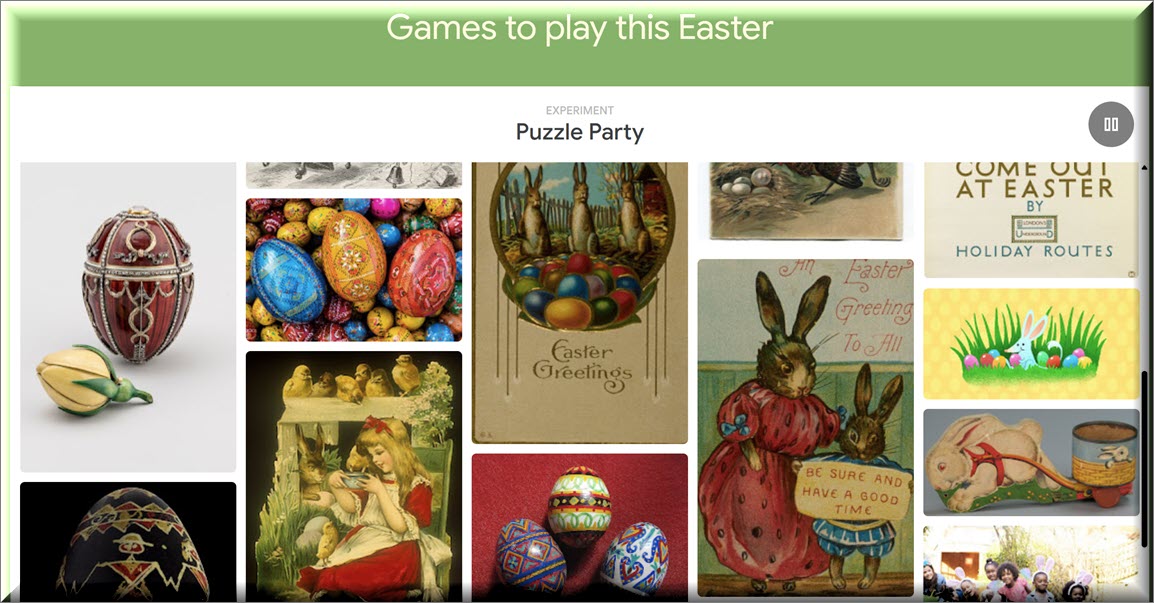
  3. Click on a specific game or activity, such as the "Puzzle Party" or "Send an Easter Card."


fig. 1 - Games to Play This Easter

Example: Choose the "Puzzle Party" and select "Multiplayer" to invite a friend to help you assemble a classic piece of Easter art in real-time.


iOS and Android


  1. Download or open the Google Arts and Culture app from the App Store or Google Play Store.
  2. Use the search icon (magnifying glass) and type "Easter."
  3. Select the "Easter Traditions" project.
  4. Tap on any of the interactive modules to start playing.
  5. Use the "Cast" feature if you want to display the game on a larger television for a group activity.


Pros and Cons


Pros:


  • Educational value that makes screen time feel productive for students.
  • High-quality visuals provided by world-renowned museums and galleries.


Cons:


  • Requires a stable internet connection as the assets are streamed in high definition.
  • Some complex puzzles might be difficult to navigate on smaller smartphone screens.


Feature Access


This experience is available globally to anyone with a web browser or the Google Arts and Culture app. 


It is a free service provided by Google. 


There are no subscriptions required. 


While the core "Easter Traditions" hub is a permanent part of the Arts and Culture project, specific seasonal games are highlighted prominently during the weeks surrounding the holiday.


Score


Criterion | Score (0–10) | Justification
Value 9
It provides high-quality, free educational content that is usually locked behind paywalls.
Usability 8
The interface is intuitive, though some puzzles require a bit of precision on mobile.
Wow Factor 9
The level of detail in the artwork and the smoothness of the browser games is impressive.
Total: 26/30 |  🌟 Excellent
Verdict: This is the best way to enjoy a "hidden" side of Google while learning something new about global history.


Key Takeaways


Google Arts and Culture offers a unique, ad-free environment to explore Easter through interactive puzzles and games. 


It bridges the gap between entertainment and education, making it perfect for both professional breaks and family bonding.


Cool Tip Snapshot


  • Feature Name: Google Arts and Culture Easter Hub
  • Platform(s): Web, iOS, Android
  • Quick Benefit: Free interactive games that teach global holiday history.
  • Access Type: Free


Try It Yourself


Visit the Google Arts and Culture site today and challenge yourself to a 50-piece puzzle of a vintage Easter postcard. 


Also, try Google's 2026 Easter doodle:  https://doodles.google/doodle/easter-2026/


If you enjoy the experience, please share this article with your family and friends to see who can get the fastest puzzle time!


READ MORE


Read the Cool Tip on OneCoolTip.com.

Check out these Cool Tips & Tricks.


  • Quick Search: Use “Easter Google Arts” to find content fast. Open Google and type the phrase.


  • Save Favorites: Bookmark exhibits you like. Use your browser’s bookmark feature.


  • Full Screen: Expand for better visuals. Press F11 on Windows.


  • Use Tablet: Touch improves experience. Open site on tablet browser.


  • Share Link: Send to family. Copy URL and text it.


  • Zoom In: Examine details. Use pinch or Ctrl + scroll.


  • Audio Mode: Turn on sound. Use device volume controls.


  • Kid Mode: Guide children. Sit with them while exploring.


  • Daily Browse: Make it a habit. Visit once per week.

ICYMI - In Case You Missed It ...

Flash Your iPhone Screen for Notifications You Might Otherwise Miss


Missed calls and texts often happen when your phone is muted or across the room. The iPhone’s flash notification feature turns your screen or camera flash into a visual alert so you always know when something important arrives.


Read the Full Cool Tip.


Read the Newsletter Version.

Looking for your next adventure?


Call Denise at Travel For You.

314.660.3039


Sign Up for the Monthly Newsletter


http://www.travelforyouvacations.com/


https://www.facebook.com/TRAVEL.FOR.U/


See You Tomorrow

Tomorrow's Cool Tip is waiting to amaze you.


Until then, go forth and conquer the tech world with your newfound knowledge!


Be sure to visit www.OneCoolTip.com for Cool Tech Tips for a Cooler Life!


And if you Like One Cool Tip, please support with TipJar!


Enjoy!


Rodger

Chief Cool Tipper

onecooltip.com@gmail.com


What Do You Think?

What do you think of today's OneCoolTip newsletter?
Positive        Neutral        Negative
X Share This Email
LinkedIn Share This Email

Connect with One Cool Tip!!

Facebook  X  Instagram  Web  Pinterest  YouTube  LinkedIn
 

As an Amazon Associate, One Cool Tip may earn a small commission from qualifying purchases.


Our media content is intended solely for informational purposes only. Please do not construe anything here as legal, tax, investment, financial, marital or other advice.


Copyright © 2026 | www.OneCoolTip.com | All Rights Reserved