|
One Cool Tip Newsletter
August 21, 2026
| Your daily dose of tech-savvy brilliance! | |
😀Greetings! Happy Friday Funday, Cool Tipper!
Get ready to streamline your digital life with simple, actionable tips delivered straight to your inbox.
Cool Tip Theme: Atlas Obscura
Use Atlas Obscura to discover unusual attractions, plan memorable side trips, create travel lists, and find overlooked places near home.
New here? Subscribe to the One Cool Tip Newsletter for daily updates. It's FREE!
| |
3️⃣
If you enjoy the One Cool Tip newsletter, please forward this newsletter to THREE friends or colleagues or share it on social media using the links below.
Leave a $$$ Tip!
Share this One Cool Tip Newsletter!
| | |
🚨Before You Post That First-Day-of-School Photo, Read This🚨
Back-to-school photos are a cherished tradition, but experts warn that sharing too much information online can put children at risk.
Photos that reveal a child's age, grade, school, birthday, teacher, or even details visible in the background can provide valuable information to scammers and identity thieves.
Child safety experts also caution against posting a child's favorite things, as that information could be used to gain their trust.
Before sharing school pictures on social media, take a closer look at what's visible in the image and review your privacy settings.
Consider posting a simple photo without signs, school names, or other identifying details.
You can still celebrate the first day of school while keeping your child's personal information private and secure.
And in Other News...
- How Video Games Are Helping Build Smarter AI
Many of today's biggest AI breakthroughs trace their roots back to video games.
Google DeepMind recently highlighted how its research journey began with AI systems learning to play classic Atari games and later progressed to mastering complex challenges such as Go, chess, and StarCraft II.
Those advances helped lay the foundation for powerful AI technologies that are now being used far beyond gaming.
DeepMind is working with game developers to create new virtual environments where AI can learn, reason, and adapt in more human-like ways.
The goal is to build AI agents that can operate across many different situations instead of excelling at just one specific task.
It is a reminder that the games we play often serve as testing grounds for the technologies that will shape our future.
| |
| 🤔 What kind of hidden wonder would you most like to discover? | | | | |
Help support One Cool Tip. Use this Amazon link when you shop online.
Check out these Cool Deals:
| | |
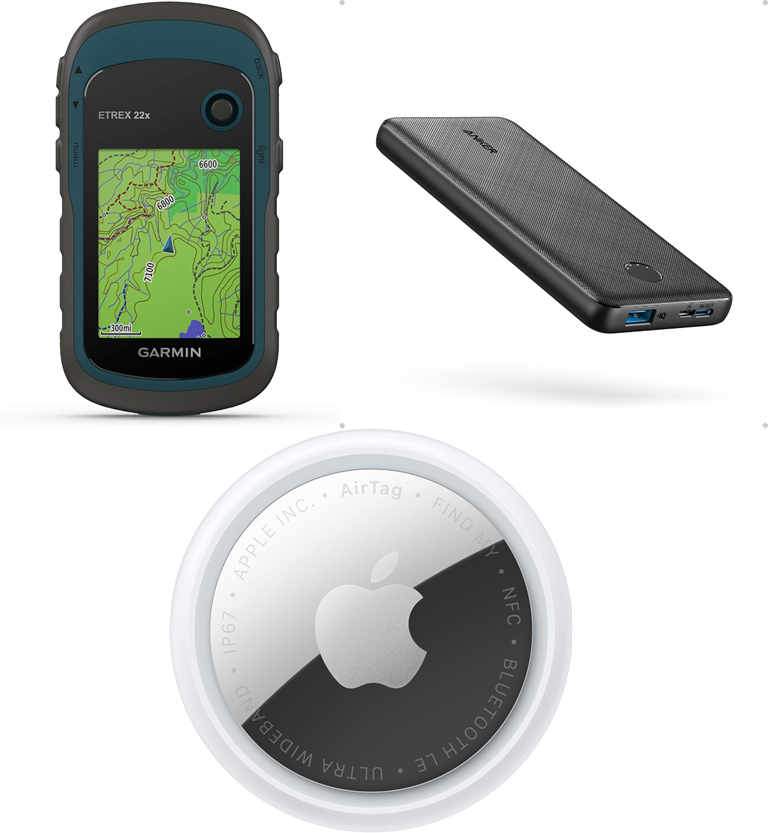
🧭 Garmin eTrex 22x Handheld GPS Navigator: A dedicated GPS provides a useful backup for outdoor attractions where cellular service may be unreliable.
Look! Now $199.99. 4.3 Stars. Check it out on Amazon!
🔋 Anker Power Bank 10000mAh Power Charger: A compact power bank helps keep your phone available for maps, photos, attraction details, and emergency calls.
Save 8%. Now $23.99. 4.5 Stars. Check it out on Amazon!
📍 Apple AirTag (2nd Gen): An AirTag can help iPhone users locate compatible luggage, backpacks, or other travel items.
Save 17%. Now $24. 4.5 Stars. Check it out on Amazon!
*Prices accurate when originally published.
One Cool Tip may earn a commission from qualifying purchases.
| | |
Find Fascinating Places Most Travelers Miss
Atlas Obscura helps you find unusual museums, roadside oddities, historic sites, natural wonders, and overlooked attractions near home or on your next trip. Its interactive map, mobile apps, custom lists, and community recommendations make it easier to venture beyond the standard tourist stops.
Most travel searches lead to the same landmarks, restaurants, and heavily promoted attractions.
That works when you want the essentials, but it can leave some of the most memorable places completely off your itinerary.
Here’s a Cool Tip: Use Atlas Obscura to find the places ordinary travel searches miss.
Atlas Obscura takes a different approach.
Its community-supported travel guide focuses on unusual places, overlooked history, scientific curiosities, architectural oddities, local legends, distinctive foods, and attractions that rarely appear in conventional travel guides.
You can search the website without an account, explore an interactive map, find places near your current location, and read the stories behind each discovery.
Create an account to build custom lists, save places you want to visit, and track locations you have explored.
Discover the Unusual With Atlas Obscura
Atlas Obscura is a travel website and mobile app built around a worldwide collection of unusual places and foods.
Members of its global community contribute discoveries, while Atlas Obscura’s editorial team reviews submissions before publication.
Instead of ranking hotels or promoting only the most popular sightseeing stops, Atlas Obscura emphasizes curiosity.
A search might reveal an eccentric museum, a tiny historic marker, a forgotten cemetery, an unusual sculpture, an underground passage, or a natural formation hidden a few miles from your route.
Individual place pages typically provide photographs, historical background, a mapped location, practical visitor information, and tips from the community.
You can also explore related destinations and other attractions nearby.
Atlas Obscura can help you:
- Find an unusual stop during a road trip.
- Add a memorable side trip to a conventional vacation.
- Discover overlooked attractions in your hometown.
- Build an itinerary around history, architecture, science, food, or nature.
- Find an alternative to another afternoon at a shopping center.
What You’ll Gain
- Discover attractions that may not rank highly in ordinary travel searches.
- Build custom lists for vacations, road trips, and local outings.
- Learn the history behind a destination before visiting.
- Track places you have visited or want to explore.
Step-by-Step Instructions
Here's how to do it.
Web/Desktop
-
Visit AtlasObscura.com in your preferred browser.
-
Select Places near me to explore attractions around your approximate location. Your browser may request permission to access your location.
-
If you prefer not to share your location, enter a city, state, country, attraction, or subject in the search box.
-
Open a result to view its description, photographs, mapped location, visitor information, and community tips.
-
Explore the surrounding map or related-place links to find other attractions nearby.
-
Create an account or sign in if you want to save places, create custom lists, mark destinations as visited, or contribute information.
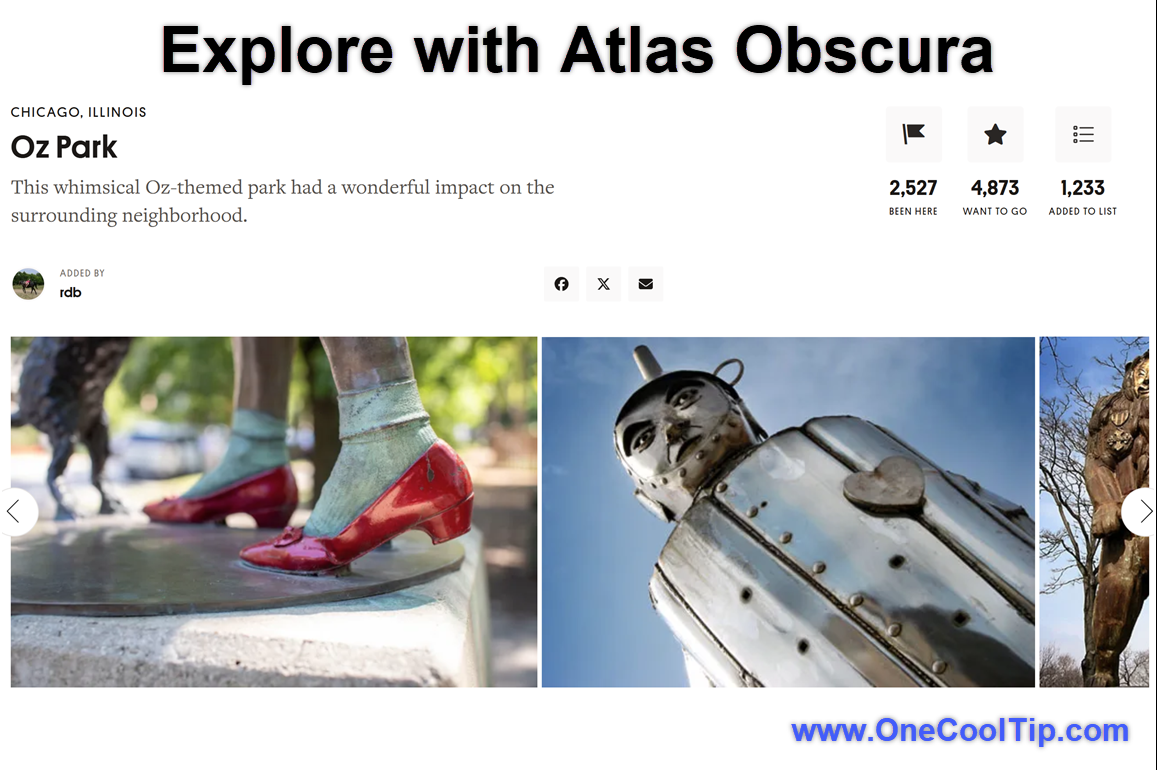
| | fig. 1 - Explore with Atlas Obscura | | |
iPhone
-
Download Atlas Obscura Travel Guide from Apple’s App Store.
-
Open the app and choose whether to permit location access. Location access helps the app identify nearby places, but you can search manually instead.
- Explore the map or search for a destination.
-
Select a map marker or search result to read the place description, view photographs, and review community tips.
-
Sign in to create custom lists, mark a location as Been There, or save it as Want to Go.
Android
-
Install Atlas Obscura Travel Guide from Google Play. Confirm that the developer is Atlas Obscura so you do not confuse it with an unofficial app.
-
Open the app and choose your preferred location permission.
- Search for a destination or explore the map around your current location.
-
Select an attraction to view its history, photographs, mapped location, and available visitor information.
-
Sign in to create lists or use the app’s travel-tracking features.
Configuration Guide
Atlas Obscura requires very little configuration.
Account
You can browse public place entries without signing in.
An account is useful if you want to create lists, save destinations, track past visits, contribute information, or maintain a profile.
Location Access
Location permission improves nearby discovery.
You can review or change that permission through your device:
- iPhone: Settings > Privacy & Security > Location Services > Atlas Obscura
- Android: Settings > Apps > Atlas Obscura > Permissions > Location
- Web browser: Open the site-information or permissions control beside the web address and review Location
Select While Using the App or the equivalent Android option if you want nearby recommendations without granting continuous background access.
You can also deny access and search for a destination manually.
Lists and Travel Tracking
After signing in, open a place and save it to an existing list or create a new one.
In the mobile app, Been There records a previous visit, while Want to Go identifies a destination for the future.
Useful list ideas include:
- Upcoming Trip
- Weekend Ideas
- Rainy-Day Stops
- Road-Trip Detours
- Places to Photograph
- Visited Favorites
- Membership
Atlas Obscura’s basic place-discovery tools can be used without purchasing a membership.
Its current membership benefits include curated trip ideas, a monthly members-only newsletter, virtual events and recordings, community posting, and early access to selected products or editorial releases.
Feature Access
-
Web: Available through modern desktop and mobile browsers.
-
iPhone: Available through Apple’s App Store; requires iOS 16.0 or later.
-
Apple Vision: The App Store lists compatibility with visionOS 1.0 or later.
-
Android: Available through Google Play; device compatibility varies.
-
Account: Not required for browsing; required for personalized lists, travel tracking, profiles, and contributions.
-
Cost: Core browsing and discovery are available without a paid membership. Optional membership benefits require payment.
-
Registration age: Atlas Obscura’s privacy notice requires users to be 18 or older to register.
-
Availability: Features and place coverage may vary by platform, account, device, and destination.
Score
Criterion | Score (0–10) | Justification
Value | 9
Atlas Obscura addresses a genuine travel-planning problem by surfacing places that can be difficult to find through conventional searches.
Usability | 8
Searching and browsing the map are straightforward, although personalized features require an account and destination details need independent verification.
Wow Factor | 9
The variety of unexpected discoveries can turn an ordinary trip or free afternoon into a memorable experience.
Total: 26/30 | 🌟Excellent
Atlas Obscura is an excellent discovery tool for travelers who enjoy finding a story behind every stop.
Compared with Apple Maps or Google Maps, Atlas Obscura is better at generating unusual ideas.
Conventional mapping apps remain better for current business hours, traffic information, route planning, and turn-by-turn navigation.
Key Takeaways
Atlas Obscura helps travelers and local explorers find intriguing places beyond the usual tourist checklist.
Use its map and lists for inspiration, then confirm hours, admission prices, accessibility, property rules, and directions with an official or current local source.
Cool Tip Snapshot
-
Feature Name: Atlas Obscura
-
Platform(s): Web, iPhone, Apple Vision, and Android
-
Quick Benefit: Find unusual attractions and save them for future trips
-
Best For: Travelers, families, road-trippers, photographers, and local explorers
-
Access Type: Free with optional Subscription
-
Difficulty: Easy
Try It Yourself
Open Atlas Obscura, search your hometown, and save one place you have never visited.
Tell us what you discovered in the comments, subscribe to the One Cool Tip newsletter, and share this Cool Tip with family, friends, and coworkers who enjoy finding something unexpected.
READ MORE
Read the Full Cool Tip.
| | |
Check Out These Cool Tips & Tricks
-
Search Nearby: Use Places near me to find unusual attractions around your current location. Allow temporary location access or enter the city manually.
-
Build Lists: Create separate lists for each vacation, road trip, or weekend outing. Sign in, open a place, and add it to a new or existing list.
-
Check the Map: Look around each saved attraction for other nearby discoveries. Zoom in on the Atlas Obscura map and open the surrounding markers.
-
Track Visits: Use Been There to maintain a personal record of completed adventures. Open the place entry while signed in and mark it after your visit.
-
Verify Hours: Confirm operating hours and access conditions before making a detour. Follow the attraction’s official link or check its current business listing.
-
Plan Detours: Search towns along a driving route instead of checking only the final destination. Save promising stops and compare them with your planned driving time.
-
Browse Interests: Explore subjects such as architecture, natural wonders, history, science, or unusual food. Start with a related place and follow its categories and recommendations.
-
Protect Privacy: Search manually if you do not want to share your current location. Deny location permission and enter the city or destination yourself.
-
Read Tips: Community notes may reveal parking limitations, entrances, seasonal conditions, or local etiquette. Review recent visitor information before leaving.
-
Contribute Carefully: Add a missing place or photo when you have reliable information and permission to use the image. Follow Atlas Obscura’s submission and photo requirements.
| | ICYMI - In Case You Missed It ... | | | | |
Automate Complex Forms with Chrome and Google Wallet
Typing lengthy identification numbers into web forms is frustrating and prone to errors. Google Chrome now integrates directly with Google Wallet to safely populate complex data like passport numbers and vehicle information on your mobile and desktop devices.
Read the Full Version.
Read the Newsletter Version.
| | |
Tomorrow's Cool Tip is waiting to amaze you.
Until then, go forth and conquer the tech world with your newfound knowledge!
Be sure to visit www.OneCoolTip.com for Cool Tech Tips for a Cooler Life!
And if you Like One Cool Tip, please support with TipJar!
Enjoy!
Rodger
Chief Cool Tipper
onecooltip.com@gmail.com
| |
| What do you think of today's OneCoolTip newsletter?
| | | | Connect with One Cool Tip!! | | |
|
As an Amazon Associate, One Cool Tip may earn a small commission from qualifying purchases.
Our media content is intended solely for informational purposes only. Please do not construe anything here as legal, tax, investment, financial, marital or other advice.
Copyright © 2026 | www.OneCoolTip.com | All Rights Reserved
|
| | | |