One Cool Tip Newsletter

April 1, 2026

Your daily dose of tech-savvy brilliance!

😀Greetings! Happy April Fool's Day, Cool Tipper!


Get ready to streamline your digital life with simple, actionable tips delivered straight to your inbox.


Cool Tip Theme: Cool Tech Tricks


New here? Subscribe to the One Cool Tip Newsletter for daily updates. It's FREE!

3️⃣

If you enjoy the One Cool Tip newsletter, please forward this newsletter to THREE friends or colleagues or share it on social media using the links below.


Leave a $$$ Tip!


Share this One Cool Tip Newsletter!

X Share This Email
LinkedIn Share This Email
Pinterest Share This Email

🚨April Fool’s Day 2026: Real Food & Drink Deals 🚨


Baskin-Robbins

  • Deal: Buy one, get one 50% off pre-packed quarts. When: April 2 (Rewards members only).


BJ’s Restaurant & Brewhouse

  • Deal: New Sweet Heat Pepperoni Pizookie for $4.01. When: April 1 only.


Checkers & Rally’s

  • Deal: Big Buford burger for $3. When: April 1–2.


Hooters

  • Deal: 10 wings for $3.99 plus beer specials. When: April 1.


Marco’s Pizza

  • Deal: Pepperoni Magnifico for $12.99 with code GOTCHA. When: April 1.


Peet’s Coffee

  • Deal: Small drip or cold brew for $0.60 and 15% off whole beans. When: April 1 (Rewards members).


QDOBA

  • Deal: Free 4 oz 3-Cheese Queso + chips for rewards members. When: April 1.


participation may vary; check restaurant location to validate the deal.

Cool Deals of the Day

Help support One Cool Tip. Use this Amazon link when you shop online.


Check out these Cool Deals:


🔌 Anker Power Strip Surge Protector: Affordable and reliable protection for devices used in your prank setups. Overall Pick $28.99 Check it out on Amazon!


🖱️ Logitech Wireless Mouse M550: Great for controlling prank setups discreetly. Save 17% Now $24.99 Check it out on Amazon!


📱 Spigen Screen Protector (iPhone): Protects screens from real cracks while you fake one. From $18.99 Check it out on Amazon!


*Prices accurate when originally published.

One Cool Tip may earn a commission from qualifying purchases.

Fuel Your Adventure

Try Big Mike's Jerky!


bigmikesjerky.com


Now on TikTok!


Today's Cool Tip

Happy April Fool’s Day: Try These 3 Harmless Tech Tricks That Fool Anyone Fast


Turn everyday devices into harmless pranks that surprise, confuse, and entertain. These quick tricks take under a minute and reset just as fast. A few small tech tweaks can create big reactions. These three April Fools tricks are safe, reversible, and surprisingly effective.


What if you could make someone think their computer just broke, without touching any hardware?


Here's a Cool Tip: April Fools’ Day is the perfect excuse to have a little fun with technology. 


The best pranks are quick, harmless, and easy to undo. 


These three ideas check all the boxes and feel just real enough to get a great reaction.


Feature Explanation


These tricks take advantage of built-in system settings that most people never explore.


Instead of installing software or risking damage, you’re simply changing how a device behaves or looks. 


That makes them safe, fast, and perfect for a quick laugh. 


The key is subtlety. The best reactions happen when the change feels unexpected but believable.


What You’ll Gain


  • Create instant, harmless reactions.
  • Learn useful system settings in the process.
  • Practice quick troubleshooting and reversibility.
  • Add a fun twist to everyday tech use.


Step-by-Step Instructions


Here's how to do it.


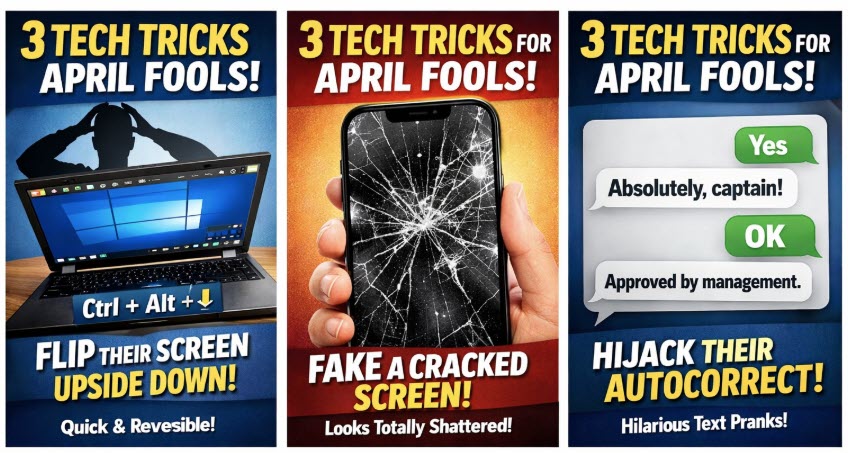
Trick #1: Turn Your Desktop Upside Down


Make someone think their computer is broken in 2 seconds.


Microsoft Windows


  1. Press Ctrl + Alt + Down Arrow.
  2. Watch the screen rotate instantly.
  3. To fix: Press Ctrl + Alt + Up Arrow.


Note: Some graphic cards and laptop keyboards do not support this.


macOS


  1. Open System Settings.
  2. Select Displays.
  3. Look for Rotation (may require external display support).
  4. Choose 180°.


Note: You may need to hold Cmd + Option while clicking Displays.

fig. 1 - 3 Tech Tricks - April Fool's

Trick #2: Fake a Cracked Screen


Convince anyone their screen just shattered without touching it.


Microsoft Windows / macOS


  1. Download a realistic cracked screen wallpaper.
  2. Right-click desktop → Set as background.
  3. Hide icons for realism.


iPhone


  1. Save cracked screen image.
  2. Go to Settings → Wallpaper.
  3. Set as Lock Screen.


Android


  1. Download image.
  2. Set as wallpaper via Display settings.


Trick #3: Autocorrect Mayhem


Make a phone “helpfully” correct words in unexpected ways.


iPhone


  1. Go to Settings → General → Keyboard.
  2. Tap Text Replacement.
  3. Add a phrase and shortcut.


Example:


  • Shortcut: “yes”.
  • Phrase: “Absolutely, captain”.


Android (Gboard)


  1. Open Settings → System → Languages & Input.
  2. Select Personal Dictionary.
  3. Add custom replacements.


Pros and Cons


Pros:


  • Subtle and long-lasting.
  • Very funny in conversation.
  • Easy to do and customize.


Cons:


  • May take time to notice.
  • Could interfere with real communication.
  • Coworkers, family and friends may get upset. They have no sense of humor!
  • Corporate HR and IT may not approve. Use with caution or not at all on PCs you do not own.


Key Takeaways


These tricks prove that small changes can create big reactions. 


They are safe, reversible, and perfect for quick fun without lasting impact.


Cool Tip Snapshot


  • Feature Name: April Fools Tech Tricks
  • Platform(s): Windows, macOS, iOS, Android
  • Quick Benefit: Instant, harmless tech pranks
  • Access Type: Free


Try It Yourself


Pick one trick and try it today. 


Then share the reaction with a friend and invite them to subscribe to the One Cool Tip newsletter for more ideas.


READ MORE


Read the Cool Tip on OneCoolTip.com.

Check out these Cool Tips & Tricks.


  • Hide Icons: Clear desktop icons to enhance wallpaper tricks. Right-click and uncheck show desktop icons.


  • Lock Screen Trick: Set prank images on lock screens. Use wallpaper settings.


  • Cursor Chaos: Enlarge the mouse pointer dramatically. Adjust in accessibility settings.


  • Sound Surprise: Change notification tones to something unusual. Edit sound settings.


  • Rename Device: Change Bluetooth name for laughs. Update device name in settings.


  • Dark Mode Flip: Switch appearance suddenly. Toggle display mode in settings.


  • Keyboard Lag: Slow typing response slightly. Adjust keyboard settings if available.

ICYMI - In Case You Missed It ...

How to Select and Copy Part of a Text Message in iOS 26


Trimming down a long text to just the essential lines used to require workarounds on iPhone. With iOS 26, Apple finally added a way to select and copy only the words you need.


Read the Full Cool Tip.


Read the Newsletter Version.

Looking for your next adventure?


Call Denise at Travel For You.

314.660.3039


Sign Up for the Monthly Newsletter


http://www.travelforyouvacations.com/


https://www.facebook.com/TRAVEL.FOR.U/


See You Tomorrow

Tomorrow's Cool Tip is waiting to amaze you.


Until then, go forth and conquer the tech world with your newfound knowledge!


Be sure to visit www.OneCoolTip.com for Cool Tech Tips for a Cooler Life!


And if you Like One Cool Tip, please support with TipJar!


Enjoy!


Rodger

Chief Cool Tipper

onecooltip.com@gmail.com


What Do You Think?

What do you think of today's OneCoolTip newsletter?
Positive        Neutral        Negative
X Share This Email
LinkedIn Share This Email

Connect with One Cool Tip!!

Facebook  X  Instagram  Web  Pinterest  YouTube  LinkedIn
 

As an Amazon Associate, One Cool Tip may earn a small commission from qualifying purchases.


Our media content is intended solely for informational purposes only. Please do not construe anything here as legal, tax, investment, financial, marital or other advice.


Copyright © 2026 | www.OneCoolTip.com | All Rights Reserved