One Cool Tip Newsletter

December 23, 2025

Your daily dose of tech-savvy brilliance!

😀Greetings! Happy Tuesday, Cool Tipper!


Get ready to streamline your digital life with simple, actionable tips delivered straight to your inbox.


Cool Tip Theme: ChatGPT Branched Chats


New here? Subscribe to the One Cool Tip Newsletter for daily updates. It's FREE!

3️⃣

If you enjoy the One Cool Tip newsletter, please forward this newsletter to THREE friends or colleagues or share it on social media using the links below.


Leave a Tip!


Share this One Cool Tip Newsletter!

X Share This Email
LinkedIn Share This Email
Pinterest Share This Email


  • Try ChatGPT’s New “Year in Review”


ChatGPT now offers a Year in Review feature that turns your AI activity into a personal highlight reel.


It surfaces your most common topics, creative streaks, productivity patterns, and even the quirky prompts you forgot you wrote.


It’s a quick way to reflect on how you used AI this year and get ideas for using it more intentionally in 2026.


Look for the Year in Review card within the app or website.


You can also create a similar prompt "Create my year in review".


Why it’s worth a look


  • See your top themes: Discover the topics you explored most.
  • Spot creative patterns: Revisit your most imaginative prompts.
  • Review productivity habits: Understand how AI supported your work.
  • Get smarter suggestions: Use your trends to guide better prompts next year.


  • Christmas too rushed and hectic? Maybe you need to Slow Down for Christmas. (my latest music effort, please LIKE and SHARE!).

Cool Deals

Help support One Cool Tip. Use this Amazon link when you shop online.


Check out these Cool Deals:


  • 📱 Logitech MX Keys S Keyboard: Comfortable typing for long AI sessions. Save 15% $109.99 Check it out on Amazon!


  • 🖥️ LG UltraWide Monitor: More room for AI chats and reference material side by side. Save 19% $296.99 Check it out on Amazon!


  • 🎧 Sony WH-1000XM5 Headphones: Focus better during deep work with AI tools. Save 38% $248. Check it out on Amazon!


*prices accurate when originally published.

One Cool Tip may earn a commission from qualifying purchases.

Fuel Your Adventure

Try Big Mike's Jerky!


bigmikesjerky.com


Now on TikTok!


Today's Cool Tip

ChatGPT Branched Chats Arrive on Mobile


ChatGPT’s new Branched Chats on mobile let you split a conversation at any point and explore multiple directions without losing your original thread. For anyone who thinks in drafts, alternatives, or parallel ideas, this quietly changes how productive mobile AI can be.


Have you ever asked ChatGPT a follow-up question and immediately regretted it because the entire conversation veered off course? 


On desktop, you could recover by scrolling or copying.


 On mobile, that detour often meant starting over. 


Here's a Cool Tip:  Use Branched Chats in ChatGPT mobile apps.


That friction is exactly what ChatGPT’s new Branched Chats feature is designed to remove.


Feature Explanation


Branched Chats allow you to fork a conversation at a specific message and continue in a new direction while preserving the original path. 


Think of it as version control for your prompts. 


You can explore alternatives, test ideas, or refine answers without overwriting prior context.


On mobile, this matters more than it sounds. 


Small screens encourage linear thinking. 


Branched Chats introduce structured divergence, which is how real problem-solving actually works.


Why it matters:


  • You keep context intact.
  • You avoid re-prompting or duplicating work.
  • You can compare outcomes side by side later.


What You’ll Gain


  • Explore multiple answers without losing your original thread.
  • Reduce prompt rewriting and rework.
  • Keep complex thinking organized on a phone.


Step-by-Step Instructions


Here's how to do it.


iOS


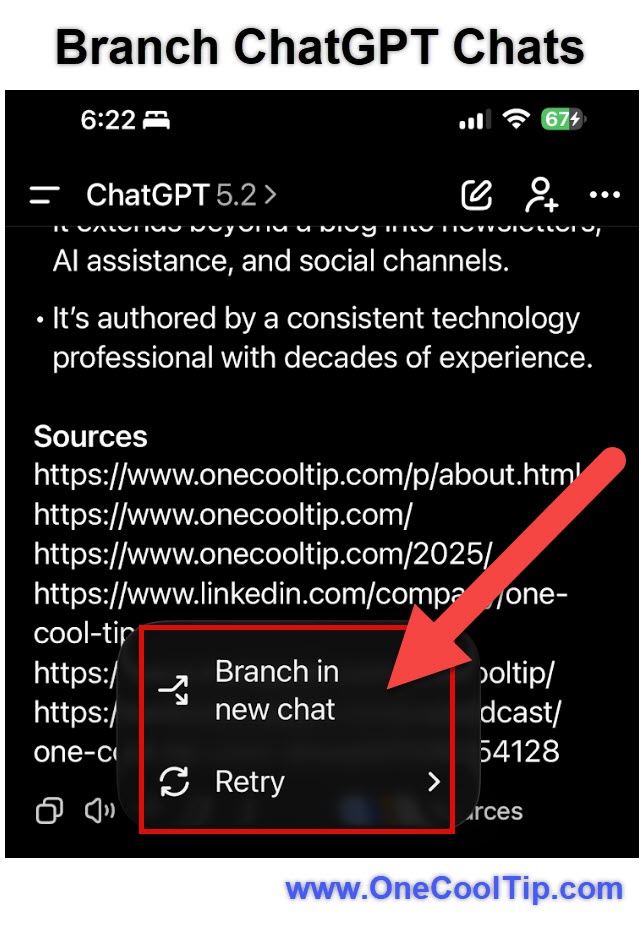
  1. Open the ChatGPT app and navigate to an existing conversation.
  2. Tap the ... menu at the end of the chat.
  3. Select "Branch in new chat" from the menu.
  4. Enter your new prompt and continue the conversation in that branch.


fig. 1 - Branch ChatGPT Chats Example

Android


  1. Open the ChatGPT app and navigate to a ChatGPT conversation.
  2. Tap and hold a message you want to branch from.
  3. Choose Branch conversation.
  4. Type your new prompt and continue independently.


Web (Existing feature)


  1. Open chat.openai.com and select an existing conversation.
  2. Click the “…” menu.
  3. Select "Branch in new chat" in new chat.
  4. A new conversation opens starting from that message.
  5. Continue prompting independently of the original thread.


Pros and Cons


Pros


  • Keeps exploratory thinking organized for business and research use.
  • Saves time by avoiding repeated setup prompts.
  • Ideal for drafting, planning, and scenario testing.


Cons


  • Branches can multiply quickly if unmanaged.
  • Discoverability is still subtle for new users.
  • Web experience may lag mobile initially.


Feature Access


  • Who: ChatGPT mobile app users.
  • Platforms: iOS and Android.
  • Status: Currently rolling out.
  • Subscription: Availability may vary by plan.
  • Regions: Global rollout expected, timing may differ.


Score

Criterion Score (0–10) Justification
Value 9
Eliminates friction in exploratory thinking, especially on mobile.
Usability 8
Intuitive once discovered, but still a bit hidden.
Wow Factor 7
Subtle feature with outsized impact rather than flash.
Total: 24/30 👍 Good
A practical, professional-grade upgrade that quietly fixes one of mobile ChatGPT’s biggest weaknesses, similar in spirit to document version history but applied to conversations.


Key Takeaways


Branched Chats bring structured thinking to mobile AI. 


You can explore ideas freely without sacrificing clarity or context. Once you start using it, linear chats feel limiting.


Cool Tip Snapshot


  • Feature Name: Branched Chats.
  • Platform(s): iOS, Android.
  • Quick Benefit: Explore multiple conversation paths without losing context.
  • Access Type: Rolling out, plan-dependent.


Try It Yourself


Open a recent ChatGPT conversation on your phone, branch it at a key moment, and explore an alternative direction. 


Share how you use branches in the comments, and pass this Cool Tip along to your team, family, and friends.


READ MORE


Read the Full Cool Tip.

Check out these Cool Tips & Tricks for Branched Chats:


  • Fork Early: Branch before you ask a risky follow-up. Create a branch.


  • Compare Ideas: Use branches to test multiple answers. Open each branch from the same prompt.


  • Draft Variations: Write different versions of content. Branch from the first draft message.


  • Scenario Testing: Explore outcomes without clutter. Branch at the decision point.


  • Teaching Aid: Adapt explanations by audience. Branch from the core lesson.


  • Meeting Prep: Explore questions separately. Branch from the agenda prompt.


  • Travel Planning: Compare itineraries. Branch after destination selection.


  • Brainstorm Safely: Try bold ideas without losing the safe path. Branch before experimenting.


  • Problem Solving: Isolate sub-problems. Branch from the problem statement.


  • Stay Organized: Keep branches purposeful. Rename or prune conversations regularly.


ICYMI - In Case You Missed It ...

The AI Model That Finally Renders Perfect Text in Images: Meet Nano Banana Pro


Google has unveiled Nano Banana Pro, the new state-of-the-art Gemini 3 Pro Image model that revolutionizes how we create and edit visuals. This powerful new tool can generate stunning, high-fidelity graphics with perfectly legible text in multiple languages, making professional design instant and accessible.


Read the Full Cool Tip.

Read the Newsletter Version.

Looking for your next adventure?


Call Denise at Travel For You.

314.660.3039


Sign Up for the Monthly Newsletter


http://www.travelforyouvacations.com/


https://www.facebook.com/TRAVEL.FOR.U/


See You Tomorrow

Tomorrow's Cool Tip is waiting to amaze you.


Until then, go forth and conquer the tech world with your newfound knowledge!


Be sure to visit www.OneCoolTip.com for Cool Tech Tips for a Cooler Life!


And if you Like One Cool Tip, please support with TipJar!


Enjoy!


Rodger

Chief Cool Tipper

onecooltip.com@gmail.com


What Do You Think?

What do you think of today's OneCoolTip newsletter?
Positive        Neutral        Negative
X Share This Email
LinkedIn Share This Email

Connect with One Cool Tip!!

Facebook  X  Instagram  Web  Pinterest  YouTube  LinkedIn
 

As an Amazon Associate, One Cool Tip may earn a small commission from qualifying purchases.


Our media content is intended solely for informational purposes only. Please do not construe anything here as legal, tax, investment, financial, marital or other advice.


Copyright © 2025 | www.OneCoolTip.com | All Rights Reserved