|
Add a Trusted Contact in ChatGPT Before You Need One
ChatGPT’s Trusted Contact feature lets eligible adult users name one person who may be notified if serious self-harm concerns are detected. It is optional, privacy-limited, and worth setting up before a difficult moment happens.
Most safety settings are easy to ignore until the moment they matter.
That includes AI.
Here’s a Cool Tip: Add Your Trusted Contact to ChatGPT Before You Need Support.
ChatGPT’s new Trusted Contact feature is one of those quiet additions that deserves a few minutes of attention, especially for people who use AI as a place to think through personal stress, family issues, school pressure, or difficult life moments.
Feature Explanation
Trusted Contact is a safety setting inside ChatGPT that allows an eligible adult user to name one trusted person, such as a close friend, family member, caregiver, or partner.
If automated systems and trained reviewers detect that the enrolled user may be discussing suicide in a way that signals a serious safety concern, ChatGPT may notify that trusted person and encourage them to check in.
The feature is not designed to replace emergency services, crisis hotlines, therapy, medical care, or human judgment.
It is an added layer of support that can help connect someone to a real person they already know.
This feature is most useful for adults who already use ChatGPT for reflection, journaling, personal planning, school pressure, career stress, or difficult family situations.
It is also practical for older adults, students over 18, caregivers, travelers, and anyone who wants a human safety net connected to their digital routines.
What You’ll Gain
- Add a backup connection before a crisis moment.
- Keep control over who is named as your trusted person.
- Limit what gets shared if a serious concern is reviewed.
- Give a trusted friend or family member a clearer reason to check in.
Step-by-Step Instructions
Here's how to do it.
Web/Desktop:
-
Navigate to www.ChatGPT.com and sign in to your personal account.
- Select your profile or account menu.
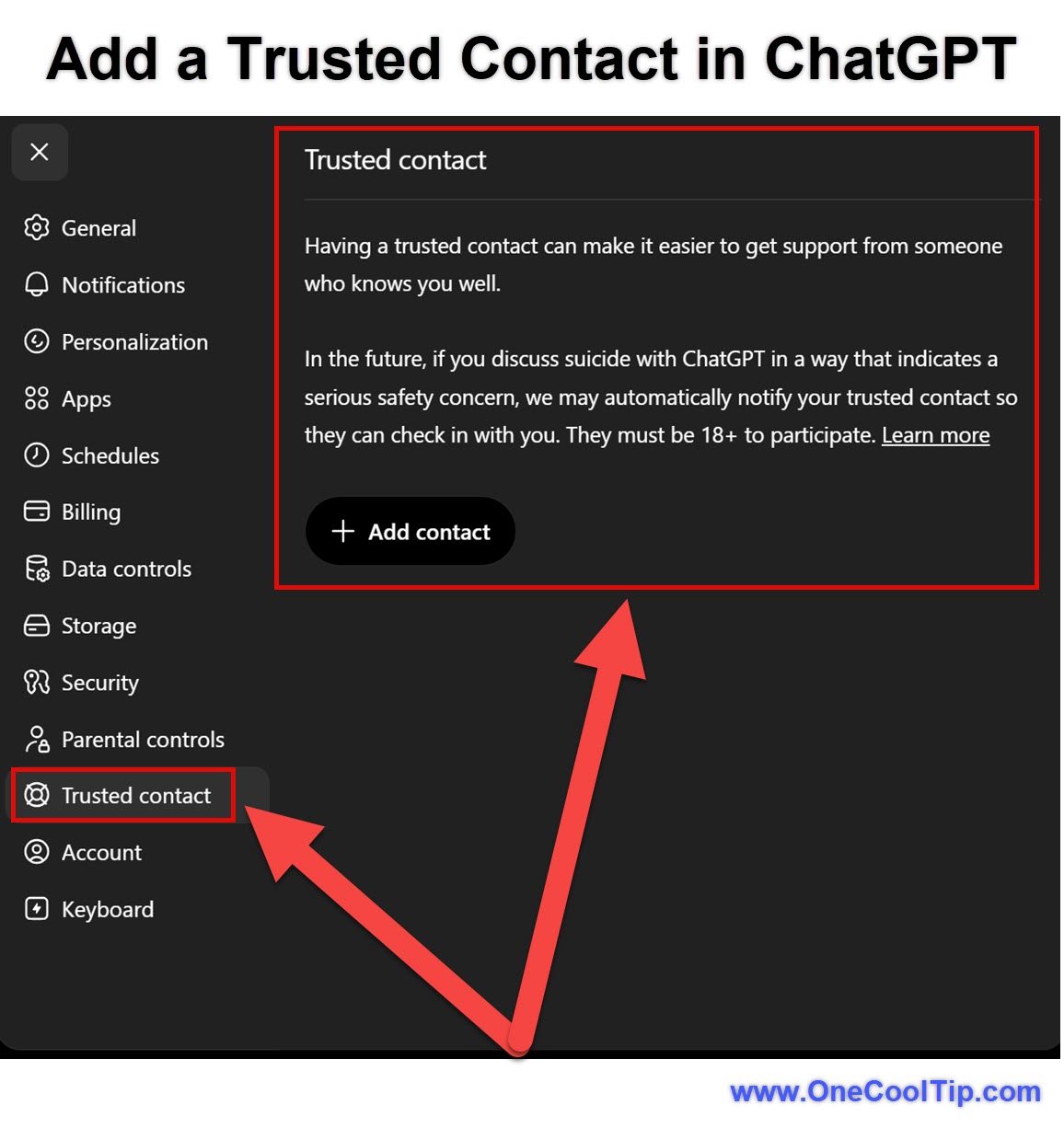
- Go to Settings > Trusted contact.
- Select Add contact.
- Enter the person’s Name and Email. Add a phone number if available.
- Confirm the person is an adult and select the consent checkbox.
- Select Save changes.
- Your contact should receive an invitation. The feature becomes active only after they accept within one week.
|