|
One Cool Tip Newsletter
July 5, 2026
| Your daily dose of tech-savvy brilliance! | |
😀Greetings! Happy Sunday, Cool Tipper!
Get ready to streamline your digital life with simple, actionable tips delivered straight to your inbox.
Cool Tip Theme: Digg AI News
New here? Subscribe to the One Cool Tip Newsletter for daily updates. It's FREE!
| |
3️⃣
If you enjoy the One Cool Tip newsletter, please forward this newsletter to THREE friends or colleagues or share it on social media using the links below.
Leave a $$$ Tip!
Share this One Cool Tip Newsletter!
| | |
🚨 Utility Bill Scam Alert: Don't Pay in a Panic🚨
The FTC is warning consumers about scammers who impersonate gas, electric, or water companies and threaten to shut off service unless an immediate payment is made.
These fraudsters often demand payment through gift cards, wire transfers, reloadable cards, or cryptocurrency because those methods are difficult to trace and recover.
If you receive a threatening call or text, hang up and contact your utility company using the phone number on your bill or its official website.
Real utility providers do not demand instant payment using these methods.
And in Other News...
- Minnesota Bans AI "Nudification" Tools
Starting Aug. 1, 2026, Minnesota law will prohibit websites, apps, and other services from allowing users to create or access AI-generated "nudified" images or videos.
The law also allows victims to sue for damages and imposes significant civil penalties on violators, marking a major step to combat non-consensual AI image abuse.
| | |
Help support One Cool Tip. Use this Amazon link when you shop online.
Check out these Cool Deals:
| | |
💻 Logitech MX Master 3S Wireless Mouse: Scroll through long feeds comfortably and efficiently.
$89.99. 4.5 Stars. Check it out on Amazon!
📱 Apple iPad (10th Generation): Currently discounted and perfect for reading news on the couch.
$429.95. 4.8 Stars. Check it out on Amazon!
🎧 Sony WH-1000XM5 Wireless Headphones: Block out distractions while you focus on your morning reading.
$398. 4.2 Stars. Check it out on Amazon!
*Prices accurate when originally published.
One Cool Tip may earn a commission from qualifying purchases.
| | |
Use Digg’s AI News Radar to Spot Tech Trends Faster
Digg is back again, but this version is less Reddit rival and more AI-powered news radar. It can help busy readers spot fast-moving tech and AI stories by scanning public signals from across the web.
Your tech feed can feel noisy, repetitive, and late.
By the time a major AI story reaches a standard news app, it may already have bounced across X, GitHub, newsletters, podcasts, and private Slack channels.
That is the problem Digg is trying to solve with its latest reboot.
Here’s a Cool Tip: Use Digg as an Early-Warning Radar.
Digg has shifted away from its short-lived Reddit-style relaunch and toward an AI-focused news aggregator built around public discussion signals, rankings, and story clusters.
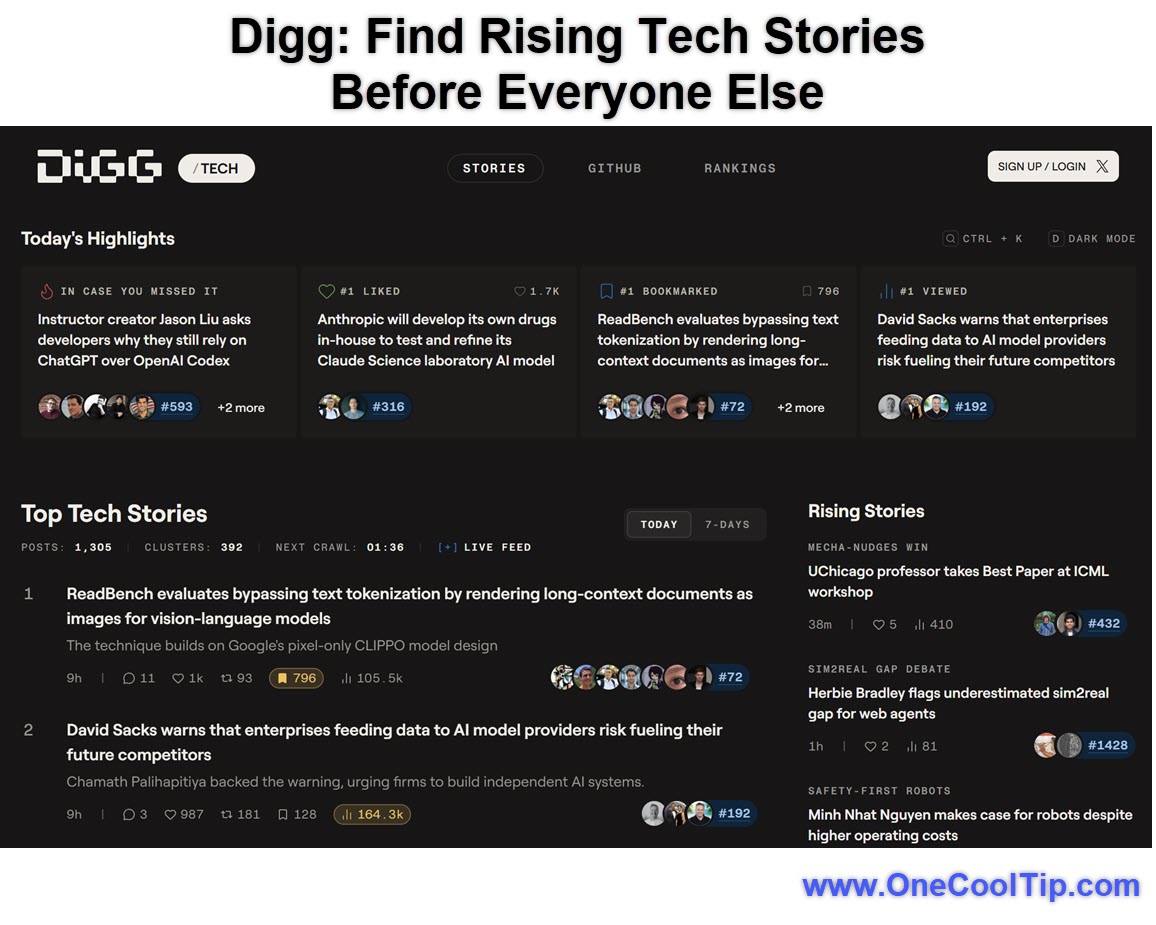
The current Digg Tech page shows Today’s Highlights, ranked tech stories, and, live-feed style indicators, video signals.
Feature Explanation
Digg’s new AI news aggregator is a public web service that collects and analyzes public information from sources such as X, GitHub, and other public sites.
Digg describes the service as an automated editorial product that generates AI-driven rankings, summaries, classifications, and topic signals.
The service is public and free, although features may change or disappear without notice.
That makes this version of Digg different from a traditional news homepage.
Instead of simply listing articles chosen by human editors, Digg attempts to detect public momentum.
It looks for what people are discussing, who is amplifying it, how fast a story is climbing, and how public signals cluster around a topic.
For technology editors, creators, analysts, and business users, that can be useful.
What You’ll Gain
-
Save time by scanning ranked tech stories instead of refreshing multiple feeds.
-
Spot trends earlier by watching public discussion clusters and momentum signals.
-
Improve research quality by comparing summaries with linked source material.
-
Reduce feed fatigue by using a focused tech-news dashboard instead of another endless social feed.
Step-by-Step Instructions
Here's how to do it.
Web/Desktop:
-
Open a browser and go to digg.com.
-
Review Today’s Highlights near the top of the page.
-
Scan the ranked Top Tech Stories list.
-
Open a story card and review the summary, public source posts, engagement indicators, and related links.
-
Verify important claims by opening the original source before quoting, sharing, or publishing.
| | fig. 1 - Find Rising Tech Stories Before Everyone Else | | |
Pros and Cons
Pros:
-
Good for trend spotting: Business users can see which AI and tech stories are gaining public attention.
-
Helpful for creators: Newsletter writers, bloggers, and video creators can use Digg to identify early story angles.
-
Source-aware: Digg links to public posts, articles, repositories, and other third-party material.
-
Low friction: The service is public and free.
-
Focused: The current Tech page is more useful for technology watchers than a broad general-news feed.
Cons:
-
AI summaries can be wrong: Automated outputs may be inaccurate, incomplete, or out of date.
-
Features may change: Digg may add, change, remove, or discontinue features without notice.
-
Public-data dependency: Digg relies on public information from outside sources, including X and GitHub.
-
Not a replacement for reporting: It is better for discovery than verification.
-
Age limitation: Users must be at least 18 years old.
Feature Access
-
Who gets it: Public and free.
-
Supported platforms: Web browsers on desktop and mobile.
-
Subscription requirements: No subscription requirement.
-
Account requirements: Public browsing appears available.
-
Age requirement: Digg’s Terms of Service say users must be at least 18 years old.
-
Status: Public web service, but feature availability may vary.
Score
Criterion | Score (0–10) | Justification
Value | 8
Digg can save time for people who monitor AI and tech news because it surfaces ranked stories and public discussion signals in one place.
Usability | 7
The web experience is easy to scan, but official platform guidance is limited and the product may continue changing.
Wow Factor | 8
Using AI to detect momentum across public tech conversations is clever, especially for people tracking fast-moving stories.
Total: 23/30 | 👍 Good
Digg’s AI news aggregator is a promising research radar, but smart users should treat it as a signal source, not a final authority.
Compared with Reddit, Digg is currently less about joining communities and more about detecting what public tech conversations are starting to matter.
Key Takeaways
Digg’s newest reboot tries to turn public tech chatter into ranked, readable signals.
It is especially useful for creators, editors, analysts, and business users who want to spot AI stories early, but every important claim still needs verification.
Cool Tip Snapshot
-
Feature Name: Digg AI News Aggregator.
-
Platform(s): Web.
-
Quick Benefit: Spot fast-rising tech and AI stories earlier.
-
Best For: Tech watchers, creators, analysts, newsletter writers, business users.
-
Access Type: Free, Public Web, Changing Features.
-
Difficulty: Easy
Try It Yourself
Visit Digg’s Tech page, scan the top stories, and use one item as a starting point for your own research today.
Then leave a comment, and share this Cool Tip with family, friends, and coworkers who follow technology.
READ MORE
Read the Full Cool Tip.
| | |
Check Out These Cool Tips & Tricks
-
Verify First: AI summaries are useful starting points, but they are not proof. Open the original source before quoting or sharing.
-
Check Dates: Always confirm when a story was published. Old stories can resurface and look new in fast-moving feeds.
-
Compare Sources: One headline is not enough for important claims. Check the original post, official announcement, and at least one independent source.
-
Watch Metrics: Engagement can show momentum, but it does not guarantee accuracy. Treat views, likes, and comments as signals, not evidence.
-
Save Links: Keep a research folder for stories you may revisit. Use browser bookmarks, OneNote, Notion, or Google Keep.
-
Use Reader Mode: Long articles are easier to read without clutter. Tap the reader icon in Safari, Edge, or Firefox when available.
-
Trim Notifications: Too many alerts make every story feel urgent. Turn off low-value app notifications and keep only priority sources.
-
Track Topics: Follow specific topics instead of every publication. Use saved searches for AI models, cybersecurity, Windows, Apple, or travel tech.
-
Archive Sources: Save important source pages before they change. Use screenshots, PDFs, or web clipping tools for editorial notes.
-
Credit Carefully: When a public post leads you to a story, cite the original source instead of only citing the aggregator.
| | ICYMI - In Case You Missed It ... | | | | |
How to Let Ziggy Marley Guide Your Next Drive
Switching up your GPS audio can completely transform a boring daily drive into a relaxing experience. Discover how to activate Ziggy Marley as your navigation guide inside the Waze app to bring positive vibes directly to your car speakers.
Read the Full Cool Tip.
Read the Newsletter Version.
| | |
Tomorrow's Cool Tip is waiting to amaze you.
Until then, go forth and conquer the tech world with your newfound knowledge!
Be sure to visit www.OneCoolTip.com for Cool Tech Tips for a Cooler Life!
And if you Like One Cool Tip, please support with TipJar!
Enjoy!
Rodger
Chief Cool Tipper
onecooltip.com@gmail.com
| |
| What do you think of today's OneCoolTip newsletter?
| | | | Connect with One Cool Tip!! | | |
|
As an Amazon Associate, One Cool Tip may earn a small commission from qualifying purchases.
Our media content is intended solely for informational purposes only. Please do not construe anything here as legal, tax, investment, financial, marital or other advice.
Copyright © 2026 | www.OneCoolTip.com | All Rights Reserved
|
| | | |