One Cool Tip Newsletter

May 15, 2026

Your daily dose of tech-savvy brilliance!

😀Greetings! Happy Friday Funday, Cool Tipper!


Get ready to streamline your digital life with simple, actionable tips delivered straight to your inbox.


Cool Tip Theme: Discover with McStumble


New here? Subscribe to the One Cool Tip Newsletter for daily updates. It's FREE!

3️⃣

If you enjoy the One Cool Tip newsletter, please forward this newsletter to THREE friends or colleagues or share it on social media using the links below.


Leave a $$$ Tip!


Share this One Cool Tip Newsletter!

X Share This Email
LinkedIn Share This Email
Pinterest Share This Email

🚨FTC Fines Shutterstock $35 Million for Illegal Subscription Tactics 🚨


The FTC announced that Shutterstock will pay $35 million to settle allegations that it trapped customers in subscriptions that were difficult, or nearly impossible, to cancel.


Shutterstock used “dark patterns” that misled users about renewal terms, hid key cancellation steps, and blocked people from ending subscriptions online.


The agency says the company also continued charging customers after they attempted to cancel.


Under the settlement, Shutterstock must:


  • Clearly disclose subscription terms.
  • Make cancellation simple and accessible.
  • Stop using deceptive renewal practices.
  • Provide refunds to affected consumers.


Cool Tip:


If you use any subscription-based service, regularly review renewal dates, check for easy cancellation options, and dispute charges promptly if a company makes cancellation difficult.


And in Other News...


  • New Floor796 Block - Godzilla.


Block #59 has been completed, in which an angry Godzilla is stuck and various heroes are trying to subdue him (or her?). Check out the original Cool Tip!

Cool Deals of the Day

Help support One Cool Tip. Use this Amazon link when you shop online.


Check out these Cool Deals:


💻 Logitech MX Keys S Wireless Keyboard. Excellent for productivity-focused web browsing and writing sessions. $129.99 Check it out on Amazon!


🖱️ Logitech MX Master 3S Mouse. Perfect for fast multitasking and browser-heavy workflows. Save 11% $79.99 Check it out on Amazon!


🎧 Sony WH-1000XM5 Noise Cancelling Headphones. Great for distraction-free research and creative work sessions. Save 30% Now $278. Check it out on Amazon!


*Prices accurate when originally published.

One Cool Tip may earn a commission from qualifying purchases.

Fuel Your Adventure

Try Big Mike's Jerky!


bigmikesjerky.com


Now on TikTok!


Today's Cool Tip

Discover Random Hidden Gems Across the Web


Sometimes the best websites are the ones you were never searching for in the first place. McStumble turns random web discovery into a fun, surprisingly addictive experience that can uncover useful tools, creative projects, and strange corners of the internet in seconds.


Do you ever feel like the modern internet keeps showing you the same five websites over and over again?


Search engines are optimized for popularity. Social media algorithms push trending content. AI summaries often point everyone toward identical sources. As a result, the web can start to feel smaller than it really is.


Here's a Cool Tip:  McStumble.


McStumble recreates the spirit of classic internet exploration by sending users to random interesting websites with a single click. 


Some are educational. 


Some are practical. Some are weird in the best possible way. 


The experience feels like channel surfing for the web, except every click has the potential to reveal something genuinely useful or unexpectedly entertaining.


Feature Explanation


McStumble is a web-based discovery tool that helps users find random websites curated for quality and interest.


The service works much like the old “StumbleUpon” experience that many longtime internet users still remember fondly. 


Instead of manually searching for sites, users click a button and instantly jump to a completely different page somewhere on the web.


The sites featured can include:


  • Productivity tools.
  • Educational resources.
  • Interactive experiences.
  • AI utilities.
  • Creative projects.
  • Fun games.
  • Data visualizations.
  • Useful reference sites.
  • Experimental web apps.


The beauty of McStumble is that it removes intent from discovery. 


Instead of searching for exactly what you already know exists, you encounter things you would probably never think to search for.


That makes it especially useful for:


  • Creative professionals.
  • Curious learners.
  • Technology enthusiasts.
  • Students.
  • Writers.
  • Educators.
  • People looking for inspiration.


McStumble was designed to help users rediscover the joy of finding interesting corners of the internet.


What You’ll Gain


  • Discover websites you would never normally find.
  • Break out of repetitive browsing habits.
  • Find creative tools and productivity resources.
  • Explore educational and entertaining web experiences.


Step-by-Step Instructions


Here's how to do it.


Web Browser (Windows 11, Mac, Chromebook), iPhone, Android


  1. Visit the McStumble website, www.mcstumble.com.
  2. Select "Discover" from the top menu.
  3. Select "Categories" from the top menu.
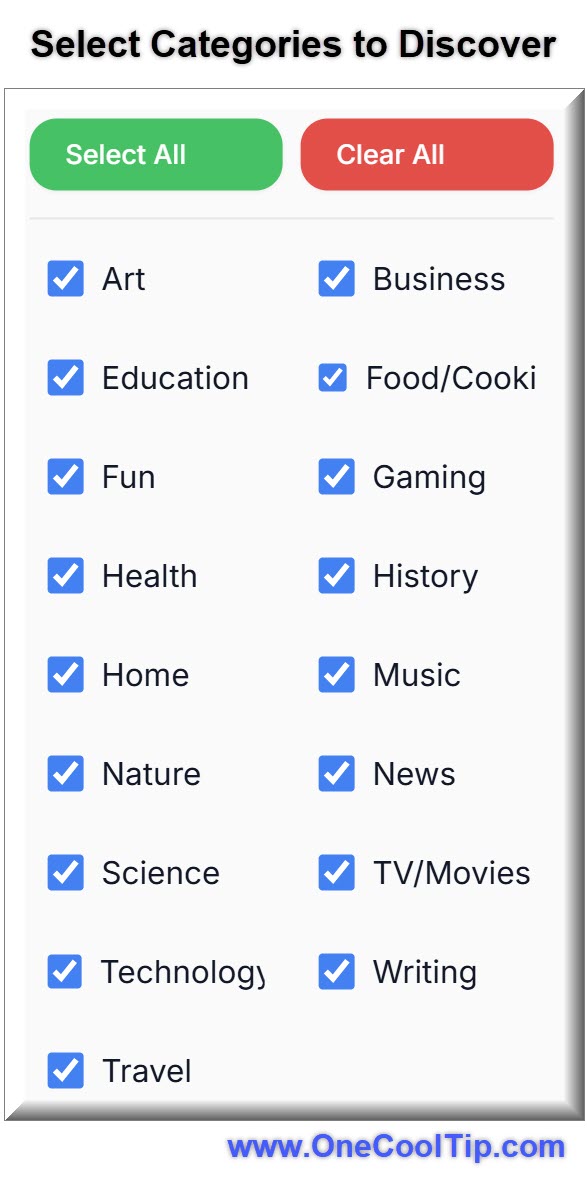
  4. Select Categories to discover.
  5. Select the "Discover" button (not the top menu)
  6. Explore the featured website.
  7. Select "Next" to discover a new website.


Note: At some websites, you'll need to select "Visit website" to see the full website.


fig. 1 - McStumble Categories Example

Pros and Cons


Pros:


  • Completely free to use.
  • No account required.
  • Excellent for creative inspiration.
  • Fast and simple interface.
  • Encourages discovery outside major platforms.
  • Useful for finding lesser-known productivity tools.


Cons:


  • Randomness means not every site will interest every user.
  • Some discoveries may feel niche or experimental.
  • No advanced filtering system currently available.
  • Certain websites may not be mobile optimized.


Feature Access


McStumble is a free web service available to anyone with a browser. 


There are no subscriptions or tiers. 


It remains an independent project focused on web preservation and discovery.


Score

Criterion | Score (0–10) | Justification
Value | 8
Excellent for discovery and inspiration, especially for curious users and creatives.
Usability | 9
Extremely simple interface with virtually no learning curve.
Wow Factor | 8
The randomness creates a surprisingly addictive browsing experience.
Total: 25/30 Tier: 🌟 Excellent
McStumble succeeds because it makes internet discovery feel fun again, especially compared to the increasingly repetitive nature of algorithm-driven browsing.


Key Takeaways


McStumble helps users rediscover the open web through random curated browsing experiences. 


It is fast, free, and surprisingly useful for finding productivity tools, educational resources, and creative inspiration.


If your online experience has started to feel repetitive, McStumble offers a refreshing alternative.


Cool Tip Snapshot


  • Feature Name: McStumble.
  • Platform(s): Web, iPhone, Android, Desktop Browsers.
  • Quick Benefit: Discover useful and interesting hidden websites instantly.
  • Access Type: Free.


Try It Yourself


Visit McStumble today and see what hidden corner of the internet you uncover next. 


Then share your favorite discoveries with friends, family, and coworkers.


READ MORE


Read the Cool Tip on OneCoolTip.com.

Check out these Cool Tips & Tricks.


  • Bookmark Fast: Save useful discoveries immediately before you forget them. Use your browser’s bookmark button or reading list feature.


  • Tab Groups: Organize discoveries into categories like AI, productivity, or education. Create tab groups in Chrome or Edge.


  • Share Finds: Great websites are more fun when shared with others. Use your browser’s Share feature.


  • Research Fuel: Use McStumble when brainstorming article ideas or projects. Open several discoveries in separate tabs.


  • Creative Spark: Random websites can trigger new business or design ideas. Spend five minutes exploring daily.


  • Mobile Discovery: Browse interesting sites while commuting or waiting in line. Open McStumble in your mobile browser.


  • Save Later: Store interesting finds in Pocket or browser collections. Tap the Share button and choose your reading app.


  • Break Algorithms: Escape repetitive social media recommendations occasionally. Visit random websites instead.


  • Explore Safely: Stick to modern browsers with built-in security protections enabled. Keep Chrome, Edge, or Safari updated.


  • Family Fun: Turn random discovery into a game with family or coworkers. Take turns finding the strangest useful website.

ICYMI - In Case You Missed It ...

Windows 11’s New Quality Pledge: What It Really Means For You


Windows is promising fewer frustrations, smarter updates, and features that feel finished before they reach your PC. Here is what that new quality push actually looks like in real life and how you can benefit from it today.


Read the Full Cool Tip.


Read the Newsletter Version.

Looking for your next adventure?


Call Denise at Travel For You.

314.660.3039


Sign Up for the Monthly Newsletter


http://www.travelforyouvacations.com/


https://www.facebook.com/TRAVEL.FOR.U/


See You Tomorrow

Tomorrow's Cool Tip is waiting to amaze you.


Until then, go forth and conquer the tech world with your newfound knowledge!


Be sure to visit www.OneCoolTip.com for Cool Tech Tips for a Cooler Life!


And if you Like One Cool Tip, please support with TipJar!


Enjoy!


Rodger

Chief Cool Tipper

onecooltip.com@gmail.com


What Do You Think?

What do you think of today's OneCoolTip newsletter?
Positive        Neutral        Negative
X Share This Email
LinkedIn Share This Email

Connect with One Cool Tip!!

Facebook  X  Instagram  Web  Pinterest  YouTube  LinkedIn
 

As an Amazon Associate, One Cool Tip may earn a small commission from qualifying purchases.


Our media content is intended solely for informational purposes only. Please do not construe anything here as legal, tax, investment, financial, marital or other advice.


Copyright © 2026 | www.OneCoolTip.com | All Rights Reserved