|
One Cool Tip Newsletter
August 28, 2026
| Your daily dose of tech-savvy brilliance! | |
😀Greetings! Happy Friday Funday, Cool Tipper!
Get ready to streamline your digital life with simple, actionable tips delivered straight to your inbox.
Cool Tip Theme: NASA's Eyes
Explore planets, asteroids, spacecraft, Earth data, and distant worlds through NASA’s free, browser-based 3D visualization tools.
New here? Subscribe to the One Cool Tip Newsletter for daily updates. It's FREE!
| |
3️⃣
If you enjoy the One Cool Tip newsletter, please forward this newsletter to THREE friends or colleagues or share it on social media using the links below.
Leave a $$$ Tip!
Share this One Cool Tip Newsletter!
| | |
🚨The Most Powerful Scam-Fighting Tool Might Be You🚨
Think spotting a scam is the end of the story?
Reporting it can help protect others from falling for the same trick.
When you share scam details with friends, family, and the FTC, you help raise awareness and give law enforcement valuable information about emerging fraud trends.
Reports submitted to the FTC are added to a national database used by local, state, and federal agencies to identify patterns and build cases against scammers.
If you encounter a scam, tell someone about it and report it at ReportFraud.ftc.gov.
Your experience could help investigators stop a scam operation and prevent future victims from losing money.
Sometimes the best way to fight fraud is simply by speaking up.
And in Other News...
- NASA's New Space Telescope Could Rewrite What We Know About the Universe
NASA is preparing to launch the Nancy Grace Roman Space Telescope, a powerful new observatory designed to explore some of the biggest mysteries in space.
Scientists hope it will help explain dark energy, the mysterious force believed to be driving the universe's expansion.
The telescope will also search for distant planets, study exploding stars called supernovas, and survey huge portions of the sky much faster than previous space telescopes.
What makes Roman especially exciting is its potential to challenge current scientific theories.
Its observations could reveal whether our existing understanding of the universe is incomplete and point the way to entirely new discoveries.
It is a reminder that today's cutting-edge technology is not just changing life on Earth.
It is helping us answer some of humanity's oldest questions about the cosmos itself.
| |
| 🤔 What would you explore first with NASA’s Eyes? | | | | |
Help support One Cool Tip. Use this Amazon link when you shop online.
Check out these Cool Deals:
| | |
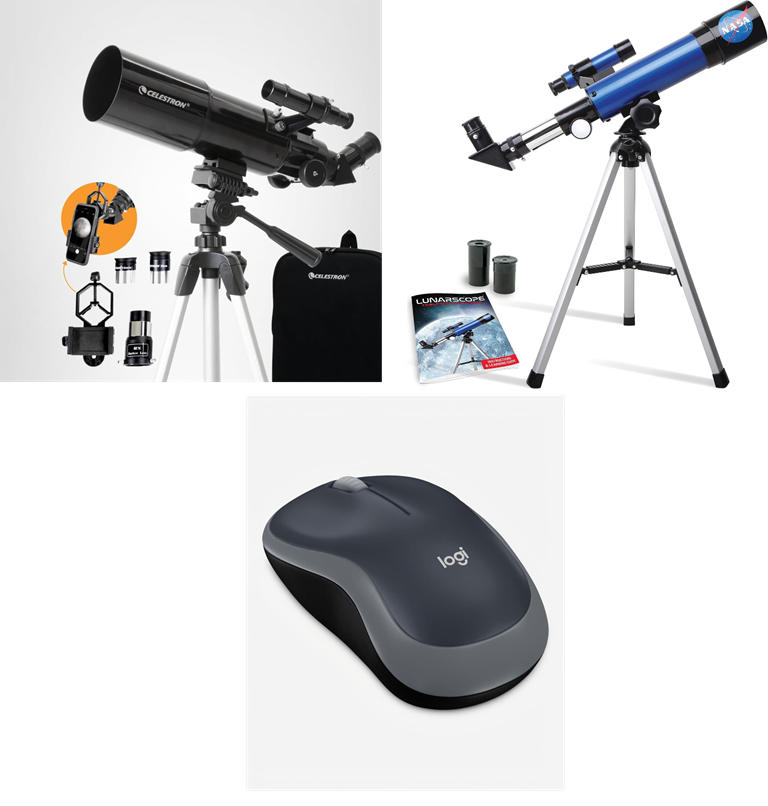
📱 Celestron Travel Scope 80mm With Smartphone Adapter: The included smartphone adapter lets beginning astronomers capture and share basic views through the telescope.
Save 22%. Now $116.99. 4.2 Stars. Check it out on Amazon!
🌙 NASA Lunar Telescope for Kids: This compact telescope provides younger space enthusiasts with a simple introduction to observing the Moon.
Overall Pick. Now $44.99. 4.1 Stars. Check it out on Amazon!
🖱️ Logitech M185 Wireless Mouse: A physical mouse offers more precise rotation, zooming, and object selection than most laptop touchpads when exploring detailed 3D scenes.
Save 28%. Now $12.99. 4.5 Stars. Check it out on Amazon!
*Prices accurate when originally published.
One Cool Tip may earn a commission from qualifying purchases.
| | |
Explore Space in 3D With NASA’s Eyes
NASA’s Eyes turns real NASA data, imagery, and spacecraft models into interactive 3D experiences. Explore planets, follow spacecraft, track nearby asteroids, monitor Earth, and visit distant worlds from your web browser.
Explore NASA’s Universe Without Leaving Your Browser
Space exploration usually happens millions of miles away, but NASA offers an unusually engaging way to bring it onto your screen.
Here’s a Cool Tip: Tour the universe with NASA’s Eyes.
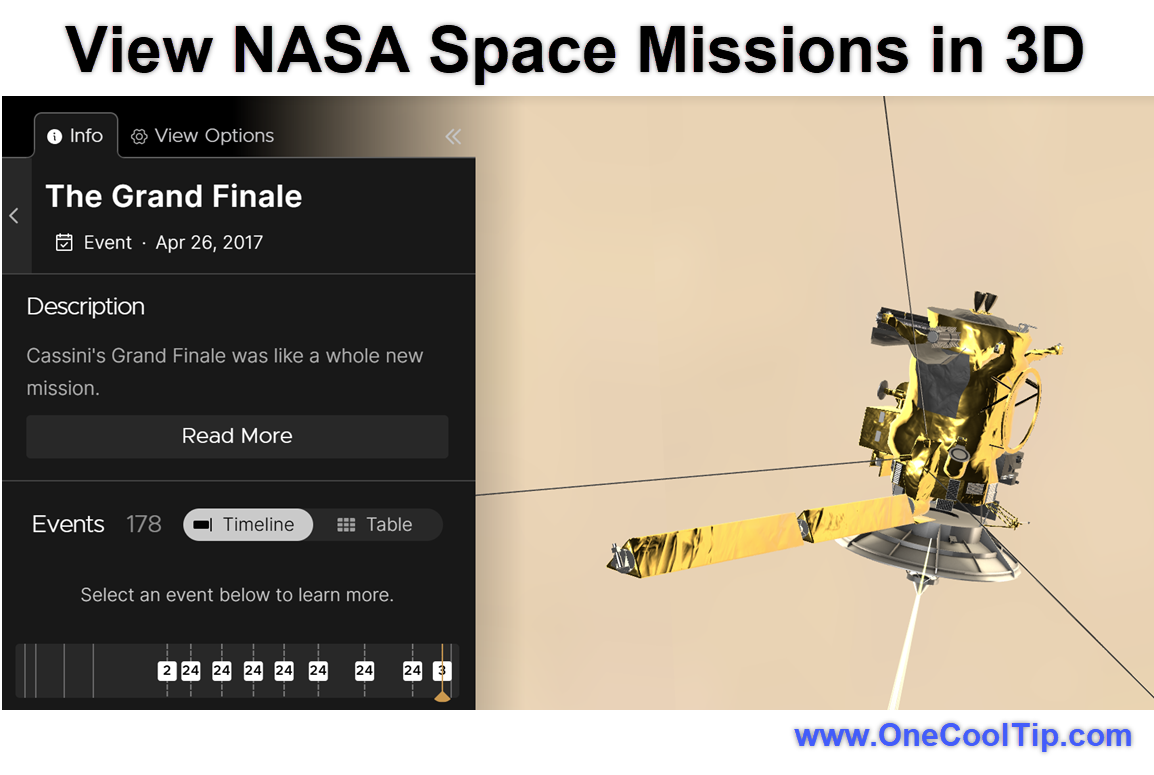
NASA’s Eyes is a collection of browser-based 3D visualizations built with NASA mission data, scientific observations, imagery, and spacecraft models. Instead of reading a static mission summary, you can rotate planets, change your viewpoint, follow spacecraft, move backward or forward through time, and examine objects from different angles.
The experience is free and runs in a modern web browser on computers, tablets, and phones. You do not need to download the old NASA’s Eyes desktop program or sign in to a NASA account to begin exploring.
What Is NASA’s Eyes?
NASA’s Eyes is not a single application.
It is a collection of related interactive experiences:
- Eyes on the Solar System lets you explore planets, moons, comets, asteroids, and NASA spacecraft.
- Eyes on Asteroids tracks more than 30,000 asteroids near Earth’s orbit and shows the next five closest approaches.
- Eyes on the Earth visualizes Earth-observing satellites, environmental measurements, and selected weather events.
- Eyes on Exoplanets lets you explore thousands of confirmed planetary systems beyond our solar system.
- DSN Now shows which spacecraft are communicating with antennas in NASA’s Deep Space Network.
- Mars Relay Network illustrates communications among Mars surface missions, orbiters, and Earth.
- Mars 2020 EDL recreates the entry, descent, and landing of the Perseverance rover on Mars.
The Solar System experience also includes time controls that let you view the solar system from 1950 through 2050.
You can revisit a historical mission event, examine the present arrangement of objects, or preview a planned mission trajectory.
NASA has transitioned the Eyes collection from its older downloadable desktop programs to browser-based applications.
Previously installed desktop versions may continue to run, but NASA and the NASA Eyes team no longer support them.
What You’ll Gain
- Explore NASA missions through interactive 3D models instead of static diagrams.
- See how planets, asteroids, satellites, and spacecraft move through space.
- Move backward or forward through time to revisit or preview mission events.
- Give students and families a free, visual introduction to space science.
Step-by-Step Instructions
Here's how to do it.
The controls and available features vary among the individual NASA’s Eyes experiences. These instructions provide a general starting point.
Web/Desktop:
-
Open the NASA’s Eyes website at https://science.nasa.gov/eyes/.
-
Review the available Eyes experiences.
-
Select View beneath the experience you want to open.
-
Wait while the visualization and its 3D assets load in a new browser window or tab.
-
Follow any introductory prompts or on-screen tutorial.
-
Click and drag to rotate or move the view.
-
Use the mouse wheel or on-screen controls to zoom.
-
Select a planet, spacecraft, asteroid, satellite, mission, or guided experience to learn more.
-
When available, use the timeline controls to change the date, pause the simulation, or adjust the speed of time.
| | fig. 1 - View NASA Space Missions in 3D | | |
iPhone, iPad, and Android:
-
Open https://science.nasa.gov/eyes/ in a current mobile browser.
-
Choose one of the available interactive experiences.
- Wait while the 3D visualization loads.
-
Tap an object or menu item to display more information.
- Drag with one finger to move or rotate the view.
- Pinch with two fingers to zoom in or out.
- Rotate your device into landscape orientation if you want more room for the visualization and controls.
The browser-based Eyes products work on devices with a modern web browser and internet connection, including phones, tablets, desktops, and laptops.
A computer with a mouse and larger display may provide more precise control over detailed 3D scenes.
Pros and Cons
Pros:
- Free to use without a subscription.
- Runs in a modern browser on computers, tablets, and phones.
- Uses NASA data, imagery, mission information, and spacecraft models.
- Offers several experiences for different scientific interests.
- Makes orbital paths and mission timelines easier to understand.
- Useful for classrooms, museums, families, and independent learning.
- Does not require the installation of desktop software.
Cons:
- Requires an internet connection.
- Detailed 3D scenes may load slowly on older devices or limited connections.
- Navigation can be difficult on a small phone screen.
- Controls and features differ among the individual Eyes experiences.
- The volume of information may overwhelm younger users without guidance.
- It is not a substitute for a location-aware night-sky or telescope-planning application.
Feature Access
-
Who Gets It: Public visitors.
-
Supported Platforms: Devices with an internet connection and modern web browser.
-
Device Types: Phones, tablets, desktops, and laptops.
-
Operating Systems: Browser-based access may work on Windows, macOS, Linux, ChromeOS, iOS, iPadOS, and Android.
-
Subscription Requirement: None.
-
Account Requirement: None for the primary browser-based experiences.
-
Access Type: Free.
Score
Criterion | Score (0–10) | Justification
Value | 9
NASA’s Eyes makes complex space and mission information freely accessible to students, families, educators, and curious adults.
Usability | 8
Opening an experience is simple, although navigating detailed 3D scenes is easier with a mouse and larger screen.
Wow Factor | 9
Following spacecraft, exploring planets, and moving through mission timelines in 3D creates an impressive and memorable experience.
Total: 26/30 | 🌟 Excellent
NASA’s Eyes earns an Excellent rating because it combines authoritative scientific information with an engaging interactive experience at no cost.
Unlike a conventional sky map such as Stellarium, NASA’s Eyes focuses on NASA missions, spacecraft, planetary systems, Earth science, and scientific visualization.
It is not designed primarily to identify objects visible from your current location.
Key Takeaways
NASA’s Eyes provides an engaging way to explore NASA missions, planets, asteroids, Earth data, and exoplanets through a web browser.
Its greatest strengths are free access, authoritative NASA information, and the ability to turn complex space concepts into interactive visual experiences.
Cool Tip Snapshot
-
Feature Name: NASA’s Eyes
-
Platform(s): Web, Windows, macOS, Linux, ChromeOS, iPhone, iPad, and Android
-
Quick Benefit: Explore NASA missions and space data in interactive 3D
-
Best For: Students, educators, families, and space enthusiasts
-
Access Type: Free
-
Difficulty: Easy
Try It Yourself
Visit NASA’s Eyes and choose one planet, spacecraft, asteroid, or distant world to explore today.
Tell us what you discovered in the comments, subscribe to the One Cool Tip newsletter, and share this article with family, friends, and coworkers who love science and space.
READ MORE
Read the Full Cool Tip.
| | |
Check Out These Cool Tips & Tricks
-
Start Small: Begin with Eyes on the Solar System because its familiar planets make the experience easier to understand. Open the NASA’s Eyes page and choose Eyes on the Solar System.
-
Use a Mouse: A mouse provides more precise control than a touchpad when rotating detailed 3D scenes. Click and drag to move the view, then use the scroll wheel to zoom.
-
Go Full Screen: Full-screen mode removes browser clutter and gives the visualization more room. Select the full-screen control, if available, or use your browser’s full-screen command.
-
Change Time: Mission paths become more meaningful when you move backward or forward through their timelines. Look for the date, playback, or simulation-speed controls within the experience.
-
Follow Missions: Following one spacecraft produces a clearer story than trying to display every object at once. Select a mission such as Voyager, New Horizons, Cassini, or Europa Clipper.
-
Track Asteroids: Eyes on Asteroids highlights more than 30,000 asteroids near Earth’s orbit and the next five closest approaches. Open Eyes on Asteroids and choose its closest-approach view.
-
Visit Exoplanets: Eyes on Exoplanets makes distant planetary systems easier to explore and compare. Select a system or planet and review the information displayed alongside it.
-
Watch Connections: DSN Now shows which Deep Space Network antennas are communicating with spacecraft. Open DSN Now and select an active antenna or spacecraft connection for more information.
-
Share a View: Some NASA’s Eyes web addresses include information about the selected object, date, or view. Copy the address after configuring the scene and test it in a private browser window before sharing.
-
Pair Resources: Use NASA’s Eyes as the visual component of a broader learning activity. Open a NASA mission page in another tab and compare its explanation with the mission’s 3D visualization.
| | ICYMI - In Case You Missed It ... | | | | |
Lockout Backup: Access Your Google Account With a Selfie Video
Google launched a selfie video verification method to help users regain access to locked accounts when standard recovery devices are unavailable. By recording guided head movements, account owners can store an encrypted facial verification baseline to verify their identity in emergency situations.
Read the Full Version.
Read the Newsletter Version.
| | |
Tomorrow's Cool Tip is waiting to amaze you.
Until then, go forth and conquer the tech world with your newfound knowledge!
Be sure to visit www.OneCoolTip.com for Cool Tech Tips for a Cooler Life!
And if you Like One Cool Tip, please support with TipJar!
Enjoy!
Rodger
Chief Cool Tipper
onecooltip.com@gmail.com
| |
| What do you think of today's OneCoolTip newsletter?
| | | | Connect with One Cool Tip!! | | |
|
As an Amazon Associate, One Cool Tip may earn a small commission from qualifying purchases.
Our media content is intended solely for informational purposes only. Please do not construe anything here as legal, tax, investment, financial, marital or other advice.
Copyright © 2026 | www.OneCoolTip.com | All Rights Reserved
|
| | | |