One Cool Tip Newsletter

April 11, 2025

Your daily dose of tech-savvy brilliance!

😀Hello Rodger, Happy Friday, Cool Tipper!


Get ready to streamline your digital life with simple, actionable tips delivered straight to your inbox.


Today's Cool Tip Theme: Pokémon / Google Search


IN THIS ISSUE


  • 🚨 Beware of Fake CAPTCHA Scams! 
  • 📲 Update WhatsApp Now! 
  • 🚀 Boost Your Friday Productivity! 
  • 🎨 Try THIS! 
  • 🎮 Unleash Your Inner Trainer.
  • 🦖 Play the Chrome Dino Game.
  • 🧱 Play the Google Breakout Game.
  • 🪙 Flip a Coin!


New here? Subscribe to the One Cool Tip Newsletter for daily updates. It's FREE!


  • 😂 Laugh with Us! Enjoy our Tech Joke of the Day, Haiku and Cool Tip Comics.


  • 🌐 Stay Informed! Check out ICYMI, and our One Cool Tip Video.


🔔 Is your email provider (Gmail, Yahoo, Outlook...) not delivering the newsletter? 


Check the Junk folder - Move the newsletter to your Inbox. And reply to this email with a “Hey, Rodger” or “I got it.” That tells your mail service you want this newsletter!


Today's Tech Trivia


Which of the following was the first Pokémon game released outside of Japan?


A) Pokémon Red

B) Pokémon Blue

C) Pokémon Yellow

D) Pokémon Red and Blue


Answer at the end.

3️⃣

If you enjoy the One Cool Tip newsletter, please forward this newsletter to THREE friends or colleagues or share it on social media using the links below.


Share this One Cool Tip Newsletter!

X Share This Email
LinkedIn Share This Email
Pinterest Share This Email


🔥Hot Topics 🔥

🚨Beware of fake CAPTCHA scams!🚨


Cybercriminals are using deceptive CAPTCHA tests to trick users into installing malware. If a CAPTCHA asks you to perform unusual actions like copying and pasting text or executing commands, it’s likely a scam. Always verify the legitimacy of websites and avoid interacting with suspicious pop-ups. Stay vigilant and protect your devices! 🛡️


And in Other News...


  • Update WhatsApp Now!


If you're using WhatsApp on Windows, update to version 2.2450.6 or later immediately! A critical vulnerability (CVE-2025-30401) was discovered that could allow attackers to execute malicious code via spoofed file attachments. This flaw has been patched, but outdated versions remain at risk. Always be cautious with unexpected attachments, even from known contacts. Stay safe and keep your software up to date!


  • 🚀 Boost Your Friday Productivity!


Copy/Paste this AI-powered productivity prompt to stay focused and organized with your favorite AI assistant: Gemini, Copilot, Grok, DuckAI, Meta and ChatGPT.


Hey AI, help me wrap up my week! Create a simple checklist to finish my top 3 work tasks XX1, XX2, XX3 today, suggest a quick way to organize my email inbox, and give me one idea to plan ahead for next week.

  • Try THIS!


Use this prompt with your favorite AI (I suggest ChatGPT) Customize the prompt for more specifics!


Create a cartoon-style image of a cat wearing sunglasses, relaxing on a beach chair with a laptop, sipping a coconut drink, and working remotely while tiny crabs take notes beside it.


Today's Cool Tip

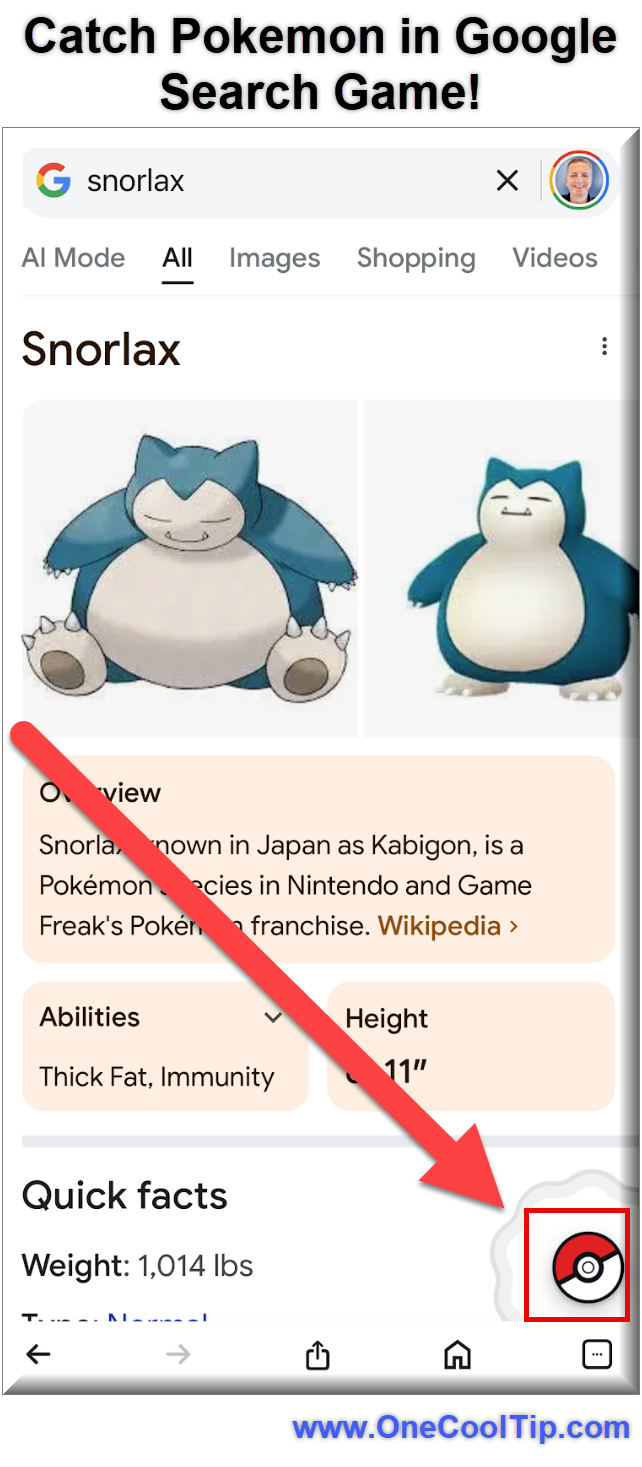
Unleash Your Inner Trainer: How to Catch Pokémon with Google Search!


In a world where technology constantly surprises us, Google Search holds more secrets than you might imagine. 


Here's a Cool Tip:  Catch Pokémon in Google Search.


Beyond answering your burning questions and directing you to the best websites, Google occasionally hides delightful Easter eggs – and one of the most charming is the ability to "catch" Pokémon. 


Yes, you read that right! 


Forget complex apps and dedicated gaming consoles for a moment. Google Search transforms into a mini Pokémon adventure, offering a unique and nostalgic experience for fans of all ages. 


But how does it work, and what Pokémon are waiting to be discovered?


What is the "Catch Pokémon on Google" Feature?


The "Catch Pokémon on Google" feature is a hidden interactive game accessible through Google Search on a mobile device. 


It allows users to find and interact with various Pokémon characters directly within the search results. 


This isn't a full-fledged Pokémon game, but rather a fun and engaging Easter egg that brings the beloved characters to life in a new and unexpected way.


Key Functions and Importance:


  • Discovery and Interaction: The primary function is to allow users to discover and interact with Pokémon characters. You can often view 3D models, hear their cries, and learn basic information about them.
  • Nostalgia and Fun: For long-time Pokémon fans, this feature offers a delightful dose of nostalgia. It’s a fun way to reconnect with the characters they grew up with.
  • Accessibility: The beauty of this feature lies in its accessibility. You don’t need to download any apps or own a specific gaming console. All you need is a device with a web browser or the Google app.
  • Surprise and Delight: Google often incorporates these kinds of Easter eggs to surprise and delight users, making the search experience more enjoyable and memorable.


How Does it Benefit Users?


This feature provides a quick and easy way to engage with the Pokémon universe without the need for dedicated games or apps. It’s perfect for a short break, a moment of fun, or for introducing someone new to the world of Pokémon. 


It also showcases Google's ability to integrate interactive and entertaining elements into its core product.


Here's how to do it.


  1. Open the Google app on your iOS or Android device or go to google.com on a mobile browser.
  2. Use the search bar to enter the name of a Pokémon.
  3. A Pokéball appears in the bottom right-hand corner.
  4. Tap the Pokéball to catch your Pokémon!
  5. Search for more!


It's important to remember that this isn't a full-fledged game.  


The "Catch Pokémon on Google" feature is a delightful example of how technology can blend information with entertainment. 


It offers a fun and accessible way for fans to engage with the Pokémon universe, providing a quick dose of nostalgia and showcasing the versatility of Google Search. 


While it's not a replacement for a full-fledged Pokémon game, it's a charming Easter egg that reminds us that technology can be both useful and playful.


READ MORE


Read the Full Cool Tip

Cool Thoughts

🆒Tell Me More


  • Mobile Exclusive: This feature is accessible only on mobile devices via the Google app or mobile browser.


  • Interactive Pokédex: Each caught Pokémon is added to your digital Pokédex, complete with silhouettes and hints for the next catch.​


  • Master Balls: Earn Master Balls at milestones (5, 20, 50, 100, 150 catches) to capture Legendary Pokémon like Mewtwo and Mew.​


  • Progress Tracking: Ensure you're signed into your Google account to save your progress across sessions.​


  • Language Settings: For optimal experience, set your Google language to English and enable "Personalize Search" in your account settings.​


⏩Quick Tips


  • 📱 Start Your Journey: Open the Google app or mobile browser and search for any of the original 151 Pokémon to begin.


  • 🔍 Use Specific Queries: If a Pokémon shares its name with a common word (e.g., "Ditto"), add "Pokémon" to your search to trigger the game.​


  • 🧭 Follow the Clues: After each catch, use the provided silhouette and hint to find the next Pokémon.​


  • 🗂 Track Your Collection: Access your Pokédex by tapping the Poké Ball icon on the search results page.​


  • 🔄 Reset if Needed: If you encounter issues, try clearing your browser cache or restarting the Google app.


✅ More Must-Read Tech Tips.


👀 How Do I Play the Chrome Dino Game?


Unleash Your Inner Dino!


Isn't it a pain when you try to Google but find you don't have an Internet connection?


Google has long tried to make this pain a bit more fun with a simple Dino game in the style of the popular Flappy Bird game that was viral hit mobile game in 2013.


Here's the Friday Funday Cool Tip:


You can play the Google Chrome Dino game anytime, even when you have an internet connection.


Here's how:


  • Enter chrome://dino/ into the Google Chrome browser.  
  • Press the space bar to play.  
  • To make the Dino jump, press the space bar. Don't hit the many obstacles!
  • When playing on mobile, tap the screen to make the Dino jump!


Discover more HERE. 


🤔 Have You Ever Wondered How to Play the Google Breakout Game?


How to Play Google Breakout


Do you remember the classic arcade game Breakout? Here's a Cool Tip for Friday Funday: Google Breakout


Now you can play it online for free! 


To play, go to: https://elgoog.im/breakout/


You can also find the link by searching Google Image and searching for Breakout.


How to Play


  • The goal is to use a paddle to hit a ball and break all of the bricks on the screen. 
  • Use the mouse of the keyboard arrow keys to move the cursor left or right.
  • As you break bricks, you will earn points. 
  • The game ends when all of the bricks are broken or when the ball falls off the screen.


Find more HERE. 


🙋‍♂️ Here's How To Flip a Coin with Google!


Making decisions can be tough, especially when you're stuck between two options. Should you go out for dinner or stay in? 


Should you watch a movie or go for a walk? 


These decisions might seem small, but they can cause a lot of stress and indecision. 


Here's a Cool Tip: Use Google's Flip a Coin tool.


Google's Flip a Coin feature is a quick and easy tool that allows you to flip a virtual coin to help make a decision. 


Here's how to do it.


  1. Type Flip a Coin into the Google search bar OR use this Cool Tip link: https://g.co/kgs/eHeVqWj
  2. A coin will appear on the screen and land on either Heads or Tails.   
  3. To try again, click Flip Again to see which side it lands on.


Next time you're stuck between two options, give Flip a Coin a try and see where chance takes you.


Find more HERE. 


❓Did you share this newsletter with three friends yet?


⌨️Today's Cool Keyboard Shortcuts


Since the Google Pokémon game is only available on a mobile device, try these shortcuts:


⭐ Bookmark Your Pokédex

  • Bookmark your current Pokédex state by keeping the search result page open in a tab.


🔄 Pull Down to Refresh

  • Use pull-to-refresh if a Pokémon doesn't load properly.


🔎 Use Auto-Suggestions

  • Typing the first few letters of a Pokémon name triggers helpful suggestions to speed up searches.


✍️Today's Haiku


Search bar adventure,

Pokémon await your tap,

Gotta catch them all.


🔎 Do you have a Cool Tip or tech question? Email us at onecooltip.com@gmail.com.


😜 Tech Joke of the Day 😅


Why did Pikachu get promoted?


Because he’s shockingly good at his job! ⚡


Cool Tip Pulse

🤔 What's your favorite way to discover fun hidden features in technology?
🤩 Exploring menus and settings
📰 Reading tech blogs and articles
🗣️ Hearing about them from friends
❓ Just stumbling upon them by accident


Fuel Your Adventure

Try Big Mike's Jerky!


bigmikesjerky.com


Did You See These Cool Tips This Week?

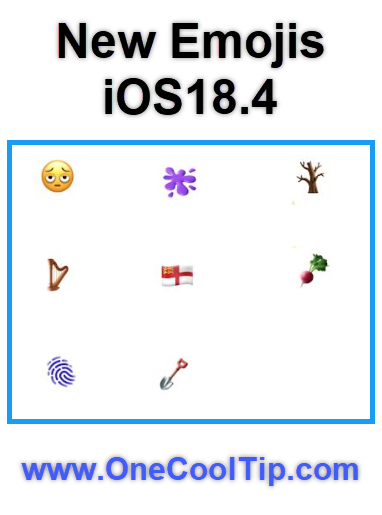
iOS 18.4 Emoji Update: A Smorgasbord of New Expressions

iOS 18.4 brings a delightful wave of new emojis to iPhones, offering a wider range of expressive options for users to communicate more vividly and authentically. This Cool Tip explores the latest additions, highlights their significance, and shows you how to enjoy them.

Read the One Cool Tip

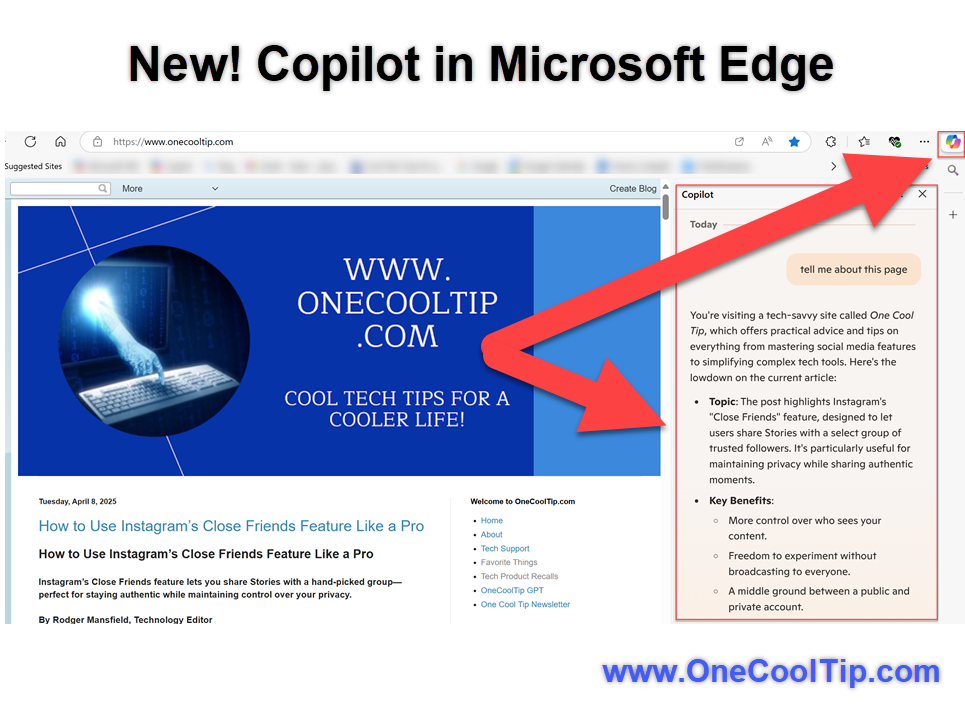
How Microsoft Edge's Copilot Vision is Redefining Web Browsing

Discover how Microsoft’s Copilot Vision in Edge transforms web browsing into an interactive, AI-driven experience. Learn about its features, benefits, and step-by-step instructions for seamless integration across devices.

Read the One Cool Tip


Find Your Adventure

Looking for your next adventure?


Call Denise at Travel For You.

314.660.3039


Sign Up for the Monthly Newsletter - Deals and Specials


http://www.travelforyouvacations.com/


https://www.facebook.com/TRAVEL.FOR.U/


ICYMI - In Case You Missed It ...

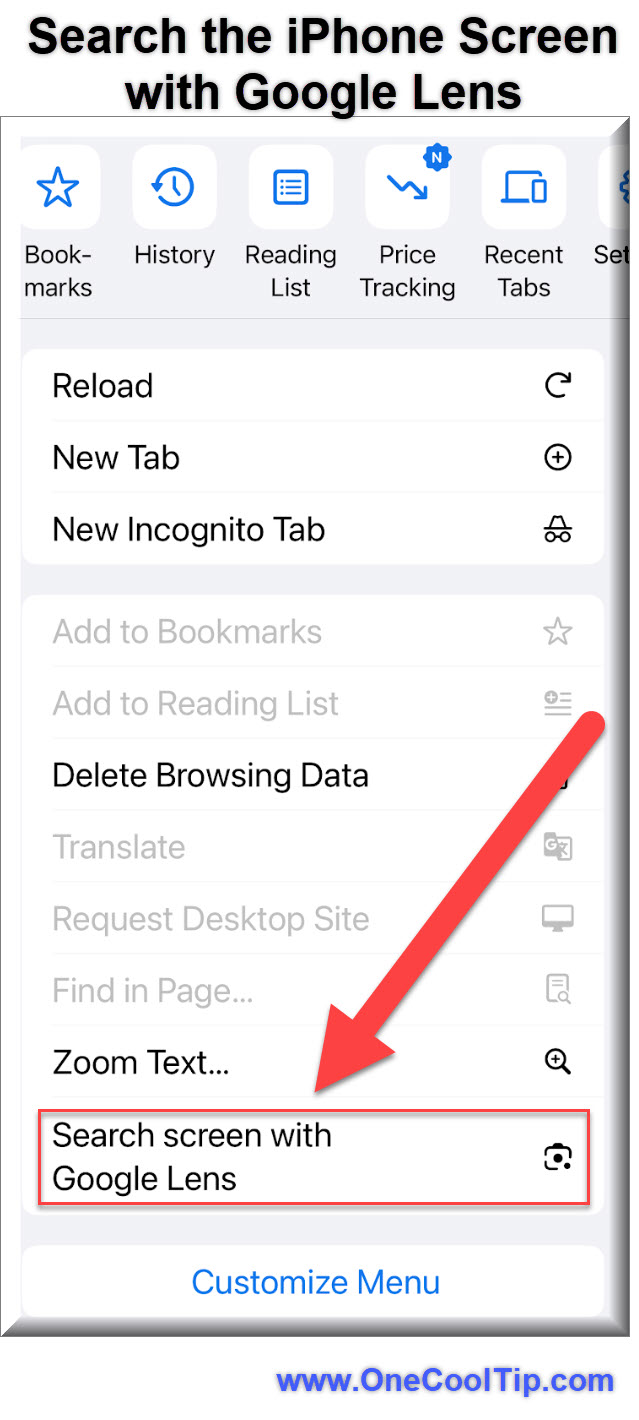
Unlocking the Power of Google Lens: Search Your Screen Effortlessly on iOS

Instantly search anything on your screen without switching apps! Google's latest update to Google Lens on iOS lets you search images, text, and more directly while browsing. Learn how this game-changing feature makes discovering information faster and easier.

Read the One Cool Tip


One Cool Tip Video

How to Play the Google Snake Game


Do you remember playing the classic Snake game on your Nokia phone? 


Do you want to play a new version on your PC or smart phone?


Watch


Cool Tip Comics

Looks like Pikachu's playing hide-and-seek with Google—guess even the best search engine can't catch 'em all!


See You Tomorrow

Trivia Answer: D) Pokémon Red and Blue


Pokémon Red and Blue were the first Pokémon games to be released internationally, arriving in North America in September 1998.


These games laid the foundation for the global Pokémon phenomenon, introducing millions to the world of pocket monsters and the iconic "Gotta Catch 'Em All!" slogan.


----------


Tomorrow's Cool Tip is waiting to amaze you.


Until then, go forth and conquer the tech world with your newfound knowledge!


And be sure to visit www.OneCoolTip.com for Cool Tech Tips for a Cooler Life!


Enjoy!


Rodger

Chief Cool Tipper

onecooltip.com@gmail.com


What Do You Think?

What do you think of today's OneCoolTip newsletter?
👍 Great
😐 OK
👎 Terrible

Please Share the One Cool Tip Newsletter!


You asked for it. You got it. There is now a One Cool Tip Newsletter archive. Did you delete a newsletter and want to read it again? Check it out HERE.


Want to help One Cool Tip grow? Please forward this email using the link above. And if you see an OCT social media post, please LIKE, COMMENT and SHARE!


Have you subscribed to the One Cool Tip YouTube channel? Subscribe HERE.

X Share This Email
LinkedIn Share This Email

Connect with One Cool Tip!!

Facebook  X  Instagram  Web  Pinterest  YouTube  LinkedIn
 

As an Amazon Associate, One Cool Tip may earn a small commission from qualifying purchases.


Our media content is intended solely for informational purposes only. Please do not construe anything here as legal, tax, investment, financial, marital or other advice.


Copyright © 2025 | www.OneCoolTip.com | All Rights Reserved