One Cool Tip Newsletter

November 13, 2026

Your daily dose of tech-savvy brilliance!

😀 Greetings! Happy Friday Funday, Cool Tipper!


Get ready to streamline your digital life with simple, actionable tips delivered straight to your inbox.


Cool Tip Theme: The Password Game


Play The Password Game on Neal.fun. Learn how to clear the opening rules, spot conflicts and turn an absurd browser puzzle into a Friday challenge.


New here? Subscribe to the One Cool Tip Newsletter for daily updates. It's FREE!

3️⃣

If you enjoy the One Cool Tip Newsletter, please forward this newsletter to THREE friends or colleagues or share it on social media using the links below.


Leave a $$$ Tip!


Share this One Cool Tip Newsletter!

X Share This Email
LinkedIn Share This Email
Pinterest Share This Email

🚨 Excited for GTA 6? Scammers Are Counting on It 🚨


The excitement surrounding Grand Theft Auto VI is giving scammers a perfect opportunity to target eager gamers.


Scammers are offering fake GTA 6 downloads, supposed leaked builds and bogus early-access offers that can lead to malware or attempts to steal money and personal information.


Some fraudulent sites even imitate Rockstar Games branding to make their offers look convincing.


One of the biggest warning signs is an offer for a PC version, demo or public beta, since none of those are currently available.


Avoid unofficial downloads and verify GTA 6 offers through Rockstar Games or your console's official store before paying or downloading anything.


The Cool Tip:


When a highly anticipated game promises something that seems too good or too early to be true, don't let excitement override your scam radar.


And in Other News...


  • Microsoft 365 Acting Up? Check This Before Blaming Your PC


If Microsoft 365, Outlook, or Teams suddenly stops working, the problem might not be your computer or internet connection.


A major Microsoft 365 service disruption has affected access to Exchange Online and features across several connected Microsoft services.


Before changing passwords, reinstalling apps, or troubleshooting your PC, check Microsoft's official service status to see whether the company is reporting a problem.


Microsoft provides a public network-health page and directs Microsoft 365 administrators to Service Health for more detailed information about detected issues.


If an outage is underway, your best move may simply be to monitor Microsoft's updates while service is restored.


The Cool Tip:


Bookmark Microsoft's status page now so you'll know where to look the next time Outlook or another Microsoft 365 service suddenly won't cooperate.

Cool Tip Poll

🤔 Which Password Game clue would you most like to tackle?

Cool Deals of the Day

  • Have you tried the Upside app? Everyday cash back on gas, groceries and dining.


Help support One Cool Tip. Use this Amazon link when you shop online.


Check out these Cool Deals:

⌨️ Logitech Pebble Keys 2 K380s: A compact physical keyboard makes it easier to edit individual characters as the puzzle gets longer. ·

Save 15%. Now $33.99. 4.3 Stars. Check it out on Amazon!


🧮 Casio HS-8VA Pocket Calculator: Keep it beside your keyboard to check arithmetic while the puzzle stays in view. Pack of 2.

Overall Pick! Now $9.90. 4.5 Stars. Check it out on Amazon!


💻 ASUS ZenBook 14X OLED Laptop: Enjoy browser games and daily tasks on a stunning, colorful OLED display.

👉Look! Now $1,284.00. 4.3 Stars. Check it out on Amazon!


*Prices accurate when originally published.

One Cool Tip may earn a commission from qualifying purchases.

Fuel Your Adventure

Try Big Mike's Jerky!


bigmikesjerky.com


Today's Cool Tip

Play The Password Game

The Password Game turns a familiar sign-up form into a browser puzzle that adds rules as you type.


Here’s how to clear the opening rules, fix an earlier rule that fails after an edit and challenge a friend without giving away the later clues.

By Rodger Mansfield, Technology Editor

November 13, 2026

Subscribe


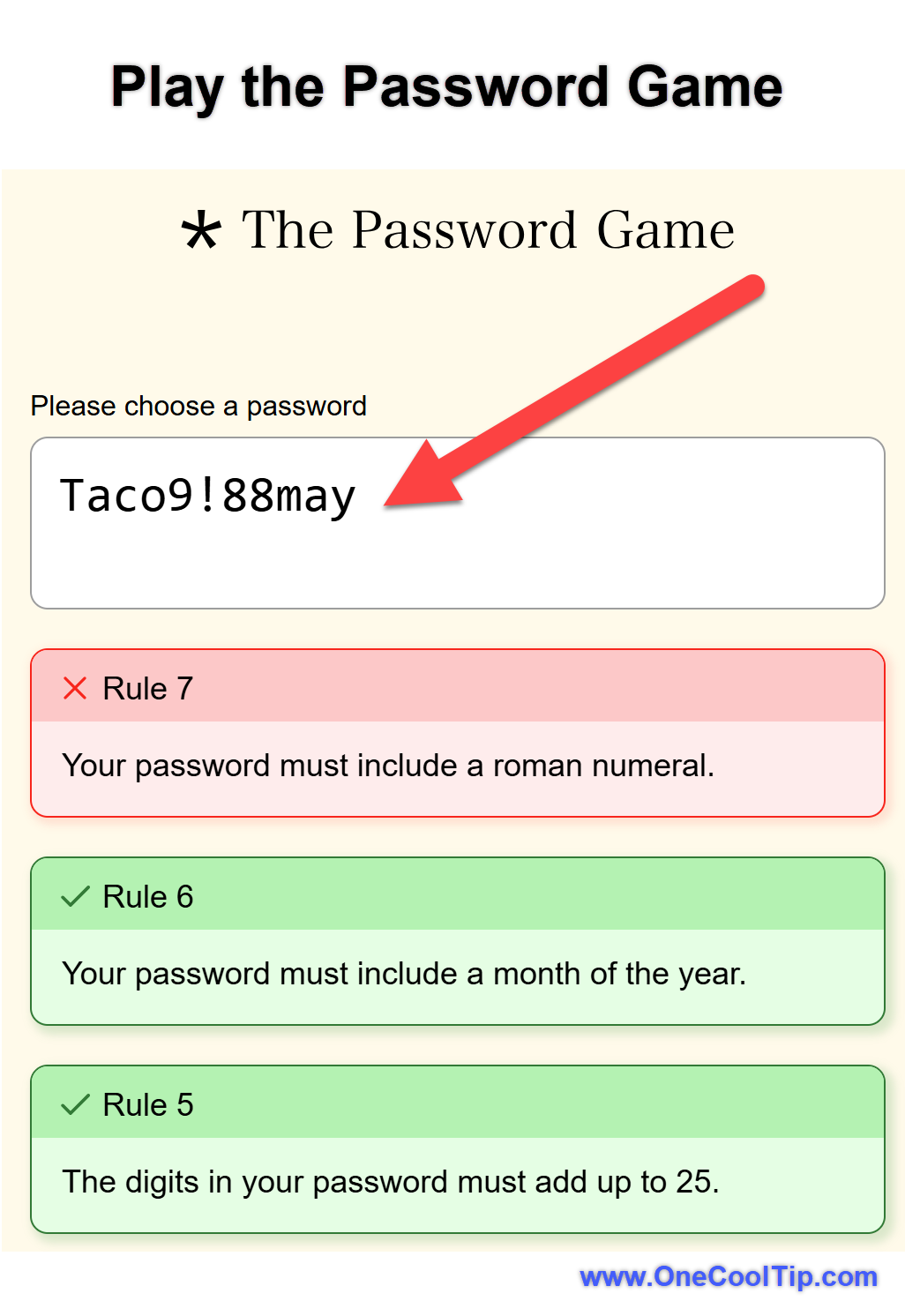
You’ve added a capital letter, a number and an exclamation point. 


You’re ready to move on. 


Now the screen wants your digits to add up to 25.


That’s where Neal Agarwal’s The Password Game takes a turn. 


A task you’d usually rush through becomes a puzzle you want to keep playing. 


It’s even funnier when someone across the room hears you ask whether a Roman numeral can ruin a perfectly good password.


Here’s a Cool Tip: Start with a made-up password and change one part at a time.


Feature Explanation


The Password Game is a browser puzzle built around one field. 


Type a made-up entry, and the game checks your work as you edit. 


It reveals additional rules as you advance, and earlier rules still apply. 


A change that satisfies the newest rule can cause an earlier check to fail.


What You’ll Gain


  • Improve your speed and accuracy under pressure.
  • Enjoy a free, browser-based distraction that requires no installation.
  • Run a short challenge with a friend, even if neither of you finishes.


Step-by-Step Instructions


Here's how to do it.


Web


  1. Open The Password Game. 
  2. Click the field and type taco. 
  3. The first rule asks for at least five characters. 
  4. Add 9 to make taco9 and meet both the length and number requirements.
  5. Capitalize the t and add an exclamation point to make Taco9!. 
  6. The next rule asks you to make the digits add up to 25.
  7. Keep editing the same entry. 
  8. Check the rules below the field after each change to see whether an earlier check failed.

fig. 1 - Play the Password Game

Pros and Cons


Pros:


  • The first screen gives you a clear place to start.
  • Rule feedback appears as you edit, so you can see what a change did.
  • The mix of words, numbers and visual clues gives different people a chance to help.
  • A short round works as a break, and the later clues reward a longer session.


Cons:


  • A quick edit can undo an earlier solution, so progress may slow as the rules pile up.
  • Clues that draw on outside knowledge may send you to a second tab.
  • Later rules involve selecting and formatting text. Those edits can feel fiddly on a small screen.


Score

Criterion |  Score (0–10) |  Justification
Value |  7
It makes a good short break and gives groups a reason to solve something together.
Usability |  8
The entry field and live checks make it easy to start. Later formatting takes more effort.
Wow Factor |  9
Watching a familiar sign-up form turn into a string of unexpected puzzles is the best part.
Total: 24/30 |  👍 Good
Start for the joke and stay for the moment when you figure out how to satisfy two seemingly incompatible rules.


Key Takeaways


Edit one part of your entry at a time so you can tell what caused a rule to fail. For a group challenge, compare the farthest clue each person uncovered and see which one sparked the best discussion.


Cool Tip Snapshot


  • Feature Name: The Password Game
  • Platform(s): Web
  • Quick Benefit: Turn a familiar password form into a browser puzzle.
  • Best For: Puzzle fans, families and groups looking for a quick challenge.
  • Access Type: Free to start, based on the Nov. 11, 2026, check.
  • Difficulty: Moderate


Try It Yourself


Play The Password Game and tell us in the comments and which rule tripped you up.


Subscribe to the free One Cool Tip Newsletter and share this challenge with family, friends and coworkers.


READ MORE


Read the Full Cool Tip!

Check Out These Cool Tips & Tricks


  • Start Fresh: A short fictional entry gives you room to edit. Type a few made-up characters to see the first rule.


  • Add Digits: The early arithmetic check adds digits individually. Count an entry such as 98 as nine plus eight.


  • Reserve Digits: A spare digit you can change gives you a way to rebalance the total. Keep the opening digits together so you can find and edit them quickly.


  • Use May: A short month is easy to spot in a crowded entry. Append lowercase may when the month rule appears.


  • Watch Capitals: Some uppercase letters can count as Roman numerals. Check newly added words for capitals such as I, V and X when the Roman numeral rule changes.


  • Keep Sections: Recognizable chunks make a long entry easier to edit. Add each clue answer as a distinct chunk and change only the part you need.


  • Check Again: A new answer can undo a rule you already cleared. Scan the rules below the field after every change.


  • Separate Tab: A separate lookup keeps the game page in place. Open a new tab for a clue, then return to the game tab to enter your answer.


  • Try One Edit: Small changes make it easier to see which rule you affected. Replace one character, check the result and reverse the edit if it creates a new problem.


  • Race a Friend: Reaching the next clue can be a win on its own. Agree on a time limit and compare the farthest rule you each reached.

ICYMI - In Case You Missed It ...

Give Your ChatGPT Creations a Home With Shareable Profiles


Give people a place to meet you and explore what you build with ChatGPT. Shareable Profiles combine a personal introduction with a showcase of your Sites, with controls over what you display.


Read the Full Version.


Read the Newsletter Version.

Looking for your next adventure?


Call Denise at Travel For You.

314.660.3039


Sign Up for the Monthly Newsletter


http://www.travelforyouvacations.com/


https://www.facebook.com/TRAVEL.FOR.U/


See You Tomorrow

Tomorrow's Cool Tip is waiting to amaze you.


Until then, go forth and conquer the tech world with your newfound knowledge!


Be sure to visit www.OneCoolTip.com for Cool Tech Tips for a Cooler Life!


And if you Like One Cool Tip, please support with TipJar!


Enjoy!


Rodger

Chief Cool Tipper

onecooltip.com@gmail.com


What Do You Think?

What do you think of today's One Cool Tip Newsletter?
Positive        Neutral        Negative
X Share This Email
LinkedIn Share This Email

Connect with One Cool Tip!

Facebook  X  Instagram  Web  Pinterest  YouTube  LinkedIn
 

As an Amazon Associate, One Cool Tip may earn a small commission from qualifying purchases.


Our media content is intended solely for informational purposes. Please do not construe anything here as legal, tax, investment, financial, marital or other advice.


Copyright © 2026 | www.OneCoolTip.com | All Rights Reserved