ā€Š

One Cool Tip Newsletter

March 22, 2026

Your daily dose of tech-savvy brilliance!

šŸ˜€Greetings! Happy Sunday, Cool Tipper!


Get ready to streamline your digital life with simple, actionable tips delivered straight to your inbox.


Cool Tip Theme: Gemini Personal Intelligence Expands


New here? Subscribe to the One Cool Tip Newsletter for daily updates. It's FREE!

3ļøāƒ£

If you enjoy the One Cool Tip newsletter, please forward this newsletter to THREE friends or colleagues or share it on social media using the links below.


Leave a Tip!


Share this One Cool Tip Newsletter!

X Share This Email
LinkedIn Share This Email
Pinterest Share This Email

🚨Gift Card Fraud Is Funding Global Crime Rings🚨


Homeland Security Investigations warns that organized crime groups are exploiting gift cards to launder money and fund illegal activities like fentanyl trafficking and human smuggling.


Under Project Red Hook, HSI is working with retailers to fight back.


  • Watch for tampered packaging, torn pull tabs, or mismatched logos.
  • Never share gift card codes with anyone you don’t know personally.
  • If the balance doesn’t match your purchase, contact the card issuer immediately.


Gift card fraud losses are in the hundreds of millions and rising.


Stay alert and report suspicious activity to local law enforcement or the retailer’s fraud hotline.


Cool Deals of the Day

Help support One Cool Tip. Use this Amazon link when you shop online.


Check out these Cool Deals:


  • šŸ’» ASUS Vivobook S 15 OLED (Copilot+ PC): The perfect hardware to complement your new AI-driven lifestyle. Save 25% Now $972. Check it out on Amazon!


  • šŸ”‹ Anker 737 Power Bank: Keep your devices charged while Gemini processes your world. Now $109.99. Check it out on Amazon!


  • šŸ  Google Nest Hub (2nd Gen): A great way to interact with the Google ecosystem at home. Now $339.88. Check it out on Amazon!


*Prices accurate when originally published.

One Cool Tip may earn a commission from qualifying purchases.

Fuel Your Adventure

Try Big Mike's Jerky!


bigmikesjerky.com


Now on TikTok!


Today's Cool Tip

Gemini for Everyone: Personal Intelligence Moves Beyond the Paywall


Google has officially expanded its "Personal Intelligence" feature to all Gemini users in the U.S., allowing the AI to connect and reason across Gmail, Photos, and Drive without a paid subscription.  This rollout marks a major shift from beta testing to a standard feature for millions of personal Google accounts.


Remember when you had to pay $20 a month just to have an AI assistant that actually knew your schedule? 


Here's a Cool Tip:  Use Gemini's Personal Intelligence for Free.


Google flipped the switch to bring Personal Intelligence to the masses. 


No longer reserved for "Pro" subscribers, this feature allows Gemini to act as a unified brain for your digital life. 


If you've ever felt like your data was trapped in silos: an airline confirmation in Gmail, a car's license plate in Photos, and a packing list in Drive, this update is the bridge you've been waiting for.


Feature Explanation


Personal Intelligence isn't just another chatbot update; it's a fundamental change in how Gemini accesses your data. 


Previously, Gemini could "fetch" a single email if you asked for it. 


Now, using a process Google calls "context packing," it can reason across multiple sources simultaneously.


It works by securely connecting your Google apps (Gmail, Photos, Drive, Maps, and YouTube) to the Gemini engine. 


When you ask a question, Gemini doesn't just search the web; it searches your world. 


It can identify patterns in your behavior, retrieve specific details like model numbers from old receipts, and even suggest activities based on your past family trips.


What You’ll Gain


  • Zero-Subscription Access: High-level personalization is now available on the free tier.
  • Multi-Source Reasoning: Ask one question that requires data from three different apps.
  • Universal Integration: Works across the Gemini App, Chrome browser, and Search's AI Mode.


Step-by-Step Instructions


Web (Chrome)


  1. Go to gemini.google.com.
  2. Look for the "Turn on Personal Intelligence" invitation card on your home screen.
  3. If you don't see it, click the Settings gear icon in the bottom left.
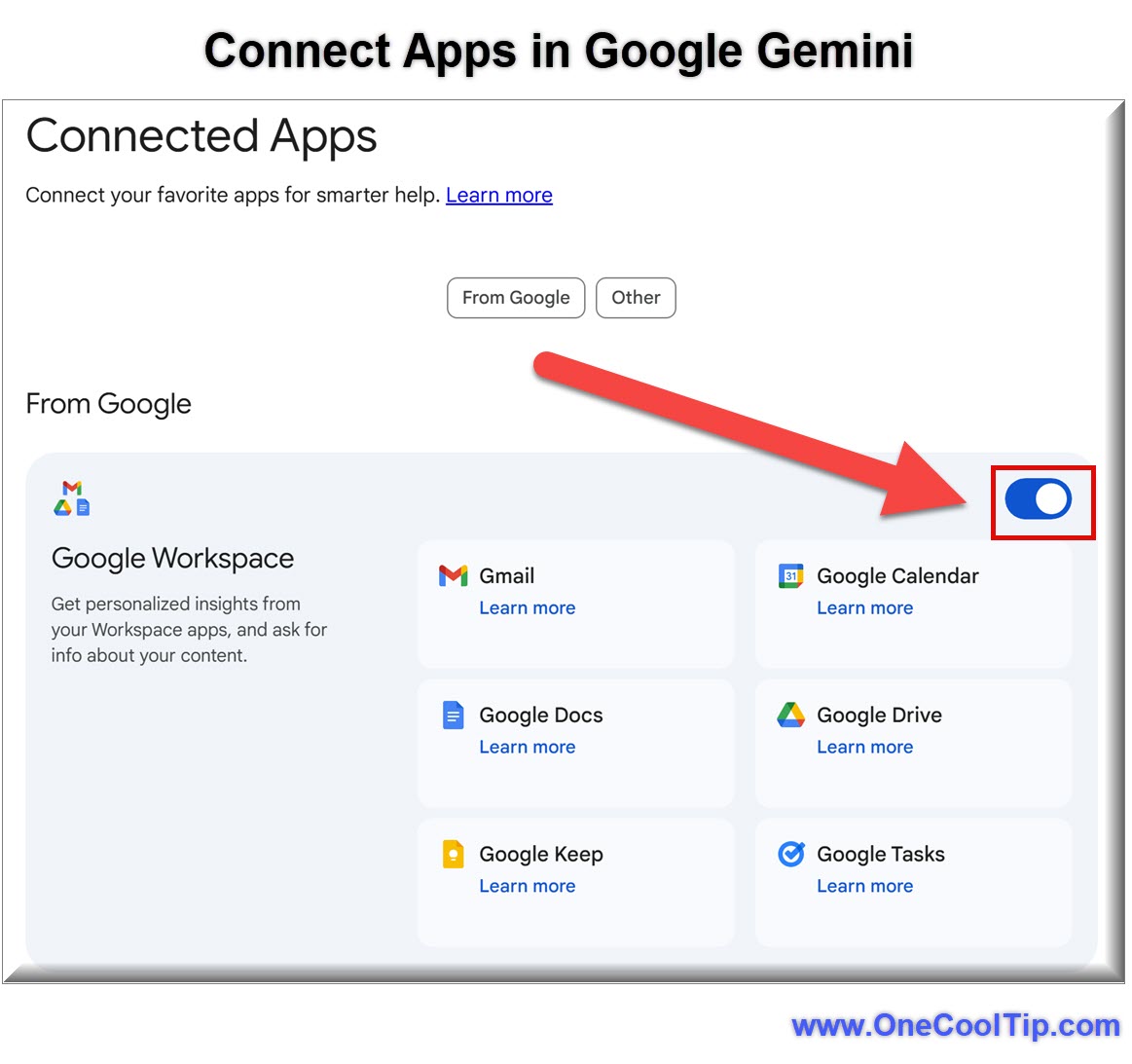
  4. Select Personal Intelligence, and ensure Google Workspace and Google Photos are enabled.


Example: Prompt Gemini with "Find the tire size for my car from my old maintenance emails and find a shop nearby that has them in stock."


fig. 1 - Connect Apps in Google Gemini

Android & iOS


  1. Open the Gemini app (Android / iOS).
  2. Tap your Profile Icon in the top-right corner.
  3. Select Settings and then Personal Intelligence.
  4. Tap Connected Apps and toggle on the services you want Gemini to access (e.g., Gmail, Google Photos).


Example: Try saying, "Based on my recent emails, when is my flight, and what's a good restaurant near my hotel that serves the kind of food I usually like?"


Pros and Cons


Pros: 


  • Dramatically reduces manual searching across different apps.
  • Free-tier availability makes advanced AI utility accessible to everyone.


Cons: 


  • Privacy Trade-off: While Google states they don't train on your Gmail data directly, they do use your prompts and Gemini's responses to improve the system.
  • Over-personalization: In early testing, the AI sometimes makes "leaps" (e.g., assuming you love a sport just because you have many photos of your kids playing it).


Feature Access


This feature is rolling out to all personal Google accounts in the U.S. 


It is not yet available for Workspace Business or Education accounts due to stricter data privacy regulations. 


Users in Europe and other regions can expect a staggered rollout throughout the remainder of 2026.


Score

Criterion | Score (0–10) | Justification
Value 10
Moving a premium feature to the free tier provides immense value to the average user.
Usability 8
The opt-in process is straightforward, though privacy settings are buried in menus.
Wow Factor 9
The ability for an AI to "remember" your life across apps is the true future of tech.
Total: 27/30 |  šŸŒŸ Excellent 
The expansion to free users makes Gemini the most practical personal assistant on the market, especially for those already deep in the Google ecosystem.


Key Takeaways


Personal Intelligence has officially graduated from a "pro feature" to a standard utility. 


By connecting your Google apps, you turn a generic chatbot into a personalized engine that understands your specific needs, history, and preferences.


Cool Tip Snapshot


  • Feature Name: Personal Intelligence (Free Expansion)
  • Platform(s): Android, iOS, Web, Chrome
  • Quick Benefit: Connects Gmail, Photos, and Drive for personalized answers.
  • Access Type: Free (U.S. Rollout)


Try It Yourself


Go into your Gemini settings right now and enable the Workspace extension. 


Ask it a question about a specific event from three years ago that you know is in your email. 


You'll see exactly why this is a game-changer. 


READ MORE


Read the Cool Tip on OneCoolTip.com.

Check out these Cool Tips & Tricks.


  • Free Tier: Personal Intelligence is now available for free users in the U.S. Go to settings and opt-in to start using it today.


  • Context Packing: Gemini can now "reason" across multiple apps at once. Ask questions that involve both your photos and your emails.


  • Privacy Toggle: You can choose which apps to connect individually. Navigate to Personal Intelligence settings to customize your data sharing.


  • Chrome Integration: Use Gemini directly in the Chrome address bar for quick searches. Type "@gemini" followed by your question in the URL bar.


  • Photo Retrieval: Ask Gemini to find specific items in your Photos by description. Try "Find the photo of my car's license plate" or "Show me my vacation photos from 2022."


  • Drafting Responses: Use Gemini to draft replies based on previous email threads. Simply ask, "Draft a reply to the last email from my boss about the budget."


  • Itinerary Building: Let Gemini build travel plans from your confirmation emails. Prompt: "Build a schedule for my trip next week based on my hotel and flight emails."


  • Smart Summaries: Get the gist of long Drive documents without opening them. Ask Gemini to "Summarize the key points in the [File Name] document."


  • Memory Feedback: You can correct Gemini if it gets a personal detail wrong. Tell it, "Actually, I don't like golf, I was just at that course for a wedding."


  • Voice Mode: Use Gemini Live for a hands-free personal assistant experience. Tap the waveform icon in the app to talk through your schedule.

ICYMI - In Case You Missed It ...

How to Edit Photos Privately with Duck.ai


DuckDuckGo has quietly added AI-powered photo editing to Duck.ai, allowing users to modify images using natural language commands. This feature gives you powerful image editing tools without the data tracking common in competing AI platforms.


Read the Full Cool Tip.


Read the Newsletter Version.

Looking for your next adventure?


Call Denise at Travel For You.

314.660.3039


Sign Up for the Monthly Newsletter


http://www.travelforyouvacations.com/


https://www.facebook.com/TRAVEL.FOR.U/


See You Tomorrow

Tomorrow's Cool Tip is waiting to amaze you.


Until then, go forth and conquer the tech world with your newfound knowledge!


Be sure to visit www.OneCoolTip.com for Cool Tech Tips for a Cooler Life!


And if you Like One Cool Tip, please support with TipJar!


Enjoy!


Rodger

Chief Cool Tipper

onecooltip.com@gmail.com


What Do You Think?

What do you think of today's OneCoolTip newsletter?
Positive        Neutral        Negative
X Share This Email
LinkedIn Share This Email

Connect with One Cool Tip!!

Facebook  X  Instagram  Web  Pinterest  YouTube  LinkedIn
ā€Š

As an Amazon Associate, One Cool Tip may earn a small commission from qualifying purchases.


Our media content is intended solely for informational purposes only. Please do not construe anything here as legal, tax, investment, financial, marital or other advice.


Copyright Ā© 2026 | www.OneCoolTip.com | All Rights Reserved


ā€Š