|
One Cool Tip Newsletter
September 11, 2026
| Your daily dose of tech-savvy brilliance! | |
😀Greetings! Happy Friday Funday, Cool Tipper!
Get ready to streamline your digital life with simple, actionable tips delivered straight to your inbox.
Cool Tip Theme: Ken Burns Video History Lessons
Learn how to find free Ken Burns history courses on YouTube, use built-in quizzes, and access classroom materials from PBS LearningMedia.
New here? Subscribe to the One Cool Tip Newsletter for daily updates. It's FREE!
| |
3️⃣
If you enjoy the One Cool Tip newsletter, please forward this newsletter to THREE friends or colleagues or share it on social media using the links below.
Leave a $$$ Tip!
Share this One Cool Tip Newsletter!
| | |
🚨New Online Protections Give Victims More Control🚨
The FTC is reminding consumers that people have new tools to help remove images that were shared online without their permission, including AI-generated deepfakes.
Under the Take It Down Act, covered online platforms are required to provide a way to report these images and remove them, along with copies, within 48 hours of a valid request.
If you discover that an image of you has been posted without your consent, report it directly through the platform's reporting tools as soon as possible.
The FTC also points consumers to StopNCII.org, a free service that helps prevent certain images from being shared across participating platforms by using a digital fingerprint rather than the image itself.
The key takeaway is that you have rights, and online platforms have legal responsibilities to help.
Knowing where to report content and acting quickly can help limit the spread of harmful material and protect your privacy.
And in Other News...
- Turn YouTube Into a Free Learning Powerhouse
Looking to learn something new without spending a dime?
The Khan Academy YouTube channel offers thousands of free educational videos covering topics such as math, science, economics, computer programming, and more.
It is a great resource for students, parents, lifelong learners, and anyone looking to sharpen their skills or better understand a subject.
Whether you need help with algebra, want to learn coding basics, or simply enjoy expanding your knowledge, there is likely a video for you.
One of the best features is that lessons are available on demand, allowing you to learn at your own pace and revisit concepts whenever needed.
Pairing short educational videos with a few minutes of daily practice can be a simple way to build new skills over time.
Best of all, you can access the content from virtually any device, making learning convenient wherever you are.
| |
| 🤔 How would you use the free Ken Burns history courses on YouTube? | | | | |
Help support One Cool Tip. Use this Amazon link when you shop online.
Check out these Cool Deals:
| | |
🎧 Sony WH-CH520 Wireless Headphones: A lightweight option for listening to documentary narration without disturbing others.
Save 43%. Now $40. 4.4 Stars. Check it out on Amazon!
📱 Lamicall Adjustable Phone Stand: Holds a phone at a comfortable angle for longer lessons and note-taking.
Look👉 Now $12.99. 4.6 Stars. Check it out on Amazon!
📺 Anker USB-C to HDMI Adapter: Useful for displaying a compatible laptop, tablet, or phone on a larger monitor or television. Confirm that the source device supports video output.
Save 24%. Now $12.98. 4.6 Stars. Check it out on Amazon!
*Prices accurate when originally published.
One Cool Tip may earn a commission from qualifying purchases.
| | |
Take Ken Burns’ Free History Courses on YouTube
You can now study American history through free Ken Burns courses on YouTube, complete with classroom-ready film clips and interactive quizzes. The first lessons cover the American Revolution, while PBS LearningMedia supplies additional resources for teachers and curious learners.
YouTube is packed with history videos, but finding a coherent lesson can feel like assembling a textbook from loose pages.
Here’s a Cool Tip: Turn free Ken Burns videos into a structured history course.
A collaboration among Ken Burns, PBS LearningMedia, and YouTube now gives viewers a more organized option: free courses built around carefully selected documentary footage, teaching materials, and interactive quizzes.
The collection debuted August 27, 2026, with three courses connected to The American Revolution.
You can watch them through the official Ken Burns YouTube channel without paying for a course subscription.
Educators can also visit PBS LearningMedia for supporting classroom resources.
What Is Ken Burns in the Classroom on YouTube?
Ken Burns in the Classroom is a collection of digital history lessons developed by PBS LearningMedia and delivered through the official Ken Burns YouTube channel.
Rather than simply posting full documentaries, the program uses professionally edited film segments designed to fit classroom schedules.
Integrated quizzes let viewers check their understanding as they watch.
The first three courses examine different sides of the American Revolution:
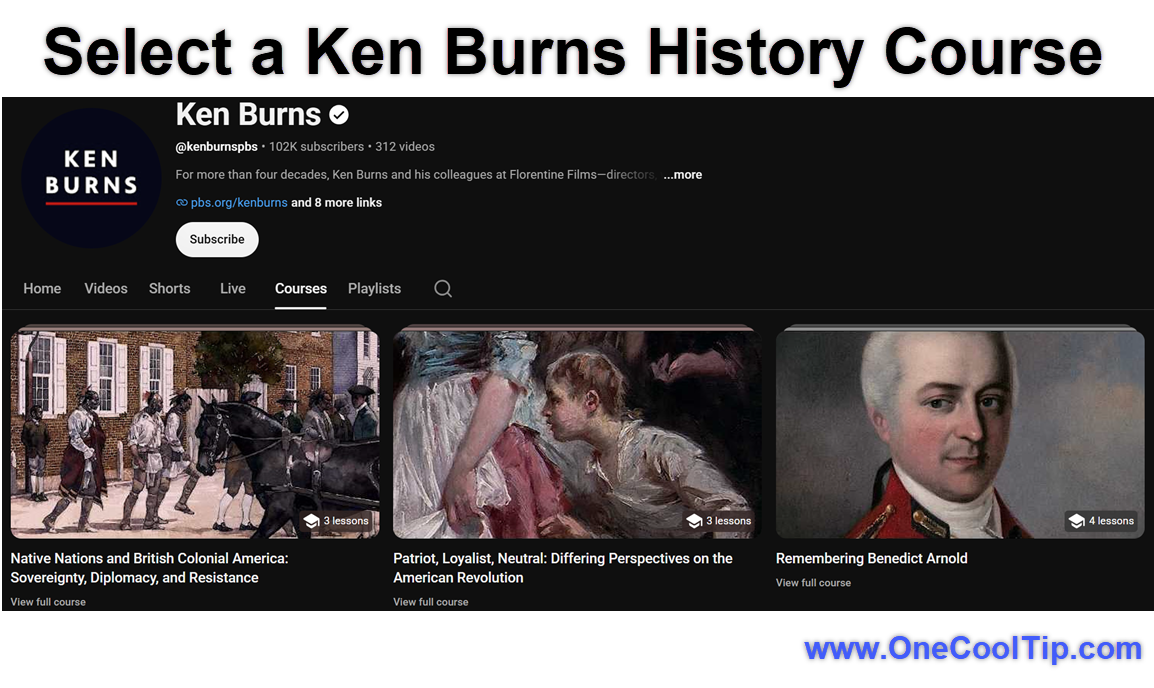
- Patriot, Loyalist, Neutral: Differing Perspectives on the American Revolution.
- Native Nations and British Colonial America: Sovereignty, Diplomacy, and Resistance.
- Remembering Benedict Arnold.
The selection matters because it asks learners to compare perspectives rather than memorize a single version of events.
A student can consider why colonists made different choices, examine Native sovereignty and diplomacy, and explore how public memory shapes a historical reputation.
YouTube said material drawn from more than 40 Ken Burns films, including The Civil War, The Dust Bowl, and The Vietnam War, would follow in the weeks after launch.
That announcement is a roadmap, not proof that every planned course is already live.
Check the channel’s Courses or Playlists area for the current selection.
What You’ll Gain
- Study major events through focused documentary segments instead of searching for disconnected clips.
- Test comprehension with quizzes built into the YouTube course experience.
- Find lesson material suitable for class discussion, independent study, or family learning.
- Save useful videos to a private playlist and return to them later.
Step-by-Step Instructions
Here's how to do it.
Web/Desktop
-
Open the official Ken Burns YouTube channel.
-
Look for the Courses or Playlists tab. If the layout differs, use the channel search and enter American Revolution.
-
Select one of the three American Revolution course titles listed above.
-
Open the first lesson and follow the course order shown in the playlist.
-
When an interactive quiz appears, choose an answer before continuing.
-
To save a lesson, select More, then Save, and choose Watch later or a playlist you created.
| | fig. 1 - Select a Ken Burns History Course | | |
iPhone/iPad and Android
-
Open the YouTube app (iOS / Android) and search for Ken Burns PBS.
-
Confirm that you are viewing the official channel at @kenburnspbs.
-
Look for Courses or Playlists. If neither appears, search YouTube for the complete course title.
-
Choose a course and start with its first video.
-
To save a lesson, tap More, tap Save, then select Watch later or another playlist. These labels are verified for Android; iPhone and iPad layouts may vary.
Pros and Cons
Pros:
-
Free access: Courses are completely free and available now.
-
Credible source material: Lessons draw from Ken Burns documentaries and PBS LearningMedia resources.
-
Active learning: Integrated quizzes encourage viewers to check comprehension instead of watching passively.
-
Flexible viewing: The courses are hosted on YouTube, making them easy to reach through a desktop browser or the YouTube mobile app.
-
Useful for several audiences: Teachers can build lessons around the material, while families and independent learners can follow it at their own pace.
Cons:
-
Limited opening catalog: The launch began with only three courses, all related to the American Revolution.
-
Interface differences: YouTube tabs and quiz presentation can vary by device, app version, account, or screen size.
-
Internet distractions: Recommendations, comments, and unrelated videos can pull attention away from the lesson.
Feature Access
The courses are completely free and available on the official Ken Burns channel.
A Premium account is not required.
Availability of particular interactive controls may vary by device, account, app version, or school policy.
Score
Criterion | Score (0–10) | Justification
Value | 9
Free, thoughtfully organized history lessons and companion materials offer strong value to educators and independent learners.
Usability | 8
The familiar YouTube interface lowers the barrier to entry, although course tabs and quizzes may look different across devices.
Wow Factor | 8
Turning Ken Burns documentary work into interactive, classroom-ready YouTube courses is a clever use of an everyday platform.
Total: 25/30 | 🌟 Excellent
This is an excellent free resource for structured history learning, even though the opening catalog is small.
Compared with a formal learning platform such as Coursera, these courses are easier to access but do not advertise certificates, instructor support, or academic credit.
Key Takeaways
Ken Burns in the Classroom turns documentary excerpts into free, guided history lessons on a platform millions of people already know.
Start with the three American Revolution courses, and use the quizzes to stay engaged.
Cool Tip Snapshot
-
Feature Name: Ken Burns in the Classroom on YouTube.
-
Platform(s): Web, Windows, macOS, iPhone, iPad, Android.
-
Quick Benefit: Free history lessons with documentary clips and interactive quizzes.
-
Best For: Students, educators, families, and lifelong learners.
-
Access Type: Free.
-
Difficulty: Easy.
Try It Yourself
Open the Ken Burns YouTube channel, choose one American Revolution course, and complete its first lesson today.
Tell us what you learned in the comments, subscribe to the One Cool Tip newsletter, and share this article with family, friends, and coworkers.
READ MORE
Read the Full Cool Tip.
| | |
Check Out These Cool Tips & Tricks
-
Start Small: Begin with one lesson rather than committing to an entire course. Open the first video and schedule the next only after you finish it.
-
Save Privately: Keep course material organized without sharing your viewing plan publicly. Select Save, create a playlist, and set its visibility to Private.
-
Use Captions: Captions can make names, dates, and unfamiliar terms easier to catch. Select CC in the player, then use Settings to adjust caption appearance when available.
-
Slow It Down: Dense historical explanations may be easier to follow at a lower playback speed. Open Settings > Playback speed and choose a slower rate.
-
Check Sources: Treat every documentary as an interpretation supported by selected evidence. Compare the lesson with primary documents and reputable historical references.
-
Pause Quizzes: Give yourself time to think before selecting an answer. Pause the video when a question appears and explain your choice aloud or in notes.
-
Take Notes: Record names, claims, and questions instead of trying to remember everything. Keep a notes app or paper notebook beside the viewing device.
-
Watch Together: Discussion exposes assumptions and helps viewers compare interpretations. Play a lesson with family or classmates and pause at natural breaks to talk.
-
Add Materials: Video works better when paired with maps, timelines, and written sources. Open the matching PBS LearningMedia collection and review its supporting resources.
-
Limit Distractions: Recommendations and notifications can interrupt focused study. Use full-screen mode, silence notifications, and close unrelated browser tabs before starting.
| | ICYMI - In Case You Missed It ... | | | | |
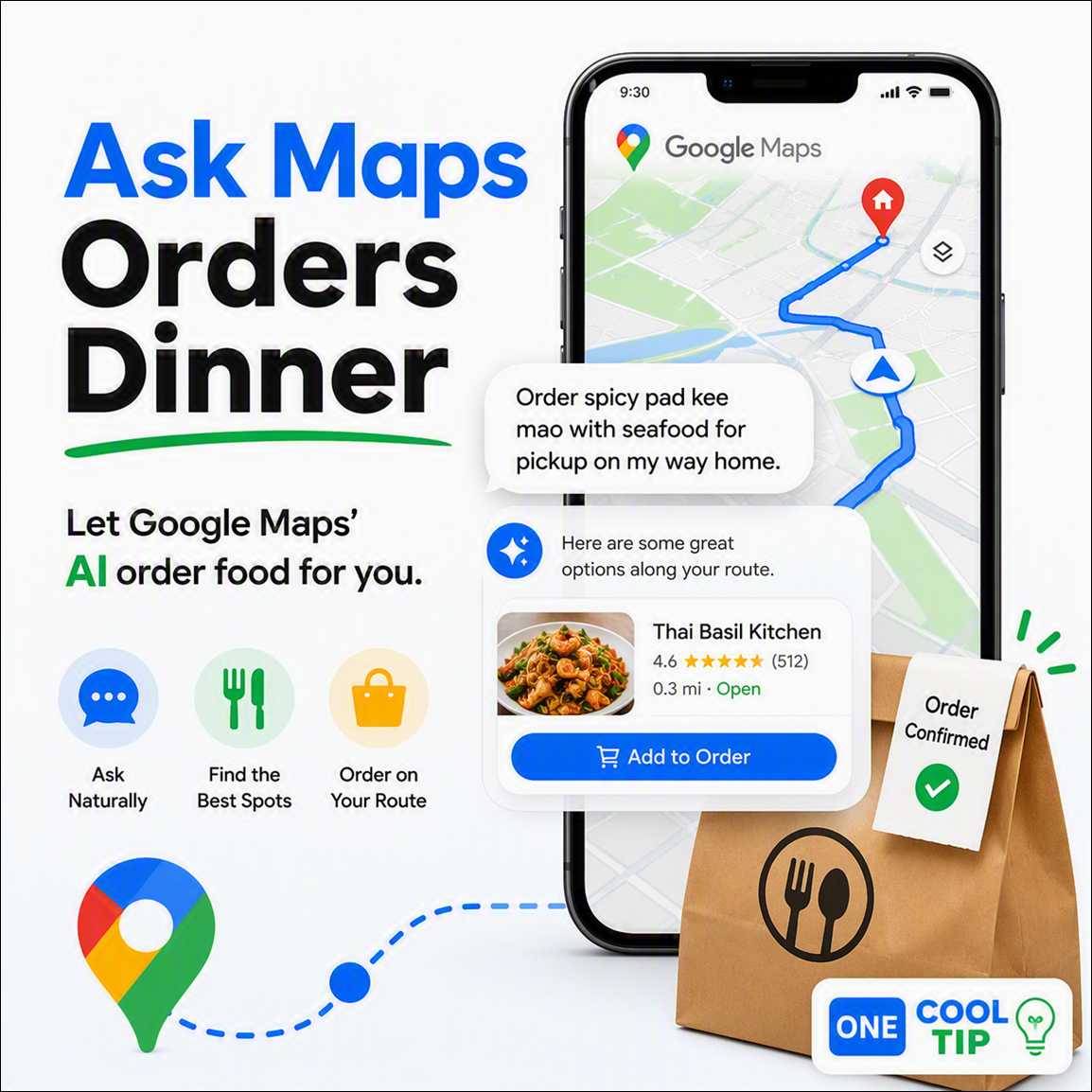
Let Google Maps AI Find and Order Your Dinner
Google Maps can now handle multi-step restaurant ordering directly through conversational prompts. By combining Gemini AI models with route data and merchant partners, Ask Maps lets you build and place food orders while you travel.
Read the Full Version.
Read the Newsletter Version.
| | |
Tomorrow's Cool Tip is waiting to amaze you.
Until then, go forth and conquer the tech world with your newfound knowledge!
Be sure to visit www.OneCoolTip.com for Cool Tech Tips for a Cooler Life!
And if you Like One Cool Tip, please support with TipJar!
Enjoy!
Rodger
Chief Cool Tipper
onecooltip.com@gmail.com
| |
| What do you think of today's OneCoolTip newsletter?
| | | | Connect with One Cool Tip! | | |
|
As an Amazon Associate, One Cool Tip may earn a small commission from qualifying purchases.
Our media content is intended solely for informational purposes. Please do not construe anything here as legal, tax, investment, financial, marital or other advice.
Copyright © 2026 | www.OneCoolTip.com | All Rights Reserved
|
| | | |