|
By Rodger Mansfield, Technology Editor
October 5, 2026
Subscribe
Ever publish a LinkedIn post about a customer success story, business partnership, conference presentation, or team achievement and wish everyone involved could share the spotlight?
LinkedIn's new Collaborative Posts feature tackles exactly that problem.
Instead of relying on tags, mentions, or reposts, multiple people and company pages can co-author a single post and share visibility across their respective audiences.
For professionals trying to grow their network and organizations seeking broader reach, it offers a more effective way to showcase teamwork and shared accomplishments.
Here's a Cool Tip: Team up on LinkedIn posts to expand your audience without creating duplicate content.
LinkedIn's new collaborative feature allows users to collaborate on posts with up to five collaborators and support formats including text, images, video, documents, polls, events, and links.
The feature is expanding globally, although availability may vary while the rollout continues.
Feature Explanation
Collaborative Posts are a new LinkedIn publishing format that allows one member or Company Page to invite others to become co-authors of a post.
Traditionally, LinkedIn users had two main options when publishing joint announcements.
They could tag another person or company, or they could ask others to share the post after publication.
While both methods work, they often split engagement across multiple posts and don't always provide equal visibility to all participants.
Collaborative Posts solve that problem by creating a single shared post.
Once invited collaborators accept, their names appear directly on the post, helping expose the content to multiple professional networks simultaneously.
Members and Company Pages can invite up to five collaborators per post.
This feature is particularly useful for:
- Customer success stories
- Partnership announcements
- Event promotions
- Recruiting initiatives
- Product launches
- Industry collaborations
- Employee recognition
- Thought leadership content
Because the post is shared, participants can engage around the same content instead of managing multiple versions of a similar announcement.
What You'll Gain
- Reach multiple professional audiences with one post.
- Give partners, customers, and coworkers visible credit.
- Increase engagement around shared projects and events.
- Reduce the need for reposts and duplicate announcements.
Step-By-Step Instructions
Here's how to do it.
Web/Desktop
-
Sign in to LinkedIn.
- Select Start a Post.
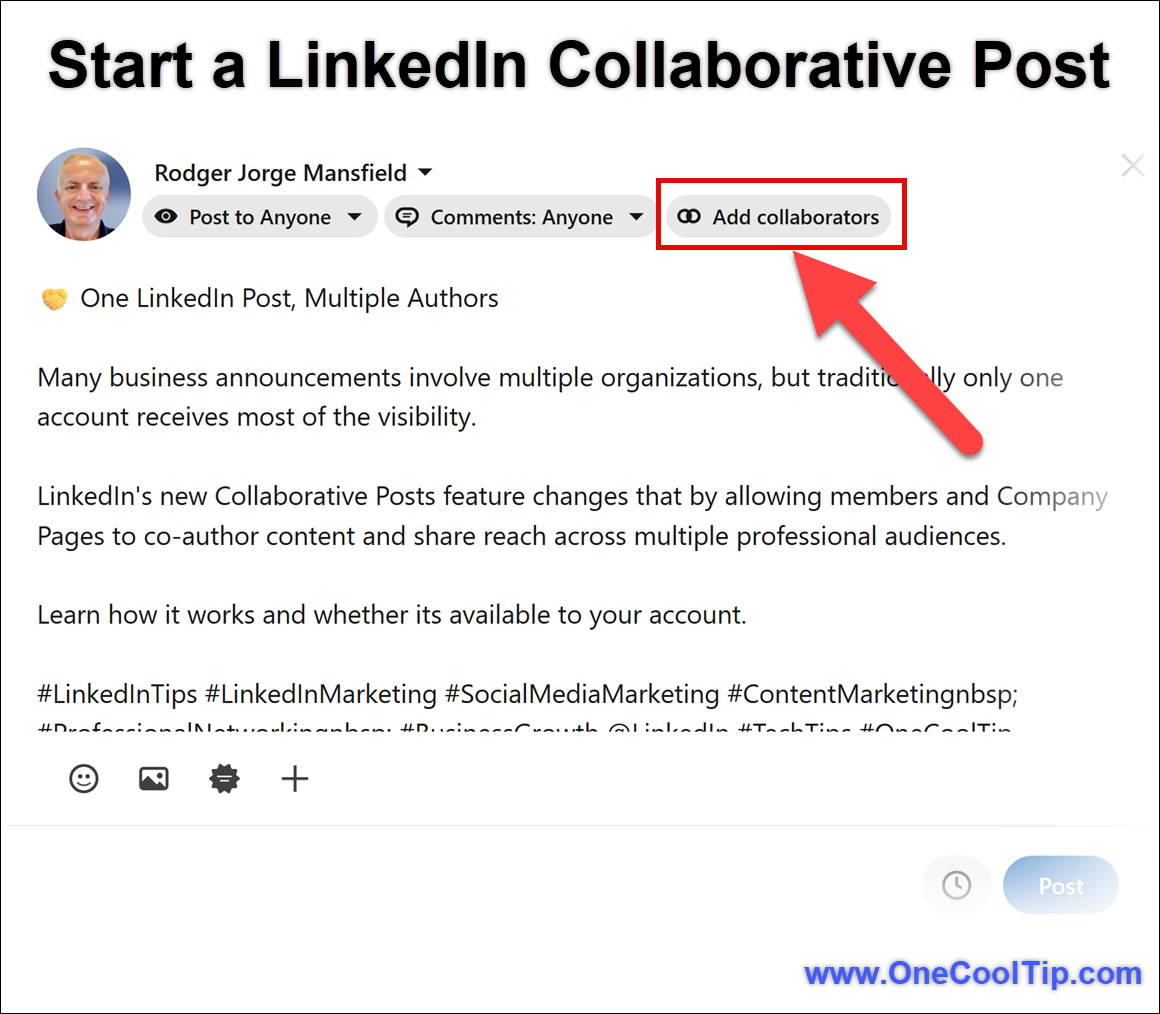
- Select Add Collaborators within the post composer.
-
Search for the person or Company Page you want to invite.
- Add up to five collaborators.
-
Create your content and publish the post.
-
Invited collaborators receive a notification to review and accept the invitation.
-
Once accepted, collaborator names appear on the post.
|