β€Š

One Cool Tip Newsletter

November 1, 2026

Your daily dose of tech-savvy brilliance!

πŸ˜€ Greetings! Happy Sunday, Cool Tipper!


Get ready to streamline your digital life with simple, actionable tips delivered straight to your inbox.


Cool Tip Theme: WhatsApp Guest Calling

ο»Ώ

WhatsApp now lets anyone join free, encrypted voice and video calls from a computer browser without creating an account. Here's how guest calling works.


New here? Subscribe to the One Cool Tip Newsletter for daily updates. It's FREE!

3️⃣

If you enjoy the One Cool Tip Newsletter, please forward this newsletter to THREE friends or colleagues or share it on social media using the links below.


Leave a $$$ Tip!


Share this One Cool Tip Newsletter!

X Share This Email
LinkedIn Share This Email
Pinterest Share This Email

🚨 AI Scams Are Getting Smarter. Here’s How to Outsmart Them 🚨


Artificial intelligence is helping scammers create more convincing emails, fake websites, cloned voices, and deepfake videos that can make fraud harder to recognize.


The National Council on Aging warns that criminals can even use information from social media to personalize scams for specific victims.


Be suspicious of unexpected requests for personal information, urgent demands for money, and payments involving gift cards, cryptocurrency, or wire transfers.


If a familiar voice calls asking for emergency money, hang up and contact that person directly using a number you already know.


Limiting the personal information you share publicly can also make it harder for scammers to create believable stories about you or your family.


The Cool Tip:


AI can make a scam sound real, so verify the person or organization independently before sending money or sharing sensitive information.


And in Other News...


  • Facebook Group Admins Just Got an AI Helper


Meta is adding Admin AI to Forum, giving Facebook Group admins help with routine moderation and community management.


Admin AI can review pending posts against group rules, flag potential problems, and help draft posts for admins to review before publishing.


Admins also get flexible moderation rules, community insights, a shared content calendar, and the ability to pin important comments.


To try these features, open the Forum app (Apple App Store or Google Play), sign in with your Facebook account, open a group you manage, and look for the available admin and Admin AI tools.


If you do not see them yet, availability may depend on your account and rollout status.


The Cool Tip:


Let AI handle some of the repetitive reviewing and drafting, but give everything a human check before approving or publishing it.


  • Top Cool Tips for October 2026


Another great month for Cool Tips! These Cool Tips have stormed the leaderboard in October!


Top New Cool Tip - October 2026


Top New Cool Tip for 2026


Top Cool Tips in October


Cool Tip Poll

πŸ€” Would you use WhatsApp to call someone who doesn't have an account?

Cool Deals of the Day

  • Have you tried the Upside app? Everyday cash back on gas, groceries and dining.ο»Ώ


Help support One Cool Tip. Use this Amazon link when you shop online.


Check out these Cool Deals:

🎧 Logitech H390 USB Headset: A wired headset with a noise-reducing microphone and inline volume controls, useful for family calls and work meetings.

Save 16%. Now $20.99. 4.4 Stars. Check it out on Amazon!


πŸ“· Logitech Brio 101 1080p Webcam: A Full HD webcam with automatic light adjustment, built-in microphone and physical privacy shutter.

Look! Now $39.99. 4.3 Stars. Check it out on Amazon!


πŸ”Š Anker PowerConf Bluetooth Speakerphone: A desktop conference speakerphone for shared workspaces or family conversations where several people are sitting around one computer.

Save 21%. Now $109.99. 4.4 Stars. Check it out on Amazon!


ο»Ώ*Prices accurate when originally published.

One Cool Tip may earn a commission from qualifying purchases.

Fuel Your Adventure

Try Big Mike's Jerky!ο»Ώ


bigmikesjerky.com


Today's Cool Tipο»Ώ

WhatsApp Calls Just Got Easier: No Account Needed!

WhatsApp now lets you invite people to voice and video calls, even if they don't have a WhatsApp account.


ο»ΏWith free, encrypted calls, browser-based guest access and no time limits, connecting with friends, family and coworkers just got easier.

By Rodger Mansfield, Technology Editor

November 1, 2026

Subscribe


Ever tried organizing a video call only to discover that someone doesn't have the right app?


Maybe your relatives prefer FaceTime, your coworkers use Microsoft Teams, and your friends use WhatsApp.


Getting everyone together can mean asking someone to download another app or create another account.


WhatsApp now offers a simpler solution.


On Oct. 14, 2026, WhatsApp introduced guest calling, allowing people without WhatsApp accounts to join voice and video calls from a computer browser.


The host still needs a WhatsApp account, but invited guests don't.


Calls are free, protected with end-to-end encryption and have no WhatsApp-imposed time limits.


Here's a Cool Tip: Create a WhatsApp call link and invite anyone to join, even without an account!


What Is WhatsApp Guest Calling?


Guest calling expands WhatsApp's existing call-link feature by allowing people without WhatsApp accounts to participate in calls.


Here's how it works.


A WhatsApp user creates a call link and shares it through email, text or another messaging service. 


The recipient opens the link in a computer browser, enters a name and waits for the host to approve the request to join.


Once admitted, the guest can participate in the conversation without registering for WhatsApp.


The feature supports individual and group calls with up to 32 participants.


Guests can also use several familiar calling features:


  • Share their computer screen to review documents or presentations.
  • React with thumbs-up and heart emojis.
  • Raise their hands to get the host's attention.
  • Participate in voice and video conversations.
  • Wait for host approval before entering a call.


There are some important restrictions.


Guests cannot see other participants' phone numbers, send WhatsApp messages or invite additional people directly into the call.


The result is a more accessible calling experience without giving guests full access to WhatsApp's messaging features.


What You'll Gain


  • Fewer barriers: Invite people without requiring them to download WhatsApp or create an account.
  • Easier collaboration: Connect with coworkers, clients or classmates who use different messaging services.
  • More control: Approve guests before admitting them and remove participants when necessary.
  • Flexible conversations: Enjoy free voice and video calls without a WhatsApp-imposed time limit.


Step-by-Step Instructions


Here's how to do it.


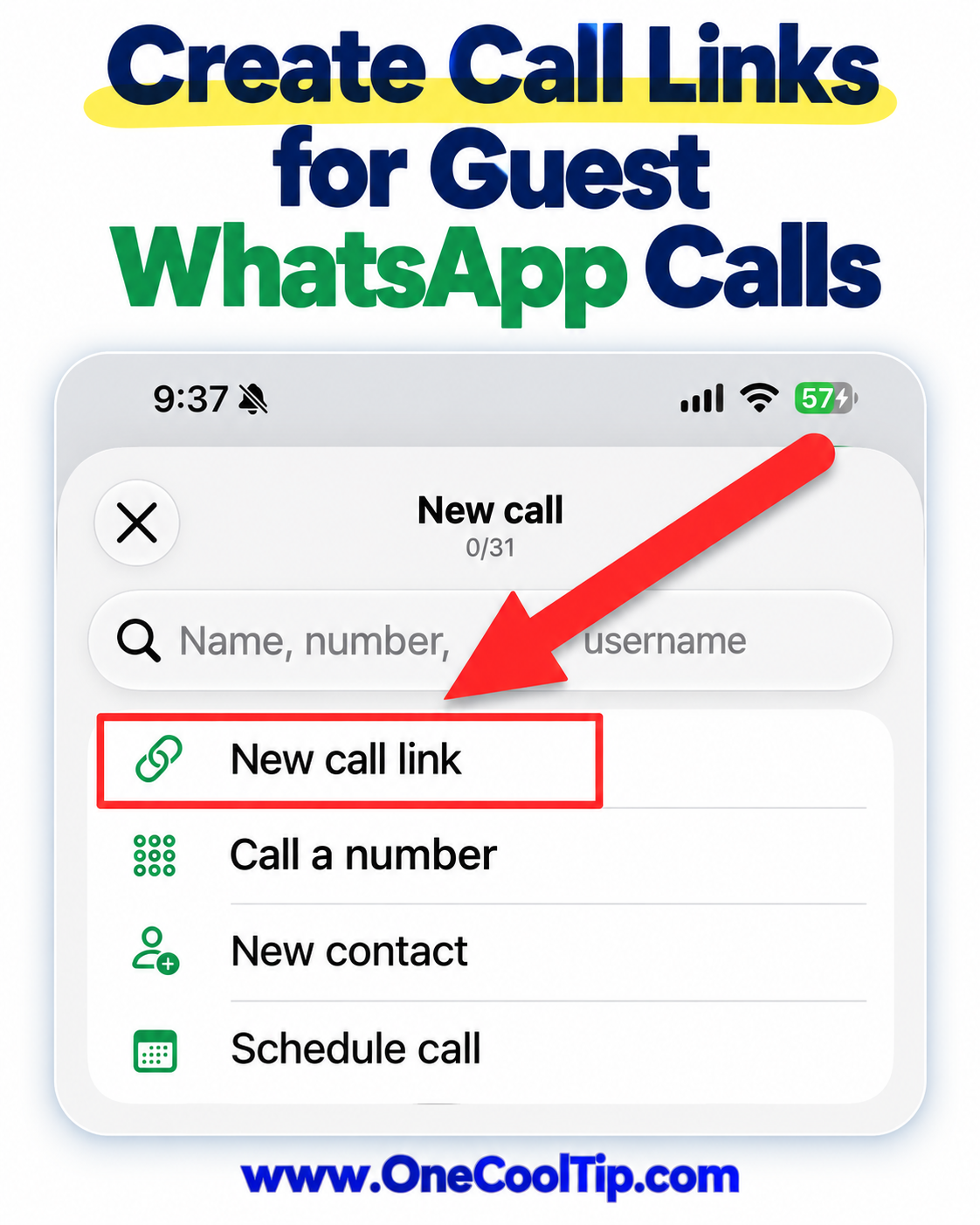
Create a WhatsApp Call Link


  1. Open WhatsApp (web, iOS, Android) on your supported device.
  2. Navigate to the Calls tab.
  3. Select the + icon.
  4. Choose the option to create a call link.
  5. Follow the available prompts to create your voice or video call link.
  6. Copy the link and send it to the people you want to invite.


Cool Note:


  • The person organizing the call must have a WhatsApp account.

fig. 1 - Create Call Links for WhatsApp Guest Calls

Join a Call Without WhatsApp


  1. Open the invitation link in a computer browser.
  2. Enter your name when prompted.
  3. Request to join the call.
  4. Wait for the host to approve your request.
  5. Once admitted, use the available microphone, camera and other calling controls to participate.


Cool Notes:


  • Your invited guests don't need WhatsApp accounts.
  • Guests can also share their computer screens, use emoji reactions and raise their hands during the conversation.


Admit Guests to Your Call


  1. As the host, you control who joins.
  2. Watch for guest requests to join your call.
  3. Review the displayed guest names.
  4. Approve the people you want to admit.
  5. Remove a guest from the call if necessary.


Cool Note:


  • WhatsApp requires host approval for account-free guests, providing an additional layer of control.


Pros and Cons


Pros:


  • Free voice and video calls without a WhatsApp-imposed time limit.
  • No WhatsApp account required for guests.
  • Support for group calls with up to 32 participants.
  • Screen sharing and reactions make collaboration easier.
  • Host approval helps control who joins.


Cons:


  • The person creating the invitation must have a WhatsApp account.
  • WhatsApp specifically documents guest participation through computer browsers, not all mobile browsers.
  • Guests cannot send messages or invite additional participants directly.
  • Participants still need a reliable internet connection and compatible calling equipment.


Feature Access


  • This feature is currently rolling out globally to all users on supported platforms. 
  • The ability to create a call link requires a registered WhatsApp account on a mobile device. Guest participation is free and requires a compatible desktop web browser. 
  • There are no subscription tiers.
  • Later this year, WhatsApp plans to introduce integrations for Google Calendar and Microsoft Outlook, allowing users to generate links directly within calendar invitations.


Score

Criterion | Score (0–10) |  Justification
Value |  9
Removes a major obstacle when inviting people outside the WhatsApp ecosystem.
Usability |  8
Creating a link is straightforward, although guest approval adds a step.
Wow Factor |  8
Browser-based, account-free access makes WhatsApp more versatile, even though other calling services offer similar features.
Total: 25/30 |  πŸŒŸ Excellent
WhatsApp guest calling makes an already popular messaging service more useful for connecting people across different devices and platforms.


Key Takeaways


WhatsApp guest calling makes it easier to include people who don't use the app. 


With free, encrypted calls, browser-based access and host approval controls, it's a practical option for family conversations, informal meetings and group discussions.


Cool Tip Snapshot


  • Feature Name: WhatsApp Guest Calling
  • Platform(s): WhatsApp for hosts; supported computer browsers for guests
  • Quick Benefit: Invite people to calls without requiring WhatsApp accounts
  • Best For: Families, small businesses, educators and travelers
  • Access Type: Free
  • Difficulty: Easy


Learn More


WhatsApp's official announcement explains how guest calling works, including invitation links, host approval, privacy protections and supported calling features.


Try It Yourself


Create a WhatsApp call link and invite someone who doesn't use WhatsApp to join you from a computer browser. 


Have you tried guest calling yet? 


Share your experience in the comments, subscribe to the free One Cool Tip Newsletter for more practical technology tips, and share this article with family, friends and coworkers!


READ MORE


Read the Full Cool Tip!

Check Out These Cool Tips & Tricks


  • Pin Chats: Keep important conversations near the top of your chat list. Open the chat's menu and select Pin.


  • Star Messages: Save important information for easy reference. Select a message and choose Star from its menu.


  • Search Chats: Find a message without scrolling through months of conversation. Use the search field and enter a name or keyword.


  • Mute Conversations: Reduce distractions from busy group chats. Open the chat's notification settings and select a mute duration.


  • Archive Chats: Hide less important conversations without deleting them. Select a chat and choose Archive.


  • Send Voice Notes: Record a quick message when typing is inconvenient. Open a chat and use the microphone control to record.


  • Share Documents: Send PDFs and other files directly in conversations. Open a chat, select the attachment control and choose Document.


  • Create Polls: Collect opinions from family members or coworkers. Open a group chat, select the attachment menu and choose Poll.


  • Link Devices: Use WhatsApp on your computer without constantly reaching for your phone. Open Settings > Linked Devices on your phone and follow the linking instructions.

ο»Ώ

  • Check Privacy: Control who sees your profile information and activity. Open Settings > Privacy and review the available visibility controls.

ICYMI - In Case You Missed It ...

Rescue Your iPhone Photos With Clean Up, Extend, and Reframe


A distracting background or awkward angle does not have to ruin a favorite photo. Discover how Apple’s iOS 27 Photos tools can help you tidy the scene, add breathing room, and rethink the perspective on a compatible iPhone.


Read the Full Version.


Read the Newsletter Version.

Looking for your next adventure?


Call Denise at Travel For You.

314.660.3039


Sign Up for the Monthly Newsletter


http://www.travelforyouvacations.com/


https://www.facebook.com/TRAVEL.FOR.U/


See You Tomorrow

Tomorrow's Cool Tip is waiting to amaze you.


Until then, go forth and conquer the tech world with your newfound knowledge!


Be sure to visit www.OneCoolTip.com for Cool Tech Tips for a Cooler Life!


And if you Like One Cool Tip, please support with TipJar!


Enjoy!

ο»Ώ


Rodger

Chief Cool Tipper

onecooltip.com@gmail.com


What Do You Think?

What do you think of today's One Cool Tip Newsletter?
Positive        Neutral        Negative
X Share This Email
LinkedIn Share This Email

Connect with One Cool Tip!

Facebook  X  Instagram  Web  Pinterest  YouTube  LinkedIn
β€Š

As an Amazon Associate, One Cool Tip may earn a small commission from qualifying purchases.


Our media content is intended solely for informational purposes. Please do not construe anything here as legal, tax, investment, financial, marital or other advice.


Copyright Β© 2026 | www.OneCoolTip.com | All Rights Reserved


β€Š