|
One Cool Tip Newsletter
October 17, 2026
| Your daily dose of tech-savvy brilliance! | |
😀 Greetings! Happy Saturday, Cool Tipper!
Get ready to streamline your digital life with simple, actionable tips delivered straight to your inbox.
Cool Tip Theme: Google Universal Cart
Google's new Universal Cart lets you collect items from multiple stores into one checkout hub in Search and Gemini. Learn how it works.
New here? Subscribe to the One Cool Tip Newsletter for daily updates. It's FREE!
| |
3️⃣
If you enjoy the One Cool Tip Newsletter, please forward this newsletter to THREE friends or colleagues or share it on social media using the links below.
Leave a $$$ Tip!
Share this One Cool Tip Newsletter!
| | |
🚨 That Adorable AI Puppy Was Actually a $50 Million Scam Clue 🚨
A website advertised “Wuffy” as a lifelike robotic puppy with AI-powered behavior, glowing reviews, and a tempting 70% discount, but the product that arrived was actually a basic battery-operated toy.
Mastercard investigators followed the trail and uncovered 250 related online storefronts selling everything from heaters to hearing aids using similar websites, ratings, and supposedly limited-time discounts.
Mastercard says its network analysis found $50 million in transactions associated with merchant IDs identified during the investigation.
The scheme shows how polished websites, fake reviews, AI-generated advertising, and steep discounts can make questionable online stores look surprisingly legitimate.
Before buying from an unfamiliar seller, look beyond the reviews and research the company, its website, and whether that amazing deal really makes sense.
The Cool Tip:
When an online product seems far more advanced and far cheaper than anything comparable, let “Wuffy” remind you that too good to be true still applies online.
And in Other News...
- Google’s AI Search Is Making Its Sources Easier to Find
Google Search is updating AI Mode and AI Overviews to make it easier to explore the websites behind their AI-generated responses.
Clearer inline links will appear more often and higher in answers, helping you open important sources while reading.
Google is also testing a dedicated section that highlights official websites and explains why each link may be useful.
Timely news carousels, more noticeable links to related articles, and clickable creator profiles are also being expanded or tested.
These improvements can help you move beyond a quick AI summary and examine the original reporting or official information for yourself.
The Cool Tip:
Treat an AI answer as a starting point, then use its source links to confirm important facts and get the full story.
| |
| 🤔 How do you currently handle shopping across multiple websites? | | | |
-
Have you tried the Upside app? Everyday cash back on gas, groceries and dining.
Help support One Cool Tip. Use this Amazon link when you shop online.
Check out these Cool Deals:
| | |
🎧 Google Pixel Buds Pro 2: A natural companion for people using Google's mobile ecosystem and Gemini.
👀Look! Now $229. 4.1 Stars. Check it out on Amazon!
📱 Samsung Galaxy Tab S10 FE Wi-Fi Tablet: A large-screen Android option for browsing, comparison shopping and other everyday tasks.
Amazon Pick! Now $699.99. 4.7 Stars. Check it out on Amazon!
💻 Logitech MX Master 3S Wireless Performance Mouse: Its hyper-fast scrolling wheel and ergonomic shape make navigating complex product comparisons and shopping tabs effortless.
Save 20%. Now $79.99. 4.6 Stars. Check it out on Amazon!
⌨️ Logitech K380 Multi-Device Bluetooth Keyboard: A compact keyboard can make entering detailed product searches easier; verify device compatibility before ordering.
Save 5%. Now $37.99. 4.3 Stars. Check it out on Amazon!
*Prices accurate when originally published.
One Cool Tip may earn a commission from qualifying purchases.
| | Combine Carts Across Stores Using Google's New Universal Cart | | |
Juggling dozens of browser tabs and forgotten online carts across different websites creates digital clutter and missed savings.
Google's new Universal Cart unites your items from multiple retailers into a single shared shopping hub inside Google Search and the Gemini app.
| | |
By Rodger Mansfield, Technology Editor
October 17, 2026
Subscribe
Online shopping often turns into a messy browser session with twenty open tabs, three separate retail logins, and screenshots scattered across your phone gallery.
You put a pair of running shoes in one store cart, household supplies in another, and completely lose track of discount codes before you finish buying.
Google is tackling that digital sprawl by adding cross-retailer checkout and tracking directly inside its ecosystem.
Instead of visiting store sites individually, shoppers can now gather products across brands into one persistent cart.
Here's a Cool Tip: Combine products from competing retailers into Google's Universal Cart to track price drops, compare card perks, and check out without tab overload.
Feature Explanation
Universal Cart is an intelligent shopping organizer built right into Google Search and the Gemini mobile application.
Rather than acting as a standalone marketplace, it acts as a central aggregation layer powered by Google's Shopping Graph, which continuously updates pricing and inventory data across more than 60 billion product listings.
When you browse items using Google Search or converse with Gemini, you can tap an option to save matching items into a single, unified cart.
The cart holds products from participating merchants such as Target, Walmart, Nike, Sephora, Wayfair, Ulta Beauty, and thousands of Shopify-backed sellers.
The system solves two distinct problems:
-
Cart fragmentation: You no longer need to remember which storefront holds each item.
-
Checkout friction: The platform integrates with Google Wallet and Google Pay via the Universal Commerce Protocol (UCP), suggesting the best reward credit card and discovering available promo codes automatically.
The original retailer always remains the seller of record, meaning they handle inventory fulfillment, shipping notices, and direct customer support.
What You’ll Gain
-
Save time by organizing purchases from multiple websites into one centralized screen.
-
Save money by receiving automatic background alerts for price drops and restocked products.
-
Maximize rewards by letting Google Wallet identify the best payment card for purchase points.
-
Eliminate tab clutter by keeping your saved shopping lists accessible across both desktop and mobile apps.
Step-by-Step Instructions
Here's how to do it.
Web/Desktop (Google Search)
-
Open your desktop browser, sign in to your primary Google account, and perform a product search at Google.com.
-
Click on a product listing from a participating retailer (such as Target, Walmart, or Nike).
-
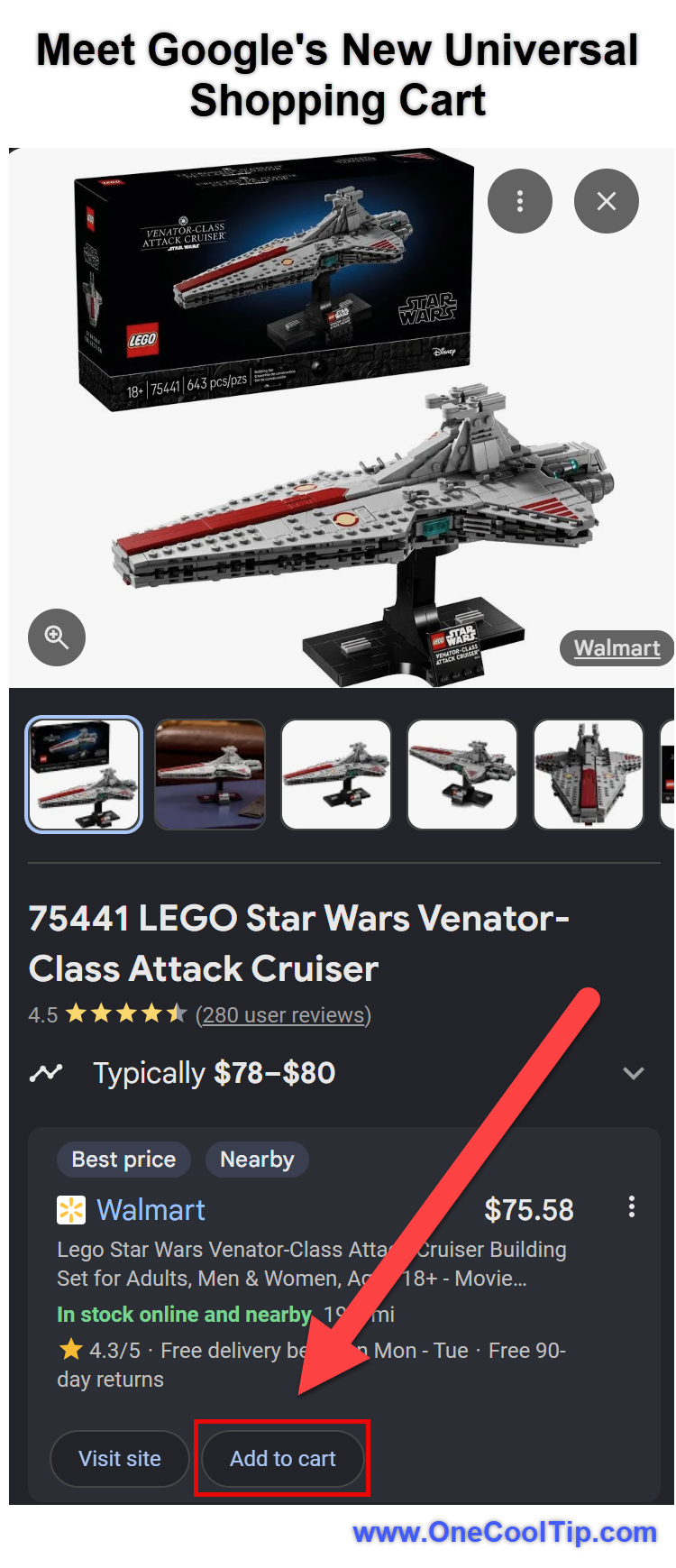
Look for the blue Add to Cart or Save to Universal Cart button located on the product details overlay.
-
Click the Cart icon in the upper-right corner of the Google Search interface to review aggregated items.
-
Select Checkout with Google Pay to purchase directly, or click Transfer to Store if you prefer to complete checkout on the merchant website.
| | fig. 1 - Meet Google's New Universal Shopping Cart | | |
iPhone/iPad (Google App or Gemini App)
-
Launch the Google app or Gemini app on your iOS device and ensure you are logged into your Google account.
-
Search for a product in Google Search, or prompt Gemini (for example: "Find a neutral wool throw pillow under forty dollars").
-
Tap the item result, then tap Add to Universal Cart.
-
Tap your profile icon or the shopping bag shortcut in the top right to open your aggregated cart.
-
Review the auto-populated promotional codes, select your Google Wallet payment method, and confirm your purchase.
Android (Google App or Gemini App)
-
Open the Gemini app or search bar on your Android device.
-
Ask Gemini for gift ideas or specific products, or run a standard Google Search query.
-
Tap Add to Universal Cart beneath the product card.
-
Swipe down or tap the cart icon to see your active multi-store cart.
-
Tap Review Cart to view price alerts, payment suggestions, and shipping totals before finalizing.
Pros and Cons
Pros:
-
Centralized shopping hub: Combines products from big-box stores and independent Shopify merchants into one interface.
-
Proactive price tracking: Background monitoring automatically flags discounts and restocked inventory using Google's Shopping Graph.
-
Card benefit optimization: Matches your Google Wallet cards with active reward categories to get the best return on spending.
-
Flexible purchasing: Allows direct one-tap Google Pay checkout or one-click export directly to the store website.
Cons:
-
Restricted regional launch: Available only in the United States at launch.
-
Merchant partner dependency: Stores must support the Universal Commerce Protocol (UCP); non-participating retailers still require separate manual browsing.
-
Google account requirement: Requires active login and card storage within Google Wallet to access full automated checkout perks.
Who Should Skip This
-
Shoppers outside the United States: The initial rollout is limited to the US domestic market.
-
Dedicated single-store loyalty shoppers: Those who shop exclusively on Amazon or through closed warehouse clubs will find limited utility for their normal shopping routines.
-
Privacy-sensitive shoppers: Users who prefer not to store credit card data with Google Wallet or sync shopping histories across services.
-
Workplace accounts: Users signed into Google Workspace accounts managed by corporate IT administrators who restrict shopping features.
Real-World Example
Holiday Gift Planning for Busy Families
- A parent is buying holiday gifts for three family members. They select a hoodie from Nike, art supplies from Target, and beauty products from Sephora.
- Instead of managing three open browser tabs and re-entering address details three times, they add all three items to their Universal Cart in Gemini.
- The cart applies verified merchant promo codes and lets the parent complete the purchases with Google Pay in one sitting.
Home Office Setup for Small Business Owners
- A remote worker researching equipment looks for an ergonomic desk chair on Wayfair and cable organizers on Shopify.
- After placing both items in the Universal Cart on Google Search, they wait for seasonal sales.
- Three days later, Google sends an automated price-drop notification, enabling the buyer to finish the order before the deal expires.
Configuration Guide
-
Enabling the Feature: Universal Cart activates automatically inside Google Search and the Gemini app for eligible US Google accounts. No manual flag or hidden switch is required.
-
Wallet and Payment Sync: Visit the Google Wallet app (Android) or Google Pay app (iOS) to ensure default shipping addresses and payment cards are current.
-
Notification Settings: To receive price drops and inventory alerts, open the Google app settings, select Notifications, and toggle on Shopping alerts and price tracking.
-
Disabling the Feature: To stop saving shopping data, open your Google Account page, navigate to Data & Privacy, and adjust Web & App Activity or clear your saved shopping history in Google Shopping preferences.
-
Admin Restrictions: Google Workspace administrators for educational or enterprise domains can disable shopping services under Google Admin Console > Apps > Additional Google Services.
Troubleshooting and Limitations
Problem: The Universal Cart icon or "Add to Cart" button does not show up on search results.
-
Why it happens: The merchant is not an active launch partner on the Universal Commerce Protocol, or you are browsing outside the United States.
-
Fix or workaround: Look for the badge indicating merchant participation (like Target, Walmart, or Nike). For non-participating stores, use standard browser bookmarks.
Problem: Items in the cart do not reflect a store's member-only coupon code.
-
Why it happens: Universal Cart reads public and partner coupons. It does not automatically authenticate private retail loyalty club memberships.
-
Fix or workaround: Click the Transfer to Merchant Cart option to push your cart contents to the retailer's direct site, then apply your unique loyalty code at native checkout.
Problem: Gemini chats do not save items to the cart.
-
Why it happens: You may be running an outdated version of the Gemini mobile app or chatting while logged out of your Google account.
-
Fix or workaround: Update the Gemini application via Google Play Store or Apple App Store, sign in with your main personal account, and restart the app.
Privacy and Data Notes
Using Universal Cart connects your product browsing activity to your Google profile.
Data Stored: Google stores your saved products, purchase history initiated through the cart, and payment preferences.
Data Shared: When you complete an order, shipping details and required payment confirmations are securely transferred to the merchant of record. The merchant does not receive full financial card numbers when Google Pay tokenization is used.
Syncing: Cart items sync across devices where you log in to your Google Account.
Controls: You can review or delete shopping activity by visiting your Google Activity dashboard at any time.
Feature Access
-
Who gets the feature: Signed-in consumer Google accounts located in the United States.
-
Supported platforms: Google Search via modern desktop and mobile browsers, the Google mobile app, and the Gemini app for Android and iOS.
-
Rollout status: Official general rollout began October 15, 2026, across the US market.
-
Regional limits: Currently unavailable in the European Union, UK, Canada, and Australia. International expansion through UCP is planned for future phases.
-
Account requirements: Standard personal Google Account. Managed enterprise Workspace accounts may restrict checkout features.
Score
Criterion | Score (0–10) | Justification
Value | 8
Solves tab chaos and tracks discounts across separate merchants without extra software.
Usability | 8
Native integration inside Search and Gemini requires no extensions or new accounts.
Wow Factor | 7
Cross-retailer aggregation is clever, though partner store limitations keep it from being universal.
Total: 23/30 | 👍 Good
Google's Universal Cart is a genuinely practical tool for multi-store shoppers that cuts through seasonal buying clutter without forcing stores into an Amazon-style walled garden.
It functions similarly to browser shopping aggregators like Honey or Klarna, but without third-party extensions, thanks to direct integration with Google Pay and the Gemini app.
Key Takeaways
Universal Cart groups products from multiple participating merchants into a single view inside Google Search and Gemini.
Built-in background tracking monitors inventory restocks, price dips, and credit card reward matches using Google Wallet.
You maintain the freedom to checkout in one place via Google Pay or push your cart directly to the seller's website.
Cool Tip Snapshot
-
Feature Name: Google Universal Cart
-
Platform(s): Web, Android, iOS (Google Search and Gemini App)
-
Quick Benefit: Manage and buy products from multiple online stores in one place
-
Best For: Holiday shoppers, busy parents, and bargain hunters
-
Access Type: Rolling Out (Free to US consumers)
-
Difficulty: Easy
Learn More
Read the official Google product announcement for full details on partner retailers, checkout mechanics, and technical architecture.
Try It Yourself
Try searching for an upcoming gift or household necessity on Google Search or in the Gemini app today, and test adding items from two different stores into your new Universal Cart.
Did it save you from opening multiple tabs?
Leave a comment below with your experience, subscribe to the One Cool Tip newsletter for regular productivity advice, and share this Cool Tip with your family, friends, and coworkers who are getting ready for holiday shopping!
READ MORE
Read the Full Cool Tip!
| | |
Check Out These Cool Tips & Tricks
-
Check Card Perks: Google Wallet analyzes your saved payment methods to identify the highest cash-back card for your cart contents. Review the recommended payment card dropdown on the checkout screen before confirming payment.
-
Enable Price Alerts: Background monitoring watches product prices so you do not have to check manually. Turn on shopping notifications in Google app settings under notifications and price tracking.
-
Export to Merchant: You can finish ordering on the retailer site if you want custom gift options or loyalty points. Select the transfer cart option next to the item inside your Universal Cart list.
-
Combine Store Brands: Items from different retailers stay together in one consolidated list. Tap add to cart on partner products from Nike, Target, and Sephora during the same browsing session.
-
Use Gemini Chat: Gemini can find items and queue them for purchase directly within conversation threads. Ask Gemini for specific gift ideas and tap the add to cart chip under generated recommendations.
-
Track Restocked Items: Out-of-stock items can remain on your radar without manual checks. Save the unavailable item to your cart and wait for Google's automatic restock alert.
-
Auto-Apply Promo Codes: Built-in code scanning looks for public merchant discounts automatically. View the promo section at the bottom of your cart to apply discovered discounts before payment.
-
Verify Seller Info: The individual store remains your point of contact for tracking and returns. Check the seller of record label on the checkout screen to see which company ships each item.
-
Clear Old Products: Removing finished or unwanted items prevents unnecessary notifications. Tap the trash can icon next to any individual listing inside the cart view.
-
Protect Saved Sessions: Shopping preferences link directly to your signed-in account. Ensure two-step verification is active on your Google profile to keep your payment details secure.
| | ICYMI - In Case You Missed It ... | | | | |
iOS 27 Gives Siri the Upgrade iPhone Users Wanted
iOS 27 introduces Siri AI, a more conversational assistant that can use personal context, understand what is on your screen, and take action across supported apps. The upgrade is significant, but hardware, language, region, age, beta status, and daily usage limits determine who can use it.
Read the Full Version.
Read the Newsletter Version.
| | |
Tomorrow's Cool Tip is waiting to amaze you.
Until then, go forth and conquer the tech world with your newfound knowledge!
Be sure to visit www.OneCoolTip.com for Cool Tech Tips for a Cooler Life!
And if you Like One Cool Tip, please support with TipJar!
Enjoy!
Rodger
Chief Cool Tipper
onecooltip.com@gmail.com
| |
| What do you think of today's One Cool Tip Newsletter?
| | | | Connect with One Cool Tip! | | |
|
As an Amazon Associate, One Cool Tip may earn a small commission from qualifying purchases.
Our media content is intended solely for informational purposes. Please do not construe anything here as legal, tax, investment, financial, marital or other advice.
Copyright © 2026 | www.OneCoolTip.com | All Rights Reserved
|
| | | |