|
One Cool Tip Newsletter
May 22, 2026
| Your daily dose of tech-savvy brilliance! | |
😀Greetings! Happy Friday Funday, Cool Tipper!
Get ready to streamline your digital life with simple, actionable tips delivered straight to your inbox.
Cool Tip Theme: Play Free Games with Poki
New here? Subscribe to the One Cool Tip Newsletter for daily updates. It's FREE!
| |
3️⃣
If you enjoy the One Cool Tip newsletter, please forward this newsletter to THREE friends or colleagues or share it on social media using the links below.
Leave a $$$ Tip!
Share this One Cool Tip Newsletter!
| | |
🚨New Phishing Kit Targets Microsoft 365 Accounts🚨
The FBI warns that a new phishing‑as‑a‑service platform called Kali365 is helping cybercriminals hijack Microsoft 365 access tokens, letting them slip past multi‑factor authentication and into Outlook, Teams, and OneDrive without your password.
What’s Happening:
Kali365, first spotted in April 2026, is sold through Telegram and uses AI‑generated phishing templates to trick users into entering a “device code” on a legitimate Microsoft verification page.
That action silently authorizes the attacker’s device, granting ongoing access to your account.
Why It Matters:
This scam doesn’t steal your password, it steals your OAuth tokens, which act like digital keys.
Once stolen, attackers can read emails, view files, and join Teams meetings as if they were you.
How to Protect Yourself:
- Block device‑code authentication in your organization’s conditional‑access policies.
- Audit existing device‑code usage to find legitimate apps before restricting access.
- Avoid entering codes from unexpected emails or messages, even if they link to a real Microsoft page.
- Report suspicious activity or phishing emails to IC3.gov.
And in Other News...
- Apple TV + to Air First Pro Sports Event Shot Entirely on iPhone 17 Pro
Major League Soccer and Apple TV + are teaming up for a broadcast milestone, the first major professional sporting event filmed entirely on iPhone 17 Pro.
The match will showcase Apple’s latest camera technology in real‑world action, using multiple iPhones to capture every angle.
Why It Matters:
This isn’t a marketing stunt.
It’s a test of how far mobile video has come.
Apple’s iPhone 17 Pro features advanced 48‑MP sensors and 5× optical zoom, and the production will rely on custom rigs and real‑time coordination between Apple and MLS crews.
What Viewers Can Expect:
- A full professional broadcast shot on iPhones.
- Behind‑the‑scenes footage highlighting Apple’s workflow.
- A glimpse at how mobile devices may reshape sports coverage.
| | |
Help support One Cool Tip. Use this Amazon link when you shop online.
Check out these Cool Deals:
🎧 JLab JBuddies Studio Kids Wired Headphones: A smart pick for families who want kids to play casual games without blasting sound through a tablet speaker. Save 25% $14.88 Check it out on Amazon!
🖱️ Logitech M325 Wireless Mouse: A simple wireless mouse makes desktop browser games easier to control than a trackpad. Save 5% $18.99 Check it out on Amazon!
📱 Lamicall Tablet Stand: A tablet stand makes touch games easier to play at a desk, kitchen table, or hotel room. Save 31% $24.99 Check it out on Amazon!
🎮 8BitDo Bluetooth Controller: A compact controller can improve casual gaming on supported devices and games. Save 17% $57.99 Check it out on Amazon!
💻 LapGear Home Office Lap Desk: Helpful for comfortable browser gaming on a laptop from the couch, bed, or travel spot. Save 20% $39.99 Check it out on Amazon!
*Prices accurate when originally published.
One Cool Tip may earn a commission from qualifying purchases.
| | |
Play Free Browser Games Fast with Poki
Poki gives users a fast way to play free online games directly in a browser without installing software. It is useful for quick breaks, family game time, classroom-friendly puzzles, and casual play across desktop, tablet, and mobile devices.
Sometimes you just want a quick game without creating another account, downloading an app, or giving up storage space on your phone or computer.
That is where browser games still shine.
Here’s a Cool Tip: Play Poki for instant, low-friction game breaks.
Feature Explanation
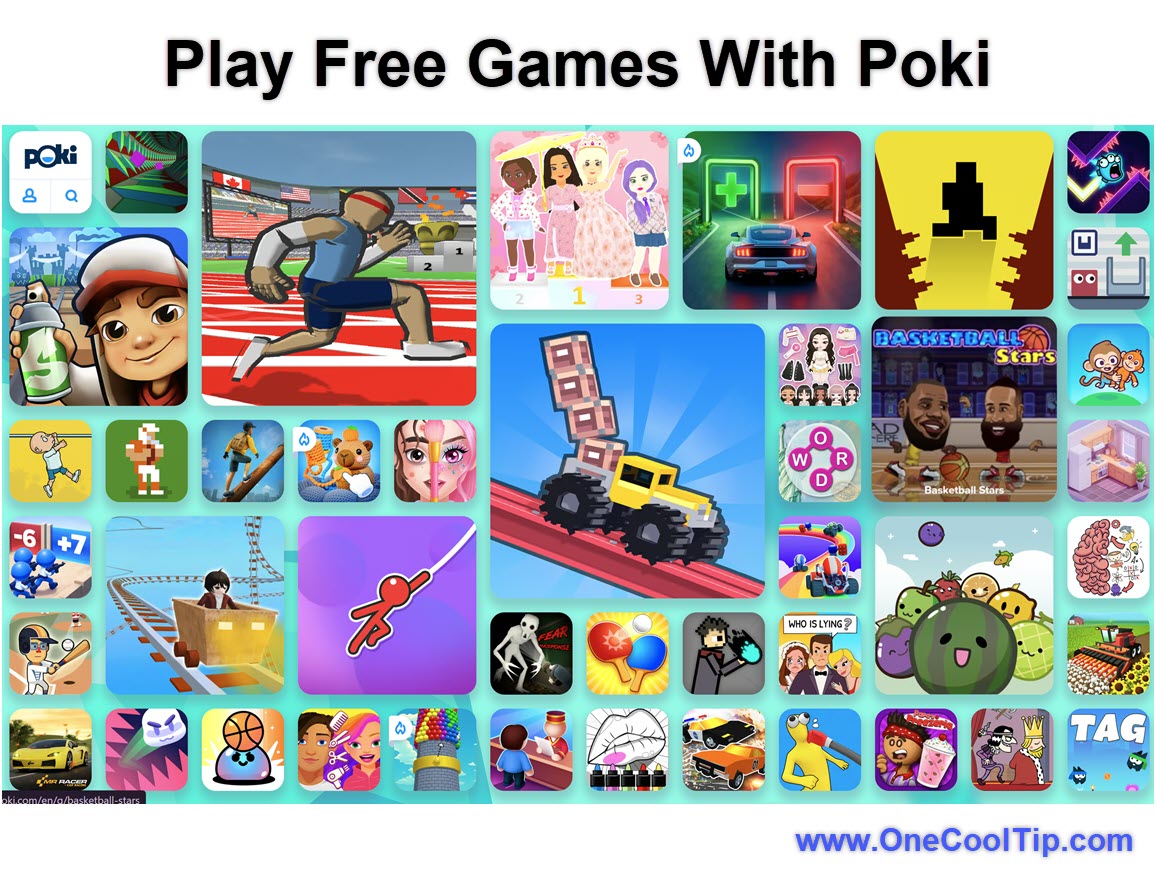
Poki is an online playground with a large library of free, browser-based games available across mobile, tablet, and desktop devices.
Users can play without creating an account, though an optional account can save progress across devices.
The appeal is simple: fast access.
The Poki platform includes more than 1,500 free games, works on mobile, tablet, and desktop, and reaches more than 100 million monthly players.
That makes Poki useful for several audiences:
- Families looking for quick, casual games.
- Students who want puzzle, math, or logic games.
- Travelers who want something lightweight to play in a browser.
- Older adults who enjoy simple games without app installs.
- Home users who want free entertainment without setting up a gaming PC.
Poki brings back the best part of classic browser gaming: click, play, stop when you are done.
What You’ll Gain
- Save time by playing games instantly in a browser.
- Avoid downloads on shared, older, or storage-limited devices.
- Find casual games quickly by browsing categories such as puzzle, car, quiz, mobile, and two-player games.
- Keep progress optional with a Poki account, or play without signing in.
Step-by-Step Instructions
Here's how to do it.
Web and Mobile
-
Open your browser and go to Poki.com.
-
Or on Android, select the Poki app to play!
-
Browse the home page, search for a game, or choose a category such as Puzzle Games, 2 Player Games, Car Games, or New Games.
-
Select a game tile.
-
Wait for the game page to load.
-
Click Play or follow the on-screen controls.
-
Follow the on-screen prompts or use the mapped keyboard, mouse, or touch controls depending on your device.
| | fig. 1 - Play Free Games With Poki | | |
Pros and Cons
Pros:
-
Fast access: Games run in the browser with no traditional install.
-
Free to play: Games are 100% free to play.
-
Broad device support: Games work on mobile, tablet, and desktop.
-
Good for quick breaks: Short games, puzzles, and skill games are easy to start and stop.
-
Optional accounts: Users can play without an account, but an account can help save progress across devices.
Cons:
-
Ad-supported experience: Advertising and personalized ads, depending on settings and region.
-
Some progress may be local: Without an account, saved progress may be stored locally in the browser.
-
School or work networks may block games: Organizations with strict filtering may restrict access.
-
Game quality varies: A large catalog means some titles will be better than others.
-
Parental controls may require tuning: Some browser or device restrictions can interfere with game loading.
Feature Access
-
Who gets it: Poki is publicly accessible through Poki.com.
-
Supported platforms: Web browsers on desktop, mobile, and tablet. Games are available on mobile, tablet, and desktop.
-
Mobile support: Games work in modern mobile browsers on iOS and Android.
-
Android app: A Poki app on Google Play.
-
Subscription: No subscription is required for basic play. Games are free.
-
Account: Optional. An account can save progress across devices.
-
Region limits: Availability, language, age rules, cookies, and privacy options may vary by location.
-
Business or education limits: Access may be blocked by network, browser, device, or admin policies.
Score
Criterion | Score (0–10) | Justification
Value | 8
Poki solves a simple but real problem: quick entertainment without downloads, payment, or setup. It is especially useful for casual users and families.
Usability | 8
The browser-based model is easy to understand, and the site works across common device types. Some games, ads, parental controls, or network filters can complicate the experience.
Wow Factor | 6
Browser games are not new, but Poki’s scale, optional account syncing, and large catalog make the experience more useful than many random game sites.
Total: 22/30 👍 Good
Poki is a strong pick for fast, free, casual gaming, especially when you want to avoid downloads.
Key Takeaways
Poki is a practical site for instant browser games across desktop and mobile devices.
Its biggest benefit is convenience: open a browser, choose a game, and start playing.
The main tradeoffs are ads, local browser storage, varying game quality, and possible restrictions on school or work networks.
Cool Tip Snapshot
-
Feature Name: Poki Free Browser Games.
-
Platform(s): Web, Windows, macOS, iPhone/iPad browser, Android browser, Android app
-
Quick Benefit: Play free games instantly without downloads
-
Best For: Families, students, casual gamers, travelers, quick breaks
-
Access Type: Free
- Difficulty: Easy
Try It Yourself
Try Poki the next time you want a quick game break without installing another app.
Send this article to family, friends, and coworkers who love quick tech finds.
READ MORE
Read the Cool Tip on OneCoolTip.com.
| | |
Check out these Cool Tips & Tricks.
-
Use Categories: Poki’s categories help you find the right kind of game faster. Start from the top navigation or search for categories such as puzzle, car, quiz, or mobile games.
-
Try Mobile Games: Some games work better on touchscreens than others. Open the Mobile Games section when playing from a phone or tablet.
-
Bookmark Favorites: Save games you enjoy so you do not have to search again. Use your browser’s bookmark button while the game page is open.
-
Create an Account: Use an optional Poki account if you want progress to follow you across devices. Open the account menu and sign in with a supported method.
-
Clear Old Data: Browser games can store progress and preferences locally. Clear cookies and site data from your browser settings if you want a fresh start.
-
Check Controls First: Some games use keyboard controls while others use touch or mouse input. Read the instructions on the game page before starting.
-
Use Full Screen: A larger view can make fast games easier to play. Look for a full-screen button in the game frame or use your browser’s full-screen mode.
-
Watch Network Rules: Poki may be blocked on school or work networks. Use a personal device and personal network when appropriate.
-
Review Privacy: Poki uses cookies for experience, performance, and advertising. Open Poki’s Privacy Center or Cookie Settings to review your options.
-
Pick Short Games: Browser games are best for quick breaks. Choose puzzle, skill, or arcade games when you only have a few minutes.
| | ICYMI - In Case You Missed It ... | | | | |
Here's How to Talk To Rename
Voice Typing in Windows 11 quietly picked up a new trick: you can now rename files in File Explorer just by speaking. If you work with lots of documents, photos, or downloads, this tiny change can save clicks, reduce typos, and make Windows feel more accessible for everyone.
Read the Full Cool Tip.
Read the Newsletter Version.
| | |
Tomorrow's Cool Tip is waiting to amaze you.
Until then, go forth and conquer the tech world with your newfound knowledge!
Be sure to visit www.OneCoolTip.com for Cool Tech Tips for a Cooler Life!
And if you Like One Cool Tip, please support with TipJar!
Enjoy!
Rodger
Chief Cool Tipper
onecooltip.com@gmail.com
| |
| What do you think of today's OneCoolTip newsletter?
| | | | Connect with One Cool Tip!! | | |
|
As an Amazon Associate, One Cool Tip may earn a small commission from qualifying purchases.
Our media content is intended solely for informational purposes only. Please do not construe anything here as legal, tax, investment, financial, marital or other advice.
Copyright © 2026 | www.OneCoolTip.com | All Rights Reserved
|
| | | |