One Cool Tip Newsletter

October 3, 2026

Your daily dose of tech-savvy brilliance!

😀 Greetings! Happy Cool Saturday, Cool Tipper!


Get ready to streamline your digital life with simple, actionable tips delivered straight to your inbox.


Cool Tip Theme: ChatGPT Virtual Try-On


See how clothes could look on you with ChatGPT’s virtual try-on. Learn how to use a selfie, manage saved photos, and check the details before buying online.


New here? Subscribe to the One Cool Tip Newsletter for daily updates. It's FREE!

3️⃣

If you enjoy the One Cool Tip newsletter, please forward this newsletter to THREE friends or colleagues or share it on social media using the links below.


Leave a $$$ Tip!


Share this One Cool Tip Newsletter!

X Share This Email
LinkedIn Share This Email
Pinterest Share This Email

🚨 The Fake Order Scam You Need to Know About 🚨


Did you receive a surprise email or text thanking you for a purchase you never made?


According to Target, scammers are increasingly sending fake order confirmations designed to trigger panic and get you to call a fraudulent phone number or click a malicious link.


Once you respond, the scammer may try to steal your login credentials, payment information, one-time security codes, or other personal details.


The best defense is to stay calm and verify the order directly through the retailer's official website or app.


Never share one-time passwords, credit card information, PINs, or account credentials with someone who contacts you unexpectedly.


Be especially cautious if you're pressured to act quickly or asked to "verify" sensitive information.


Remember, a little skepticism can go a long way.


When an unexpected order alert appears, check first and click later.


And in Other News...


  • One Less Password to Remember: Sign In With ChatGPT


If you're tired of creating new usernames and passwords, OpenAI has introduced a new Sign in with ChatGPT option for supported apps and websites.


Similar to signing in with Google or Microsoft, it lets you use your ChatGPT account to create, link, or access accounts on participating services.


Early partners include popular tools such as Airtable, GitLab, HubSpot, Notion, Supabase, and Vercel.


The good news for privacy-conscious users is that OpenAI says this sign-in method shares only basic identity information, such as your name, email address, and profile picture.


It does not automatically share your ChatGPT conversations, memory, files, billing details, or other account data.


As with any sign-in service, always review the permissions being requested before approving access.


A few seconds spent checking what an app can access can help keep your accounts secure while making sign-ins faster and easier.


  • Can AI Create Art? A New Debate Is Growing


Artificial intelligence can generate impressive images, music, and writing in seconds, but many people continue to ask an important question: Is it the same as human creativity?


In a recent X message, Pope Leo XIV said that there is a fundamental difference between human-created art and content produced by AI systems, arguing that algorithms cannot replace the uniquely human spark behind artistic expression.


He also called for artists and cultural institutions to work together to help preserve human creativity and culture in the age of AI.


The takeaway is not to fear AI, but to think critically about how it is used.


AI can be a powerful tool for brainstorming and productivity, yet human imagination, emotion, and life experience remain at the heart of meaningful creative work.


As AI becomes more common, learning to appreciate both technology and human creativity may be one of the most valuable skills of all.

Cool Tip Poll

🤔 Would you use ChatGPT to virtually try on clothes?

Cool Deals of the Day

Help support One Cool Tip. Use this Amazon link when you shop online.


Check out these Cool Deals:

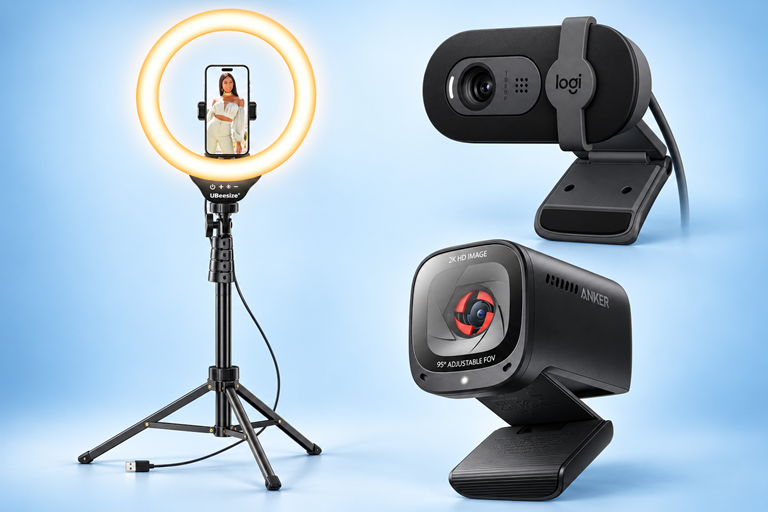
📷 Logitech Brio 101 Webcam: A webcam offers a convenient desktop photo source and doubles as meeting equipment. 

Save 7%. Now $37.17. 4.3 Stars. Check it out on Amazon!


🎥 Anker PowerConf C200 Webcam: An alternative desktop camera for readers who also record tutorials or join video meetings. 

Overall Pick! Now $69.99. 4.4 Stars. Check it out on Amazon!


💡 UBeesize Ring Light with Tripod Stand: A lighting-and-stand setup can make reference photos easier to compose consistently.

Save 10%. Now $29.69. 4.4 Stars. Check it out on Amazon!


*Prices accurate when originally published.

One Cool Tip may earn a commission from qualifying purchases.

Fuel Your Adventure

Try Big Mike's Jerky!


bigmikesjerky.com


Today's Cool Tip

Try Before You Buy: ChatGPT’s Virtual Dressing Room

ChatGPT can now give you a personal preview of clothing and accessories using your photo. See how to try an item virtually, manage your saved selfie, and avoid mistaking an attractive image for a guaranteed fit.

By Rodger Mansfield, Technology Editor

October 3, 2026

Subscribe


That blazer looks terrific on the store’s model. 


Will it look just as good with your favorite shirt?


Online shopping gives you plenty of pictures, but usually none of you wearing the item. 


A personal preview can help you decide which styles deserve a closer look before you order.


Here’s a Cool Tip: Use ChatGPT’s virtual try-on to preview clothing with your own photo.


Feature Explanation


The “Try on” button on clothing and accessory listings uses ChatGPT Images to generate a picture of you wearing the item. OpenAI lists mobile and web availability. 


Think of it as a visual shortlist. 


A preview can help you explore whether a style feels like you, while the retailer’s listing provides the purchase details. 


Travelers planning dinner outfits and professionals choosing casual office clothing have an obvious use for it.


What You’ll Gain


- See how a clothing style could look on you.

- Narrow your shopping choices before comparing purchase details.

- Build outfit ideas around clothing you already enjoy wearing.


Step-by-Step Instructions


Here's how to do it.


Web:


  1. Open ChatGPT in your browser.
  2. Ask for clothing suggestions. Try: “Find men’s casual blazers under $150.”
  3. Choose a clothing or accessory listing and select Try on.
  4. Take or upload a selfie when prompted.
  5. Review the generated picture. Look at the overall style, then compare the item against its retailer photos. 

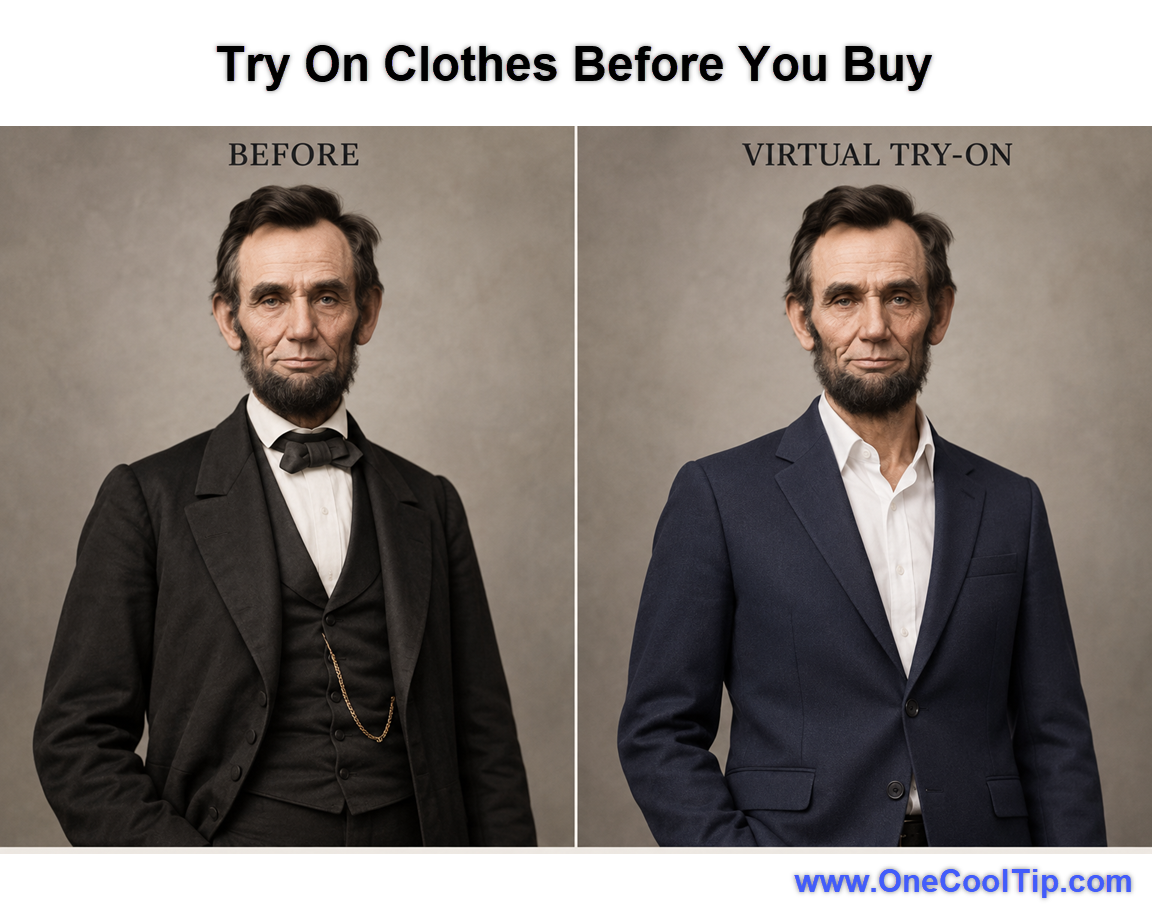
fig. 1 - Try On Clothes Before You Buy

Mobile:


  1. Open the ChatGPT app for Android or iOS.
  2. Ask ChatGPT for clothing or accessory suggestions.
  3. Select Try on on a product listing.
  4. Take or upload a selfie when prompted.
  5. Review the generated preview.


OpenAI documents mobile and web access without separate shopping instructions for each mobile operating system. 


Another Cool Approach: 


  1. Upload a photo of yourself to ChatGPT.
  2. Upload an image of the clothing or accessory into a conversation.
  3. Ask ChatGPT to show you wearing it:
“Show me wearing the blazer in the product image over my existing shirt. Preserve my face, body proportions, the jacket’s color and its details.” Treat those directions as requests, not guarantees.


Pros and Cons


Pros:


  • Adds a personal perspective to the shopping decision.
  • Helps organize ideas for a trip or event.
  • Encourages comparison before an impulse purchase.


Cons:


  • A personal preview requires a photo of you.
  • A persuasive picture can create more confidence than the evidence warrants.
  • Access details are not fully specified in the announcement.


Feature Access


The feature is available through ChatGPT shopping experiences on mobile and web platforms. 


Availability may vary by account, region, device, app version, or phased rollout status. 


Supported platforms:


  • Web
  • Mobile apps


ChatGPT Account Requirements:


  • Eligible shopping listings or uploaded item images
  • Photo upload capability


Score

Criterion |  Score (0–10) |  Justification
Value |  7
A useful way to consider appearance before buying. It leaves sizing and material questions unresolved.
Usability |  8
The documented sequence is straightforward. Missing-button cases are less clearly explained.
Wow Factor | 9
A familiar photo becomes a personal outfit preview. The visual transformation makes a memorable demonstration.
Total: 24/30 | 👍 Good
Strong visual appeal and practical limits. Compared with browsing catalog photos, a personal preview answers a different question: whether you like the imagined look on yourself.


Key Takeaways


Use the preview to decide what deserves further consideration. 


Before buying, compare the preview with the original product photos and check the measurements and return policy.


Cool Tip Snapshot


  • Feature Name: ChatGPT Virtual Try-On
  • Platform(s): Mobile and web.
  • Quick Benefit: Preview an outfit’s appearance.
  • Best For: Shoppers, travelers and wardrobe planning.
  • Access Type: Plan eligibility not specified in the announcement.
  • Difficulty: Easy


Try It Yourself


Preview an item you are considering, then tell us whether the picture helped. 


Comment, subscribe to the One Cool Tip newsletter for FREE, and share this Cool Tip with family, friends, and coworkers.


READ MORE


Read the Full Cool Tip.

Check Out These Cool Tips & Tricks


  • Set a Budget: Give your shopping request a spending limit so the search has a clear target. Ask, “Find casual blazers under $150,” using that amount as your preferred budget.


  • Name the Occasion: Context makes your request easier to understand. Specify whether you are shopping for cruise dinners, office days or an outdoor event.


  • Describe Preferences: Tell ChatGPT which colors and styles appeal to you. Include your preferred color, cut and fabric in the request.


  • Supply References: An item photo makes the desired garment explicit. Upload the picture and ask to see it worn on you.


  • Preserve Identity: Ask for a preview that keeps your appearance consistent. Include “Preserve my face and body proportions,” then inspect the result instead of assuming the request succeeded.


  • Keep Context: Test a jacket with a shirt you already wear. Ask ChatGPT to add the blazer while keeping the visible shirt unchanged.


  • Inspect Details: Small visual differences can change your impression of an item. Compare lapels, buttons, pockets and color against the retailer’s image.


  • Check Sizing: Visual appeal does not establish fit. Compare your measurements with the merchant’s size chart before ordering.


  • Refresh Photos: A current reference gives you a more relevant starting point. Open Settings → Personalization → Reference photos and choose Change photo.


  • Limit Training: Review the account setting that controls training use for new conversations. Turn off Settings → Data controls → Improve the model for everyone if that matches your preference.

ICYMI - In Case You Missed It ...

10 Siri Commands That Make Your iPhone More Useful


Siri can handle many everyday iPhone tasks without making you open an app or search through menus. These 10 practical commands can help you communicate, stay organized, find directions, and use your iPhone more efficiently.


Read the Full Version.


Read the Newsletter Version.

Looking for your next adventure?


Call Denise at Travel For You.

314.660.3039


Sign Up for the Monthly Newsletter


http://www.travelforyouvacations.com/


https://www.facebook.com/TRAVEL.FOR.U/


See You Tomorrow

Tomorrow's Cool Tip is waiting to amaze you.


Until then, go forth and conquer the tech world with your newfound knowledge!


Be sure to visit www.OneCoolTip.com for Cool Tech Tips for a Cooler Life!


And if you Like One Cool Tip, please support with TipJar!


Enjoy!


Rodger

Chief Cool Tipper

onecooltip.com@gmail.com


What Do You Think?

What do you think of today's OneCoolTip newsletter?
Positive        Neutral        Negative
X Share This Email
LinkedIn Share This Email

Connect with One Cool Tip!

Facebook  X  Instagram  Web  Pinterest  YouTube  LinkedIn
 

As an Amazon Associate, One Cool Tip may earn a small commission from qualifying purchases.


Our media content is intended solely for informational purposes. Please do not construe anything here as legal, tax, investment, financial, marital or other advice.


Copyright © 2026 | www.OneCoolTip.com | All Rights Reserved