β€Š

One Cool Tip Newsletter

September 12, 2026

Your daily dose of tech-savvy brilliance!

πŸ˜€Greetings! Happy Saturday, Cool Tipper!


Get ready to streamline your digital life with simple, actionable tips delivered straight to your inbox.


Cool Tip Theme: Meta Muse AI

ο»Ώ

Meta's new Muse AI agent sends email and handles everyday tasks for you. Here's what it does, what it costs, and how to try it today.


New here? Subscribe to the One Cool Tip Newsletter for daily updates. It's FREE!

3️⃣

If you enjoy the One Cool Tip newsletter, please forward this newsletter to THREE friends or colleagues or share it on social media using the links below.


Leave a $$$ Tip!


Share this One Cool Tip Newsletter!

X Share This Email
LinkedIn Share This Email
Pinterest Share This Email

🚨When a Data Breach Involves IDs, Act Fast🚨


Recent data breach notifications involving IDScan.net identity verification services are a reminder that personal information such as driver's license data can be especially valuable to criminals.


If you receive a notice that your information may have been exposed, don't assume someone else will protect you.


Review the company's notification carefully and take advantage of any free credit monitoring or identity protection services being offered.


It's also a good idea to monitor your bank accounts, credit card statements, and credit reports for unusual activity.


Be extra cautious of emails, text messages, or phone calls that reference the breach, as scammers often use major security incidents to launch convincing phishing attacks.


Acting quickly after a breach can significantly reduce the risk of identity theft and financial fraud.


And in Other News...


  • Is Social Media Training AI With Your Photos?


A new lawsuit (pdf) against Meta raises questions about how companies use photos shared on social media to develop artificial intelligence and facial recognition technologies.


The lawsuit alleges that images from Facebook and Instagram were used to help train AI models and develop a facial recognition system without proper consent, claims that remain subject to legal proceedings.


Regardless of the outcome, the case is a good reminder to review the privacy settings on your social media accounts.


Many platforms use user content in different ways to improve products and services, so it is worth understanding what permissions you have granted.


Consider limiting who can view your photos, reviewing privacy policies periodically, and removing images you no longer want publicly accessible.


Your photos are more than memories.


They are data, and it pays to know how that data may be used.

Cool Tip Poll

πŸ€” How much would you trust Meta Muse to do for you?

Cool Deals of the Day

Help support One Cool Tip. Use this Amazon link when you shop online.


Check out these Cool Deals:

πŸ€– Meta Ray-Ban (Gen 2) Headliner Smart AI Glasses: Meta says Muse is coming to its AI glasses soon, so these are the ones to watch.

LookπŸ‘‰ Now $379.00. 4.1 Stars. Check it out on Amazon!


🎧 Apple AirPods Pro (2nd Gen) Wireless Earbuds: Talk to your Muse agent hands-free while it runs your errands.

LookπŸ‘‰ Now $263.86. 4.8 Stars. Check it out on Amazon!


πŸ”‹ Anker Power Bank, 10,000mAh Portable Charger: Keep your phone charged while your agent keeps working in the background.

LookπŸ‘‰ Now $29.99. 4.5 Stars. Check it out on Amazon!


ο»Ώ*Prices accurate when originally published.

One Cool Tip may earn a commission from qualifying purchases.

Fuel Your Adventure

Try Big Mike's Jerky!ο»Ώ


bigmikesjerky.com


Now on TikTok!


Today's Cool Tipο»Ώ

Meta Muse: The AI Agent That Runs Your Errands


Meta just launched Muse, a personal AI agent that does not just answer your questions, it actually does your work. Here is what it can handle, what it costs, and how to try it right now.


Your to-do list has two kinds of items. 


The ones that need your brain, and the ones that just need somebody to do them. 


Booking the flight, turning a recipe video into a grocery list, haggling with the cable company.


Here’s a Cool Tip: hand your errands to Meta’s Muse AI agent.


Meta has introduced Muse, its biggest consumer AI bet yet, aimed at that second kind of task. 


Powered by Meta's Muse Spark model, Muse takes plain-language requests and does the work: sending emails, filling out forms, even negotiating on your behalf. 


It keeps working in the background after you close the app and checks in when it needs your approval.


Feature Explanation


Muse is an agentic AI. A chatbot answers one question at a time. 


An agent takes real actions across apps and websites, works through multi-step jobs on its own, and keeps going in the background.


It runs inside Meta's Muse Secure VM, a private virtual machine with its own browser that books appointments, fills out forms, and handles customer service chats. 


A separate watchdog called Sentinel is walled off from Muse on the same machine, making sure Muse never acts without your approval.


You message Muse like a person in the Muse, app connecting your apps one at a time. 


Before anything consequential, a sent message, a purchase, shared data, Muse asks: allow once, always allow, or deny. 


An audit trail shows everything it did. 


It can turn a saved recipe reel into a grocery list or quietly work a bill negotiation, returning when it needs a yes. 


It is brand new, rolling out in the US for 18 and over, with Meta AI glasses support coming soon.


What's the Difference?


Meta AI (meta.ai) is Meta's conversational assistant, basically their ChatGPT. 


It answers questions, writes text, generates images, and chats with you. 


It lives inside Facebook, Instagram, WhatsApp, and Messenger, and has its own standalone app and site. Free, widely available, been around a while.


Muse (muse.ai) is Meta's new personal AI agent, launched September 8, 2026. 


Instead of just answering, it takes real actions across your apps and websites: booking travel, sending emails, filling out forms, negotiating bills, making purchases. 


It runs in its own secure virtual machine with a browser, keeps working in the background after you close the app, and asks your approval before anything consequential like spending money. 


It's US-only, 18+, free with a usage limit, with $20 and $100 monthly plans for heavier use.


So, Meta AI is "a simple AI chat experience similar to ChatGPT," while Muse is "a personal AI agent that can take actions on a user's behalf across different apps and websites."


They're separate products, but related: Muse is powered by Meta's newer Muse Spark model and represents the step from chatbot to agent.


What You’ll Gain


  • Get hours back by handing off travel booking and customer-service calls.
  • Stop babysitting tasks. Muse works in the background, pinging you only for approvals.
  • Stay in control with per-action approvals and a full audit trail.
  • Keep data fenced off with a private virtual machine and one-time card numbers.


Step-by-Step Instructions


Here's how to do it.


Web/Desktop


  1. Go to muse.ai and create your account (18+, US only).
  2. Skip the payment card for now. The free tier works without one; add a payment method only when you want a paid plan or agent-made purchases.
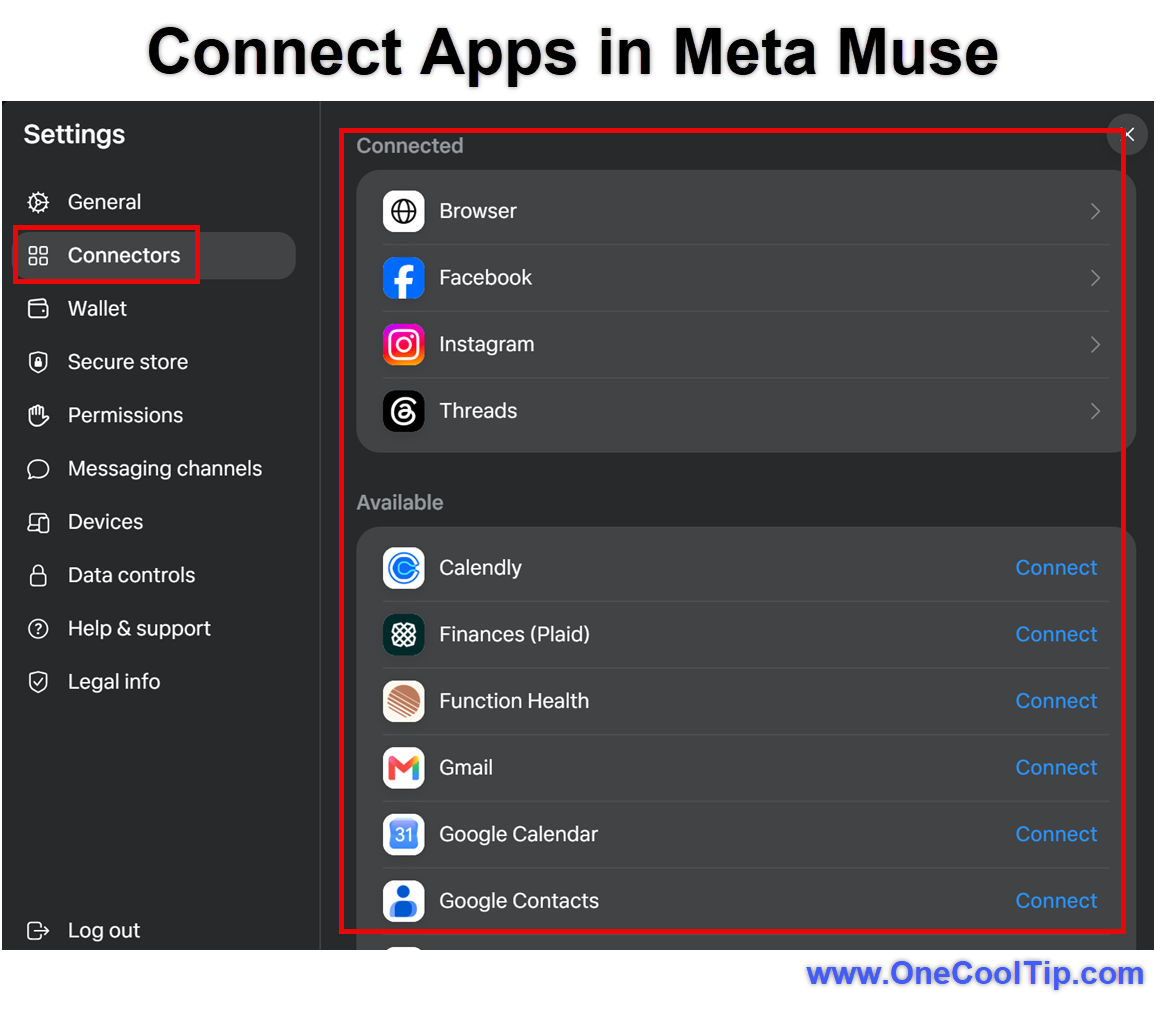
  3. Connect apps one at a time, starting with email and calendar.
  4. Personalize your agent: name it, pick an avatar, set its tone.
  5. Type a task in plain language, such as "Find a cheaper Chicago flight next month and show options before booking."
  6. Review every approval request before Muse sends or spends anything.


fig. 1 - Connect Apps in Meta Muse

Cool Examples:


  • Reminder setup in plain English. Say "remind me to water the plants every Sunday morning" and it's done, recurring, no digging through app settings.
  • Inbox triage. Connect your email and have Muse draft replies to routine messages, flag the ones that actually need you, and summarize long threads you missed.
  • Recipe to grocery list. Send it a saved recipe video or reel and it builds the grocery list, then reminds you to shop on Saturday.
  • Appointment wrangling. Give it something like "book a dentist appointment next week, mornings preferred" and it checks availability, books it, and adds it to your calendar.
  • Bill negotiation. Ask it to review a cable or phone bill, then have it work the provider's support chat to get a lower rate. It pauses and asks before agreeing to anything.


iPhone / Android


  1. Install the Muse app from the App Store or Google Play Store.
  2. Sign in and complete the setup process.
  3. Connect apps one at a time.
  4. Start a chat and describe the task, or message Muse inside WhatsApp.


Pros and Cons


Pros:


  1. It does things, not just chat: booking travel, negotiating bills, filling out forms.
  2. Approvals keep you in charge: nothing sent or purchased without your say-so, with a full audit trail.
  3. It works while you are away: long tasks continue after you close the app.
  4. Serious security design: private virtual machine, separate Sentinel watchdog, one-time card numbers via Link by Stripe, and a credential store the agent cannot read.


Cons:


  1. US only, 18 and over, with no timeline for other regions.
  2. Payments need a linked card: purchases and paid plans require a payment method, though the free tier works without one.
  3. Steep paid plans: $20/month Power, $100/month Maximum.
  4. The trust question is real: Meta's privacy history will make many hesitate to share logins.


Feature Access


  • Available to 18 and older in the United States, rolling out now. 
  • Works on the web at muse.ai, iOS, Android, and WhatsApp, with Meta AI glasses support coming soon. 
  • Free with a usage limit and in-app meter; Power ($20/month) and Maximum ($100/month) add usage. 


Score


Criterion | Score (0–10) |  Justification
Value |  8
Tackles real time sinks like booking and forms, with approvals keeping you in control.
Usability |  7
Plain-language chat is easy; connecting apps and permissions takes setup.
Wow Factor |  8
An agent that negotiates bills while the app is closed still feels new.
Total: 23/30 |  πŸ‘ Good
A genuinely useful agent with serious security engineering, held back by US-only availability and trust Meta still has to earn.


Key Takeaways


Muse moves Meta's AI past chatting and into doing, handling errands like travel booking and bill negotiating while you get on with your day. 


It is free to try in the US with thoughtful guardrails, but start small, connect apps gradually, and keep an eye on that usage meter.


Cool Tip Snapshot


  • Feature Name: Muse by Meta
  • Platform(s): Web (muse.ai), iOS, Android, WhatsApp
  • Quick Benefit: An AI agent that completes errands and multi-step tasks for you, with your approval
  • Best For: Busy home users and professionals drowning in small tasks
  • Access Type: Free with usage limit; subscription ($20/mo Power, $100/mo Maximum); rolling out in the US
  • Difficulty: Easy


Try It Yourself


Head to muse.ai or grab the Muse app and hand it one small errand this week, like finding a cheaper flight or drafting a tricky email. 


Then tell us in the comments how it did. 


If this tip saved you time, share it with family, friends, and coworkers, and subscribe to the One Cool Tip newsletter so you never miss the next one.


READ MORE


Read the Full Cool Tip.

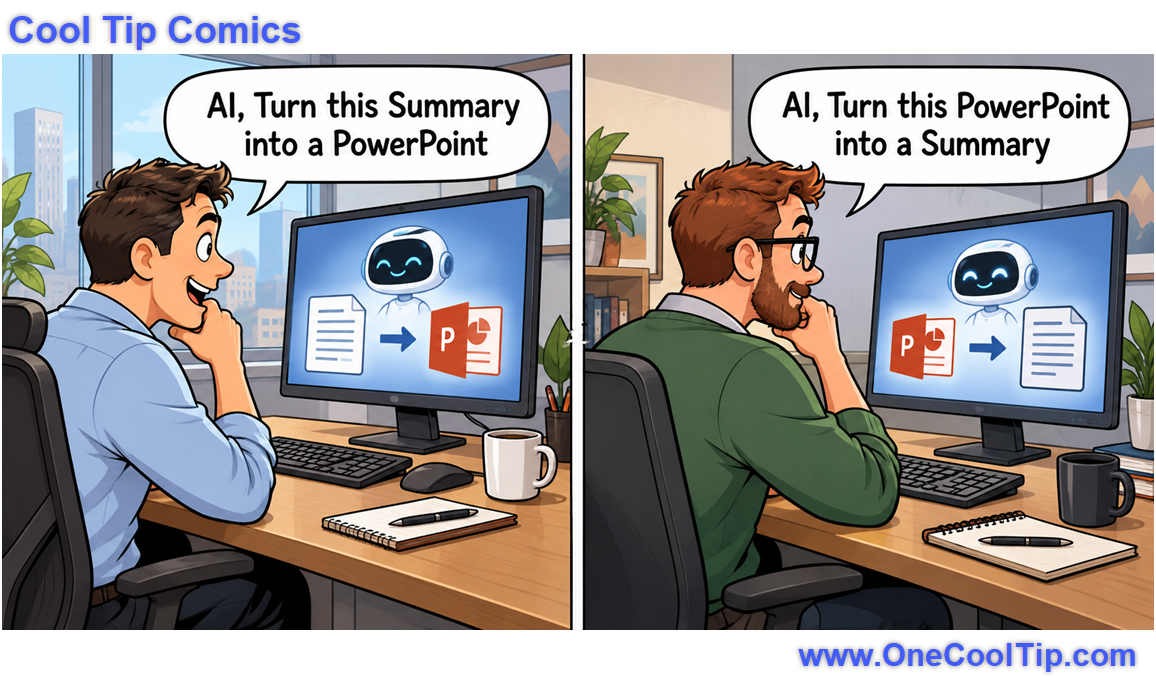
 AI productivity: saving time at both ends while creating more work in the middle.

Check Out These Cool Tips & Tricks


  • Name It: Give your Muse agent a name and avatar so it feels like your own helper. Open the Muse app settings, choose Personalize, and set both.

ο»Ώ

  • Connect Slowly: Link one app at a time, starting with email and calendar, so you understand what Muse can see. Add each connection from the app's Connect screen and review its permissions.


  • Approve Everything: Review each approval card before Muse sends or spends anything. Tap the pending approval in chat and choose allow once, always allow, or deny.


  • Watch the Meter: Keep an eye on the in-app usage meter so the free limit never surprises you. Find it in the app's main menu and check the percentage before big tasks.


  • Speak Naturally: Talk to Muse like a person, not a search engine, and include the details. Type or say the full task, such as "Book a table for four in Chicago on Friday around 7."


  • Set a Goal: Turn a long-term aim into an action plan Muse can advance on its own. Tell Muse your goal in chat and let it build the plan, then check its progress weekly.


  • Recipe to List: Turn saved recipe videos into grocery lists in seconds. Message Muse the reel and ask it to build the list and remind you to shop on Saturday.


  • Bill Help: Ask Muse to review a bill or work a support chat for a lower rate. Describe the bill in chat and approve each step before Muse contacts the provider.


  • Travel Scout: Let Muse compare flights and hotels while you do something else. Give it your dates, budget, and preferences, then review the shortlist it returns.


  • Audit Check: Review the audit trail weekly to see everything Muse did. Open the activity or history section of the app and scan the completed and planned actions.

ICYMI - In Case You Missed It ...

5 Hidden Windows 11 Features That Save Time Every Day


Windows 11 includes several built-in tools that can make everyday tasks faster, cleaner, and less frustrating. These five overlooked features help you copy smarter, organize your screen, capture better screenshots, focus longer, and reach system tools quickly.


Read the Full Version.


Read the Newsletter Version.

Looking for your next adventure?


Call Denise at Travel For You.

314.660.3039


Sign Up for the Monthly Newsletter


http://www.travelforyouvacations.com/


https://www.facebook.com/TRAVEL.FOR.U/


See You Tomorrow

Tomorrow's Cool Tip is waiting to amaze you.


Until then, go forth and conquer the tech world with your newfound knowledge!


Be sure to visit www.OneCoolTip.com for Cool Tech Tips for a Cooler Life!


And if you Like One Cool Tip, please support with TipJar!


Enjoy!

ο»Ώ


Rodger

Chief Cool Tipper

onecooltip.com@gmail.com


What Do You Think?

What do you think of today's OneCoolTip newsletter?
Positive        Neutral        Negative
X Share This Email
LinkedIn Share This Email

Connect with One Cool Tip!

Facebook  X  Instagram  Web  Pinterest  YouTube  LinkedIn
β€Š

As an Amazon Associate, One Cool Tip may earn a small commission from qualifying purchases.


Our media content is intended solely for informational purposes. Please do not construe anything here as legal, tax, investment, financial, marital or other advice.


Copyright Β© 2026 | www.OneCoolTip.com | All Rights Reserved


β€Š