|
Buy It in ChatGPT: A Faster Way to Shop Without Leaving the Chat
You can now browse, compare, and buy products directly inside ChatGPT with a smooth checkout powered by trusted retail partners. This feature removes friction from online shopping and shortens the journey from idea to purchase.
Every shopping session starts with a simple idea.
A new keyboard for work.
A compact air purifier for the home office.
A last-minute gift for a friend.
The problem is the usual maze of browser tabs, comparison charts, and checkout pages that follow.
It is easy to lose momentum or forget what you were researching.
Here's a Cool Tip: Buy in ChatGPT.
OpenAI has introduced a new shopping flow inside ChatGPT that keeps everything in the same place.
You ask for a recommendation, refine the options, review details, and complete the purchase with a checkout experience provided by real retailers.
The entire cycle stays inside one conversation.
Feature Explanation
We've already told you about the new ChatGPT Shopping Research feature.
But this is a whole new thing.
OpenAI’s Buy It in ChatGPT experience integrates product browsing and purchasing into a single chat.
You ask ChatGPT to find products that match your budget, preferences, or features.
ChatGPT responds with options and structured comparisons based on product listings from partnered retailers.
You can then view details, pick a model, and follow a retailer powered checkout. Payment details and fulfillment are handled by the retailer. ChatGPT does not process payments itself.
This feature matters because it compresses a multi-site shopping workflow into one conversation.
For busy users or anyone researching technical items, it keeps the process focused and reduces decision fatigue.
What You’ll Gain
- A shorter path from research to purchase.
- Cleaner product comparisons without switching apps.
- Retailer-backed checkout flow inside ChatGPT.
- Fewer browser tabs and fewer distractions.
Step by Step Instructions
Here's how to do it.
Microsoft Web/Desktop (Browser or Windows App)
-
Open ChatGPT on the web, www.ChatGPT.com or the Windows app.
-
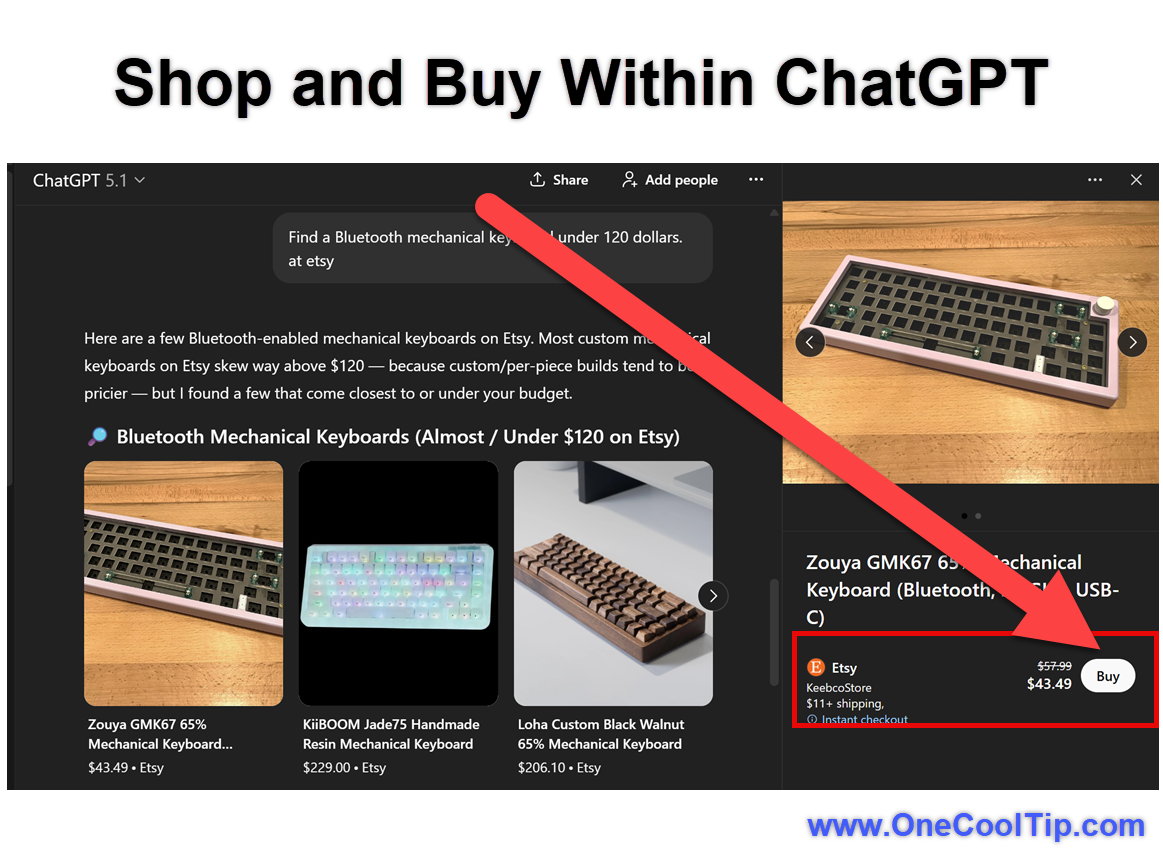
Type a request such as “Find a Bluetooth mechanical keyboard under 120 dollars on Etsy.”
-
Review the recommendations.
-
Select “Buy” or “View product” when available.
- Follow the retailer checkout page that appears in a panel inside ChatGPT.
Note: This example added "on Etsy." The model should not require this but to demonstrate the feature it was used.
|