β€Š

One Cool Tip Newsletter

July 21, 2026

Your daily dose of tech-savvy brilliance!

πŸ˜€Greetings! Happy Tuesday, Cool Tipper!


Get ready to streamline your digital life with simple, actionable tips delivered straight to your inbox.


Cool Tip Theme: Chrome and Google Wallet Advanced Autofill.

ο»Ώ

New here? Subscribe to the One Cool Tip Newsletter for daily updates. It's FREE!

3️⃣

If you enjoy the One Cool Tip newsletter, please forward this newsletter to THREE friends or colleagues or share it on social media using the links below.


Leave a $$$ Tip!


Share this One Cool Tip Newsletter!

X Share This Email
LinkedIn Share This Email
Pinterest Share This Email

🚨 Walmart Warns Shoppers About Rising Scam Tactics🚨


Walmart is reminding customers to stay alert as scammers continue using phone calls, emails, text messages, and fake websites to steal money and personal information.


Common scams often involve urgent requests to send money, buy gift cards, share gift card numbers, or provide sensitive account details.


Walmart emphasizes that legitimate government agencies and reputable companies will not demand payment through gift cards, wire transfers, or cryptocurrency.


The retailer also warns consumers to be cautious of fake tech support, job offers, mystery shopper schemes, and phishing or text-message scams.


If a message or caller creates pressure to act immediately, treat it as a red flag and verify the request through official channels.


Staying skeptical of unsolicited requests and protecting personal information can help prevent becoming the next victim of fraud.


And in Other News...


UK Government Dropping Digital ID Plan


The UK government is reportedly scrapping plans for a national digital ID program and shifting its focus toward addressing cost-of-living concerns.


Resources previously allocated to the digital ID initiative will be redirected to priorities that provide more immediate support for households.


The move follows ongoing debate around digital identity systems and reflects a broader effort to focus on economic challenges affecting consumers.


For now, the decision signals a pause in one of the UK's most significant digital government projects.


Browser Features

πŸ€” What matters most when choosing a web browser?

Cool Deals of the Day

Help support One Cool Tip. Use this Amazon link when you shop online.


Check out these Cool Deals:

πŸ”‹ TORRAS MiniMag 5,000mAh Magnetic Power Bank: A compact power bank helps keep an iPhone available while completing reservations, check-ins and payment forms away from an outlet.

Save 13%. $39.99. 4.3 Stars. Check it out on Amazon!


⚑ Anker Nano 20W USB-C Charger: Its compact design makes it useful for travelers who depend on their phones for Wallet information, reservations and online forms.

Overall Pick! $11.99. 4.8 Stars. Check it out on Amazon!


πŸ“± Lamicall Foldable Phone Stand: A stand keeps the phone steady while comparing documents or completing a longer form.

Save 23%. $9.99. 4.7 Stars. Check it out on Amazon!


ο»Ώ*Prices accurate when originally published.

One Cool Tip may earn a commission from qualifying purchases.

Fuel Your Adventure

Try Big Mike's Jerky!ο»Ώ


bigmikesjerky.com


Now on TikTok!


Today's Cool Tipο»Ώ

Automate Complex Forms with Chrome and Google Wallet


Typing lengthy identification numbers into web forms is frustrating and prone to errors. Google Chrome now integrates directly with Google Wallet to safely populate complex data like passport numbers and vehicle information on your mobile and desktop devices.


Booking an international flight to a destination like London often involves a frantic search for your physical passport. 


You find the booklet, prop it open, and carefully type a long string of alphanumeric characters into the airline website, hoping you did not transpose any letters. 


This manual data entry process is tedious and slows down routine online tasks like event check-ins or paying parking fees. 


Here is a Cool Tip: Connect Google Chrome to Google Wallet to Automatically Fill Your Most Complex Web Forms.


Google recently addressed this friction by updating how the Chrome browser interacts with stored data.


Feature Explanation


Google Chrome recently received an update that significantly expands its autofill capabilities. 


While browsers have historically managed basic contact information and passwords, this new functionality targets complex, sensitive data types. 


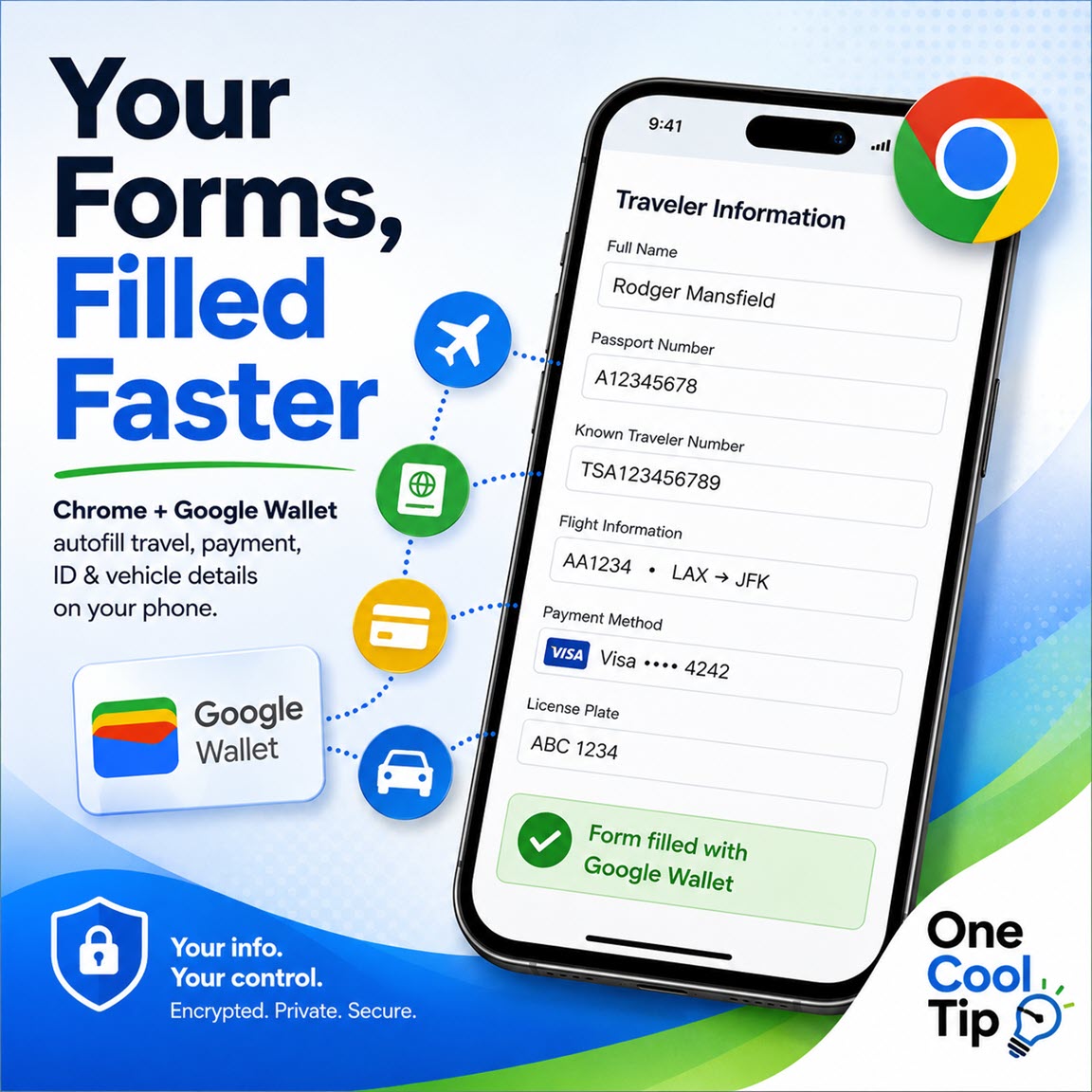
Chrome can now automatically populate fields requiring flight details, Vehicle Identification Numbers, license plates, and official identification details.


This integration bridges the gap between the Chrome browser and Google Wallet. 


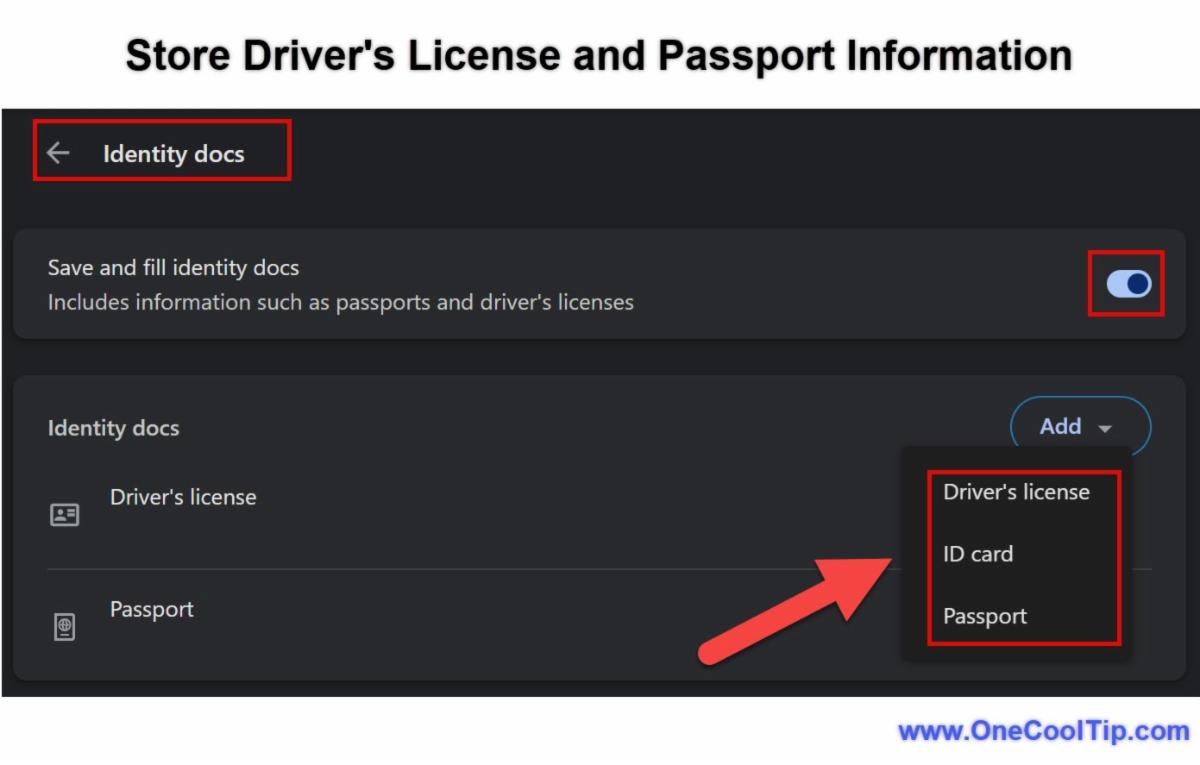
Data securely stored in your Google Wallet, including driver's licenses, passports, and Known Traveler Numbers, is now accessible to Chrome across desktop, iOS, and Android platforms. 


When you encounter a web form requesting this information, Chrome will offer to fill it automatically.


This matters because it removes the friction of manual data entry for high-stakes forms. 


Travelers, shoppers, and professionals frequently need to provide exact identification numbers on tight deadlines. 


The update eliminates typographical errors and speeds up the checkout or registration process. 


If your details are not yet in Google Wallet, Chrome will prompt you to save them upon your first manual entry, building your digital wallet for future convenience.


What You'll Gain


  • Save time by eliminating the need to locate physical documents during online checkouts.
  • Reduce confusion when forms require exact alphanumeric strings like a Known Traveler Number or vehicle identification number.
  • Improve privacy by keeping sensitive identification data encrypted within the Google ecosystem rather than typing it in public spaces.
  • Make daily work easier by streamlining travel booking and administrative tasks across your phone and computer.


Step-by-Step Instructions


Here's how to do it.


Web/Desktop:

ο»Ώ

  1. Open the Google Chrome browser on your computer.
  2. Click the three-dot menu in the upper right corner and select Settings.
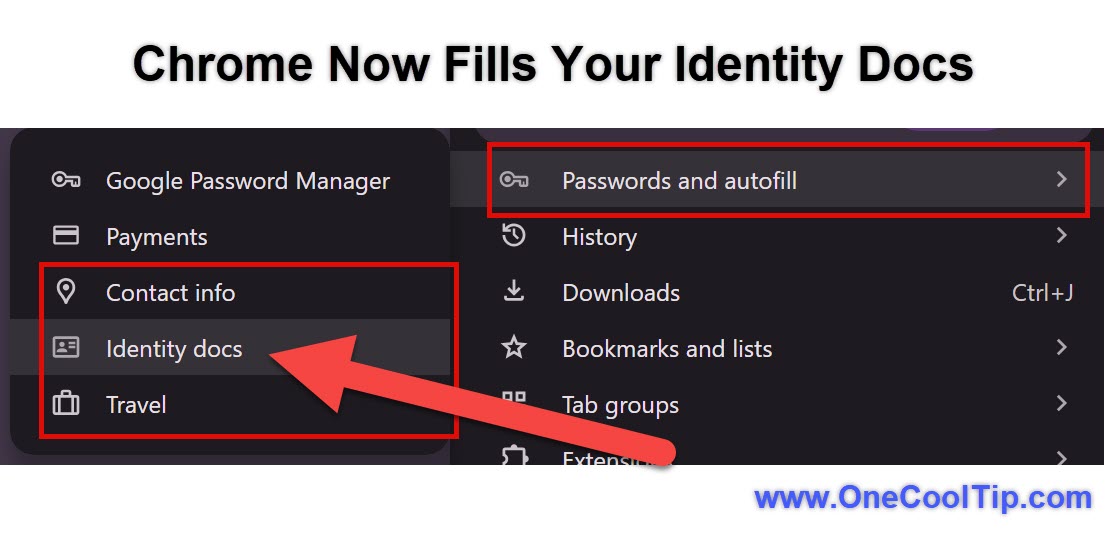
  3. Click on Autofill and passwords in the sidebar to verify your stored data.
  4. When browsing a site that requires identification or vehicle data, click the text field and select the Chrome prompt to authorize the fill.


fig. 1 - Chrome Now Fills Your Identity Docs

fig. 2 - Store Driver's License and Passport Information

iPhone/iPad:


  1. Open the Google Chrome app on your iOS device (the menu path and visual interface are identical on an iPad).
  2. Tap the three-dot menu and select Settings.
  3. Tap on Autofill to ensure your Google Wallet integration is active.
  4. Tap a form field on a supported website and authenticate with Face ID or Touch ID to let Chrome enter the details.


Android:


  1. Open the Google Chrome app on your Android smartphone or tablet.
  2. Tap the three-dot menu and open Settings.
  3. Select Autofill and payment methods to manage your Google Wallet connection.
  4. Tap any complex form field on a website and use your device biometric lock to authorize the data transfer.


Pros and Cons


Pros:


  • Speeds up airline check-ins and hotel reservations for business travelers.
  • Reduces typing mistakes when entering critical vehicle registration or passport data.
  • Keeps data secured with device encryption and biometric authentication requirements.
  • Synchronizes cleanly across mobile and desktop platforms using your Google account.


Cons:


  • Requires users to trust Google with highly sensitive government identification data.
  • May not recognize unconventional form fields on older or poorly coded websites.
  • Relies on the user having an active device lock enabled to function properly.


Privacy and Data Notes


Storing government IDs and travel documents introduces valid privacy questions. 


Google states that all sensitive data stored in Google Wallet and used by Chrome is encrypted. 


Chrome will never fill this information without your explicit permission, which typically requires biometric authentication like a fingerprint or facial scan.


The data is tied to your Google Account. 


If you lose your device, the information remains protected behind your lock screen and can be wiped remotely using Google account management tools. 


To limit sharing, you can opt out of browser syncing entirely or choose to store private passes locally on the device rather than in the cloud.


Feature Access


Google announced this integration on June 23, 2026. 


The advanced autofill capabilities are currently rolling out to Google Chrome users on iOS, Android, and desktop platforms. 


Users must have an active Google account and use Google Wallet to store their credentials. 


Availability may vary by region depending on local Google Wallet support for digital IDs and passports. 


Enterprise environments may experience restricted access if domain administrators disable autofill or wallet integrations through device management policies.


Score

Criterion | Score (0–10) | Justification
Value |  9
Eliminating manual entry for passports and VINs saves significant time and prevents costly typographical errors.
Usability |  8
The integration works smoothly, though users must ensure their device security settings are properly configured.
Wow Factor |  7
It is a highly practical update that securely connects two major Google services to solve a daily frustration.
Total: 24/30 |  πŸ‘ Good
This update makes Google Chrome significantly more useful for handling complex administrative tasks on the go. 
It compares favorably to Apple's iCloud Keychain, pushing the boundary from simple passwords to comprehensive digital identity management.


Key Takeaways


Google Chrome now automatically fills complex forms using data stored securely in Google Wallet.


This integration allows quick access to passport numbers, driver's licenses, and vehicle details across desktop and mobile devices. 


Sensitive information remains encrypted and requires user authorization before any data is transferred to a website.


Cool Tip Snapshot


  • Feature Name: Chrome and Google Wallet Advanced Autofill.
  • Platform(s): Web, Windows, macOS, iOS, Android.
  • Quick Benefit: Fill complex forms automatically without manual typing.
  • Best For: Travelers, shoppers, and busy professionals.
  • Access Type: Free (Rolling Out).
  • Difficulty: Easy.


Try It Yourself


Next time you book a flight, open Chrome and let it securely pull your Known Traveler Number straight from Google Wallet. 


Drop a comment below if this saved you time today, and share this article with your family, friends, and coworkers.


READ MORE


Read the Full Cool Tip.

Check Out These Cool Tips & Tricks


  • Check Wallet: Ensure your data is saved. Open Google Wallet to verify your documents are properly stored before trying to autofill a form.


  • Update Chrome: Keep your browser current. You must run the latest version of the Chrome app to access the newest Google Wallet integrations.


  • Enable Sync: Connect your devices. Turn on Chrome Sync in your browser settings so your data is available on both your phone and laptop.


  • Biometric Security: Protect your data. Set up Face ID or fingerprint unlock on your device to ensure only you can authorize autofill.


  • Add Manually: Build your digital wallet. If Chrome asks to save a new Known Traveler Number during checkout, accept the prompt to save it for next time.


  • Manage Passes: Review private data. Use the specific controls inside the Google Wallet app to manage or delete sensitive digital IDs.


  • Check Connections: Verify active links. Go to Autofill and passwords in Chrome settings to ensure the Google Wallet toggle is switched on.


  • Clear Cache: Fix broken forms. If a website refuses to trigger the autofill prompt, clearing your browser cache might resolve the loading error.

ο»Ώ

  • Limit Sharing: Control your footprint. You can choose to only store payment methods and disable the syncing of identification cards if you prefer more privacy.
  • Stay Alert: Watch for scams. Only authorize autofill on secure websites that display the padlock icon in the browser address bar.

ICYMI - In Case You Missed It ...

Talk to the World With Gemini 3.5 Live Translate


Google just upgraded real-time translation with Gemini 3.5 Live Translate, allowing you to have natural conversations across 70 languages without waiting for your turn to speak. This new model preserves your tone and pace for smoother communication.


Read the Full Cool Tip.


Read the Newsletter Version.

Looking for your next adventure?


Call Denise at Travel For You.

314.660.3039


Sign Up for the Monthly Newsletter


http://www.travelforyouvacations.com/


https://www.facebook.com/TRAVEL.FOR.U/


See You Tomorrow

Tomorrow's Cool Tip is waiting to amaze you.


Until then, go forth and conquer the tech world with your newfound knowledge!


Be sure to visit www.OneCoolTip.com for Cool Tech Tips for a Cooler Life!


And if you Like One Cool Tip, please support with TipJar!


Enjoy!

ο»Ώ


Rodger

Chief Cool Tipper

onecooltip.com@gmail.com


What Do You Think?

What do you think of today's OneCoolTip newsletter?
Positive        Neutral        Negative
X Share This Email
LinkedIn Share This Email

Connect with One Cool Tip!!

Facebook  X  Instagram  Web  Pinterest  YouTube  LinkedIn
β€Š

As an Amazon Associate, One Cool Tip may earn a small commission from qualifying purchases.


Our media content is intended solely for informational purposes only. Please do not construe anything here as legal, tax, investment, financial, marital or other advice.


Copyright Β© 2026 | www.OneCoolTip.com | All Rights Reserved


β€Š