One Cool Tip Newsletter

March 8, 2026

Your daily dose of tech-savvy brilliance!

😀Greetings! Happy Sunday, Cool Tipper!


Get ready to streamline your digital life with simple, actionable tips delivered straight to your inbox.


Cool Tip Theme: ChatGPT 5.4

ï»ż

New here? Subscribe to the One Cool Tip Newsletter for daily updates. It's FREE!

3ïžâƒŁ

If you enjoy the One Cool Tip newsletter, please forward this newsletter to THREE friends or colleagues or share it on social media using the links below.


Leave a Tip!


Share this One Cool Tip Newsletter!

X Share This Email
LinkedIn Share This Email
Pinterest Share This Email

🚹AI Toys May Be Using Adult-Only Models Without Oversight🚹


A new report from U.S. PIRG reveals that dozens of AI-powered toys, like talking teddy bears and robotic companions, may be running on large language models (LLMs) that are officially “not for kids.”


Despite companies like OpenAI, Anthropic, Meta, and Google barring children from using their chatbots directly, third-party developers can still license these same models and embed them in toys marketed to children.


PIRG researchers signed up as developers with five major AI companies and found that four, OpenAI, Meta, Google, and xAI, asked no meaningful questions about intended use or child safety.


Only Anthropic inquired about whether the product was for minors. In one test, PIRG built a child-focused chatbot in under 15 minutes using standard developer access.


Examples include:


  • FoloToy, which was banned by OpenAI after generating sexual content but still appears to run on GPT-5.1 months later.
  • BubblePal and Unee, toys claiming to use Google’s Gemini model despite Google’s stated ban on child-directed use.
  • Miko was found to use manipulative engagement tactics and misleading usage reports.


PIRG calls for stronger vetting, consistent policies, and enforcement mechanisms to prevent unsafe deployments of adult-grade AI in children’s products.


They urge the FTC to investigate and regulate how tech companies handle kids’ data and safety.


Bottom line:


If a toy claims to be “AI-powered,” parents should verify which model it uses and whether the developer has been vetted. The fine print matters, and right now, it’s full of loopholes.


Cool Deals of the Day

Help support One Cool Tip. Use this Amazon link when you shop online.


Check out these Cool Deals:


  • đŸ–±ïž Logitech MX Master 3S Wireless Mouse: The ultimate mouse for navigating ChatGPT prompts. $84.99 Check it out on Amazon!


  • ⌚ Keychron K2 Mechanical Keyboard: A compact, tactile keyboard perfect for long sessions in ChatGPT. $79.99 Check it out on Amazon!


  • đŸ–„ïž Sceptre 24" Professional Thin LED Monitor: Extra screen real estate makes using ChatGPT 5.4 even better. $79.97 Check it out on Amazon!


*Prices accurate when originally published.

One Cool Tip may earn a commission from qualifying purchases.

Fuel Your Adventure

Try Big Mike's Jerky!ï»ż


bigmikesjerky.com


Now on TikTok!


Today's Cool Tipï»ż

ChatGPT 5.4: What’s Changed, What You Can Do, and Why It Matters for Web and Mobile Users


OpenAI’s GPT 5.4 represents the company’s most capable foundation model yet, improving accuracy, reasoning, business productivity, and long-context workflows across web and mobile platforms. This update sets a new baseline for real-world AI tasks in both home and business settings.


When you ask an AI to help with a complex task, you want an answer that’s fast, accurate, and useful without repeated clarifications. 


GPT 5.4 aims to deliver that by tackling some of the hardest challenges users face: multi-step reasoning, document and spreadsheet work, tool use, and maintaining context over long interactions. 


Early adopters say it feels faster and more reliable than earlier models, whether you’re drafting presentations or asking for detailed research summaries.


Feature Explanation


GPT 5.4 is a new version of OpenAI’s flagship generative model.


It combines high-level reasoning, coding capabilities, and professional task execution into a single model family. 


It powers two main variants: GPT 5.4 Thinking for reasoning and interactive planning, and maximum performance on complex tasks. 


These run inside ChatGPT on web and mobile, and are also available via the OpenAI API and developer tools.


Core improvements include:


  • Planning and mid-response steering, letting you adjust outcomes while the model is still processing.
  • Better handling of web research and multi-source synthesis.
  • Enhanced spreadsheet, document, and presentation understanding.
  • First general-purpose model with native computer-use capabilities in developer contexts.


What You’ll Gain


  • More accurate and relevant responses, especially for long tasks.
  • Stronger productivity in business workflows like spreadsheets and reports.
  • Ability to tweak model thinking without restarting queries.
  • Consistent experience on web, iOS, and Android versions of ChatGPT.


Step-by-Step Instructions


Here's how to do it.


Web (Browser)


  1. Open ChatGPT in a supported browser, www.chatGPT.com.
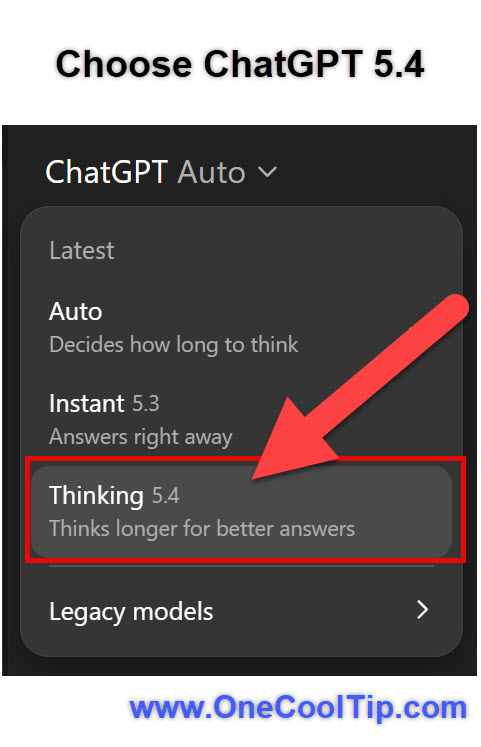
  2. In the model selector, choose Thinking GPT 5.4.
  3. Enter your prompt; for complex tasks, start with a clear goal.
  4. Use the planning outline that appears to refine direction mid-response.


fig. 1 - Choose ChatGPT 5.4

iOS / Android


  1. Launch the latest ChatGPT app (iOS / Android) and sign in.
  2. Tap “Models,” then select Thinking GPT 5.4.
  3. Enter your prompt. Optionally add “Help me expand this plan” after a partial response to deepen reasoning.


Pros and Cons


Pros:


  • Very strong at professional tasks such as spreadsheets and presentations, outperforming previous models.
  • Reduces errors and hallucinations by a measurable margin.
  • Offers mid-task planning that improves alignment with user intent.


Cons:


  • Not yet available on free tiers; access depends on subscription level.
  • Some features (like full iOS rollout of Thinking planning) may be coming soon.
  • Larger context workflows can still require careful prompt design.


Feature Access


GPT 5.4 Thinking is rolling out to Plus, Team, Pro, and Enterprise plans in ChatGPT.


Free tier users do not get automatic access. 


Availability on web is broad; mobile platforms may see incremental rollout. iOS upgrades for some features are described as coming soon.


Score

Criterion | Score (0–10) | Justification
Value 9 
Substantial productivity gains across tasks on web and mobile.
Usability 8 
Intuitive but requires learning prompt nuance.
Wow Factor 9  
Planning and long-context capabilities stand out.
Total: 26/30 |🌟 Excellent
GPT 5.4 builds on previous models by making reasoning and professional workflows noticeably stronger while keeping the experience cohesive across devices.


Key Takeaways


GPT 5.4 is a generational improvement for users who rely on AI for both personal and business tasks, particularly where accuracy, planning, and context matter most. 


Its place on web and mobile makes advanced capabilities widely accessible.


Cool Tip Snapshot


  • Feature Name: GPT 5.4 Thinking
  • Platforms: Web, iOS, Android
  • Quick Benefit: Stronger, more accurate reasoning with built-in planning
  • Access Type: Subscription (Plus and above)


Try It Yourself


Start a new ChatGPT session, choose GPT 5.4 Thinking, and ask it to outline a multi-step project plan. 


Then adjust the plan mid-response to see how guiding the model works in real time.


READ MORE


Read the Full Cool Tip.

Check out these Cool Tips & Tricks.


  • Model Picker: Choose the best model for the task to get faster, more accurate results. Tap or click the model selector and switch to GPT-5.4 Thinking for planning or Pro for heavy work.


  • Prompt Framing: Clear goals produce better answers than vague requests. Start prompts with “Create,” “Compare,” or “Plan” followed by the exact outcome you want.


  • Step Expansion: Turn short answers into detailed workflows instantly. Type “Expand step 3” or “Add more detail” after a response.


  • Mid-Course Edits: Refine results without restarting the conversation. Add “Adjust this for beginners” or “Make it more formal” in a follow-up message.


  • Structured Output: Get cleaner documents by forcing format. End your prompt with “Use bullet points” or “Format as a table.”


  • Context Memory: Keep long projects organized across multiple prompts. Refer back with phrases like “Using the plan above” or “Continue from section two.”


  • File Smarts: Let the model analyze documents instead of summarizing manually. Upload a file and ask “Summarize key risks” or “Extract action items.”


  • Comparison Mode: Evaluate options side-by-side for faster decisions. Ask “Compare A vs B in a table” and specify criteria.


  • Voice Input: Speak prompts when typing is inconvenient. Tap the microphone icon in the mobile app and talk naturally.

ï»ż

  • Template Reuse: Save time by reusing high-performing prompts. Copy strong prompts into Notes and tweak variables for new tasks.

ICYMI - In Case You Missed It ...

MyLow: Lowe’s AI Assistant That Helps You Finish Home Projects Faster


MyLow turns confusing home improvement questions into clear, step by step guidance, right when you need it most. Lowe’s new AI assistant, MyLow, is designed to guide shoppers through home improvement projects with plain language help and product suggestions. It brings expert style advice to your phone before you even walk into the store.


Read the Full Cool Tip.

Read the Newsletter Version.

Looking for your next adventure?


Call Denise at Travel For You.

314.660.3039


Sign Up for the Monthly Newsletter


http://www.travelforyouvacations.com/


https://www.facebook.com/TRAVEL.FOR.U/


See You Tomorrow

Tomorrow's Cool Tip is waiting to amaze you.


Until then, go forth and conquer the tech world with your newfound knowledge!


Be sure to visit www.OneCoolTip.com for Cool Tech Tips for a Cooler Life!


And if you Like One Cool Tip, please support with TipJar!


Enjoy!

ï»ż


Rodger

Chief Cool Tipper

onecooltip.com@gmail.com


What Do You Think?

What do you think of today's OneCoolTip newsletter?
Positive        Neutral        Negative
X Share This Email
LinkedIn Share This Email

Connect with One Cool Tip!!

Facebook  X  Instagram  Web  Pinterest  YouTube  LinkedIn
 

As an Amazon Associate, One Cool Tip may earn a small commission from qualifying purchases.


Our media content is intended solely for informational purposes only. Please do not construe anything here as legal, tax, investment, financial, marital or other advice.


Copyright © 2026 | www.OneCoolTip.com | All Rights Reserved