One Cool Tip Newsletter

October 31, 2026

Your daily dose of tech-savvy brilliance!

😀 Greetings! Happy Halloween, Cool Tipper!


Get ready to streamline your digital life with simple, actionable tips delivered straight to your inbox.


Cool Tip Theme: Google's Museum of Frights


Explore classic ghost tales, eerie masterpieces, and haunted artifacts for free in Google Arts & Culture's seasonal virtual hub, Museum of Frights.


New here? Subscribe to the One Cool Tip Newsletter for daily updates. It's FREE!

3️⃣

If you enjoy the One Cool Tip Newsletter, please forward this newsletter to THREE friends or colleagues or share it on social media using the links below.


Leave a $$$ Tip!


Share this One Cool Tip Newsletter!

X Share This Email
LinkedIn Share This Email
Pinterest Share This Email

🚨 Stop, Pause, Verify: Three Words That Could Save You From a Scary Scam 🚨


Scammers are getting better at pretending to be banks, government officials, businesses, friends, and even family members.


Bank of America’s Scam Prevention guide warns that common red flags include emotional pressure, urgent demands, threats, promises of rewards, and requests for unusual payment methods such as gift cards, cryptocurrency, or wire transfers.


If someone unexpectedly asks for money or personal information, stop and don’t rush into responding.


Even when a request looks legitimate, verify it independently by contacting the organization through a trusted phone number, such as the one printed on your card or statement.


You can add another layer of protection by using strong passwords, multifactor authentication, and biometric security such as Face ID.


The best scam-fighting tool may simply be giving yourself a moment to stop, verify, and think before you act.


And in Other News...


  • 🎃 Google’s 2026 Halloween Doodle Has a Spooky Twist


Need a little Halloween fun between emails and errands?


Google’s Halloween 2026 Doodle celebrates the holiday with artwork inspired by the classic art of shadow puppets.


The Doodle gives Google’s familiar homepage logo a playful, spooky makeover.


Halloween is celebrated around the world with traditions such as spooky movies, costumes, and trick-or-treating for sweets.


It’s also a good excuse to explore Google’s Doodle archive, where you can discover past creations and even search for the Doodle that appeared on your birthday.


Take a quick break today and check out the Halloween 2026 Doodle before the ghosts and goblins disappear for another year.


  • 🎃 AI Prompt: Create Your Own Halloween Pumpkin Stencil


Create a printable, black-and-white pumpkin-carving stencil featuring [INSERT YOUR DESIGN IDEA HERE].


Use a bold, high-contrast, stencil-style design with solid black shapes and clean white areas.


The white areas represent the sections to cut out of the pumpkin, while the black areas represent the pumpkin skin that stays intact.


Keep the design simple enough to carve with basic pumpkin-carving tools.


Avoid tiny details, thin lines, complicated shading, gradients, and intricate patterns.


Important: Make sure all black areas remain connected to the main pumpkin surface so no unsupported pieces fall out when carved. Add connecting bridges wherever necessary.


Center the design on a plain white background, with generous margins. Make it suitable for printing on standard 8.5-by-11-inch paper.


Produce a clean, professional, easy-to-follow stencil with no colors, text, decorations, or background elements.


The final image should be ready to print, tape onto a pumpkin, and use as a carving guide.

Cool Tip Poll

🤔 How do you prefer to experience art and history?

Cool Deals of the Day

  • Have you tried the Upside app? Everyday cash back on gas, groceries and dining.


Help support One Cool Tip. Use this Amazon link when you shop online.


Check out these Cool Deals:

🖥️ Philips 27-inch Monitor: A big screen is particularly useful for examining artwork and museum imagery from a desktop computer.

Save 10%. Now $89.99. 4.6 Stars. Check it out on Amazon!


📽️ Kodak Luma 350 Portable Projector: Turn virtual museum exploration into a family-sized experience by putting cultural content on a larger screen.

Look! Now $329.99. 4.4 Stars. Check it out on Amazon!


🎧 JBL Tune 770NC Wireless Headphones: Useful when exploring multimedia cultural content without disturbing everyone else in the room.

Save 30%. Now $139.95. 4.5 Stars. Check it out on Amazon!


🔊 Anker Soundcore 2 Bluetooth Speaker: A compact speaker can make multimedia browsing more of a shared family activity.

Save 33%. Now $29.98. 4.3 Stars. Check it out on Amazon!


*Prices accurate when originally published.

One Cool Tip may earn a commission from qualifying purchases.

Fuel Your Adventure

Try Big Mike's Jerky!


bigmikesjerky.com


Today's Cool Tip

Tour Creepy Fine Art in Google's Virtual Museum of Frights

Discover centuries of haunted history, spooky masterpieces, and chilling global lore packaged into an interactive digital exhibit.


Google's seasonal online project lets you tour world-famous museum collections right from your web browser or phone.

By Rodger Mansfield, Technology Editor

October 31, 2026

Subscribe


Finding quality Halloween activities that do not involve store-bought plastic props or cheap jump scares can be surprisingly difficult. 


Whether you need a clever educational activity for curious kids or simply want to browse historic oddities on a quiet evening, the usual streaming queues and party lists often fall flat.


Google curates a dedicated hub inside its cultural archive that brings together hundreds of partner institutions to spotlight the bizarre, the ghostly, and the macabre across human history.


Here’s a Cool Tip: Explore the Museum of Frights on Google Arts & Culture.


Feature Explanation


Museum of Frights is a curated virtual exhibition hosted on the free Google Arts & Culture platform.


Instead of requiring physical travel to galleries in London, Madrid, or Oslo, the platform aggregates high-resolution scans, historical essays, and 360-degree virtual walks into one themed portal.


The collection organizes artwork and artifacts around classic eerie themes. 


You can examine Henry Fuseli’s "The Nightmare" up close, inspect Vincent van Gogh’s rebellious "Head of a Skeleton with a Burning Cigarette," study Japanese ghost woodblock prints by Kunisada, and inspect Francisco Goya’s dark folklore paintings.


The feature works directly inside any standard desktop browser as well as the native Google Arts & Culture mobile applications for Android and iOS. 


It solves the perennial challenge of finding engaging, high-caliber seasonal content by pairing museum-grade historical curation with interactive zoom and Street View tools. 


It remains an overlooked gem that Google resurfaces each autumn for art lovers, educators, and holiday enthusiasts alike.


What You’ll Gain


  • Inspect ultra-high-resolution masterpieces and historic artifacts without museum admission fees.
  • Engage students or family members with educational folklore and spooky art history.
  • Explore historic haunted landmarks worldwide via integrated Street View navigation.
  • Save, organize, and share custom galleries of bizarre artifacts directly to your Google account.


Step-by-Step Instructions


Here's how to do it.


Web/Desktop:


  1. Launch your preferred web browser and navigate directly to the official project page: 
  2. Scroll through the homepage carousel to view curated collections, such as iconic spooky paintings, witch trials documentation, and haunted architecture.
  3. Click on any featured story or artwork card to open the interactive viewer.
  4. Use your mouse scroll wheel or click the Zoom (+) button in the lower corner to view brushwork and hidden details in high resolution.

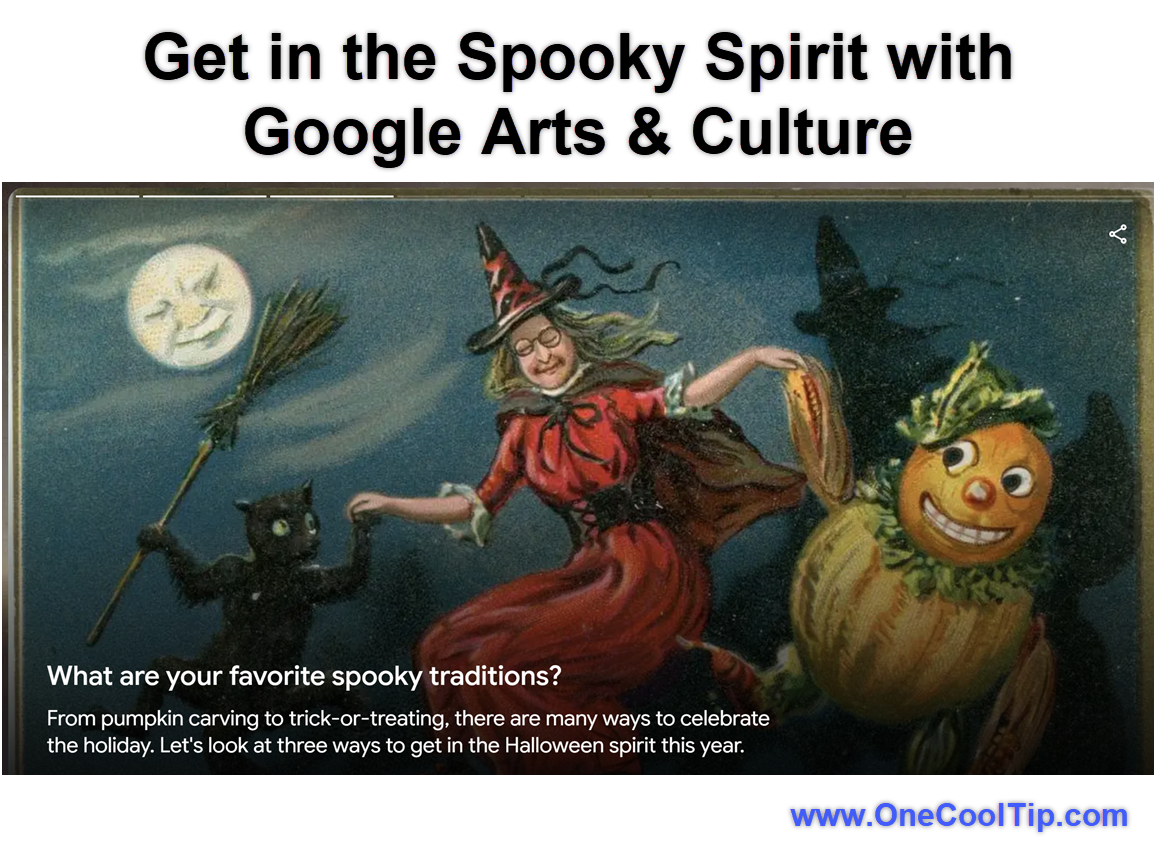
fig. 1 - Get in the Spooky Spirit with Google Arts Culture

Cool Note:


  • Click the Heart (Favorite) button near the item header to save the artwork to your personal collection.


iPhone/iPad:


  1. Open the App Store and download the free Google Arts & Culture app if you have not already installed it.
  2. Launch the app and tap the Search (magnifying glass) icon in the navigation bar.
  3. Type Museum of Frights or Halloween into the search query bar and select the themed project collection.
  4. Swipe through the visual story cards vertically to progress through the curated exhibit.
  5. Tap any high-resolution image to enter full-screen pinch-to-zoom mode.


Android:


  1. Open the Google Play Store and install or update the Google Arts & Culture app.
  2. Launch the app and sign in with your standard Google Account if prompted.
  3. Tap the Explore tab at the bottom, or search for Museum of Frights in the top search field.
  4. Tap the featured exhibition card to open the gallery.
  5. Tap the Share button on any story card to generate a direct web link for messages, classrooms, or social feeds.


Pros and Cons


Pros:


  • Completely free to access without subscriptions, paywalls, or premium tiers.
  • High-definition image capture lets you see microscopic canvas texture and hidden elements.
  • Broad educational value for classrooms, homeschool curricula, and autumn party trivia.
  • Responsive interface runs smoothly across desktop monitors, Chromebooks, tablets, and smartphones.


Cons:


  • Requires a steady, high-speed broadband connection to load dense gigapixel images smoothly.
  • The thematic hub can occasionally be hard to locate via the main platform homepage outside the October season.
  • Certain partner museum items only offer short summaries rather than comprehensive audio tours.


Feature Access


The project is publicly available worldwide to all users with modern web access. 


It does not require Google Workspace licenses, Google One subscriptions, or beta enrollments. 


Access is platform-agnostic, running across Windows, macOS, ChromeOS, Linux, Android, and iOS. Certain localized partner descriptions may vary depending on your browser language setting.


Score

Criterion  | Score (0–10)  | Justification
Value  | 8
Provides free, curated access to global museum treasures with high cultural and educational merit.
Usability  | 8
The clean browser layout and touch-friendly zoom tools make exploration effortless for all ages.
Wow Factor  | 7
Deep-zoom viewing of famous eerie paintings delivers a neat surprise, even if the general viewer is familiar.
Total: 23/30  | 👍 Good
Google's Museum of Frights is an engaging, zero-cost digital exhibition that turns classic art history into a fun, spooky autumn pastime. 
It compares favorably to standard virtual gallery tours by unifying disparate global collections around a single, festive seasonal narrative.


Key Takeaways


Google Arts & Culture gathers hundreds of dark historical paintings, eerie artifacts, and folklore exhibits into one free portal.


High-resolution gigapixel viewing lets you uncover canvas details and brushwork rarely seen in regular textbooks.


Anyone with a standard browser or mobile device can tour the collections without logging in or paying a fee.


Cool Tip Snapshot


  • Feature Name: Google Museum of Frights
  • Platform(s): Web, Android, iOS, Windows, macOS, ChromeOS
  • Quick Benefit: Tour eerie art masterpieces and ghost lore from global museums for free.
  • Best For: Families, educators, history fans, and art lovers
  • Access Type: Free
  • Difficulty: Easy


Try It Yourself


Give this Cool Tip a spin today by loading up the collection, zooming in on your favorite spooky painting, and sharing your discoveries with friends, family, and coworkers. 


Do you have a favorite strange artifact in the collection? 


Drop your thoughts in the comments, share this guide, and subscribe to the One Cool Tip newsletter for practical tech advice delivered weekly.


READ MORE


Read the Full Cool Tip!

Check Out These Cool Tips & Tricks


  • Pick a Path: Avoid aimless scrolling by starting with Terrifying Tales, Scary Sites or Spook-tacular Art. Choose one category on the main Museum of Frights page and follow it until something grabs you.


  • Go Big: Artwork deserves more room than a tiny phone display. Open the experience on your largest available computer or tablet screen.


  • Zoom In: Museum artifacts often reward close examination. When an individual item offers viewing controls, use the options presented on its page to inspect it more closely.


  • Family Pick: Turn browsing into a family Halloween activity. Let everyone pick one artifact or story and explain why it was their favorite.


  • History Hunt: Choose a familiar Halloween tradition and investigate where it came from. The collection includes material about pumpkins, costumes and trick-or-treating.


  • Costume Ideas: Skip the generic image search when you're hunting for unusual inspiration. Browse the site's costume material drawn from spooky art and museum artifacts.


  • Get Weird: Don't stop with ghosts and witches. Scroll into the unusual museum objects and strange institutions where the collection becomes especially interesting.


  • Classroom Challenge: Give students a spooky object as a research starting point. Have them trace its historical or cultural context rather than simply describing the picture.


  • Follow Links: Museum of Frights works best when you don't treat the landing page as the destination. Open stories and objects that interest you and continue into the broader collection.


  • Come Back: Google Arts & Culture contains far more than Halloween material. After the holiday, use the broader service to keep exploring museums, artworks and cultural collections.

ICYMI - In Case You Missed It ...

Talk to Mr. Darcy? How NotebookLM Brings Jane Austen to Life


Ever wished you could ask a question about Pride and Prejudice and get an instant, citation-backed answer? Google's NotebookLM makes it possible by turning classic literature into an interactive AI experience.


Read the Full Version.


Read the Newsletter Version.

Looking for your next adventure?


Call Denise at Travel For You.

314.660.3039


Sign Up for the Monthly Newsletter


http://www.travelforyouvacations.com/


https://www.facebook.com/TRAVEL.FOR.U/


See You Tomorrow

Tomorrow's Cool Tip is waiting to amaze you.


Until then, go forth and conquer the tech world with your newfound knowledge!


Be sure to visit www.OneCoolTip.com for Cool Tech Tips for a Cooler Life!


And if you Like One Cool Tip, please support with TipJar!


Enjoy!


Rodger

Chief Cool Tipper

onecooltip.com@gmail.com


What Do You Think?

What do you think of today's One Cool Tip Newsletter?
Positive        Neutral        Negative
X Share This Email
LinkedIn Share This Email

Connect with One Cool Tip!

Facebook  X  Instagram  Web  Pinterest  YouTube  LinkedIn
 

As an Amazon Associate, One Cool Tip may earn a small commission from qualifying purchases.


Our media content is intended solely for informational purposes. Please do not construe anything here as legal, tax, investment, financial, marital or other advice.


Copyright © 2026 | www.OneCoolTip.com | All Rights Reserved