One Cool Tip Newsletter

November 16, 2025

Your daily dose of tech-savvy brilliance!

😀Greetings! Happy Sunday, Cool Tipper!


Get ready to streamline your digital life with simple, actionable tips delivered straight to your inbox.


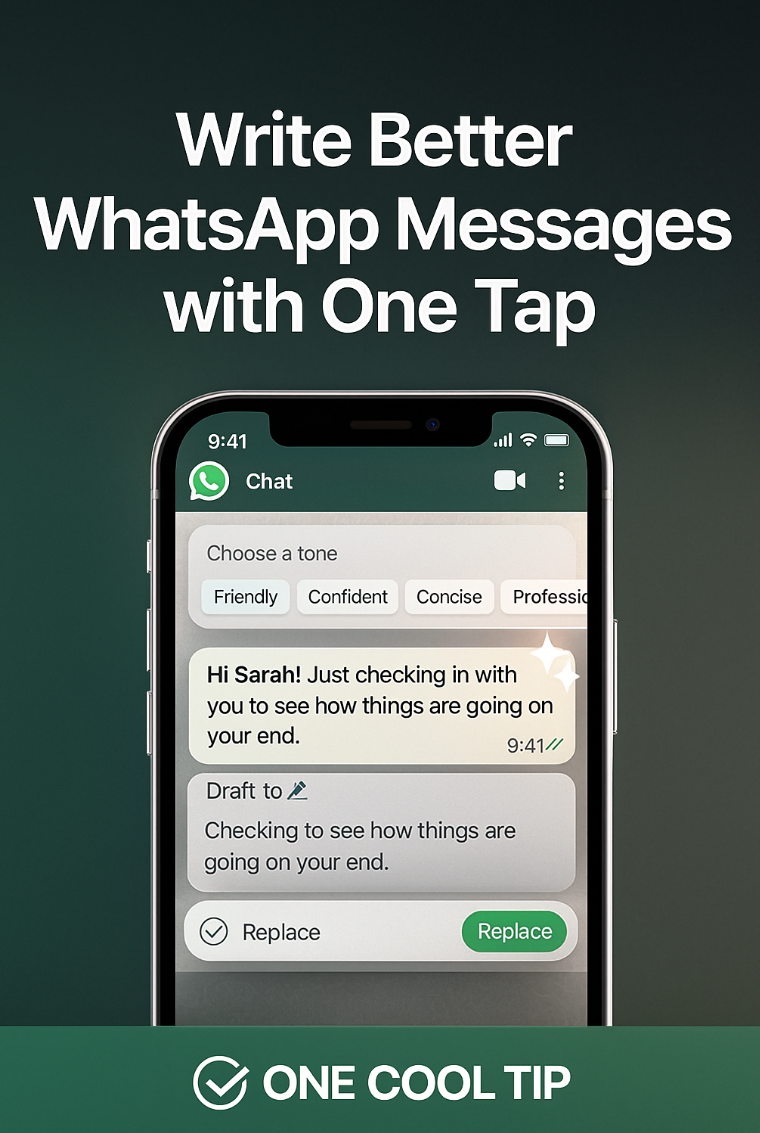
Cool Tip Theme: Write Better with WhatsApp AI.


Enjoy today's abbreviated Cool Tip Newsletter while Cool Tip is searching the world for more Cool Tips.


New here? Subscribe to the One Cool Tip Newsletter for daily updates. It's FREE!

Check out these Cool Tips for WhatsApp:


  • Message Yourself: Use your personal chat as a secure, fast way to save notes, reminders, or links across your devices. Start a new chat, search for your own contact name, and begin messaging.


  • Pin Chats: Keep your most important or frequently used conversations at the top of your chat list for easy access. Swipe right (iOS) or tap and hold (Android) on a chat, then select Pin.


  • Silence Unknowns: Automatically filter out calls from people not in your contacts to reduce spam and interruptions. Go to Settings, select Privacy, then Calls, and toggle on Silence unknown callers.


  • Custom Notifications: Assign unique sounds to specific chats so you know who is messaging you without looking at your phone. Open a chat, tap the contact or group name, and choose Notifications, select an Alert Tone.

Cool Deals

Help support One Cool Tip. Use this Amazon link when you shop online.


Look at these Cool Products:


  • 🎧 Bose QuietComfort Earbuds II: Perfect for focusing and drafting clear, concise messages without distraction. $159.90 Check it out on Amazon!


  • 🔋 Anker Nano Power Bank: Keeps your mobile device charged so you never miss an important message or the chance to rewrite it. Save 14% $42.99 Check it out on Amazon!


  • ⌨️ Logitech Pebble Keys 2 K380s Keyboard: For users who prefer drafting longer, more complex WhatsApp business messages. Overall Picks $39.99 Check it out on Amazon!


*prices accurate when originally published.

Fuel Your Adventure

Try Big Mike's Jerky!


bigmikesjerky.com


Now on TikTok!


Today's Cool Tip

Let AI Help You Write in WhatsApp


WhatsApp just added a smarter way to refine your messages before you send them. Pick your tone, preview the rewrite, and send something that sounds clearer and more intentional.


Have you ever hit "send" on a message only to instantly regret the tone? 


Perhaps you meant to sound encouraging, but it came across as demanding. 


Maybe you drafted a professional update that read like a casual chat. 


In today’s fast-paced digital communication, getting the tone right is critical, especially when sending work or business-related messages on platforms like WhatsApp. 


An unintended nuance can derail a deal or create unnecessary friction with a coworker or client. 


This is a common and frustrating problem. 


Here's a Cool Tip:  Let AI rewrite your WhatsApp Messages.


Fortunately, WhatsApp now offers a smart solution built right into the composition window.


Feature Explanation


WhatsApp is rolling out an AI writing assistant, an on-device feature designed to help users refine the tone and polish the phrasing of their drafted messages before they are sent. 


It uses a small language model that runs locally on your phone, enhancing privacy. 


When you type a message, the AI offers suggestions to rewrite or rephrase the text. 


This feature is not a grammar check; it is a communication tool.


The feature works by analyzing your message draft and then presenting alternative ways to express the same idea, focusing on changing the message's style and tone. 


For example, a curt one-line reminder can be softened into a polite request. 


A complex explanation can be simplified for clarity. 


This matters because WhatsApp is increasingly used for official business communications, and maintaining a professional or appropriate tone is key to successful interaction.


What You’ll Gain


  • Clarity: Ensure your message is easy to understand without ambiguity.
  • Tone Control: Effortlessly switch between professional, casual, formal, or friendly tones.
  • Time Savings: Quickly polish drafts without manually composing multiple versions.
  • Fewer Misunderstandings: Reduce the chance of an unintended meaning causing friction.


Step-by-Step Instructions


Here's how to do it.


 iOS


  1. Open WhatsApp and pick any chat.
  2. Write your message normally.
  3. Tap the keyboard icon in the message writing block (to the right).
  4. Tap the writing help icon (the magic pencil) that appears above the keyboard.
  5. Select a tone: friendly, confident, concise, or professional.
  6. Preview the rewrite.
  7. Insert it into your chat or make final edits.


fig. 1 - WhatsApp AI Writing Help Example

Android


  1. Open WhatsApp and go to a conversation.
  2. Enter your message in the text box.
  3. Tap the AI writing help icon next to the send arrow.
  4. Pick your desired tone.
  5. Review the improved message.
  6. Replace or refine it before sending.


Pros and Cons


Pros


  • Time saver: Useful for quick rewrites during busy workdays.
  • Business friendly: Helps craft clear messages for clients or colleagues.
  • Cross-platform: Works on both iOS and Android.


Cons


  • Tone presets may feel limited: Some users may want more advanced control.
  • Rollout timing varies: Not all accounts receive the feature at the same moment.
  • Helpful but not perfect: Creative messages sometimes need manual adjustments.


Feature Access


WhatsApp states that writing help is currently rolling out to iOS and Android apps. 


Not all regions or users will receive it at the same time. 


No subscription is required.


Score  

Criterion | Score | Justification
Value 9
Addresses a core communication need: tone. High value for both personal and business users who rely on text.
Usability 8
Simple integration right into the text selection menu makes it very easy to access without leaving the chat interface.
Wow Factor 7
While AI writing is not new, integrating an on-device, tone-aware model directly into WhatsApp is a seamless and welcome step forward.
Total: 24/30 👍 18–24 Good 

This is a highly practical, easy-to-use tool that immediately improves the quality and clarity of essential WhatsApp communication. 


It is similar in function to tone-check features found in tools like Grammarly or Microsoft Copilot, but its placement directly in the WhatsApp composer gives it superior accessibility for quick edits.


Key Takeaways


The new AI writing assistant significantly enhances how you communicate on WhatsApp by putting tone control in your hands. 


Users can now quickly transform messages from curt to courteous or casual to professional, drastically reducing miscommunication. 


By running the AI on the device, WhatsApp is delivering a powerful productivity feature while aiming to maintain user privacy.


Cool Tip Snapshot


Feature Name: AI Rewrite/Writing Assistant.

Platform(s): iOS, Android.

Quick Benefit: Refine message tone and clarity before sending.

Access Type (Free, Subscription, Beta): Free, currently rolling out.


Try It Yourself


Draft a text you usually send to a coworker or a challenging client, then try out the Rewrite feature to see how it can instantly improve your tone and clarity. 


Come back and tell us your favorite "before and after" example in the comments section below. 


Make sure to subscribe to the One Cool Tip newsletter and share this article with your team, family, and friends so they can master their WhatsApp messages too!


READ MORE


Read the Full Cool Tip HERE.

ICYMI - In Case You Missed It ...

Call Screening on iPhone with iOS 26


iOS 26 gives iPhone users a smarter way to handle unwanted calls. The new Call Screening feature lets your phone ask unknown callers to identify themselves so you can see who’s calling and why before you decide to answer.


Read the Full Cool Tip.

Looking for your next adventure?


Call Denise at Travel For You.

314.660.3039


Sign Up for the Monthly Newsletter


http://www.travelforyouvacations.com/


https://www.facebook.com/TRAVEL.FOR.U/


See You Tomorrow

Tomorrow's Cool Tip is waiting to amaze you.


Until then, go forth and conquer the tech world with your newfound knowledge!


Be sure to visit www.OneCoolTip.com for Cool Tech Tips for a Cooler Life!


And if you Like One Cool Tip, please support with TipJar!


Enjoy!


Rodger

Chief Cool Tipper

onecooltip.com@gmail.com

3️⃣

If you enjoy the One Cool Tip newsletter, please forward this newsletter to THREE friends or colleagues or share it on social media using the links below.


Leave a Tip!


Share this One Cool Tip Newsletter!

X Share This Email
LinkedIn Share This Email
Pinterest Share This Email


What Do You Think?

What do you think of today's OneCoolTip newsletter?
Positive        Neutral        Negative
X Share This Email
LinkedIn Share This Email

Connect with One Cool Tip!!

Facebook  X  Instagram  Web  Pinterest  YouTube  LinkedIn
 

As an Amazon Associate, One Cool Tip may earn a small commission from qualifying purchases.


Our media content is intended solely for informational purposes only. Please do not construe anything here as legal, tax, investment, financial, marital or other advice.


Copyright © 2025 | www.OneCoolTip.com | All Rights Reserved