|
Control Your Instagram Reels Algorithm
Take back control of what shows up in your Reels feed with new tools that let you shape, reset, and fine-tune what Instagram recommends. With a few taps, you can steer recommendations toward what actually matters to you.
Have you ever wondered why your Instagram Reels feed suddenly fills up with videos you never asked for, or why one accidental like seems to haunt your feed for weeks?
For years, the Reels algorithm felt like a black box.
Here's a Cool Tip: See and Control Your Reels Algorithm.
Instagram is now opening that box, giving users direct tools to understand, adjust, and even reset how Reels recommendations work.
Feature Explanation
Instagram’s new Reels algorithm controls focus on transparency and user choice.
Instead of passively training the algorithm through likes and watches alone, users can now actively signal what they want more of and what they want less of.
These controls work by adjusting the interest signals Instagram uses to rank Reels.
The result is faster correction and fewer repeated mistakes in your feed.
Why it matters: Reels now drive discovery on Instagram.
Whether you are a creator, business owner, educator, or casual user, your Reels feed influences what you learn, buy, and share.
What You’ll Gain
- A Reels feed that reflects your actual interests.
- Faster removal of unwanted or repetitive content.
- More transparency into how Instagram recommendations work.
- Better alignment between your actions and your feed results.
Step-by-Step Instructions
Here's how to do it.
iPhone and Android (iOS / Android)
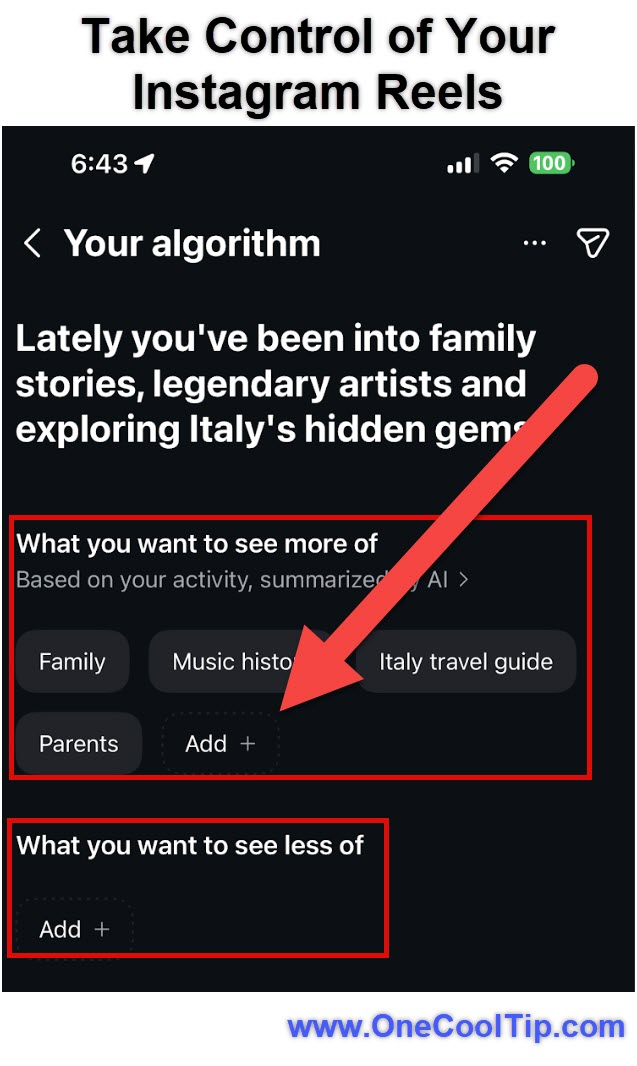
- Open Instagram app and tap Reels on the lower menu.
- Look for the icon in the top right-hand corner (two lines with hearts).
- Tap to open Your Algorithm.
- Review the interest labels.
- Tap Add+ to add interests.
-
Reels will reflect your choices.
- Tap an interest label to remove.
- Tap the Share icon to share your interests to your Story so that friends and followers can see what you're into.
|