One Cool Tip Newsletter

February 24, 2026

Your daily dose of tech-savvy brilliance!

😀Greetings! Happy Tuesday, Cool Tipper!


Get ready to streamline your digital life with simple, actionable tips delivered straight to your inbox.


Cool Tip Theme: WhatsApp Strict Account Settings


New here? Subscribe to the One Cool Tip Newsletter for daily updates. It's FREE!

3️⃣

If you enjoy the One Cool Tip newsletter, please forward this newsletter to THREE friends or colleagues or share it on social media using the links below.


Leave a Tip!


Share this One Cool Tip Newsletter!

X Share This Email
LinkedIn Share This Email
Pinterest Share This Email

🚨Substack Confirms Data Breach

Exposing Emails and Phone Numbers


Substack discovered an attacker accessed user information by exploiting a system weakness in October 2025.


The exposed data includes email addresses, phone numbers, and internal account metadata, though passwords, credit card numbers, and financial information were not affected.


The breach went undetected for up to four months, with Substack identifying evidence of unauthorized access on February 3, 2026.


The company has notified affected users by email and says it has fixed the underlying issue and launched a full investigation.


What You Should Do


  • Be cautious with unexpected emails or texts, especially those asking for personal information.
  • Watch for phishing attempts that use your email or phone number.
  • Review your Substack account for unusual activity and enable multifactor authentication if you haven’t already.


Cool Deals of the Day

Help support One Cool Tip. Use this Amazon link when you shop online.


Check out these Cool Deals:


  • 📱 Privacy Screen Protector: Keep prying eyes away from your secure chats while you are in public. From $8.95 Check it out on Amazon!


  • 🔋 Anker Magnetic Power Bank: Never let your phone die when you are managing your security settings on the go. Save 33% NOW $39.99 Check it out on Amazon!


  • 💻 Logitech MX Keys Keyboard: Professional keyboard with enhanced security shortcuts. Overall Pick. Now $129.99 Check it out on Amazon!


  • 🔊 Anker Soundcore Wireless Earbuds: Ideal for taking secure WhatsApp calls in noisy environments without broadcasting your conversation. Save 50% NOW $19.98 Check it out on Amazon!


*Prices accurate when originally published.

One Cool Tip may earn a commission from qualifying purchases.

Fuel Your Adventure

Try Big Mike's Jerky!


bigmikesjerky.com


Now on TikTok!


Today's Cool Tip

Lock Down Your Chats with WhatsApp’s Strict Account Settings


WhatsApp has introduced new Strict Account Settings designed to strengthen privacy and reduce unwanted contact. Here’s how the feature works, who gets it, and how to configure it for maximum control.


How many times have you been added to a random group chat or received a suspicious message from an unknown number? 


Messaging apps are essential for business and personal communication, but convenience often comes at the cost of privacy.


Here's a Cool Tip:  Set WhatsApp's Strict Account Settings.


WhatsApp’s latest privacy update, called Strict Account Settings, aims to rebalance that equation. 


These new controls give users stronger defenses against spam, unwanted group adds, and visibility exposure while preserving end-to-end encryption.


If you use WhatsApp for business coordination, family communication, or client outreach, this is a feature worth enabling.


Feature Explanation


Strict Account Settings adds an extra layer of privacy controls inside WhatsApp. 


It builds on existing settings such as Last Seen, Profile Photo, and Groups, but shifts your account toward a more restrictive posture by default.


In practical terms, it:

  • Limits who can add you to groups.
  • Reduces visibility of your profile details to unknown contacts.
  • Strengthens controls around messaging requests.
  • Helps prevent mass-add spam behaviors.


The feature is designed to provide stronger privacy protection while maintaining encrypted messaging.


Why it matters: 


  • Spam and phishing increasingly originate inside messaging platforms. Reducing unsolicited contact lowers social engineering risk for both home users and business professionals.


What You’ll Gain


With Strict Account Settings enabled, you can expect:

  • Fewer unwanted group chat invitations
  • Reduced exposure of your profile information
  • Lower risk of messaging-based scams
  • More control over who can reach you


Step-by-Step Instructions


Here's how to do it.


iOS


  1. Open WhatsApp.
  2. Tap Settings in the bottom-right corner.
  3. Select Privacy.
  4. Select Advanced.
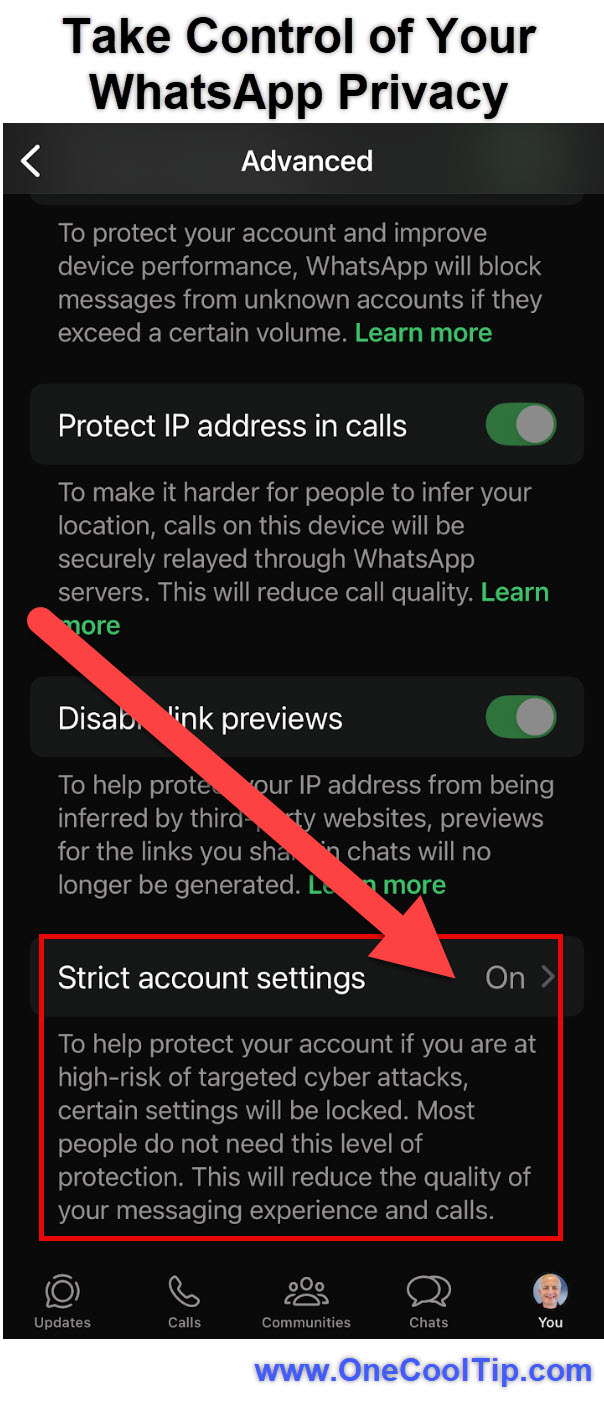
  5. Locate the new Strict Account Settings option.
  6. Enable the toggle.


fig. 1 - Take Control of Your WhatsApp Security

Android


  1. Open WhatsApp.
  2. Tap the three-dot menu in the top-right corner.
  3. Select Settings.
  4. Tap Privacy.
  5. Scroll to the bottom and tap Advanced.
  6. Enable Strict Account Settings or enhanced restrictions.


If you do not see the feature yet, it may still be rolling out.


Please note that these settings can only be managed from your primary mobile device


You cannot enable or disable Strict Account Settings from WhatsApp Web or the Desktop app.


Pros and Cons


Pros


  • Stronger spam protection that reduces unsolicited group invites for professionals.
  • Better client privacy for consultants, educators, and business owners.
  • Low-friction activation with simple toggle-based setup.
  • Preserves encryption while improving exposure control.


Cons


  • May limit networking if strict filtering blocks legitimate outreach.
  • Rollout timing varies, so some users may not see it yet.
  • Requires periodic review if your communication needs change.


Feature Access


  • Strict Account Settings is currently rolling out globally across iOS, and Android. 
  • Availability may vary by version and region.
  • No subscription is required. WhatsApp remains free to use.


Score

Criterion | Score (0–10) | Justification
Value 9
Strong protection against spam and unwanted contact, especially valuable for business users.
Usability 8
Simple toggle-based activation, but requires manual review of related privacy settings.
Wow Factor 6
Incremental improvement rather than a breakthrough feature.
Total: 23/30 👍 Good
A practical and necessary privacy upgrade that compares well with Telegram’s strict group controls and Signal’s privacy-first approach.


Key Takeaways


Strict Account Settings strengthens your control over who can contact you and view your profile. It reduces spam, protects sensitive information, and requires only a few minutes to enable.


Cool Tip Snapshot


  • Feature Name: Strict Account Settings.
  • Platform(s): iOS, Android.
  • Quick Benefit: Reduces unwanted contact and protects profile visibility.
  • Access Type: Free, currently rolling out.


Try It Yourself


Open WhatsApp today, enable Strict Account Settings, and review your privacy controls. 


Share this article with your team, family, and friends. 


READ MORE


Read the Full Cool Tip.

Check out these Cool Tips & Tricks.


  • Group Control: Limit who can add you to groups. Go to Settings > Privacy > Groups.


  • Profile Lock: Restrict profile photo visibility. Set it to My Contacts.


  • Last Seen: Hide your online activity. Adjust in Privacy settings.


  • Silence Unknown: Block unknown callers. Enable Silence Unknown Callers.


  • Blocked List: Review blocked contacts monthly. Open Privacy > Blocked.


  • Two-Step Verification: Add PIN protection. Enable in Account settings.


  • Security Notifications: Turn on login alerts. Enable in Settings > Account > Security.


  • Archived Chats: Keep inbox clean. Swipe left to archive.


  • Disappearing Messages: Auto-delete sensitive chats. Enable in chat settings

.

  • Linked Devices: Audit logged-in devices. Review under Linked Devices.


ICYMI - In Case You Missed It ...

ChatGPT Predicts Age to Make AI Safer


ChatGPT is beginning to infer whether a user is likely a minor or an adult, not to profile people, but to adjust safety protections in real time. This behind-the-scenes shift matters for parents, educators, and anyone who cares about how AI behaves responsibly.


Read the Full Cool Tip.

Read the Newsletter Version.

Looking for your next adventure?


Call Denise at Travel For You.

314.660.3039


Sign Up for the Monthly Newsletter


http://www.travelforyouvacations.com/


https://www.facebook.com/TRAVEL.FOR.U/


See You Tomorrow

Tomorrow's Cool Tip is waiting to amaze you.


Until then, go forth and conquer the tech world with your newfound knowledge!


Be sure to visit www.OneCoolTip.com for Cool Tech Tips for a Cooler Life!


And if you Like One Cool Tip, please support with TipJar!


Enjoy!


Rodger

Chief Cool Tipper

onecooltip.com@gmail.com


What Do You Think?

What do you think of today's OneCoolTip newsletter?
Positive        Neutral        Negative
X Share This Email
LinkedIn Share This Email

Connect with One Cool Tip!!

Facebook  X  Instagram  Web  Pinterest  YouTube  LinkedIn

As an Amazon Associate, One Cool Tip may earn a small commission from qualifying purchases.


Our media content is intended solely for informational purposes only. Please do not construe anything here as legal, tax, investment, financial, marital or other advice.


Copyright © 2026 | www.OneCoolTip.com | All Rights Reserved