|
One Cool Tip Newsletter
September 17, 2026
| Your daily dose of tech-savvy brilliance! | |
😀Greetings! Happy Siri Thursday, Cool Tipper!
Get ready to streamline your digital life with simple, actionable tips delivered straight to your inbox.
Cool Tip Theme: iOS 27 Siri AI
Siri AI in iOS 27 understands context, works across apps, and answers natural questions. See who gets it and how to start using it.
New here? Subscribe to the One Cool Tip Newsletter for daily updates. It's FREE!
| |
3️⃣
If you enjoy the One Cool Tip newsletter, please forward this newsletter to THREE friends or colleagues or share it on social media using the links below.
Leave a $$$ Tip!
Share this One Cool Tip Newsletter!
| | |
🚨The Phone Call That Sounds Official Could Be a Scam🚨
A growing scam is targeting consumers by impersonating government agencies and law enforcement officials.
According to the FBI's Internet Crime Complaint Center, criminals use phone calls, texts, emails, and even AI-powered video calls to appear legitimate and pressure victims into sending money or sharing personal information.
Between January 2025 and July 2026, these scams generated nearly 61,000 complaints and more than $1.6 billion in reported losses.
The best defense is a healthy dose of skepticism.
Real government agencies and law enforcement officials do not call, text, or video chat demanding immediate payment, cryptocurrency, gift cards, or sensitive personal information.
While AI can make scams more convincing, it can also remind us why independent verification matters.
If you receive an unexpected message from someone claiming to be an official, hang up and contact the agency directly using information from its official website.
And in Other News...
- Apple vs. OpenAI: Why This Legal Fight Matters to Everyday Tech Users
A growing legal battle between Apple and OpenAI highlights a challenge facing many technology companies in the AI era: how to attract top talent while protecting valuable business information.
Apple alleges that former employees improperly retained confidential information, while OpenAI argues that no trade secrets were stolen and that employees have the right to change jobs.
The dispute comes as competition in artificial intelligence and consumer technology continues to intensify.
The case is a reminder that the race to build better AI tools involves not only innovation, but also questions about intellectual property and corporate responsibility.
Supporters of AI see these employee moves as a normal part of a fast-moving industry, while critics worry about whether companies can adequately safeguard sensitive information.
Regardless of the outcome, the case could influence how tech firms recruit talent and protect trade secrets in the years ahead.
| |
| 🤔 What excites or concerns you most about Siri AI in iOS 27? | | | | |
Help support One Cool Tip. Use this Amazon link when you shop online.
Check out these Cool Deals:
| | |
Apple AirPods Pro 3 Wireless Earbuds with Active Noise Cancellation: Enjoy premium wireless audio while staying connected to the trusted Apple devices associated with your Apple Account.
Save 20%. Now $199. 4.4 Stars. Check it out on Amazon!
Apple Watch Series 11 [GPS 42mm]: Keep notifications and Apple services close at hand through a wearable connected to your Apple Account and paired iPhone.
Look👉 Now $379.05. 4.7 Stars. Check it out on Amazon!
Apple iPad 11-inch: A trusted iPad can provide another convenient way to manage your Apple Account, reset your password, and access Apple services.
Save 11%. Now $399.99. 4.7 Stars. Check it out on Amazon!
*Prices accurate when originally published.
One Cool Tip may earn a commission from qualifying purchases.
| | |
iOS 27 Gives Siri the Upgrade iPhone Users Wanted
iOS 27 introduces Siri AI, a more conversational assistant that can use personal context, understand what is on your screen, and take action across supported apps. The upgrade is significant, but hardware, language, region, age, beta status, and daily usage limits determine who can use it.
Siri has long handled timers, calls, directions, and simple questions.
Ask it to find an old email, understand what is on your screen, or continue a complicated conversation, however, and the experience could quickly fall apart.
Here’s a Cool Tip: Update to iOS 27, enable Apple Intelligence, then give Siri a task with context.
iOS 27 changes that equation. Apple’s new Siri AI combines conversational answers, personal context, onscreen awareness, broader knowledge, and actions inside supported apps.
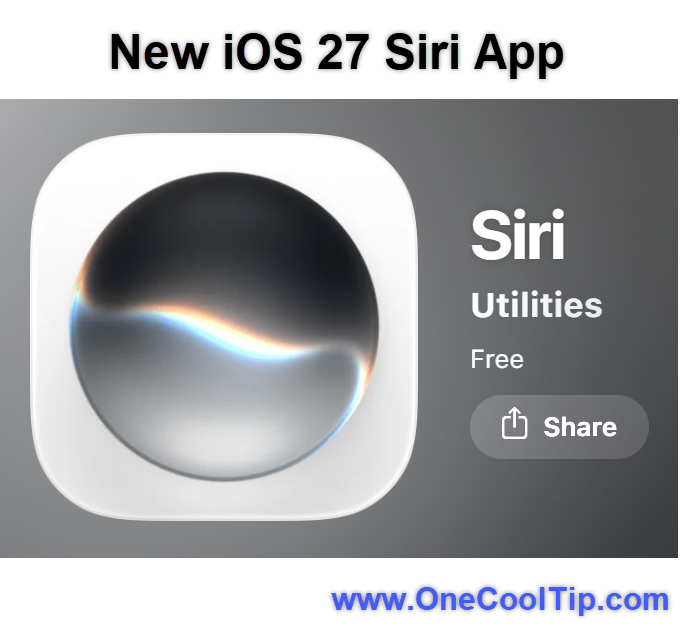
It also adds a dedicated Siri app that stores conversations and syncs them through iCloud across compatible Apple devices.
This is not a universal upgrade for every iPhone that can install iOS 27.
Apple lists the iPhone 15 Pro, iPhone 15 Pro Max, iPhone 16 models or later, iPhone Air, and iPhone Duo as supported. Some regions, languages, devices, and features have additional restrictions.
What Siri AI Does
Siri AI is Apple’s next-generation assistant, powered by Apple Intelligence.
You can speak or type naturally, ask follow-up questions, and use it for open-ended work such as brainstorming or drafting.
Its personal-context tools can locate information in Mail, Messages, Photos, and Notes without requiring you to remember an exact filename or phrase.
Onscreen awareness lets Siri answer questions about information already displayed.
App actions can create reminders, send email, add calendar events, edit a recently sent message, enhance a photo, or add music to a playlist when the relevant app supports the action.
A new Siri mode in Camera combines the assistant with Visual Intelligence so you can ask about an object or scene in front of the camera.
The dedicated Siri app is more than a larger search box.
It gathers conversation history in one place, lets you pin useful threads, and uses iCloud to sync history across compatible devices.
Write with Siri can draft new text or refine existing writing.
In Mail and Messages, it can adapt to the user’s writing style, punctuation, and tone.
What You’ll Gain
- Find buried emails, photos, messages, and notes with a natural request.
- Complete multistep tasks without jumping through several apps.
- Ask follow-up questions without restating the entire subject.
- Continue a Siri conversation across compatible Apple devices.
Step-by-Step Instructions
Here's how to do ir.
iPhone/iPad
-
Back up the device, connect it to power and Wi-Fi, then open Settings > General > Software Update.
-
Install iOS 27 or iPadOS 27 if it is offered to your device.
-
Open Settings > Apple Intelligence & Siri and turn on Apple Intelligence if the option is available. Apple says the device and Siri language must be set to a supported language. Availability can vary by region, device, and rollout status.
-
Invoke Siri with “Siri” or “Hey Siri,” press and hold the side button, or open the dedicated Siri app. Type or speak a natural request.
-
Try a contextual request such as: “Find the email with my October hotel confirmation and create a reminder to check in the day before.” Review any proposed action before approving it.
-
To use onscreen context, open the relevant page, photo, message, or document and ask Siri a question about what is displayed.
| | fig. 1 - New iOS 27 Siri App | | |
Note: If you need to reload the new iOS Siri, you can download it HERE.
macOS
-
Install macOS 27 from System Settings > General > Software Update.
-
Open System Settings > Apple Intelligence & Siri, enable Apple Intelligence, and confirm that the Mac uses a supported language.
-
Open the Siri app, use the menu bar control, or invoke Siri with your configured shortcut.
-
Ask Siri to locate information, explain onscreen content, draft text, or perform a supported app action.
Apple Watch and Apple Vision Pro
- Siri AI is also rolling out on supported Apple Watch and Apple Vision Pro hardware.
- Apple Watch support requires Apple Watch Series 9 or later, Apple Watch Ultra 2 or later, or Apple Watch SE 3 paired with an Apple Intelligence-enabled iPhone.
- Some Apple Watch features require the iPhone to be nearby.
Pros and Cons
Pros:
-
Better continuity: Follow-up questions make Siri more useful for research, planning, and troubleshooting.
-
Personal retrieval: Natural-language searches can locate details across supported personal apps.
-
Fewer app switches: Supported actions can turn information into reminders, messages, calendar events, and other results.
-
Cross-device history: The Siri app can sync conversations through iCloud across compatible Apple products.
-
Multiple input methods: Users can talk or type, which helps in quiet workplaces and noisy public spaces.
Cons:
-
Limited hardware: Many iPhones that run iOS 27 do not qualify for Siri AI.
-
Beta limits: Siri AI is rolling out as a beta, so users may encounter errors or inconsistent behavior.
-
Language and region gaps: English arrived first. The EU and China have additional restrictions.
-
Usage caps: Apple says server-dependent features can be subject to daily limits, with expanded access planned as a future paid option.
Feature Access
-
Status: Rolling out as a beta in English beginning September 14, 2026.
-
Additional Siri AI languages: Apple announced French, Japanese, Korean, Portuguese, and Spanish for October 2026.
-
iPhone hardware: iPhone 15 Pro, iPhone 15 Pro Max, iPhone 16 models or later, iPhone Air, and iPhone Duo.
-
Other hardware: iPad mini with A17 Pro, iPads with M1 or later, MacBook Neo with A18 Pro, Macs with M1 or later, Apple Vision Pro, and specified newer Apple Watch models.
-
Regions: Initially unavailable on iPhone, iPad, and Apple Watch in the EU. Siri AI and other new Apple Intelligence features are unavailable in China at launch.
-
Age: Not available to users under 13.
Score
Criterion | Score (0–10) | Justification
Value | 9
Personal retrieval and cross-app actions address real limitations in the old Siri. The benefit rises sharply for users already invested in Apple apps.
Usability | 7
Natural conversation is approachable, but beta status, compatibility rules, regional limits, and usage caps complicate the experience.
Wow Factor | 9
Onscreen awareness, personal context, and app actions turn Siri into a substantially broader assistant.
Total: 25/30 | 🌟 Excellent
Siri AI is the most consequential Siri upgrade yet, but its excellent score applies to eligible users who can tolerate beta limitations.
Compared with ChatGPT, Gemini, and Copilot, Siri AI’s distinctive advantage is its operating-system integration and access to supported personal context. Its disadvantage is that it is tied to Apple hardware and a controlled rollout.
Key Takeaways
Siri AI can retrieve personal information, understand onscreen content, hold longer conversations, and act across supported apps.
Check hardware, language, and region eligibility before upgrading specifically for Siri AI, then verify every consequential action while the feature remains in beta.
Cool Tip Snapshot
-
Feature Name: Siri AI.
-
Platform(s): iOS 27, iPadOS 27, macOS 27, watchOS 27, visionOS 27.
-
Quick Benefit: Find information and complete supported tasks using natural conversation.
-
Best For: Apple users who manage email, messages, photos, notes, schedules, and reminders.
-
Access Type: Beta, Rolling Out.
-
Difficulty: Easy.
Try It Yourself
Update an eligible device, enable Apple Intelligence, and ask Siri to find one useful item you would normally hunt down manually.
Tell us how it worked, subscribe to the One Cool Tip newsletter, and share this Cool Tip with family, friends, and coworkers.
READ MORE
Read the Full Cool Tip.
| | |
Check Out These Cool Tips & Tricks
-
Speak Naturally: Siri AI understands conversational phrasing, so ask a complete question instead of stacking keywords. Invoke Siri and describe the outcome you want.
-
Add Context: Names, dates, locations, and app names help Siri find the correct item. Say, “Find the hotel email from my husband for our December trip,” rather than “Find my hotel.”
-
Ask Follow-Ups: Keep the conversation going without repeating every detail. After the first answer, ask, “What time does it start?” or “Add that to my calendar.”
-
Use the Screen: Ask about a message, photo, page, or document already displayed. Open the content first, then invoke Siri and refer to “this.”
-
Type Quietly: Use typed requests in meetings, airplanes, and other quiet settings. Open the Siri app or use Type to Siri when that control is available.
-
Review Actions: Check recipients, dates, wording, and attachments before Siri sends or saves anything. Read the confirmation card before approving the action.
-
Pin Threads: Keep recurring plans or research easy to find in the Siri app. Open a useful conversation and use the pin control when available.
-
Refine Drafts: Ask Write with Siri to shorten, clarify, or change the tone of text. Select the text, open the writing control, and describe the revision.
-
Protect Privacy: Reduce access if you do not want Siri using a particular app’s data. Review permissions under Apple Intelligence, Siri, iCloud, and the app’s settings.
-
Keep Updated: Beta features improve through software updates. Check Settings > General > Software Update and review Apple’s feature-availability page.
| | ICYMI - In Case You Missed It ... | | | | |
Control Your Instagram Reels Algorithm
Take back control of what shows up in your Reels feed with new tools that let you shape, reset, and fine-tune what Instagram recommends. With a few taps, you can steer recommendations toward what actually matters to you.
Read the Full Version.
Read the Newsletter Version.
| | |
Tomorrow's Cool Tip is waiting to amaze you.
Until then, go forth and conquer the tech world with your newfound knowledge!
Be sure to visit www.OneCoolTip.com for Cool Tech Tips for a Cooler Life!
And if you Like One Cool Tip, please support with TipJar!
Enjoy!
Rodger
Chief Cool Tipper
onecooltip.com@gmail.com
| |
| What do you think of today's OneCoolTip newsletter?
| | | | Connect with One Cool Tip! | | |
|
As an Amazon Associate, One Cool Tip may earn a small commission from qualifying purchases.
Our media content is intended solely for informational purposes. Please do not construe anything here as legal, tax, investment, financial, marital or other advice.
Copyright © 2026 | www.OneCoolTip.com | All Rights Reserved
|
| | | |