|
Android
-
Open the Gemini app and sign in with your personal Google Account.
-
In a regular chat, ask “@Google Wallet, which airline loyalty cards have I saved?”
-
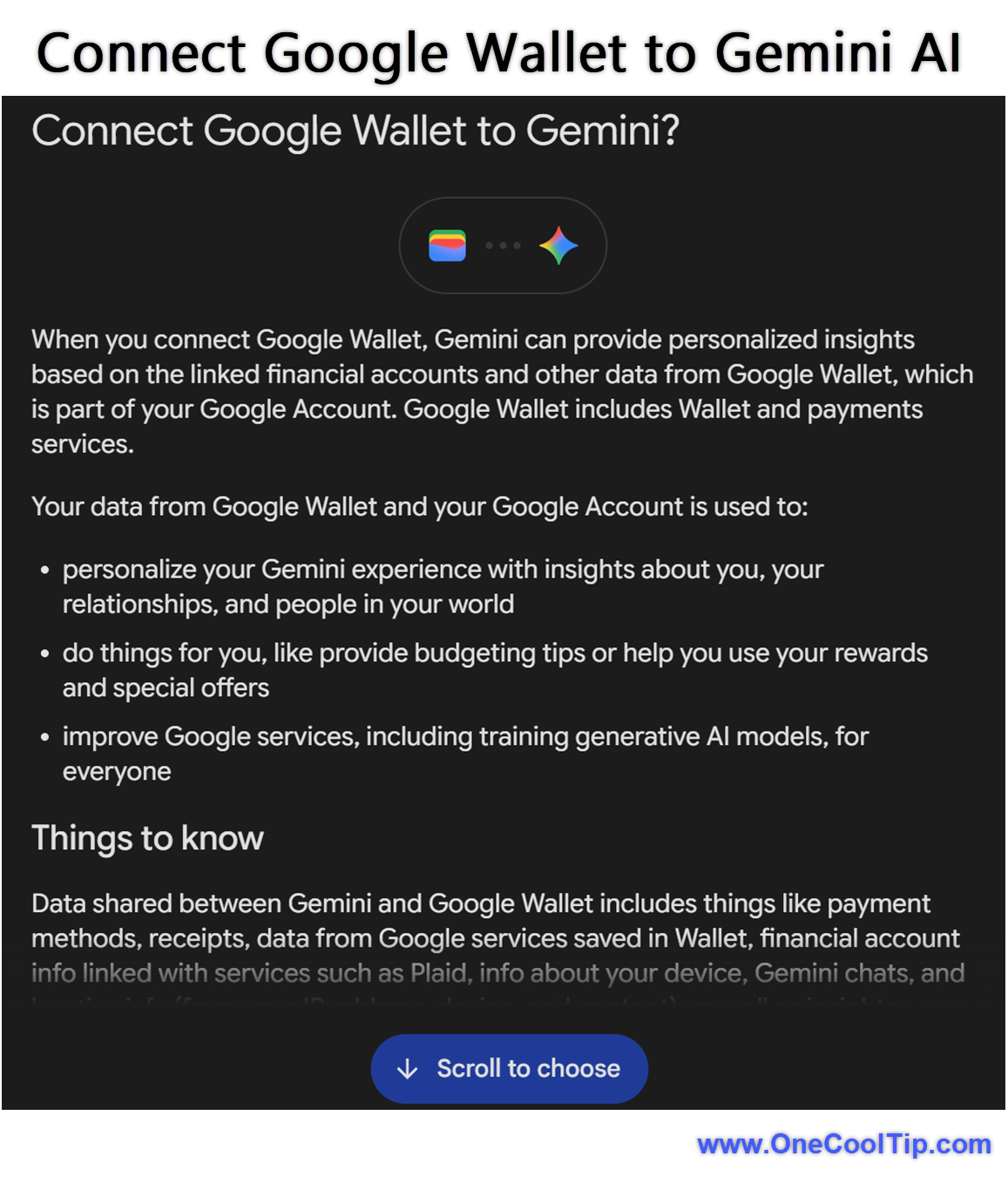
If Gemini offers to connect Google Wallet, follow the prompts.
-
Send your question again if needed.
iPhone and iPad
-
Open the Gemini app and sign in with your personal Google Account.
-
In a regular chat, ask “@Google Wallet, show me my saved airline loyalty cards.”
-
Follow the prompts if Gemini offers to connect Google Wallet.
-
Check the response for your saved loyalty cards.
-
For passes you saved in Apple Wallet, open Apple Wallet directly.
Cool Note:
You can now add Google Wallet to your iPhone. Learn more here:
Pros and Cons
Pros:
- You can ask for a specific pass without scrolling through Wallet.
- You can try pass lookup before linking a financial account.
- A recurring-charge summary gives you a starting point for reviewing subscriptions.
Cons:
- Cash purchases and unlinked accounts can leave gaps in spending summaries.
- Wallet access requires Gemini History to be on.
- The option may still be missing from eligible accounts during the rollout.
Who Should Skip This
If you keep only a few passes, opening Wallet may be quicker.
If you keep Gemini History off, you can still use Wallet for passes and your bank or card app to review spending.
Real-World Examples
-
Frequent traveler: Ask which airline loyalty cards you’ve saved before booking a fare. Verify the membership number in Wallet before adding it to the reservation.
-
Household organizer: Ask “@Google Wallet, list recurring streaming charges from my linked accounts over the past three months.” Confirm each charge against your statement before acting.
-
Eventgoer: Ask whether there’s an offer tied to a pass you saved in Wallet. At the venue, open Wallet or the ticket issuer’s app to show the barcode.
Configuration Guide
On the web, go to Settings → Personal Intelligence → Connected Apps.
Select Add to connect Google Wallet when it’s offered.
To turn off access, open More options next to Google Wallet and select Disconnect.
To remove a financial connection, open Google Wallet on the web → Settings → Accounts linked with Plaid.
Select the account, click Unlink and confirm.
This is a separate control from disconnecting Wallet in Gemini.
Troubleshooting and Limitations
Problem: Google Wallet doesn’t appear.
-
Why It Happens: Your account may be ineligible or still waiting for the rollout.
-
Fix or Workaround: Check your account type, language and Gemini History. Try a Wallet prompt in a regular Gemini chat.
Problem: Gemini gives a general answer.
-
Why It Happens: Gemini may have treated your prompt as a general question.
-
Fix or Workaround: Add @Google Wallet and name the pass, merchant or date range.
Problem: A spending total looks low.
-
Why It Happens: Some purchases may be on an unlinked account or outside the dates you requested.
-
Fix or Workaround: Check the linked accounts and compare the result with your statement.
Problem: Wallet requests fail in Gemini Live or a Gem.
-
Why It Happens: Google excludes those features from the Wallet connection.
-
Fix or Workaround: Open a regular Gemini chat and ask again.
Privacy and Data Notes
Gemini can use saved pass details and linked financial data.
Google and Plaid store account information, including transaction history, while your financial account is linked.
Earlier chats can remain in Gemini History after you disconnect Wallet.
You can review or delete those chats and manage AI training choices in Gemini History.
Feature Access
Google is gradually rolling out the English-language connection to U.S. users 18 and older.
You need an eligible personal Google Account and Gemini History turned on.
Eligible free users can use the feature on the web or in the Gemini app for Android, iPhone and iPad.
Work, school and supervised accounts are excluded.
Score
Criterion | Score (0–10) | Justification
Value | 8
Useful for finding travel details and reviewing recurring charges.
Usability | 7
The Wallet tag is easy to use once the account and History settings are in place.
Wow Factor | 7
Gemini can look for patterns across transactions from linked accounts.
Total: 22/30 | 👍 Good
Worth trying if you use Google Wallet regularly and want to find saved passes by asking a question.
Key Takeaways
Start with a pass you’ve already saved.
If you decide to link a financial account, include a merchant or date range in spending questions and verify any charges you plan to act on.
Cool Tip Snapshot
-
Feature Name: Google Wallet in Gemini
-
Platform(s): Gemini web app, Android, iPhone and iPad
-
Quick Benefit: Ask for saved passes, rewards and spending summaries.
-
Best For: Frequent travelers and people reviewing recurring charges
-
Access Type: Free, rolling out to eligible U.S. accounts
-
Difficulty: Easy
Learn More
Google’s guide covers eligibility, setup by device and the Wallet requests you can make in Gemini.
Try It Yourself
Ask Gemini to find a pass you’ve saved in Google Wallet.
Tell us in the comments how it went, subscribe to the free One Cool Tip Newsletter and share this tip with family, friends and coworkers.
READ MORE
Read the Full Cool Tip!
|