|
How to Use "Thinking with 3 Pro" in Google Gemini
Unlock deep reasoning, self-correcting logic, and dynamic visual layouts with Google's most powerful AI mode yet.
Have you ever stared at a complex problem and wished you could see the actual thought process behind the answer?
Here's a Cool Tip: Think with Gemini 3 Pro.
Google has just rolled out "Thinking with 3 Pro," a new mode in the Gemini app and Google Search that does exactly that, pausing to reason, plan, and even self-correct before it speaks.
What Is "Thinking with 3 Pro"?
"Thinking with 3 Pro" is a specialized toggle available within the Gemini interface that activates Google's Gemini 3 Pro model, released in late 2025.
Unlike the standard "Fast" mode (powered by Gemini 3 Flash), this mode dedicates significantly more compute power to "ponder" your query.
It breaks down multi-step problems, writes and tests code internally, and generates dynamic visual layouts, like interactive charts or custom simulations—right in the chat window.
What You’ll Gain
-
Transparent Logic: See the "Thought Signatures" where the AI shows its reasoning steps.
-
Higher Accuracy: Reduced errors in math, coding, and logic puzzles due to internal self-correction.
-
Dynamic Visuals: Generate on-the-fly infographics and interactive tools instead of just text.
-
Deep Research: Handle queries that require synthesizing data from dozens of sources.
Step-by-Step Instructions
Here's how to do it.
On Desktop (Web)
-
Navigate to Google Search, www.Google.com.
-
Select AI Mode.
-
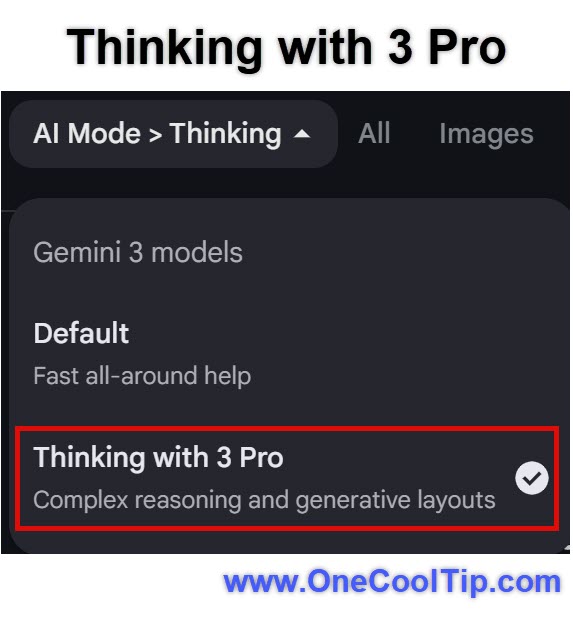
Select 'Thinking with 3 Pro' from the AI Mode dropdown.
-
Or Navigate to gemini.google.com.
-
Select 'Thinking' or 'Pro'.
-
Type a complex prompt (e.g., "Create a 7-day meal plan for a family of four, optimizing for zero food waste by reusing ingredients across multiple recipes").
-
Google generates the output.
|