|
One Cool Tip Newsletter
March 6, 2026
| Your daily dose of tech-savvy brilliance! | |
😀Greetings!, Happy Friday Funday, Cool Tipper!
Get ready to streamline your digital life with simple, actionable tips delivered straight to your inbox.
Today's Cool Tip Theme: Drive with Star Trek
IN THIS ISSUE
- 🌐 Chrome Speed Boost: Google is doubling the pace of Chrome updates to every two weeks starting September 2026.
- 🤖 AI Road Trip Planner: Use our "Starfleet Logistics" prompt to turn your next journey into a mission briefing.
- 🖖 Waze Star Trek Experience: Boldly go with The Doctor as your co-pilot and the U.S.S. Athena as your vehicle.
- ⛽ Gas Price Finder: Use the hidden "Gas" button in Waze to find the cheapest fuel in your sector.
- 💻 Waze on the Web: Plan your route on the big screen and send it directly to your phone.
- 🎙️ Custom Voice Navigation: Record your own turn-by-turn directions or share them with friends.
New here? Subscribe to the One Cool Tip Newsletter for daily updates. It's FREE!
-
😂 Laugh with Us! Enjoy our Tech Joke of the Day, Haiku and Cool Tip Comics.
-
🌐 Stay Informed! Check out ICYMI, and our One Cool Tip Video.
| | |
3️⃣
If you enjoy the One Cool Tip newsletter, please forward this newsletter to THREE friends or colleagues or share it on social media using the links below.
Leave a Tip!
Share this One Cool Tip Newsletter!
| | |
Today's Tech Trivia
Answer at the end of this newsletter.
| |
| When did the U.S. stop "Selective Availability," the intentional blurring of civilian GPS? | | | | |
🚨Chrome Is About to Update Twice as Fast 🚨
Google announced a major shift: starting September 2026, Chrome will move from a four‑week release cycle to a two‑week one. That means faster security patches, quicker feature rollouts, and smaller, easier‑to‑test updates for users on Windows, macOS, Linux, Android, and iOS.
What’s Changing
-
New schedule: A fresh Chrome stable release every 14 days beginning with Chrome 153 on September 8, 2026.
-
Why it matters: Smaller updates reduce breakage and get security fixes into users’ hands sooner.
-
Enterprise impact: The Extended Stable channel stays on its eight‑week cycle, so IT teams still have breathing room.
-
Platforms: Applies across desktop, Android, and iOS. Dev and Canary channels remain unchanged.
What You Should Do
- Enable automatic updates so you receive security fixes as soon as they ship.
- Test critical extensions ahead of time if you manage devices for a business.
- Bookmark Chrome’s release notes to keep track of what’s new every two weeks.
| | |
Try this Cool AI prompt. Copy and paste to ChatGPT, Gemini or Copilot.
"I am planning a road trip from [Starting City] to [Destination City].
Act as a Starfleet Logistics Officer.
Provide a 'mission briefing' that includes the most efficient route, three 'scout-worthy' landmarks or quirky roadside attractions to visit along the way, and a checklist of 'emergency rations' (local snacks) I should acquire in each sector."
| | |
Boldly Go to Your Next Destination with the Waze Star Trek Experience
Add a touch of science fiction to your commute by navigating with The Doctor from Star Trek guiding your route in Waze.
Imagine your daily commute feeling less like a chore and more like an adventure through space.
Here's a Cool Tip: Drive with Star Trek.
Waze has teamed up with Star Trek to make that happen for drivers, blending navigation with a beloved sci-fi universe.
Feature Explanation
The new “Drive with Star Trek” experience in Waze lets you navigate with voice guidance provided by The Doctor (voiced by Robert Picardo), the holographic medic from Star Trek: Starfleet Academy as your co-pilot.
You can also customize your in-app mood and vehicle icon to fit the Star Trek theme.
Why It Matters
This is more than a cosmetic change.
Special voice packs and themed icons make the navigation experience more fun, keep users engaged with directions, and highlight how Waze continues to collaborate with pop culture franchises to make everyday tasks feel fresh and enjoyable.
What You’ll Gain
- Navigation with a recognizable voice familiar to Star Trek fans.
- Themed map icons and moods for visual flair.
- Keeps routine drives entertaining and memorable.
Step-by-Step Instructions
Here's how to do it.
iOS and Android
-
Open the Waze app (iOS / Android).
-
Tap the menu icon.
-
Tap Pick a Sidekick.
-
Tap Drive with Star Trek.
-
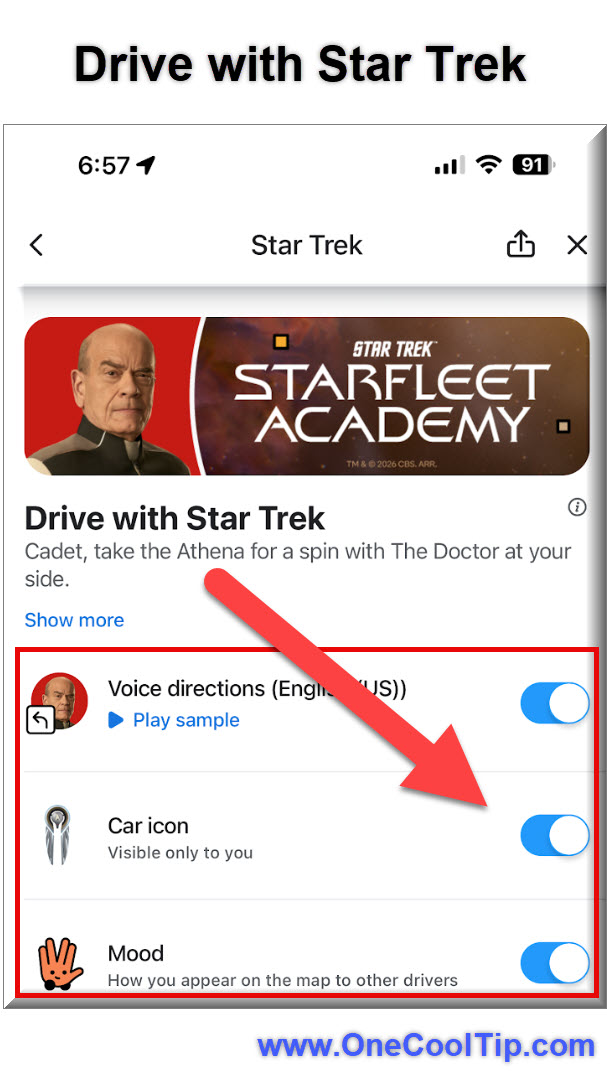
Toggle these options on:
-
Voice directions: English (US).
-
Car icon: Visible only to you.
-
Mood: How you appear on the map to other drivers.
| | fig. 1 - Enable Drive with Star Trek Example | |
Pros and Cons
Pros
- Brings entertainment value to navigation.
- Great for fans of the franchise.
- Encourages use of Waze over default navigation in some cases.
Cons
- Not a utility feature if you’re looking only for efficiency.
- Some drivers may find character voices distracting.
- The novelty could wear off over time.
Feature Access
This experience is currently available globally in English for Waze users who have updated to the latest app version.
Score
Criterion | Score (0–10) | Justification
Value 7
Adds enjoyment but does not change core navigation accuracy.
Usability 8
Easy to activate and use.
Wow Factor 9
Themed experience feels fresh and fun.
Total: 24/30 | 👍 Good
A fun, engaging navigation twist for Star Trek fans, best for users who enjoy themed experiences.
Key Takeaways
This new feature turns routine navigation into an entertaining experience with character-voice guidance and theme customization.
It is especially fun for fans and anyone who enjoys adding personality to ordinary tasks.
Cool Tip Snapshot
-
Feature Name: Drive with Star Trek.
-
Platform(s): Waze on iOS and Android.
-
Quick Benefit: Make drives more engaging and thematic.
-
Access Type: Free with Waze app update.
Try It Yourself
Update Waze, find the Star Trek experience in the menu, apply it, and enjoy your next drive with a voice from the final frontier.
READ MORE
Read the Full Cool Tip.
| | Help support One Cool Tip. Use this Amazon link when you shop online. | |
-
🚗 iOttie Easy One Touch 6 Universal Car Mount (Dashboard & Windshield): Rock-solid phone mounting with one-touch locking keeps Waze visible and stable for turn-by-turn guidance. $15.19 Check it out on Amazon!
-
🔌 Anker PowerDrive Speed+ 2 USB Car Charger (Quick Charge 3.0): Fast dual-port charging keeps your phone powered during GPS use, music streaming, and bright map displays. $16.99 Check it out on Amazon!
-
🎙️ Jabra Talk 45 Bluetooth Headset: Clear calls and voice prompts without touching your phone, great for hands-free navigation and safety. $145.99 Check it out on Amazon!
-
🔊 Avantree Roadtrip Bluetooth Speaker & FM Transmitter: Streams Waze audio and music through car speakers, ideal for older vehicles without modern infotainment. $64.99 Check it out on Amazon!
Prices accurate at time of publication
One Cool Tip may earn a commission from qualifying purchases.
| | |
🆒Tell Me More
- Waze regularly releases themed voice packs tied to major entertainment franchises.
- You can mix and match voice, mood, and vehicle icon independently.
- Voice packs often include custom phrases for hazards and reroutes.
- Themed modes are easy to toggle off when you want standard navigation.
⏩Quick Tips
- 🛰️ Offline Maps: Download your local area maps in Google Maps as a backup in case you enter a "dead zone" in the Neutral Zone.
- 🚦 Report Hazards: Tap the orange report icon in Waze to warn other "cadets" about road debris or police presence.
- 🎧 Audio Sync: Connect your Spotify account within Waze settings to control your music without leaving the navigation screen.
- 🕒 Planned Drives: Use the "Planned Drives" feature to see exactly when you should "warp" out of your driveway to arrive on time.
| | ✅ More Must-Read Tech Tips | | |
👀 How Do I Find the Best Gas Prices?
All hail the mighty power of Waze.
We've told you how the Waze app can help you navigate your next drive by avoiding congestion, police and road hazards.
But it's also a great way to find the best gas prices too.
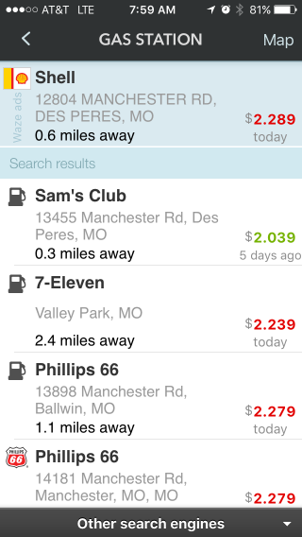
You can find the closest stations to you as well as brands and current prices.
Here's how to do it. On the Android and iOS mobile apps:
-
Open the Waze app.
-
Tap the Where to? search at the bottom of the screen.
-
Tap on Gas
- View nearby gas stations and prices. You'll see the gas brand names and current prices as well as the distance to the station.
-
Tap Go to navigate to the gas station.
Now you're ready to roll.
Discover more HERE.
| | |
Did you know that you can use Waze on a PC?
Access real-time traffic updates, find gas stations, report hazards, and even earn points - all without draining your phone's battery or squinting at a tiny screen.
How to Navigate with Waze Web:
-
Head to: https://www.waze.com/ on your desktop or laptop.
- Allow location access.
-
Enter your destination and choose your preferred route.
-
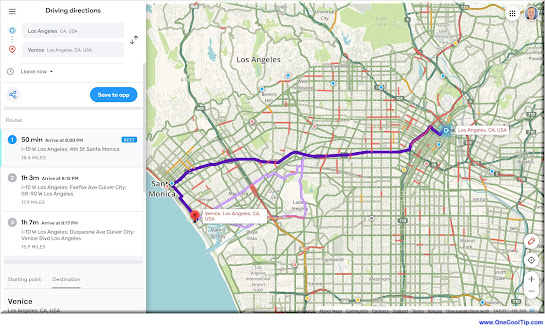
See live traffic updates, accidents, police traps, and even gas prices along your route.
-
Report hazards, accidents, and road closures to help other drivers on the road.
-
Save your driving route instructions to your mobile phone Waze app by selecting the "Save to app" button.
Use Waze on the Web on your laptop to research the best route, avoid construction zones, and find gas stations along the way.
Find out more HERE.
| | |
Waze lets users create their own custom audio and also the ability to share that audio with others.
Here's how to record your voice directions:
-
Open Waze app on your mobile phone.
-
Tap the Hamburger menu (three lines)
-
Tap Settings.
-
Tap Voice and sound.
-
Tap Waze voice.
-
Tap Add a voice.
-
Click OK on the Safety Warning screen (after reading!)
-
Tap Name your voice.
-
Tap Enter a name for your custom voice to give your set of recordings a name.
-
Tap Done.
-
Tap on the type of direction you'd like to record,
-
Tap the record icon to start recording and stop when you've finished recording.
-
To play your recording back, tap the play icon.
-
Tap Save.
A few suggestions when making and using the custom voice navigation:
- Be accurate when recording your custom navigation. Safety first!
- Your voice recording is saved locally. So it is possible that it can be deleted when you uninstall the Waze app.
- Did you read the warning above about being accurate when making a custom recording? Safety first!
- Custom voice navigation is not as complete as the normal voice navigation options. Use a custom voice when you are familiar with your travel plans and destinations. Use the default voice options when you need more precise street names for your audio navigation.
Learn more HERE.
| | |
❓Did you share this newsletter with three friends yet?
😎 Cool Facts
-
50: Waze supports over 50 voice navigation languages. Source.
-
$1.1 Billion: Google acquired Waze for $1.1 billion in 2013. Source.
-
50 Million: Waze has tens of millions of monthly active users globally. Source.
⌨️Today's Cool Shortcuts
- 📍 Saved Favorites: Start common trips instantly from the home screen. Swipe the row of icons under the search bar and tap a saved location to begin navigation without typing.
- 🕘 Recent Destinations: Revisit places you have just been with one tap. Tap the "Where to?" search bar to see a list of your most recent trips and select one to start your route.
- 🏠 Home & Work Shortcuts: Skip the search for your most frequent daily commutes. Set your addresses once under the "Saved" menu, then tap the Home or Work icon at the top of the search list for immediate routing.
😜 Tech Joke of the Day 😅
How do you know a starship is in trouble?
When the navigator says, "Recalculating..." every five seconds.
🔎 Do you have a Cool Tip or tech question? Email us at onecooltip.com@gmail.com.
| | |
Course is set for home,
The Doctor guides the starship,
Traffic fades away.
| |
| 🤔 Would you use a themed navigation voice? | | | | Did You See These Cool Tips This Week? | | | | Flash Your iPhone Screen for Notifications You Might Otherwise Miss | |
Missed calls and texts often happen when your phone is muted or across the room. The iPhone’s flash notification feature turns your screen or camera flash into a visual alert so you always know when something important arrives.
Read the Newsletter Version.
| | | | Windows 11 Adds a One Click Internet Speed Test in the Taskbar | |
Windows 11 now includes a built-in shortcut that lets you check your internet speed directly from the taskbar. It is a small change that saves time when troubleshooting slow connections.
Read the Newsletter Version.
| |
ICYMI - In Case You Missed It ...
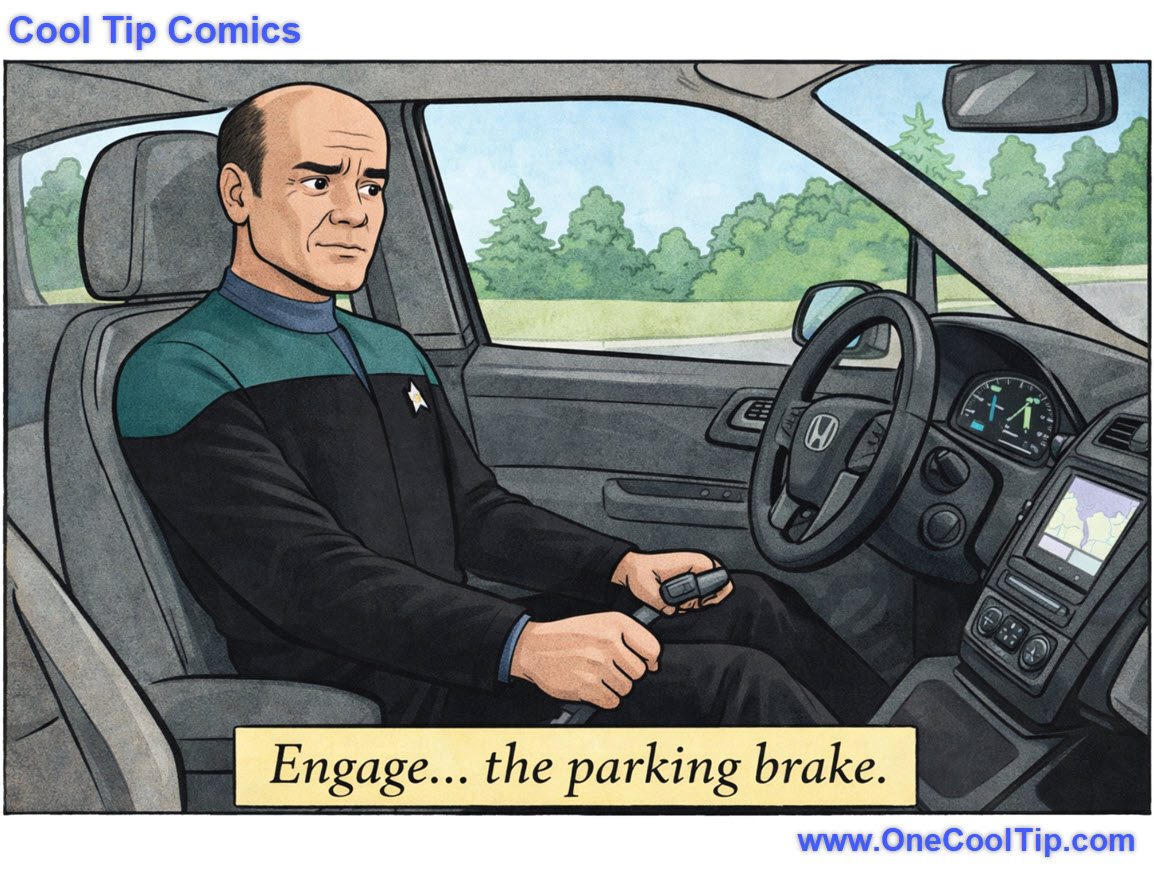
| | | | Watch Sesame Street for Free: How to Access the New Digital Library | The sunny days are officially here for streaming. You can now access over 100 full-length episodes of Sesame Street for free on YouTube. | | Boldly parking where no driver has parked before. 🚗✨ | | |
Trivia Answer: B) 2000
Before May 2000, civilian GPS was intentionally blurred for "national security" reasons, making it accurate only within about 100 meters.
On the orders of President Bill Clinton, the military turned off this degradation, instantly making civilian GPS ten times more accurate.
This single decision paved the way for modern turn-by-turn navigation, ride-sharing apps, and even themed Waze voices.
----------
Tomorrow's Cool Tip is waiting to amaze you.
Until then, go forth and conquer the tech world with your newfound knowledge!
Be sure to visit www.OneCoolTip.com for Cool Tech Tips for a Cooler Life!
And if you Like One Cool Tip, please support with TipJar!
Enjoy!
Rodger
Chief Cool Tipper
onecooltip.com@gmail.com
| |
| What do you think of today's OneCoolTip newsletter? | | | |
Please Share the One Cool Tip Newsletter!
You asked for it. You got it. There is now a One Cool Tip Newsletter archive. Did you delete a newsletter and want to read it again? Check it out HERE.
Want to help One Cool Tip grow? Please forward this email using the link above. And if you see an OCT social media post, please LIKE, COMMENT and SHARE!
Have you subscribed to the One Cool Tip YouTube channel? Subscribe HERE.
| | Connect with One Cool Tip!! | | |
|
As an Amazon Associate, One Cool Tip may earn a small commission from qualifying purchases.
Our media content is intended solely for informational purposes only. Please do not construe anything here as legal, tax, investment, financial, marital or other advice.
Copyright © 2026 | www.OneCoolTip.com | All Rights Reserved
|
| | | |