ā€Š

One Cool Tip Newsletter

April 2, 2026

Your daily dose of tech-savvy brilliance!

šŸ˜€Greetings! Happy Thursday, Cool Tipper!


Get ready to streamline your digital life with simple, actionable tips delivered straight to your inbox.


Cool Tip Theme: Talk to ChatGPT in Apple CarPlay


New here? Subscribe to the One Cool Tip Newsletter for daily updates. It's FREE!

3ļøāƒ£

If you enjoy the One Cool Tip newsletter, please forward this newsletter to THREE friends or colleagues or share it on social media using the links below.


Leave a $$$ Tip!


Share this One Cool Tip Newsletter!

X Share This Email
LinkedIn Share This Email
Pinterest Share This Email

šŸšØšŸ“± iPhones in Orbit: NASA’s New Tech Frontier🚨


NASA’s Artemis II mission, launched April 1, 2026, is the first crewed flight in the Artemis program, and it’s also the first to include iPhones and Android phones as part of the onboard gear.


In a surprising shift from decades of strict equipment protocols, astronauts were seen passing an iPhone around in zero gravity, testing how consumer-grade devices perform in deep space.


Why It Matters:


  • Real-world testing: NASA is evaluating how smartphones handle radiation, motion, and data capture beyond Earth’s orbit.
  • Footage from the Moon’s vicinity: The crew is using iPhones to record high-quality video of Earth, the Moon, and life aboard Orion.
  • Future missions: Success here could pave the way for more flexible tech options on Artemis III and beyond.


NASA hasn’t confirmed the exact iPhone models or configurations, but visuals show the phones tucked into custom suit pockets and used during downtime in orbit.


And in Other News...


  • Watch live video from the Artemis II's Orion spacecraft.


participation may vary; check restaurant location to validate the deal.

Cool Deals of the Day

Help support One Cool Tip. Use this Amazon link when you shop online.


Check out these Cool Deals:


šŸ”Œ Anker USB-C to Lightning Cable. High-speed data is key for a stable CarPlay connection. $15.99 Check it out on Amazon!


šŸ“± Belkin MagSafe Car Charger, Mount. Keep your iPhone 16 secure while navigating. $49.99 Check it out on Amazon!


šŸ”‹ Baseus 65W Car Charger. Fast charging to keep your phone powered during long AI conversations. $37.49 Check it out on Amazon!


*Prices accurate when originally published.

One Cool Tip may earn a commission from qualifying purchases.

Fuel Your Adventure

Try Big Mike's Jerky!


bigmikesjerky.com


Now on TikTok!


Today's Cool Tip

Talk to ChatGPT in Apple CarPlay


Turn your car into a rolling AI assistant with hands-free conversations that actually help. Apple CarPlay is no longer just for maps and music. With the latest iOS update, you can now talk to ChatGPT directly while driving, unlocking a new level of hands-free productivity and convenience.


You’re driving, your hands are on the wheel, and a question pops into your head. 


Normally, you would wait or fumble with your phone. 


Now imagine simply asking your car and getting a thoughtful, detailed answer back. 


Here's a Cool Tip:  Use ChatGPT with Apple CarPlay.


This is not just voice control. 


It is real conversational AI, available while you drive.


Feature Explanation


This feature allows you to interact with ChatGPT through Apple CarPlay using voice commands.


Instead of tapping your phone, you speak naturally, and ChatGPT responds through your car’s audio system.


It works by integrating the ChatGPT app on iPhone with CarPlay. 


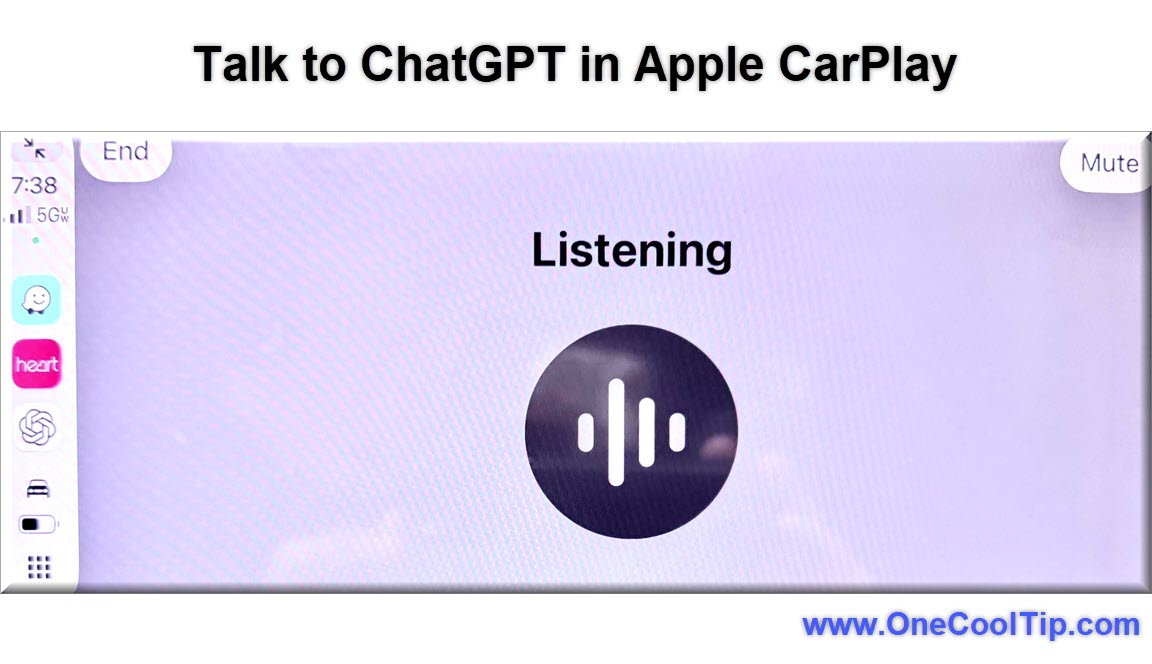
Once enabled, you can launch it using voice or from the CarPlay interface, then ask questions, generate ideas, or get help with tasks.


Why it matters:


  • Safer than using your phone while driving.
  • More capable than traditional voice assistants.
  • Useful for real-time thinking, planning, and problem solving.


What You’ll Gain


  • Hands-free AI assistance while driving.
  • Faster answers than traditional voice assistants.
  • Real-time brainstorming and decision support.
  • Safer interaction compared to phone use.


Step-by-Step Instructions


Here's how to do it.


iOS (Apple CarPlay)

  1. Ensure you are updated to iOS 26.4 or later.
  2. Install the ChatGPT app from the App Store.
  3. Open Settings on your iPhone.
  4. Go to General > CarPlay.
  5. Select your vehicle.
  6. Add ChatGPT to your CarPlay apps list.
  7. Start your car and connect CarPlay.
  8. Tap the ChatGPT icon or activate Siri and launch it.


fig. 1 - Talk to ChatGPT in Apple CarPlay Example

Example:


You’re heading to a meeting and say: ā€œChatGPT, summarize today’s agenda and give me talking points.ā€


Pros and Cons


Pros:


  • Hands-free interaction improves safety.
  • More intelligent responses than Siri or Alexa.
  • Great for brainstorming and learning on the go.
  • Works with natural language, no rigid commands.


Cons:


  • Requires mobile data connection.
  • Voice responses may take a few seconds.
  • Limited interface compared to phone app.
  • Availability depends on rollout and app updates.


Feature Access


  • Requires iPhone with CarPlay support.
  • Requires latest iOS version, iOS 26.4 or greater.
  • Requires ChatGPT app installed.
  • Currently rolling out depending on app version and region.


Score

Criterion | Score (0–10) | Justification
Value | 9
Delivers real productivity benefits while driving safely.
Usability | 8
Simple setup, but depends on app availability and connectivity.
Wow Factor | 9
Feels futuristic and significantly more capable than standard assistants.
Total: 26/30 | šŸŒŸ Excellent
A major step forward for in-car intelligence, surpassing traditional voice assistants in capability and usefulness.


Key Takeaways


ChatGPT in Apple CarPlay turns your car into a practical AI workspace. 


It improves safety, boosts productivity, and enables real-time thinking while driving. 


For many users, this will replace traditional voice assistants entirely.


Cool Tip Snapshot


  • Feature Name: ChatGPT in Apple CarPlay.
  • Platform(s): iOS, CarPlay.
  • Quick Benefit: Hands-free AI conversations while driving.
  • Access Type: App-based, currently rolling out.


Try It Yourself


Install ChatGPT on your iPhone, add it to CarPlay, and try asking one useful question on your next drive. 


Pass this along to someone who spends time behind the whee!


READ MORE


Read the Cool Tip on OneCoolTip.com.

Check out these Cool Tips & Tricks.


  • Voice First: Start interactions with a clear command. Say ā€œOpen ChatGPTā€ using Siri.


  • Short Questions: Keep prompts concise. Ask one question at a time.


  • Follow-Up: Ask follow-ups naturally. Continue the conversation without restarting.


  • Driving Mode: Keep your focus on the road. Use audio responses only.


  • Idea Capture: Ask ChatGPT to outline ideas. Then revisit later on your phone.


  • Meeting Prep: Request summaries before arriving. Ask for talking points.


  • Learning Mode: Ask quick explanations. Get simple breakdowns of topics.


  • Travel Help: Ask for nearby stops. Get suggestions without searching manually.


  • Brainstorming: Use it for creative thinking. Ask for names, ideas, or angles.


  • Data Check: Confirm facts quickly. Ask for quick summaries or comparisons.

Be Afraid of Her Ruse


ā€œBe Afraid of Her Ruseā€ is an original song that explores quiet manipulation, charm, and the kind of power that doesn’t need to shout to take control. 


I wrote this as a character-driven piece about someone who wins not through force, but through subtle influence, where every choice feels like your own until it’s too late. 


The lyrics follow the slow unraveling of confidence, trust, and control, wrapped in elegance and illusion. 


It’s a darker, cinematic story about perception, persuasion, and the danger of putting your trust and love in someone who plays a game.


Amazon | Apple Music | Spotify | YouTube Music

YouTube | RJMansfieldMusic.com

ICYMI - In Case You Missed It ...

Turn Word Into Your AI Writing Partner With Agent Mode


Agent Mode in Word lets you describe your goal and have Copilot do targeted edits, rewrites, and formatting inside your document. Once you learn where to find it and how to steer it, Word starts to feel less like a blank page and more like a collaborative editor.


Read the Full Cool Tip.


Read the Newsletter Version.

Looking for your next adventure?


Call Denise at Travel For You.

314.660.3039


Sign Up for the Monthly Newsletter


http://www.travelforyouvacations.com/


https://www.facebook.com/TRAVEL.FOR.U/


See You Tomorrow

Tomorrow's Cool Tip is waiting to amaze you.


Until then, go forth and conquer the tech world with your newfound knowledge!


Be sure to visit www.OneCoolTip.com for Cool Tech Tips for a Cooler Life!


And if you Like One Cool Tip, please support with TipJar!


Enjoy!


Rodger

Chief Cool Tipper

onecooltip.com@gmail.com


What Do You Think?

What do you think of today's OneCoolTip newsletter?
Positive        Neutral        Negative
X Share This Email
LinkedIn Share This Email

Connect with One Cool Tip!!

Facebook  X  Instagram  Web  Pinterest  YouTube  LinkedIn
ā€Š

As an Amazon Associate, One Cool Tip may earn a small commission from qualifying purchases.


Our media content is intended solely for informational purposes only. Please do not construe anything here as legal, tax, investment, financial, marital or other advice.


Copyright Ā© 2026 | www.OneCoolTip.com | All Rights Reserved


ā€Š