One Cool Tip Newsletter

October 9, 2026

Your daily dose of tech-savvy brilliance!

😀 Greetings! Happy Friday Funday, Cool Tipper!


Get ready to streamline your digital life with simple, actionable tips delivered straight to your inbox.


Cool Tip Theme: Jigsaw Explorer.


Play online jigsaw puzzles with Jigsaw Explorer. Adjust the challenge, solve puzzles with friends, and turn a favorite photo into your next puzzle.


New here? Subscribe to the One Cool Tip Newsletter for daily updates. It's FREE!

3️⃣

If you enjoy the One Cool Tip Newsletter, please forward this newsletter to THREE friends or colleagues or share it on social media using the links below.


Leave a $$$ Tip!


Share this One Cool Tip Newsletter!

X Share This Email
LinkedIn Share This Email
Pinterest Share This Email

🚨 Live Nation Data Breach: Watch Your Mail and Your Credit 🚨


Live Nation Entertainment has disclosed a data breach involving sensitive personal information, including Social Security numbers, government identification numbers, and health records.


Live Nation Entertainment has begun notifying people whose information was determined to be compromised.


If you receive a notification letter, read it carefully to determine what information involving you was exposed and what protection resources are being offered.


Consider monitoring your financial and credit accounts closely for activity you do not recognize.


If your Social Security number was exposed, placing a credit freeze with the three major credit bureaus is also a strong precaution you can take.


Cool Tip:


Treat any unexpected email, text, or phone call about the breach cautiously, and verify information through official channels before providing personal details.


And in Other News...


  • Calling All Zelda Fans: Best Buy Is Planning a Midnight Launch


Best Buy is turning the launch of The Legend of Zelda: Ocarina of Time into a late-night event, with nearly all of its U.S. stores opening for the game’s release.


Fans can pick up pre-orders beginning at midnight ET on November 5, with corresponding earlier opening times on November 4 in other U.S. time zones.


Best Buy says a limited number of The Legend of Zelda 40th Anniversary Edition Switch 2 System consoles, games, and special-edition controllers will also be available for purchase.


Pre-orders can be placed in stores, online, or through the Best Buy app.


If you are hoping to explore Hyrule the moment the game arrives, check your local store’s participation and availability before heading out

Cool Tip Poll

🤔 How would you play an online jigsaw puzzle?

Cool Deals of the Day

Help support One Cool Tip. Use this Amazon link when you shop online.


Check out these Cool Deals:

🖱️ Logitech Signature M650 Wireless Mouse: A conventional mouse may make dragging pieces more comfortable than a laptop touchpad. 

Look! 👀👀👀 Now $39.99. 4.6 Stars. Check it out on Amazon!


🔵 Logitech ERGO M575 Wireless Trackball: A stationary trackball is an alternative for players who prefer moving the pointer with a thumb. 

Look! 👀👀👀 Now $49.99. 4.5 Stars. Check it out on Amazon!


📱 Lamicall Tablet Stand: A stand can prop up a tablet for viewing between turns, though touch dragging may be easier with the tablet flat.

Amazon's Choice! Now $16.99. 4.8 Stars. Check it out on Amazon!


*Prices accurate when originally published.

One Cool Tip may earn a commission from qualifying purchases.

Fuel Your Adventure

Try Big Mike's Jerky!


bigmikesjerky.com


Today's Cool Tip

Turn Your Browser Into a Jigsaw Puzzle Table

Jigsaw Explorer gives you a puzzle table inside your browser, with adjustable difficulty and the option to solve together from different locations.


Try a mystery puzzle, invite a friend, or make a favorite photograph the next challenge.

By Rodger Mansfield, Technology Editor

October 9, 2026

Subscribe


You want to work on a jigsaw puzzle, but your dining table is already occupied. 


Once the pieces come out, putting everything away before dinner becomes another task.


Here’s a Cool Tip: Play Jigsaw Explorer in your browser and invite a friend to help.


An online puzzle gives you room to sort pieces and return to unfinished work. 


Choose a colorful picture, build the border, and enjoy a satisfying break.


Feature Explanation


Jigsaw Explorer turns photographs into movable puzzle pieces. 


Its established browser player offers adjustable piece counts, full-screen display, edge-piece filtering, and optional rotation. 


The Friday mystery puzzle shows only part of the photograph in its preview; finishing reveals the whole picture.


Choose your own pace. 


Distinct colors make sorting easier; similar shades demand more patience.


What You’ll Gain


  • Enjoy a puzzle without occupying a table.
  • Adjust the challenge to suit your available time.
  • Share an activity with someone in another location.


Step-by-Step Instructions


Here's how to do it.


Web/Desktop:


  1. Open Jigsaw Explorer.
  2. Select a featured puzzle, the daily puzzle, or browse the puzzles.
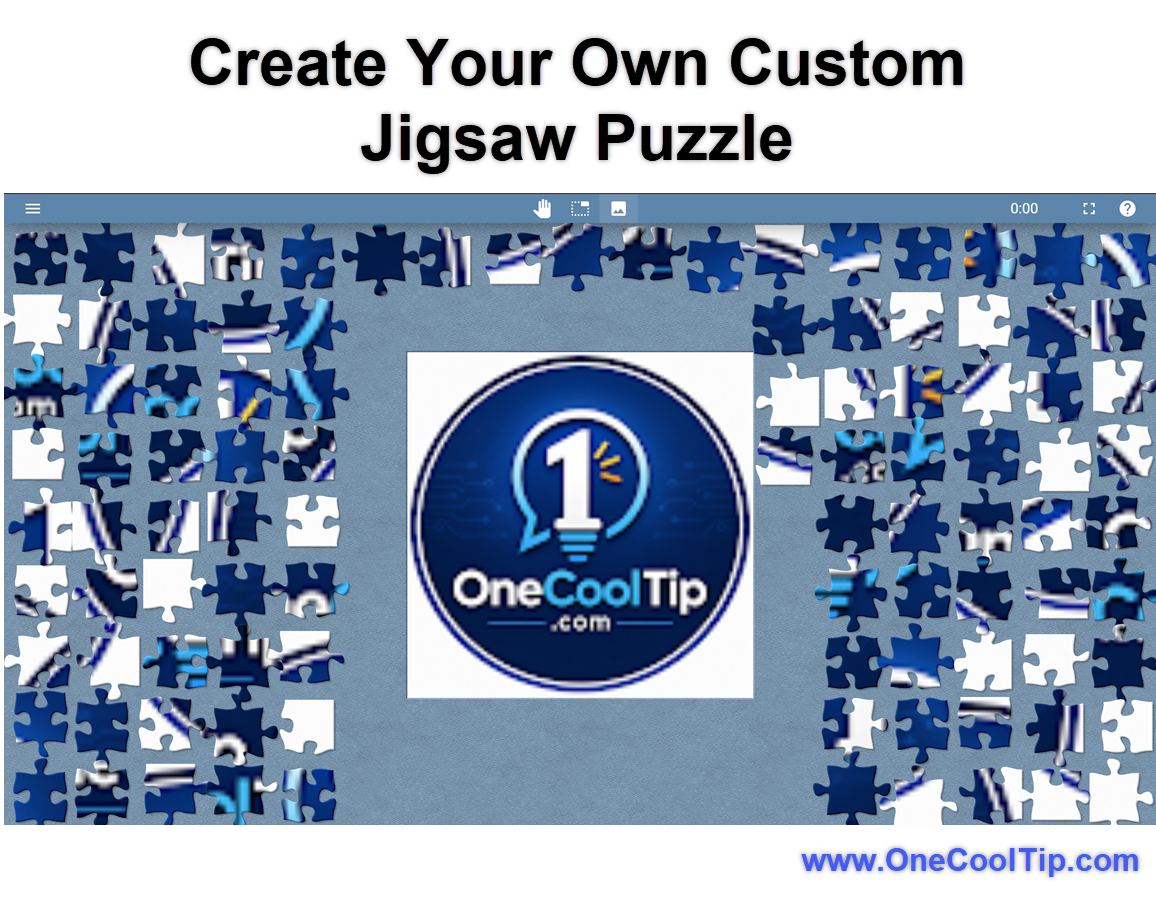
  3. To create a custom puzzle, select the Custom Puzzle link at the bottom. 
  4. Choose the piece count in the starting panel. Begin with fewer pieces if you want a shorter session.
  5. Drag pieces together to assemble the picture.
  6. Use the edge-piece control to concentrate on the border, then continue with the interior.


fig. 1 - Create Your Own Custom Jigsaw Puzzle

Play with someone else:


  1. Open a fresh puzzle.
  2. Select the multiplayer button before assembling pieces.
  3. Enter a nickname and select Create Game Link.
  4. Copy and share the link with your invited players, then bookmark it.
  5. Invitees open the link and enter their own nicknames; everyone sees the shared progress.
  • Switching a started solo puzzle to multiplayer resets it. Once another player joins, the edge-piece control rearranges pieces instead of hiding interior pieces. 
  • Phones/Tablets: Open the website in a browser and choose a puzzle. Use touch to move pieces; if rotation is enabled, tap a piece to select it, then tap it again to rotate.


Pros and Cons


Pros:


  • No physical cleanup when you want a short break.
  • Difficulty choices accommodate different moods.
  • Shared solving makes a pleasant remote social activity.
  • Personal photographs can give a puzzle more meaning.


Cons:


  • Small screens leave less room for sorting.
  • Clearing browser storage can remove solo progress. 
  • Shared photo puzzles need a working image address. 


Feature Access


The current website offers playable puzzles without displaying a purchase or registration requirement. 


It requires a modern browser and is available for PCs, Macs, tablets, and phones. 


Children’s access is restricted.


In the United States, ordinary use requires age 13 or older; outside the U.S., applicable child-privacy rules may set a higher threshold. 


The terms permit limited, supervised use of adult-created custom puzzles under specified conditions.


Score

Criterion | Score (0–10) | Justification
Value | 8
A pleasant recreational activity with an appealing shared-play option.
Usability |  8
Starting is straightforward, although photo URLs and saving behavior require attention.
Wow Factor |  7
Mystery pictures and collaborative solving add interest to a familiar activity.
Total: 23/30 | 👍 Good
An enjoyable browser destination for a puzzle break.
Compared with a physical jigsaw, it makes cleanup easier while trading away the tactile experience.


Key Takeaways


Choose an approachable image and difficulty before committing to a big challenge. 


If you want company, create the multiplayer session first and keep its link somewhere you can find it.


Cool Tip Snapshot


  • Feature Name: Jigsaw Explorer.
  • Platform(s): Web browsers on computers, tablets, and phones.
  • Quick Benefit: Enjoy adjustable puzzles and shared solving.
  • Best For: Adult puzzle fans and remote social groups.
  • Access Type: Browser play with no purchase prompt in the reviewed entry workflow.
  • Difficulty: Easy.


Learn More


The official multiplayer guide explains invitations, returning to a shared game, and connection troubleshooting.


Try It Yourself


Choose a puzzle and see how far you get during your next break. 


Comment with your favorite puzzle subject, subscribe to the One Cool Tip Newsletter for FREE, and share this Cool Tip with your family, friends, and coworkers.


READ MORE


Read the Full Cool Tip!

Check Out These Cool Tips & Tricks


  • Start Small: Make your first puzzle manageable. Choose a lower piece count before starting.


  • Border First: Isolate the outline during solo play. Use the edge-piece control.


  • Room to Sort: Give yourself more space. Select full-screen display.


  • Quiet Play: Silence piece sounds. Select Mute in the player menu.


  • Rotation Challenge: Add another layer of difficulty. Enable the circular-arrow control before playing.


  • Picture Peek: Check the reference image briefly. Hold B on a desktop keyboard during ordinary puzzle play.


  • Color Contrast: Make pieces stand out. Press T on a desktop keyboard to change the theme.


  • Invite First: Avoid restarting when friends join. Create the multiplayer link before assembling pieces.


  • Keep Your Link: Return to the shared puzzle later. Bookmark the multiplayer game address.


  • Photo Puzzle: Use an image you have permission to share. Enter its direct image URL on Create a Custom Jigsaw Puzzle.

ICYMI - In Case You Missed It ...

Windows 11 Adds Long-Requested Taskbar and Start Controls


Microsoft’s latest Windows 11 preview update gives users more control over the taskbar, Start menu, Search, and File Explorer. The improvements are practical, but known issues mean you may want to wait before installing the update on an essential PC.


Read the Full Version.


Read the Newsletter Version.

Looking for your next adventure?


Call Denise at Travel For You.

314.660.3039


Sign Up for the Monthly Newsletter


http://www.travelforyouvacations.com/


https://www.facebook.com/TRAVEL.FOR.U/


See You Tomorrow

Tomorrow's Cool Tip is waiting to amaze you.


Until then, go forth and conquer the tech world with your newfound knowledge!


Be sure to visit www.OneCoolTip.com for Cool Tech Tips for a Cooler Life!


And if you Like One Cool Tip, please support with TipJar!


Enjoy!


Rodger

Chief Cool Tipper

onecooltip.com@gmail.com


What Do You Think?

What do you think of today's One Cool Tip Newsletter?
Positive        Neutral        Negative
X Share This Email
LinkedIn Share This Email

Connect with One Cool Tip!

Facebook  X  Instagram  Web  Pinterest  YouTube  LinkedIn
 

As an Amazon Associate, One Cool Tip may earn a small commission from qualifying purchases.


Our media content is intended solely for informational purposes. Please do not construe anything here as legal, tax, investment, financial, marital or other advice.


Copyright © 2026 | www.OneCoolTip.com | All Rights Reserved