One Cool Tip Newsletter

March 24, 2026

Your daily dose of tech-savvy brilliance!

😀Greetings! Happy Tuesday, Cool Tipper!


Get ready to streamline your digital life with simple, actionable tips delivered straight to your inbox.


Cool Tip Theme: Find Receipts on Your Phone


New here? Subscribe to the One Cool Tip Newsletter for daily updates. It's FREE!

3️⃣

If you enjoy the One Cool Tip newsletter, please forward this newsletter to THREE friends or colleagues or share it on social media using the links below.


Leave a Tip!


Share this One Cool Tip Newsletter!

X Share This Email
LinkedIn Share This Email
Pinterest Share This Email

🚨Crunchyroll Data Breach: User Info Exposed🚨


A data breach by third-party service advisor may have impacted Crunchyroll customers.


Crunchyroll is a popular anime site but has not confirmed the data breach.


Exposed data may include names, email addresses, physical addresses, and phone numbers.


The incident stemmed from unauthorized access at the vendor level, not a direct breach of Crunchyroll’s internal systems.


Have you been notified?


Let us know.


What You Should Do Now


  • Change your Crunchyroll password and avoid reusing it on other sites.
  • Enable two‑factor authentication on your account.
  • Watch for phishing emails pretending to be from Crunchyroll or Telus.
  • Monitor your inbox.


Cool Deals of the Day

Help support One Cool Tip. Use this Amazon link when you shop online.


Check out these Cool Deals:


*Prices accurate when originally published.

One Cool Tip may earn a commission from qualifying purchases.

Fuel Your Adventure

Try Big Mike's Jerky!


bigmikesjerky.com


Now on TikTok!


Today's Cool Tip

How to Find Receipts on Your Phone Without Digging Through Photos


Quickly locate receipts, QR codes, and scanned documents right inside your photo library using built-in search tools on iPhone and Android.


Ever stood at a return counter scrolling endlessly through your camera roll, hoping to find that one receipt?


Here's a Cool Tip: Know How to Search Photos.


Your phone already knows where it is. 


You just haven’t been using the right search.


Feature Explanation


Both iPhone and Android devices now include intelligent photo search capabilities that can identify and categorize text inside images. 


That includes receipts, invoices, QR codes, and even edited photos.


On iPhone, Apple’s Photos app uses on-device intelligence to scan and index text found in images. 


You can search terms like “receipt,” “invoice,” or even store names.


On Android, Google Photos offers a similar capability using Google Lens and image recognition to identify documents and receipts.


Why it matters:


  • This turns your photo library into a searchable archive. 
  • No more scrolling. 
  • No more guessing filenames. 
  • Just type and find.


What You’ll Gain


  • Faster expense tracking and reimbursements.
  • Easy access to receipts for returns and warranties.
  • Better organization without extra apps.
  • Reduced reliance on paper clutter.


Step-by-Step Instructions


Here's how to do it.


iPhone


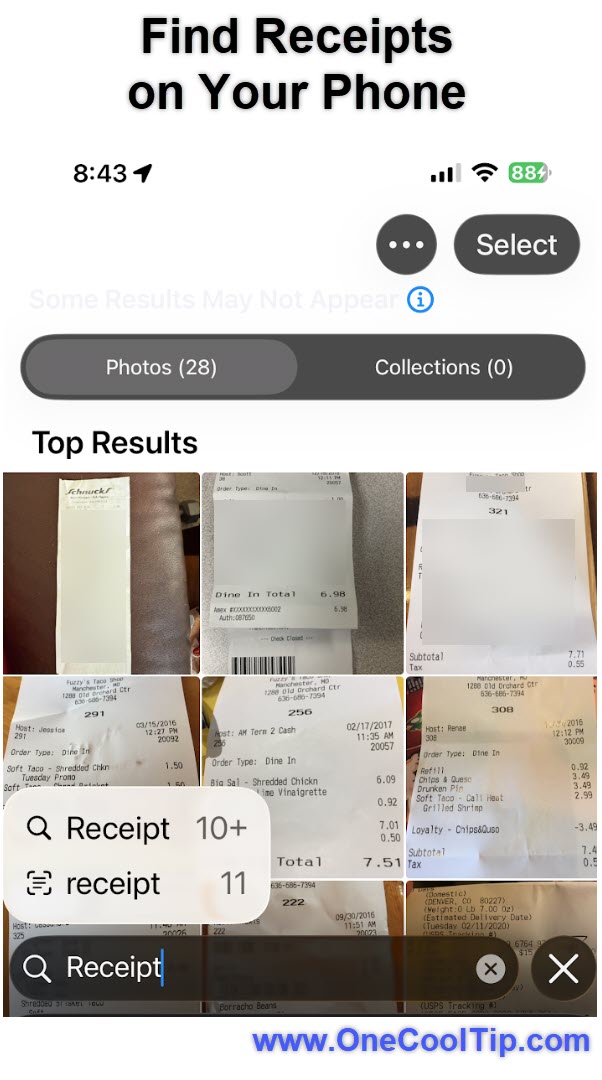
  1. Open the Photos app.
  2. Tap Search at the bottom.
  3. Type keywords like:
  • “receipt”.
  • store name (e.g., “Target”).
  • “QR code”.


4 Tap a result to view matching images.


fig. 1 - Find Receipts On Your Phone Example

Android (Google Photos)


  1. Open the Google Photos app.
  2. Tap the Search tab at the bottom.
  3. Look for the "Documents" shortcut chip directly under the search bar. This is the fastest way to see all receipts, posters, and signs at once.
  4. Alternatively, type a keyword in the top search bar:
  • “Receipt”
  • “Invoice”
  • Brand names

5 Tap an image to view it. To extract specific data, tap the "Copy Text" button.


Pros and Cons


Pros:


  • No extra apps required.
  • Works automatically in the background.
  • Highly accurate text recognition.
  • Saves time for business and personal use.


Cons:


  • Requires photos to be reasonably clear.
  • Older images may not be fully indexed yet.
  • Privacy-conscious users may prefer manual organization.


Feature Access


  • iPhone: Available on iOS 15 and later via Apple Photos app.
  • Android: Available via Google Photos and Google Lens, widely supported on modern devices.
  • Availability: Standard feature, not subscription-based, though enhancements may roll out gradually.


Score

Criterion | Score (0–10) | Justification
Value 9
Eliminates time wasted searching for receipts and documents.
Usability 8
Extremely simple once users know the feature exists.
Wow Factor 7
Subtle but powerful capability that feels almost invisible.
Total: 24/30 | 👍 Good
A quiet productivity upgrade that rivals dedicated receipt apps without the overhead.


Key Takeaways


Your phone is already indexing your receipts and documents automatically.


Using simple keyword searches, you can retrieve critical information in seconds.


This is one of the easiest ways to upgrade your daily workflow without installing anything new.


Cool Tip Snapshot


  • Feature Name: Photo Text Search for Receipts.
  • Platform(s): iOS, Android.
  • Quick Benefit: Instantly find receipts and documents.
  • Access Type: Free, built-in.


Try It Yourself


Open your Photos app right now and search “receipt.”


Then try a store name.


If it works, you just saved yourself hours this year.


If you found this useful, share it with your team, family, or friends!


READ MORE


Read the Cool Tip on OneCoolTip.com.

Check out these Cool Tips & Tricks.


  • Search Smart: Use store names to find receipts quickly. Type the name in the search bar.


  • Use Keywords: Words like “invoice” or “bill” improve results. Try multiple terms.


  • Scan Clearly: Take sharp photos for better recognition. Hold steady and use good lighting.


  • Crop Receipts: Trim images to improve search accuracy. Edit in Photos before saving.


  • Use Favorites: Mark important receipts for quick access. Tap the heart icon.


  • Organize Albums: Create a “Receipts” album for backups. Add key images manually.


  • Copy Text: Extract text from receipts easily. Tap and hold text in the image.


  • Search Dates: Combine keywords with time filters. Scroll by month if needed.


  • Backup Enabled: Ensure cloud backup is on. This keeps receipts accessible across devices.


  • Use Lens: On Android, use Google Lens for deeper recognition. Tap the Lens icon in Photos.

ICYMI - In Case You Missed It ...

WhatsApp Security image image

Lock Down Your Chats with WhatsApp’s Strict Account Settings


WhatsApp has introduced new Strict Account Settings designed to strengthen privacy and reduce unwanted contact. Here’s how the feature works, who gets it, and how to configure it for maximum control.


Read the Full Cool Tip.


Read the Newsletter Version.

Looking for your next adventure?


Call Denise at Travel For You.

314.660.3039


Sign Up for the Monthly Newsletter


http://www.travelforyouvacations.com/


https://www.facebook.com/TRAVEL.FOR.U/


See You Tomorrow

Tomorrow's Cool Tip is waiting to amaze you.


Until then, go forth and conquer the tech world with your newfound knowledge!


Be sure to visit www.OneCoolTip.com for Cool Tech Tips for a Cooler Life!


And if you Like One Cool Tip, please support with TipJar!


Enjoy!


Rodger

Chief Cool Tipper

onecooltip.com@gmail.com


What Do You Think?

What do you think of today's OneCoolTip newsletter?
Positive        Neutral        Negative
X Share This Email
LinkedIn Share This Email

Connect with One Cool Tip!!

Facebook  X  Instagram  Web  Pinterest  YouTube  LinkedIn
 

As an Amazon Associate, One Cool Tip may earn a small commission from qualifying purchases.


Our media content is intended solely for informational purposes only. Please do not construe anything here as legal, tax, investment, financial, marital or other advice.


Copyright © 2026 | www.OneCoolTip.com | All Rights Reserved