|
***For RWJBH and Rutgers Providers Live on Epic*** | |
|
Provider Top Stories
Attn: Physician Leaders and Practice Managers! Share these key items in your meetings:
Ambulatory and Inpatient Providers:
-
Exciting Update! Once a performing provider signs their portion of an e-consent, they can push the consent to the patient's MyChart for the patient/designee signature.
- This is especially helpful when a provider needs to obtain patient consent via telehealth or over the telephone.
- Please promote MyChart to your patients.
Inpatient Providers:
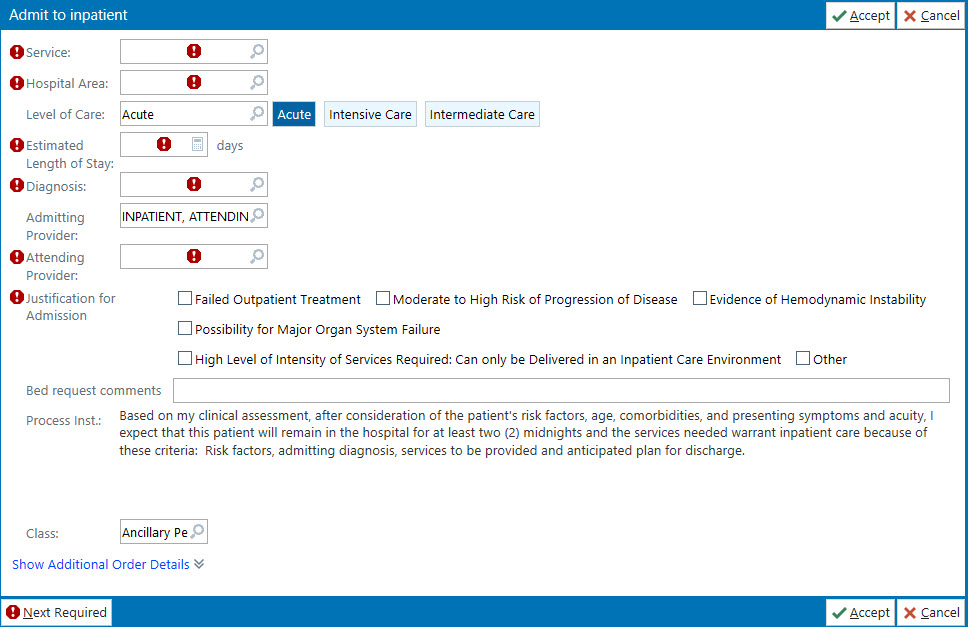
- Help with Outpatient in A Bed Patient Status Order and Level of Care
- Patient Lists, Provider Care Teams, Consults, and QGenda remain a focus.
- Tip Sheets and QGenda recorded demo available in this edition to help you get acquainted with this new functionality!
| |
|
Today's Wave 4 Top Ten
- Currently no open issues to report.
| |
|
Below please find the latest and greatest tip sheets created by the Epic Training Team.
| |
| Title | Audience | Description | | Sending E-Consents to MyChart | Providers | Learn how to send E-consents to patient's MyChart to obtain signature at the bedside. | | CMC Discharge Readmit to TCU | CMC Providers | How CMC providers will place discharge readmit orders to TCU | | Haiku Notifications Tip sheet | Providers | How to turn on/off notifications in Haiku | | Vocera Vina General Commands | Inpatient Clinicians | How to login into Vocera Vina and explore the available command prompts | | Procedure and Specimen Order Panels | Providers | Procedure and Specimen Order Panels | | |
|
Remember, all tip sheets are readily available by pressing F1 and accessing your Learning Home Dashboard in Epic.
| |
|
Thank you, Epic Together Training Team, for developing curriculum, building a true-to-life training environment, providing dynamic instruction, and for all these amazing tip sheets!
| |
Outpatient in a Bad Patient Status Order Defined | |
|
Outpatient in a Bed Patient Status Order Clarification
-
"Outpatient in a Bed" is the correct patient class for outpatient surgery or outpatient procedure patients who need extended recovery time before discharge.
- While "Observation" may seem correct, all charges for a patient's outpatient surgery are included in the surgery case. Therefore, Observation Patient Class, dropping hourly bed charges, is an incorrect Patient Status Order for extended recovery scenarios.
-
When Outpatient Surgery/Outpatient Procedure patients require extended recovery time, please place an "Outpatient in a Bed" patient status order.
Click here to review the Patient Status Order Tip Sheet for more information.
| |
|
What is Level of Care?
Entered by the provider at the time a Patient Status Order, Transfer Order, or Patient Status Update Order is placed.
Level of Care is:
- Provider designated determination of the level of care the patient requires at the time.
- Drives inclusion/exclusion criteria for clinical decision support rules and alerts.
- Medicare and payor required fields that are tied to billing charges.
-
Do not assume Level of Care automatically by patient location. For example, although most cases in the ICU have Intensive Care, we may encounter boarder patients with a lower acuity.
| |
Order Labs with IR Procedures | |
|
Referring Providers must include required lab orders when ordering Interventional Radiology Procedures
- Referring Physicians need to remember to order the required labs that go with the procedure.
- The provider ordering the procedure best understands the indications for the procedure and should be defaulted to receive the results.
| |
MyChart Inpatient E-Consent News | |
|
Exciting Inpatient MyChart E-Consent Update!
- Once a performing provider signs their portion of an e-consent, they can push the consent to the patient's MyChart for the patient/designee signature.
- This is especially helpful when a provider needs to obtain patient consent via telehealth or over the telephone.
Click here to review the new Sending E-Consents to Patient's MyChart Tip Sheet.
|
- Look for the green checkmark on Storyboard to see if a patient has an active MyChart Account and is able to complete e-signatures of their consents via MyChart.
|
- Patients with an inactive MyChart Account will have this icon on their Storyboard.
- Please promote MyChart to your patients.
| |
When the performing provider attempts to push the e-Consent document to a patient's inactive MyChart, the e-Consent appears like this: | |
|
Sepsis SBAR
Clinicians will need to call the operator for all Medical Alert -Sepsis Response Team Activations.
Situation
The Epic Sepsis Alert does not send a message to the operator for overhead announcement of Sepsis Response Team.
Background
Epic has a Sepsis Alert that will fire to the clinician when they are logged into Hyperspace (desktop). This alert is based on the St. John's Model.
Assessment
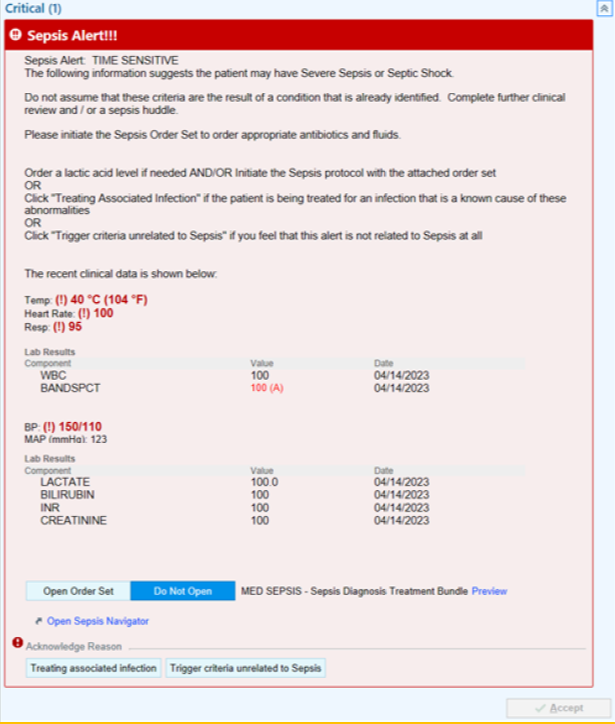
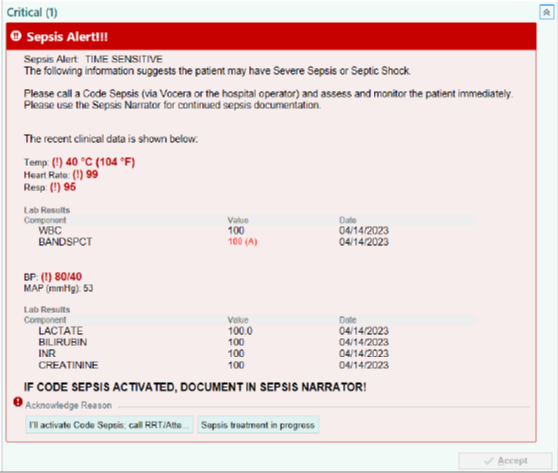
Epic uses the same criteria, but the platform works differently. The nurse and provider will receive a Best Practice Advisory (BPA) alert while in the chart. They will need to select an intervention (either order the Order Set or initiate the Sepsis Huddle).
Below please see a screenshot of the Provider Sepsis BPA alert.
| |
Below please see a screenshot of the Nurse Sepsis BPA alert. | |
|
Recommendation
Clinicians should contact the operator directly to report Medical Alert - Sepsis Response Team Activations if a patient within their care is demonstrating signs and symptoms of sepsis.
| |
RX Routing and Narcotics at Discharge | |
|
Providers without EPCS Privileges (Most Commonly Residents) Need a Second Signature for e-Prescriptions of Narcotics at Discharge
- Residents can order narcotics when a patient is admitted under the permit of the hospital.
- In order for a resident to prescribe narcotics at discharge (as discharge orders are outpatient prescriptions), they must have a DEA Number and be a registered EPCS user.
-
To request EPCS access, please open an Imprivata EPCS ServiceNow Ticket.
| |
-
Reminder: Prescriptions requiring second signature (such as narcotics) are not active and not received by the pharmacy until they are second signed by an authorizing provider, such as the attending.
-
Whoever is ordering the narcotic medication should immediately contact the second signing provider to prevent delays with activating narcotics prescriptions at discharge.
- If the second signature has not been completed, the retail pharmacy will not receive the narcotic prescriptions.
| |
Promoting MyChart, Epic's Patient Portal | |
|
Tell Your Patients About MyChart!
- Approximately 40% of all RWJBH patients have activated MyChart.
-
Patients are more likely to use MyChart if encouraged to do so by their trusted RWJBH provider.
- Benefits of MyChart:
- Gives providers a way to stay connected to their patients between visits.
- Improves efficiency of office workflow.
- Helps patients stay more engaged in their care, while enabling them to manage more on their own:
| |
- Schedule appointments and check in online
- Access test results in real-time
- Request prescription refills/renewals
- Have telehealth/video visits with their RWJBH provider
| |
- Connect with their RWJBH provider by sending messages and asking non-urgent questions.
-
Use their RWJBH MyChart account to view health information from other institutions by linking MyChart accounts
| |
Pre-Op Orders Required for Surgery Cases | |
|
IMPORTANT: Pre-Op orders must be entered for Case Requests to reserve Operating Room (OR) time
IMPORTANT: Failure to include the Pre-Op order may result in case delays and case cancellations.
-
There are currently numerous scheduled cases missing Pre-Op orders.
-
For surgeons that are entering Pre-Op orders for the cases that are already scheduled:
- To verify if a case is already scheduled, review the orders in the Order Checklist
- You can also access Chart Review: The case will appear as Scheduled in the encounter.
|
-
Please select the procedure via the Case Review Context pop up to attach the Pre-Op Orders.
- Please do NOT fill out a new Case Request if the case is already scheduled.
| |
-
Selecting the correct Phase of Care of Preprocedure is important.
- Selecting the wrong Phase of Care may contribute to the issue of missing Pre-Op orders.
- For questions about Phase of Care, please reach out to your CSI ATE Support for help.
| |
|
Helpful Tip Sheets for Procedure/Pre-Op Workflows
Remember that all Epic Tip Sheets are available by pressing F1 to access your Learning Home Dashboard in Epic!
- Click the links below to review these helpful training tools on these important workflows!
| |
Consults, QGenda, Patient Lists, and Provider Care Teams | |
|
Please review the handy training tools below on Consults QGenda, Patient Lists, and Provider Care Teams
| |
|
Watch the QGenda Demo!
David Gold, Director, Epic Acute Clinical Care Teams on the Epic Together Project Team, provided a wonderful demo on QGenda on Friday during the 7:30 AM Provider Huddle. If you missed out, we are providing a link to the recorded demo below! Please watch at your leisure to learn all about QGenda!
| |
Wave 4 Dedicated Provider Support | |
|
Wave 4 Providers, Please Save these Important Numbers in your Phone:
-
Dedicated Provider Help Desk: 855-453-1948
-
Epic Training Provider Hotline: 732-658-4820
| |
|
Help with Haiku/Canto, Dragon, Power Mic Mobile, and EPCS!
- Do you have questions about Epic's Mobile applications? Help is here!
-
On site Mobile Application support is available Monday - Friday from 8:00 AM - 4:00 PM at all Wave 4 Hospital Locations in the Physician Lounge!
- Drop by your Physician Lounge for assistance with Epic's Mobile Apps.
For additional help, click to review the Haiku/Canto, Dragon, Power Mic Mobile Training Tools below:
| |
-
Remember that all tip sheets are readily available on your Learning Home Dashboards!
-
Press F1 to access training tools at your fingertips!
| |
Wave 4 Go-Live Help Resources | |
|
To be viewed on your mobile device:
To view the unit crosswalk documents, click the links below:
To be printed and posted, click the links below:
| |
Scan the QR codes above with your mobile device for ready Go-Live Help! | |
Scan the QR codes above with your mobile device for Unit Crosswalk documents! | |
|
Review the Epic "Get Help at a Glance" Flyer!
The "Epic How to Get Help" Flyer includes instructions to:
- Open a Help Desk Ticket
- Check The Status of an Open Ticket
- Enter an Epic Enhancement Request
Click hereto view the updated "Epic: How to Get Help" flyer!
| |
Live Site Epic Provider Print Edition! | |
|
Phone a friend:
Our cell numbers are available below.
Please call with any questions or concerns.
| |
RWJBH-Rutgers Medical Leadership Team | |
|
Dr. Joshua Bershad
EVP, Physician Services;
Clinical Assistant Professor of Medicine Rutgers Robert Wood Johnson Medical School
Joshua.Bershad@rwjbh.org
Cell: 973-202-0900
Dr. Frank Sonnenberg
Chief Medical Informatics Officer, RWJBarnabas-Rutgers Medical Group; Professor of Medicine, Rutgers Robert Wood Johnson Medical School
Frank.Sonnenberg@RWJBH.org
Cell: 908-313-6563
Dr. Carol Ash, DO, MHCDS, MBA, FACHE, CPHQ, CHCQM-PHYADV
Chief Medical Officer
Robert Wood Johnson University Hospital Rahway
Carol.Ash@rwjbh.org
Phone: 732-499-6134
Cell: 732-857-6535
Dr. Seth D. Rosenbaum, MD, MMM
SVP, Chief Medical Officer Robert Wood Johnson University Hospital Hamilton;
Clinical Assistant Professor, Department of Medicine, Rutgers-Robert Wood Johnson Medical School
Seth.Rosenbaum@rwjbh.org
Phone: 609-584-2865
Cell: 609-508-7951
Dr. Anil K. Gupta, MD, MBA, FACC
Chief Medical Officer Monmouth Medical Center Southern Campus
Anil.Gupta@rwjbh.org
Phone: 732-886-4364
Cell: 732-228-2122
Dr. Meika Neblett, MD
Chief Medical Officer
Community Medical Center
Meika.Neblett@rwjbh.org
Phone: 732-691-1915
Cell: 732-557-8264
| |  |
|
Dr. Sal Moffa
Chief Medical Officer, RWJUH Somerset
Salvatore.Moffa@rwjbh.org
Phone: 908-685-2816
Cell: 609-238-5248
Dr. Stephen O’Mahony
SVP & Chief Health Information Officer, RWJBarnabas Health;
Clinical Associate Professor of Medicine, Rutgers New Jersey Medical School
Stephen.OMahony@rwjbh.org
Phone: 973-322-4231
Cell: 203-820-6519
Dr. Sheraz Siddiqui, MD
Chief of Hospital Medicine
Robert Wood Johnson
University Hospital
Associate Professor, Department of Family Medicine and Community Health
Rutgers-Robert Wood Johnson Medical School
siddiqsh@rwjms.rutgers.edu
Cell: 732-986-3577
Dr. Deborah L. Toppmeyer
Professor of Medicine, Robert Wood Johnson Medical School; Chief Medical Officer, Chief, Division of Medical Oncology, Director,
The Stacy Goldstein Breast Center
Rutgers Cancer Institute of New Jersey, Rutgers
The State University of New Jersey
deb.toppmeyer@rutgers.edu
Phone: 732-235-9692
Dr. Kenneth Granet, MD, FACP
Chief Medical Officer
Monmouth Medical Center
kenneth.granet@rwjbh.org
Phone: 732-923-7518
Dr. Ije Akunyili, MD,
MBA, MPA, FACEP
Chief Medical Officer
Jersey City Medical Center
Ijeoma.Akunyili@rwjbh.org
| | | | |