One Cool Tip Newsletter

March 19, 2026

Your daily dose of tech-savvy brilliance!

😀Greetings! Happy Thursday, Cool Tipper!


Get ready to streamline your digital life with simple, actionable tips delivered straight to your inbox.


Cool Tip Theme: Apple Background Security Improvements


New here? Subscribe to the One Cool Tip Newsletter for daily updates. It's FREE!

3️⃣

If you enjoy the One Cool Tip newsletter, please forward this newsletter to THREE friends or colleagues or share it on social media using the links below.


Leave a Tip!


Share this One Cool Tip Newsletter!

X Share This Email
LinkedIn Share This Email
Pinterest Share This Email

🚨IRS Warns About 2026’s Top Tax Scams🚨


The IRS just released its annual “Dirty Dozen” list of tax scams, and it’s a must-read for anyone filing taxes this season.


From phishing emails and fake charities to shady tax preparers and social media misinformation, scammers are evolving fast.


What to watch for:


  • Unsolicited messages claiming to be from the IRS or tax software companies.
  • Promises of “free money” from government programs or grants.
  • Ghost preparers who refuse to sign your return.
  • Social media posts pushing false refund strategies.


The IRS will never contact you by email, text, or social media to ask for personal or financial info.


Always verify before clicking, sharing, or paying.


And in Other News...


  • Apple Ships First Background Security Patch for iOS 26.3.1 (a)


Apple just released its first Background Security Improvement, a new type of lightweight patch that quietly fixes serious flaws between major iOS updates.


This update, labeled iOS 26.3.1 (a), targets a WebKit vulnerability that could let malicious websites bypass browser security rules.


If you’re running iOS 26.1 or later, be sure to read the Cool Tip below to ensure your Apple Device is protected.

Cool Deals of the Day

Help support One Cool Tip. Use this Amazon link when you shop online.


Check out these Cool Deals:


*Prices accurate when originally published.

One Cool Tip may earn a commission from qualifying purchases.

Fuel Your Adventure

Try Big Mike's Jerky!


bigmikesjerky.com


Now on TikTok!


Today's Cool Tip

Apple Background Security Improvements: A Smarter Way to Patch Your iPhone and Mac Between Updates


Apple can now deliver security fixes between full updates using Background Security Improvements. This feature quietly strengthens your device without interrupting your workflow. Apple’s Background Security Improvements allow your iPhone and Mac to receive lightweight security fixes automatically between major updates. This reduces your exposure to threats without requiring manual action.


What happens between software updates when a new vulnerability is discovered?


Traditionally, you wait.


That waiting period creates risk. 


Here's a Cool Tip:  Ensure Your Apple Devices are Protected Between Updates.


Apple’s Background Security Improvements are designed to protect your devices between updates. 


Instead of bundling every fix into large updates, Apple can now push smaller, targeted protections directly to your device in the background.


Feature Explanation


Background Security Improvements are lightweight security updates delivered automatically between full operating system updates.


These updates can include protections for:


  • Safari
  • The WebKit framework
  • Core system libraries


These improvements are applied without requiring a full system upgrade. 


In many cases, they may install automatically when the device is connected to power and Wi-Fi.


Key points:


  • These are incremental security fixes, not full OS updates.
  • They are delivered more frequently than traditional updates.
  • They help reduce the window between vulnerability discovery and protection.
  • This is Apple moving toward a faster, more modular security model, similar to how modern browsers update.


What You’ll Gain


  • Faster protection between major updates.
  • Reduced exposure to known vulnerabilities.
  • Automatic security improvements with minimal effort.


Step-by-Step Instructions


Here's how to do it.


iOS/iPadOS


  1. Open Settings.
  2. Tap Privacy & Security.
  3. Scroll to Background Security Improvements.
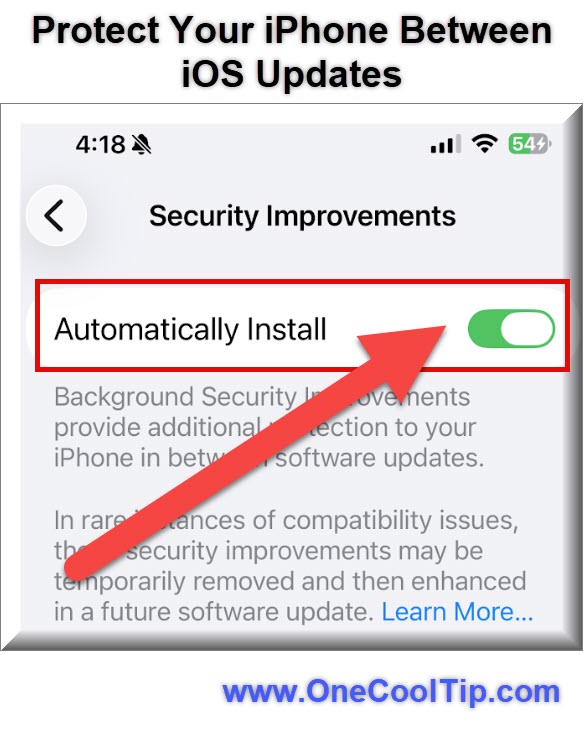
  4. Ensure Automatically Install is turned ON.


fig. 1 - Protect Your iPhone Between iOS Updates

macOS


  1. Open the Apple Menu and select System Settings.
  2. Click Privacy & Security in the sidebar.
  3. Click Background Security Improvements.
  4. Switch the toggle to On.


Pros and Cons


Pros


  • Faster patching: Reduces exposure time to known vulnerabilities.
  • Low disruption: No need for full system updates.
  • Automatic delivery: Minimal user involvement.


Cons


  • Limited visibility: Users do not see detailed patch notes.
  • Less control: Cannot manage individual updates.
  • Dependency on updates: Full OS updates are still required periodically.


Feature Access


Available starting with iOS 26.1, iPadOS 26.1, and macOS 26.1 (Apple, accessed 2026)


Included with system updates


No subscription required


Currently available on supported Apple devices with recent OS versions


Score

Criterion | Score (0–10) | Justification
Value | 9
Significantly reduces vulnerability exposure between updates.
Usability | 10
Fully automatic with a single toggle.
Wow Factor | 7
Not visible to users but highly impactful.
Total: 26/30 | 🌟Excellent
A meaningful evolution in Apple’s security model that closes the gap between updates and real-world threats.


Key Takeaways


Background Security Improvements allow Apple to deliver protections faster and more efficiently. 


They reduce risk without adding complexity. 


This feature strengthens your device in ways most users will never notice but will benefit from.


Cool Tip Snapshot


  • Feature Name: Background Security Improvements.
  • Platform(s): iOS, iPadOS, macOS.
  • Quick Benefit: Faster security fixes between updates.
  • Access Type: Free.


Try It Yourself


Check your device today and make sure Background Security Improvements are enabled. 


Share this tip with your team, family, and friends, and invite them to subscribe to the One Cool Tip newsletter for more practical insights.


READ MORE


Read the Cool Tip on OneCoolTip.com.

Check out these Cool Tips & Tricks.


  • Enable Auto: Turn it on immediately. Go to Privacy & Security settings.


  • Check Status: Review settings monthly. Open Background Security Improvements.


  • Stay Updated: Install full updates too. Use Software Update menu.


  • Use Wi-Fi: Connect regularly. Updates install more reliably.


  • Charge Device: Plug in overnight. Background installs occur more often.


  • Restart Device: Reboot occasionally. Restart via the Settings menu.


  • Review Privacy: Audit settings. Visit Privacy & Security regularly.


  • Update Apps: Keep apps current. Enable App Store auto updates.


  • Avoid Delays: Don’t skip updates. Install major updates periodically.


  • Educate Others: Share this feature. Help family enable protection.

ICYMI - In Case You Missed It ...

iOS 26 Fixes Motion Sickness With Smarter Vehicle Motion Cues


Apple has upgraded Vehicle Motion Cues in iOS 26 to help prevent motion sickness using real-time visual indicators. This small but powerful accessibility feature makes using your phone in a car dramatically more comfortable.


Read the Full Cool Tip.


Read the Newsletter Version.

Looking for your next adventure?


Call Denise at Travel For You.

314.660.3039


Sign Up for the Monthly Newsletter


http://www.travelforyouvacations.com/


https://www.facebook.com/TRAVEL.FOR.U/


See You Tomorrow

Tomorrow's Cool Tip is waiting to amaze you.


Until then, go forth and conquer the tech world with your newfound knowledge!


Be sure to visit www.OneCoolTip.com for Cool Tech Tips for a Cooler Life!


And if you Like One Cool Tip, please support with TipJar!


Enjoy!


Rodger

Chief Cool Tipper

onecooltip.com@gmail.com


What Do You Think?

What do you think of today's OneCoolTip newsletter?
Positive        Neutral        Negative
X Share This Email
LinkedIn Share This Email

Connect with One Cool Tip!!

Facebook  X  Instagram  Web  Pinterest  YouTube  LinkedIn
 

As an Amazon Associate, One Cool Tip may earn a small commission from qualifying purchases.


Our media content is intended solely for informational purposes only. Please do not construe anything here as legal, tax, investment, financial, marital or other advice.


Copyright © 2026 | www.OneCoolTip.com | All Rights Reserved