One Cool Tip Newsletter

August 25, 2026

Your daily dose of tech-savvy brilliance!

😀Greetings! Happy Tuesday, Cool Tipper!


Get ready to streamline your digital life with simple, actionable tips delivered straight to your inbox.


Cool Tip Theme: Claude Projects


Learn how Claude Projects organizes chats, files, and instructions into focused workspaces that make recurring AI tasks easier to manage.


New here? Subscribe to the One Cool Tip Newsletter for daily updates. It's FREE!

3️⃣

If you enjoy the One Cool Tip newsletter, please forward this newsletter to THREE friends or colleagues or share it on social media using the links below.


Leave a $$$ Tip!


Share this One Cool Tip Newsletter!

X Share This Email
LinkedIn Share This Email
Pinterest Share This Email

🚨A New AI Scam Is Targeting Families When They’re Most Vulnerable🚨


Scammers are using AI to search public obituaries and identify people who may be grieving and more vulnerable to fraud.


Criminals use details from an obituary to convince family members that they need to pay money to protect their inheritance.


AI makes these scams more convincing by helping fraudsters quickly gather personal information and create believable stories, emails, texts, and phone calls.


If you or a loved one recently lost a family member, be especially cautious of unexpected calls, emails, or messages involving finances, taxes, inheritances, or estate matters.


Verify any request independently before sharing information or sending money.


Remember that scammers often use personal details to build trust, so just because someone knows family information does not mean they are legitimate.


And in Other News...


  • The End of “Was This Written by AI?”


AI-generated content may soon become easier to identify.


Anthropic, the company behind Claude, has announced a new watermarking system that embeds an invisible, machine-detectable pattern into text generated by future Claude models.


The watermark does not change how the text reads and does not add visible characters or labels.


Instead, it creates a hidden signal that can help determine whether Claude was likely involved in producing the content.


Anthropic says the change is being implemented to comply with transparency requirements under the European Union's AI Act and will apply to supported Claude models worldwide.


This is an important step toward greater transparency online.


As AI-generated content becomes more common, tools like watermarking could help people better understand when artificial intelligence may have been involved in creating what they are reading.

Cool Tip Poll

🤔 How would you use Claude Projects?

Cool Deals of the Day

Help support One Cool Tip. Use this Amazon link when you shop online.


Check out these Cool Deals:

🖥️ Anker USB-C Docking Station: Handy for anyone running multiple Claude project chats alongside spreadsheets and reference docs on a second screen.

Save 28%. Now $17.99. 4.4 Stars. Check it out on Amazon!


📓 Reusable Smart Notebook (Rocketbook): Great for jotting quick notes before organizing them into a Claude project's knowledge base.

Look! Now $29.99. 4.4 Stars. Check it out on Amazon!


🎧 Anker Soundcore Noise Cancelling Headphones: Useful for focused work sessions building out a project's instructions and files.

Look! Now $199.99. 4.5 Stars. Check it out on Amazon!


*Prices accurate when originally published.

One Cool Tip may earn a commission from qualifying purchases.

Fuel Your Adventure

Try Big Mike's Jerky!


bigmikesjerky.com


Now on TikTok!


Today's Cool Tip

Organize Your AI Work with Claude Projects


Claude Projects turns scattered AI conversations into organized workspaces for specific subjects, clients, or recurring tasks. Each project can contain related chats, reusable instructions, and reference files.


A long list of unrelated AI conversations quickly becomes difficult to manage. 


Instructions for one assignment are buried in an old chat, reference files must be uploaded again, and Claude may need the same background information every time you begin a new conversation.


Here’s a Cool Tip: Create a Claude Project for work you repeat.


Claude Projects offers a more organized approach. 


You can create a dedicated workspace for a newsletter, research assignment, household project, class, client, or vacation. 


Inside the project, Claude can use shared instructions and uploaded reference material across multiple conversations.


Projects are available to all Claude users. 


Free accounts can create up to five projects. 


Paid plans provide expanded project knowledge through retrieval-augmented generation, commonly called RAG.


Feature Explanation


A Claude Project is a self-contained workspace containing related conversations, project instructions, and an optional knowledge base.


For example, a small-business owner could create a project called “Monthly Marketing” and add:


  • A brand style guide
  • Product descriptions
  • Customer profiles
  • Approved terminology
  • Instructions about tone and formatting
  • Separate chats for email, social media, and campaign ideas


Project instructions tell Claude how to respond throughout that project. 


Project knowledge provides source material that Claude can reference across the project’s conversations.


However, placing several chats inside the same project does not automatically give every chat access to everything discussed in the others. 


Information that Claude should consistently reference must be added to the project knowledge base or project instructions.


Claude also lets users move existing conversations into projects, star frequently used projects, and archive completed ones.


What You’ll Gain


  • Keep related Claude conversations in one workspace.
  • Reduce repeated explanations with reusable project instructions.
  • Give Claude consistent access to selected reference material.
  • Separate client, school, travel, creative, and personal work.
  • Archive completed work without permanently deleting it.


Step-by-Step Instructions


Here's how to do it.


Web/Desktop


  1. Sign in to Claude, claude.ai.
  2. Select Projects from the left sidebar. You can also go directly to `claude.ai/projects`.
  3. Select + New Project in the upper-right corner.
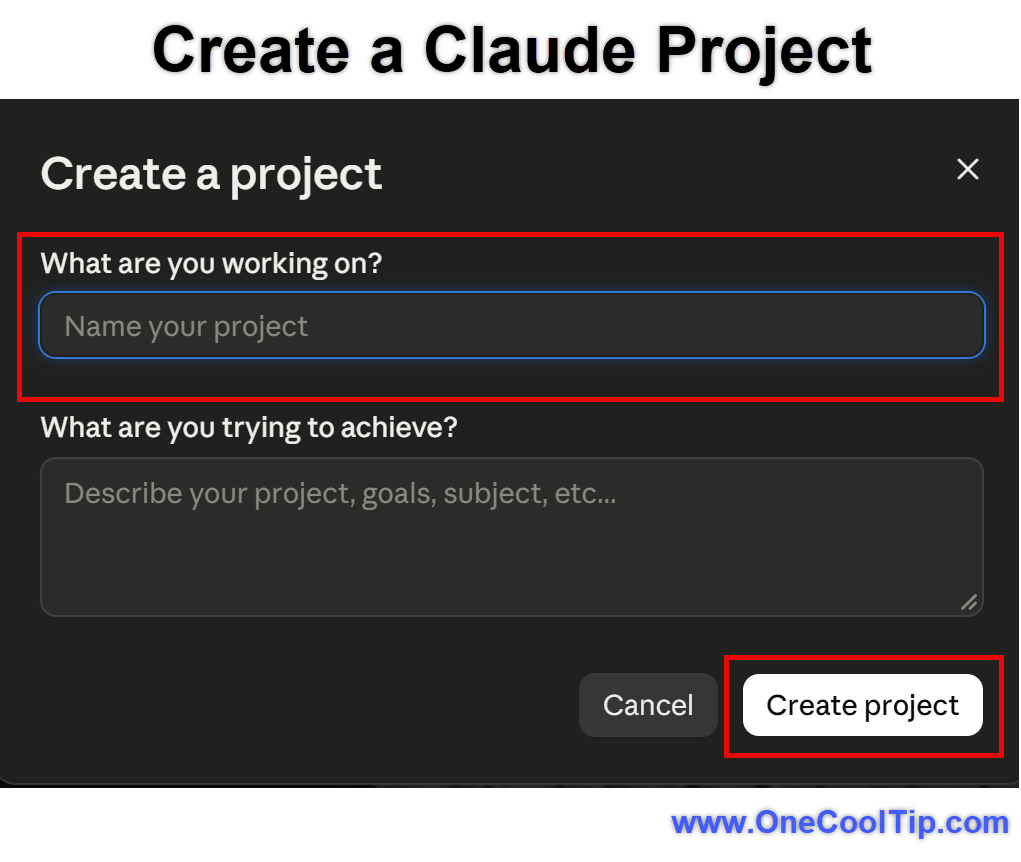
  4. Enter a descriptive project name and an optional description.
  5. If you use a Team or Enterprise account, choose whether the project should remain private or be available to your organization.
  6. Open the project and select the + button in the project knowledge area.
  7. Upload relevant documents, reference material, text, or code.
  8. Select Set project instructions.
  9. Enter standing directions that Claude should follow in the project.
  10. Select Save instructions.
  11. Start a new chat from inside the project.


fig. 1 - Create a Claude Project

Cool Note:


  • Claude does not use the project’s name or description as conversational context. 


iPhone, iPad, and Android


  • For reliable setup, use Claude in a desktop browser or visit `claude.ai/projects` from a mobile browser.


Move an Existing Chat into a Project


  1. Open your Claude chat history.
  2. Select the dropdown arrow beside the conversation title.
  3. Choose Add to project.
  4. Search for or select the destination project.
  5. Confirm the move.


The same conversation menu can remove a chat from a project or move it into a different project.


Pros and Cons


Pros:


  • Better organization: Client work, research, household planning, and creative projects remain separate.
  • Reusable instructions: Standing directions can apply across multiple conversations.
  • Persistent references: Files in project knowledge remain available within the project.
  • Flexible cleanup: Projects can be starred for quick access or archived when completed.
  • Team collaboration: Team and Enterprise users can share projects with coworkers.


Cons:


  • Free-account limit: Free users can create no more than five projects.
  • Separate chat context: Chats do not automatically share their complete conversation histories.
  • Paid knowledge expansion: Automatic RAG expansion requires a Pro, Max, Team, or Enterprise plan.
  • Privacy considerations: Shared project members may be able to view project knowledge and instructions.
  • Review remains necessary: Organized source material does not guarantee an accurate AI response.


Feature Access


  • Free: Projects are available, with a limit of five projects.
  • Pro and Max: Projects include automatic RAG expansion for larger knowledge bases.
  • Team and Enterprise: Projects include RAG and organizational sharing controls.
  • Platform: The complete configuration workflow is documented for Claude’s web interface.
  • Beta status: Projects are generally available. Enterprise group sharing is currently identified as beta.
  • Administration: Organization administrators may restrict organization-wide project sharing.


Score

Criterion | Score (0–10) |  Justification 
Value |  9
Projects reduce repeated setup and keep related conversations and reference material together.
Usability |  8
Creation is straightforward, but users must understand the difference between project descriptions, instructions, chats, and knowledge.
Wow Factor  |  7
The concept is familiar, but persistent instructions, reusable knowledge, and automatic RAG make it especially practical.
Total: 24/30 |  👍 Good
Claude Projects is highly useful for anyone who regularly returns to the same subject or workflow.
Unlike an ordinary AI conversation, a Project provides a structured home for multiple chats, standing instructions, and shared reference material.


Key Takeaways


Claude Projects makes recurring AI work easier to organize and more consistent. 


The best results come from giving each project a clear purpose, writing concise project instructions, and uploading only the reference material Claude genuinely needs.


Cool Tip Snapshot


  • Feature Name: Claude Projects
  • Platform(s): Claude web interface
  • Quick Benefit: Organizes related chats, instructions, and files
  • Best For: Recurring work, research, clients, courses, content, and travel planning
  • Access Type: Free with limits; expanded capabilities on paid plans
  • Difficulty: Easy


Try It Yourself


Create one Claude Project for a task you repeat, add clear project instructions, and move one related conversation into it. 


Tell us how you organize your AI work, subscribe to the One Cool Tip newsletter, and share this article with family, friends, and coworkers.


READ MORE


Read the Full Cool Tip.

Check Out These Cool Tips & Tricks


  • Focused Projects: Give each project one clear purpose instead of combining unrelated work. Create separate projects for different clients, courses, trips, or publications.


  • Smart Names: Choose project names that will remain meaningful months later. Include the client, subject, campaign, or semester in the name.


  • Standing Instructions: Put recurring requirements in the project instructions. Select Set project instructions, enter the rules, and save them.


  • Useful Knowledge: Upload only material Claude is likely to reference repeatedly. Use the project’s + button to add selected files or text.


  • Source Dates: Add revision dates to filenames when current information matters. Rename files before uploading them so outdated versions are easy to identify.


  • Separate Chats: Start a fresh chat for each deliverable. Keep research, drafting, troubleshooting, and final review in separate conversations.


  • Move History: Move useful standalone conversations into the appropriate project. Open the chat menu and select Add to project.


  • Star Priorities: Star projects you use frequently so they are easier to find. Click the star icon next to any project name to pin it to the top of your sidebar.


  • Archive Work: Archive completed projects instead of leaving them in the active list. Open the project’s three-dot menu and select the archive option.


  • Review Sharing: Check access before uploading confidential material. Open Share and confirm each member’s permission level.

ICYMI - In Case You Missed It ...

Stop Wasting Time Re-Uploading Sources With Gemini Notebook Auto-Sync


Google recently rebranded NotebookLM to Gemini Notebook and introduced automatic syncing for Google Drive documents. This update means your AI workspace always reflects the latest versions of your files without manual intervention.


Read the Full Version.


Read the Newsletter Version.

Looking for your next adventure?


Call Denise at Travel For You.

314.660.3039


Sign Up for the Monthly Newsletter


http://www.travelforyouvacations.com/


https://www.facebook.com/TRAVEL.FOR.U/


See You Tomorrow

Tomorrow's Cool Tip is waiting to amaze you.


Until then, go forth and conquer the tech world with your newfound knowledge!


Be sure to visit www.OneCoolTip.com for Cool Tech Tips for a Cooler Life!


And if you Like One Cool Tip, please support with TipJar!


Enjoy!


Rodger

Chief Cool Tipper

onecooltip.com@gmail.com


What Do You Think?

What do you think of today's OneCoolTip newsletter?
Positive        Neutral        Negative
X Share This Email
LinkedIn Share This Email

Connect with One Cool Tip!!

Facebook  X  Instagram  Web  Pinterest  YouTube  LinkedIn
 

As an Amazon Associate, One Cool Tip may earn a small commission from qualifying purchases.


Our media content is intended solely for informational purposes only. Please do not construe anything here as legal, tax, investment, financial, marital or other advice.


Copyright © 2026 | www.OneCoolTip.com | All Rights Reserved