One Cool Tip Newsletter

December 21, 2025

Your daily dose of tech-savvy brilliance!

😀Greetings! Happy Sunday, Cool Tipper!


Get ready to streamline your digital life with simple, actionable tips delivered straight to your inbox.


Cool Tip Theme: Google Search AI Mode Plus Button


New here? Subscribe to the One Cool Tip Newsletter for daily updates. It's FREE!

3️⃣

If you enjoy the One Cool Tip newsletter, please forward this newsletter to THREE friends or colleagues or share it on social media using the links below.


Leave a Tip!


Share this One Cool Tip Newsletter!

X Share This Email
LinkedIn Share This Email
Pinterest Share This Email


  • Try Google’s Hidden “6‑7” Screen Shake


Google quietly added a fun visual Easter egg to Search.


Type 6‑7, 67, or 6 7 into the Google Search bar and your results page will bounce in a quick up‑and‑down motion. It mimics the viral “6‑7” meme that spread across TikTok and Instagram throughout 2025.


The effect works on desktop and mobile. No settings to toggle, no extensions to install. Just type the numbers and watch the animation kick in.


Why it exists:


Google often drops small surprises into Search, from “do a barrel roll” to “askew.”


This one taps into the cultural moment around the 6‑7 meme, which Dictionary.com named a defining expression of 2025.


How to do it:


  1. Open Google Search in your browser.
  2. Type 6‑7 or 67.
  3. Press Enter and watch the page shake.


A tiny moment of delight in your day, and a reminder that even the world’s biggest search engine still has a sense of humor.


Cool Deals

Help support One Cool Tip. Use this Amazon link when you shop online.


Check out these Cool Deals:


  • 📱 Logitech MX Keys S Keyboard: Comfortable typing for long AI sessions. Save 15% $109.99 Check it out on Amazon!


  • 🖥️ LG UltraWide Monitor: More room for Google Search and reference material side by side. Save 19% $284.99 Check it out on Amazon!


  • 🎧 Sony WH-1000XM5 Headphones: Focus better during deep work with AI tools. Save 38% $248. Check it out on Amazon!


*prices accurate when originally published.

One Cool Tip may earn a commission from qualifying purchases.

Fuel Your Adventure

Try Big Mike's Jerky!


bigmikesjerky.com


Now on TikTok!


Today's Cool Tip

Google Search Just Added a Plus Button


Google is transforming its search bar from a text box into a command center with a simple interface update. You can now upload a photo or file directly to Search to get AI-powered answers for complex problems you cannot easily describe with words.


When was the last time you searched Google without typing a word?


Here's a Cool Tip:  Use the New Google Search AI Mode Plus (+) Button.


Google is quietly rolling out a feature that lets you stop typing and start showing.


Feature Explanation


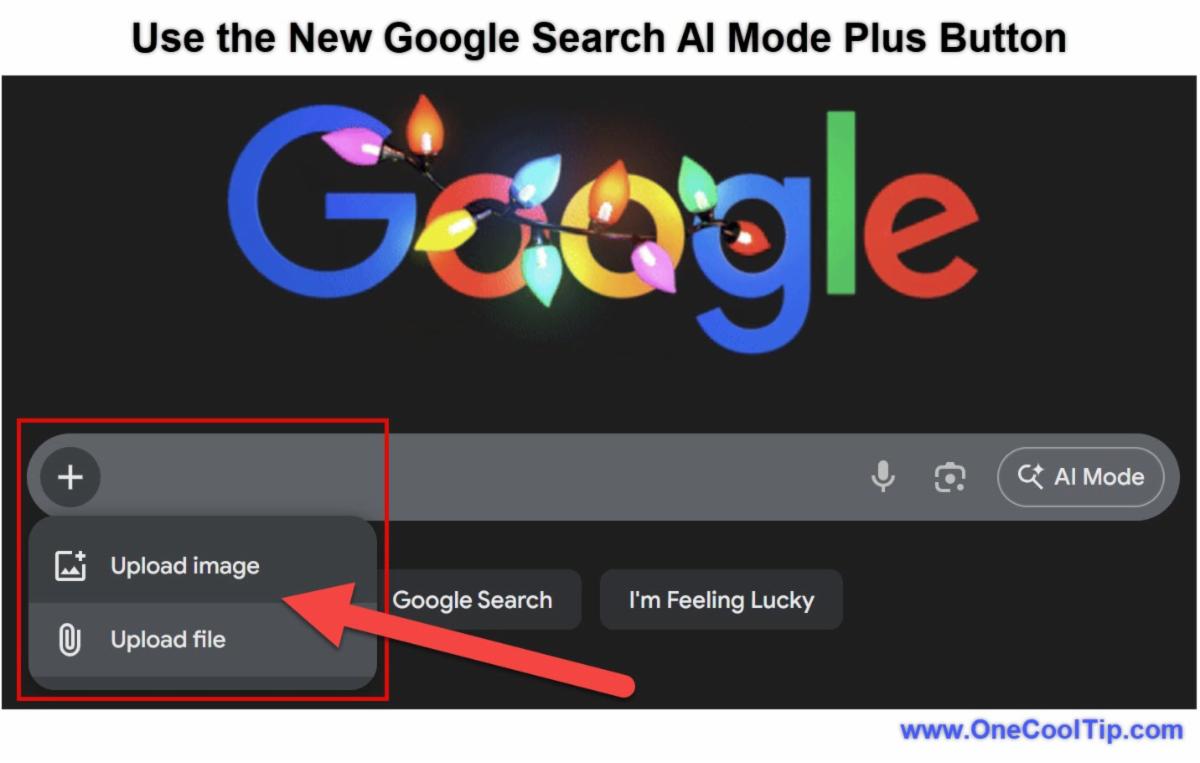
Google has added a Plus (+) icon to the left side of the desktop search bar. 


This simple button is a massive shift: it functions like the attachment paperclip in AI chatbots like ChatGPT or Gemini.


You can now click this icon to upload images or files directly from your computer. 


Once uploaded, Google’s AI analyzes the content to understand the context. 


It then provides an "AI Overview" that diagnoses the issue or answers your specific question. 


While mobile users have had similar features via Google Lens, this update brings true input to the desktop web for the first time.


What You’ll Gain


  • Faster Troubleshooting: Diagnose mechanical issues from photos without learning technical jargon.
  • Desktop Convenience: Analyze files already saved on your computer without transferring them to your phone.
  • Seamless Workflow: Drag-and-drop complex files directly into the search homepage.


Step-by-Step Instructions


Here's how to do it.


Web / Desktop


  1. Navigate to the main Google homepage, www.google.com.
  2. Look for a new Plus (+) symbol.
  3. Click the icon and select "Upload file".
  4. Once the file loads, type a specific question like "Why is this fan wobbling?"
  5. Google processes the media and generates an AI Overview at the top of the results page.


fig. 1 - Google Search AI Mode Plus Button Example

Android / iOS (via Google Lens)


  • Mobile does not have the "Plus" button yet, but uses the Camera icon for a similar result.
  1. Launch the Google App (iOS Android) on your mobile device.
  2. Select the camera icon in the search bar.
  3. Instead of snapping a photo, tap the gallery icon in the bottom left to select an image.
  4. Tap the "Ask about this image" to type your query to get the same AI analysis.


Pros and Cons


Pros


  • Reduces friction for visual or technical questions.
  • Improves accuracy for product and error identification.
  • Natural extension of Lens and AI Overviews.
  • Excellent for education and troubleshooting.


Cons


  • Results depend on image clarity.
  • Rollout appears inconsistent across accounts.
  • Privacy-sensitive users may hesitate to upload files.


Configuration Guide


  • There is no specific "switch" to turn this on or off as it is a server-side update.
  • Availability: If you do not see the Plus (+) icon on desktop yet, ensure you are signed into your Google Account.


Feature Access


Rollout Status: The Plus (+) icon is Desktop-First. It is currently rolling out to users in the US and select regions.


Mobile Users: Continue using the Google Lens (Camera) icon.


Account Type: Available for standard Google accounts.


Score

Criterion | Score (0–10) | Justification
Value 9
Bringing image and file input to the desktop fills a huge gap between mobile Lens and PC search.
Usability 8
Drag-and-drop is intuitive, though having two visual search icons (Plus and Lens) is slightly cluttered.
Wow Factor 8
Powerful but intentionally understated.
Total: 25/30 🌟 Excellent
This update unifies the Google ecosystem, making the desktop search bar just as powerful and sensory as the mobile app.


Key Takeaways


Google is blurring the line between "Search" and "AI Chatbot." 


By adding a dedicated file upload button to the desktop, they are acknowledging that we search with more than just keywords. 


This feature is perfect for users who store photos and files on their computers and want quick AI answers without transferring files to their phones.


Cool Tip Snapshot


  • Feature Name: Google Search Desktop Upload (Plus Icon).
  • Platform(s): Web (Desktop exclusive UI); Mobile via Lens.
  • Quick Benefit: Drag-and-drop analysis on desktop.
  • Access Type: Free (Rolling out).


Try It Yourself


Go to your computer and find a photo or file. 


Open Google.com, look for the new Plus (+) sign on the left of the bar, and drag your file there. 


Ask Google "Where was this taken?" and see if the AI can identify the location!


Do you like this tip? 


Please click the Like button, leave a comment and share with your team, family and friends!


READ MORE


Read the Full Cool Tip.

Check out these Cool Tips & Tricks for Google Search AI Mode Plus Button:


  • Desktop Shortcut: Skip the click, just drag a file from your desktop directly to the search bar to auto-trigger the upload.


  • Error Messages: Upload a screenshot of a computer error message to get a fix without typing the code.


  • Bird Calls: Upload a picture of a bird to identify the species instantly.


  • Foreign Menus: Upload a photo of a menu to translate all items at once.


  • Math Problems: Upload a picture of a handwritten equation to get step-by-step solutions.


  • Plant Care: Upload a picture of your garden to identify pests or diseases on your plants.


  • Code Debugging: Upload a snippet of code (as an image or text file) to ask the AI to find the bug.


ICYMI - In Case You Missed It ...

How Google Turns 50,000 Everyday Sounds Into Your Next Beat


This remarkable AI tool transforms ordinary noises like dog barks, sneezes, and footsteps into a massive, searchable library of percussion, letting anyone make unique musical loops. It is an approachable, powerful demonstration of machine learning applied to creativity that redefines what a drum machine can be.


Read the Full Cool Tip.

Read the Newsletter Version.

Looking for your next adventure?


Call Denise at Travel For You.

314.660.3039


Sign Up for the Monthly Newsletter


http://www.travelforyouvacations.com/


https://www.facebook.com/TRAVEL.FOR.U/


See You Tomorrow

Tomorrow's Cool Tip is waiting to amaze you.


Until then, go forth and conquer the tech world with your newfound knowledge!


Be sure to visit www.OneCoolTip.com for Cool Tech Tips for a Cooler Life!


And if you Like One Cool Tip, please support with TipJar!


Enjoy!


Rodger

Chief Cool Tipper

onecooltip.com@gmail.com


What Do You Think?

What do you think of today's OneCoolTip newsletter?
Positive        Neutral        Negative
X Share This Email
LinkedIn Share This Email

Connect with One Cool Tip!!

Facebook  X  Instagram  Web  Pinterest  YouTube  LinkedIn

As an Amazon Associate, One Cool Tip may earn a small commission from qualifying purchases.


Our media content is intended solely for informational purposes only. Please do not construe anything here as legal, tax, investment, financial, marital or other advice.


Copyright © 2025 | www.OneCoolTip.com | All Rights Reserved