One Cool Tip Newsletter

April 16, 2026

Your daily dose of tech-savvy brilliance!

😀Greetings! Happy Apple Thursday, Cool Tipper!


Get ready to streamline your digital life with simple, actionable tips delivered straight to your inbox.


Cool Tip Theme: Google AI Edge Eloquent


New here? Subscribe to the One Cool Tip Newsletter for daily updates. It's FREE!

3️⃣

If you enjoy the One Cool Tip newsletter, please forward this newsletter to THREE friends or colleagues or share it on social media using the links below.


Leave a $$$ Tip!


Share this One Cool Tip Newsletter!

X Share This Email
LinkedIn Share This Email
Pinterest Share This Email

🚨 🛰️ Amazon to Acquire Globalstar, Partnering With Apple for Satellite Connectivity 🛰️ 🚨


Amazon announced plans to acquire Globalstar, the mobile satellite operator behind Apple’s Emergency SOS via satellite.


The deal will fold Globalstar’s spectrum and satellite assets into Amazon Leo, Amazon’s low-Earth-orbit network, expanding its reach to direct-to-device (D2D) services for phones, wearables, and IoT devices.


As part of the agreement, Amazon and Apple will collaborate to power satellite features on iPhone and Apple Watch models, including emergency messaging, roadside assistance, and location sharing, all backed by Amazon Leo’s next-generation satellites.


Amazon says the move will help mobile carriers extend coverage “beyond the reach of terrestrial networks,” improving connectivity during disasters and in remote areas. The merger is expected to close in 2027, pending regulatory approval.


And in Other News...


Google Launches Native Gemini App for Mac


Google has officially rolled out a native Gemini app for macOS, giving Mac users the same instant AI assistance that Windows users have enjoyed for months. The app works system-wide: press Option + Space to summon Gemini anywhere on your Mac, whether you’re drafting a report, checking a spreadsheet formula, or summarizing a chart.


You can even share your screen or local files with Gemini to get context-aware help, such as asking “What are the three biggest takeaways here?” while viewing a complex graph. The Mac app also supports image generation with Nano Banana and video creation with Veo, bringing Google’s creative AI tools directly to desktop workflows.


Available globally for macOS 15 and newer, the Gemini app can be downloaded now at gemini.google/mac.


Cool Deals of the Day

Help support One Cool Tip. Use this Amazon link when you shop online.


Check out these Cool Deals:


*Prices accurate when originally published.

One Cool Tip may earn a commission from qualifying purchases.

Fuel Your Adventure

Try Big Mike's Jerky!


bigmikesjerky.com


Now on TikTok!


Today's Cool Tip

Turn Your iPhone Into A Private AI Dictation Powerhouse


Google’s new AI Edge Eloquent app quietly turns your iPhone into a fast, offline-first dictation studio that feels more like an editor than a recorder. If you have ever stared at a blank email or meeting-doc, this might be the most useful free app you install this year.


Have you ever walked out of a meeting with great ideas in your head and nothing written down? 


By the time you reach your desk, half of it is gone. 


Traditional voice memos help, but raw transcripts full of ums, false starts, and half sentences are painful to reuse.


Here's a Cool Tip:  Try Google AI Edge Eloquent for iOS.


Google AI Edge Eloquent aims to fix that problem by treating your speech like a first draft and automatically cleaning it into something you can paste straight into an email, doc, or chat. 


It is part of Google’s broader “AI Edge” push for on-device AI, but here it shows up as a focused, practical iOS app instead of a flashy demo.


Feature Explanation


Google AI Edge Eloquent is a free dictation app for iPhone that turns natural, messy speech into structured, polished text. 


You tap record, talk the way you normally would, then stop. 


The app shows live transcription as you speak and, when you finish, it automatically removes filler words like “um” and “uh,” smooths corrections, and copies the cleaned text to your clipboard.


Under the hood, Eloquent runs Gemma-based speech recognition models directly on your device, so core transcription and cleanup work offline once the model is downloaded.  


Optional “Enhanced text polishing” uses Gemini in the cloud for deeper rewriting, but you can keep everything local if privacy is your priority.


Beyond simple transcription, Eloquent offers one-tap transformations:


  • Key points: Turn your monologue into bullet point summaries.
  • Formal: Rewrite casual speech into professional tone.
  • Short / Long: Compress or expand your ideas into more concise or more detailed text.


The app also keeps a searchable history of past sessions and tracks stats like words per minute.


It also lets you build a personal dictionary or import vocabulary from recent Gmail messages so it learns your names, acronyms, and jargon.


Why it matters: instead of juggling a recorder, a notes app, and a separate editor, you get a single place where talking becomes usable writing in seconds.


What You’ll Gain


  • Faster capture: Turn spoken thoughts into ready-to-paste text in one step.
  • Cleaner output: Remove filler words and false starts automatically so you are not editing every sentence.
  • Better focus: Talk through ideas without staring at a cursor or worrying about structure.
  • More privacy: Keep core transcription on device while choosing if and when to use cloud polishing.


Step-by-Step Instructions


Google AI Edge Eloquent is currently only available for iOS.


iOS


  1. Install the app from the App Store.
  2. Launch the app, grant microphone permission, and read the short intro.
  3. On the first run, you will be asked to pick between fully offline “On device mode” and “Enhanced text polishing” that uses Gemini in the cloud. 
  4. Start with On device mode if you want maximum privacy, then experiment with Gemini later.
  5. Tap the big record button and speak naturally. 
  6. After you stop, Eloquent automatically removes filler words and cleans the text. 
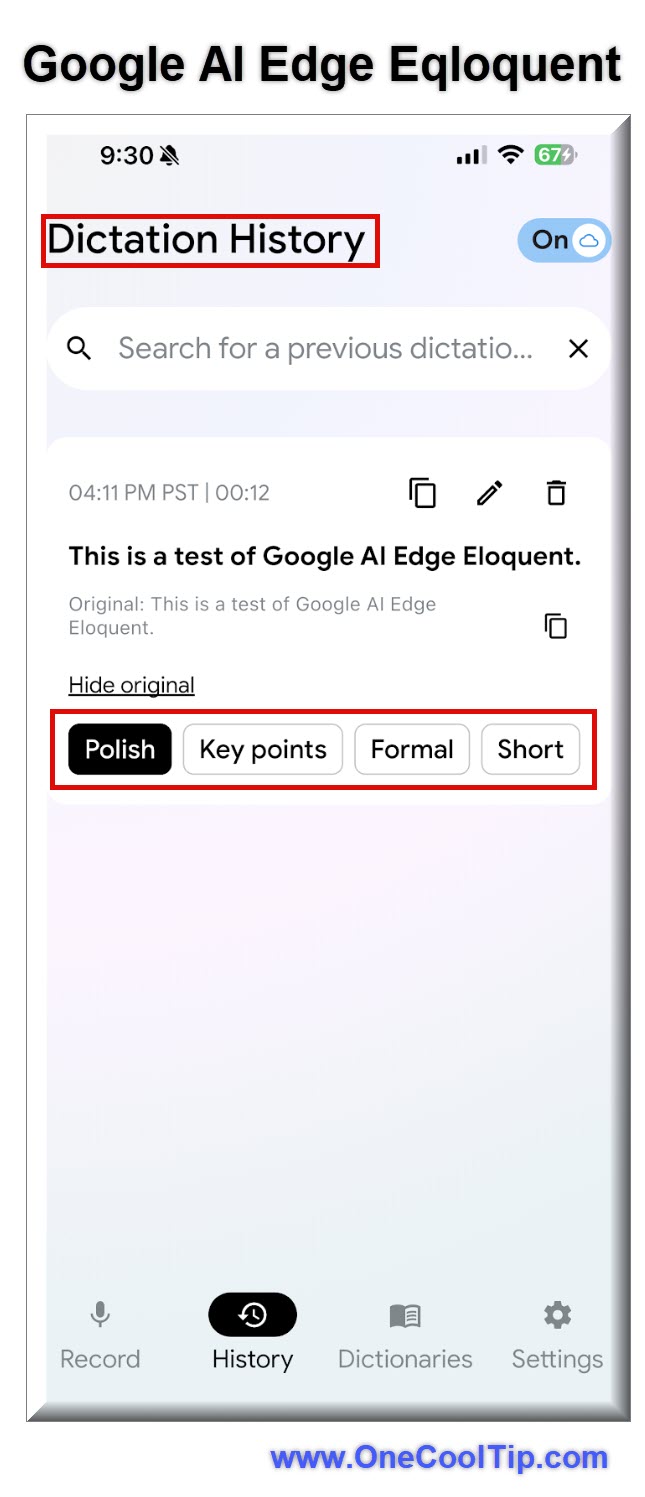
  7. Use the Key points, Formal, Short, or Long buttons to reshape the same content for different uses, such as bullet points for a meeting recap or a formal email draft.
  8. Copy and paste into your app of choice.
  9. Tap the History tab to revisit past sessions, search by keyword, or delete sensitive entries. 
  10. Open Dictionaries to add product names, client companies, or internal acronyms so Eloquent gets them right next time.


fig. 1 - Google AI Edge Eloquent Example

Pros and Cons


Pros:


  • Free and uncapped: No subscription, no usage limit, which makes it attractive compared with paid dictation competitors.
  • Offline first: Core transcription runs on device, ideal for travel, spotty networks, or privacy sensitive work.
  • Smart cleanup and styles: Built-in removal of filler words plus one tap styles (Key points, Formal, Short, Long) reduce editing time.
  • Personal dictionary: Custom vocabulary and Gmail-based term import help with names, brands, and technical jargon.


Cons:


  • iOS only for now: No Android or desktop app yet, which limits adoption in mixed device teams.
  • English only: On device models officially support English only, with multilingual support still in development.
  • Privacy tradeoffs in cloud mode: Enhanced text polishing uses Gemini and is tied to a broader data collection policy that some users may find uncomfortable.


Feature Access


  • Platform: iOS only, available via the App Store.
  • Language: English only for on device models, with multilingual support planned.
  • Regions: Available in most regions, but currently restricted in the UK, Switzerland, the EEA, and Brazil due to regulatory approvals in progress.
  • Pricing: Free, with no subscription and no stated usage cap at the time of writing.


Score

Criterion | Score (0–10) | Justification
Value 9
Free, offline capable dictation with smart cleanup is a strong offer compared with paid competitors.
Usability 8 
The interface is simple and clipboard centric, though the lack of a system keyboard and Android version holds it back.
Wow Factor 8 
On device AI that turns messy speech into near ready prose feels quietly impressive in daily use.
Total: 25/30 🌟 Excellent
Google AI Edge Eloquent is one of the most practical AI tools on iOS today, and it compares favorably to subscription dictation apps by offering similar or better output without ongoing fees.


Key Takeaways


Google AI Edge Eloquent turns your iPhone into a fast, private dictation tool that produces cleaner text than typical voice notes. 


It is especially useful for people who think out loud and want to turn that stream into emails, summaries, and documents without a lot of editing. 


If you live in productivity apps all day, this is an easy win.


Cool Tip Snapshot


  • Feature Name: Google AI Edge Eloquent
  • Platform(s): iOS (English only, most regions)
  • Quick Benefit: Speak naturally and get polished, ready to paste text in seconds.
  • Access Type (Free, Subscription, Beta): Free, currently rolling out as a standalone iOS app.


Try It Yourself


Open the App Store on your iPhone, install Google AI Edge Eloquent, and use it to dictate your next meeting recap or follow up email.


Then share how it went with your team, drop a comment for other readers, and subscribe to the One Cool Tip newsletter so you do not miss future tips you can share with colleagues, family, and friends.


READ MORE


Read the Cool Tip on OneCoolTip.com.

Check out these Cool Tips & Tricks.


  • Filler Removal: Stop worrying about vocal pauses. The app automatically deletes "ums" and "ahs" after you hit stop.


  • Key Points: Summarize long rants instantly. Tap the "Key points" button to turn a three-minute recording into four bullets.


  • Formal Mode: Draft emails while walking. Use the "Formal" toggle to turn casual speech into professional prose.


  • Instant Copy: Save time with the clipboard. Eloquent copies your cleaned text automatically the moment it is finished.


  • Personal Dictionary: Improve accuracy for names. Add your colleagues' names in the Dictionaries tab so they are always spelled right.


  • Gmail Learning: Sync your vocabulary. Optionally connect Gmail to let the AI learn the jargon you actually use.


  • Offline Toggle: Stay completely private. Switch on "Fully Offline" mode in the top corner to keep audio local.


  • History Tab: Never lose a thought. Access the History tab to find and re-copy old transcriptions you forgot to save.


  • Action Button: Quick launch the app. Set your iPhone 15/16 Pro Action Button to open Eloquent for one-tap dictation.


  • Share the Wealth: Help your team. Use the share button in this article to show your coworkers how to stop typing long reports.


ICYMI - In Case You Missed It ...

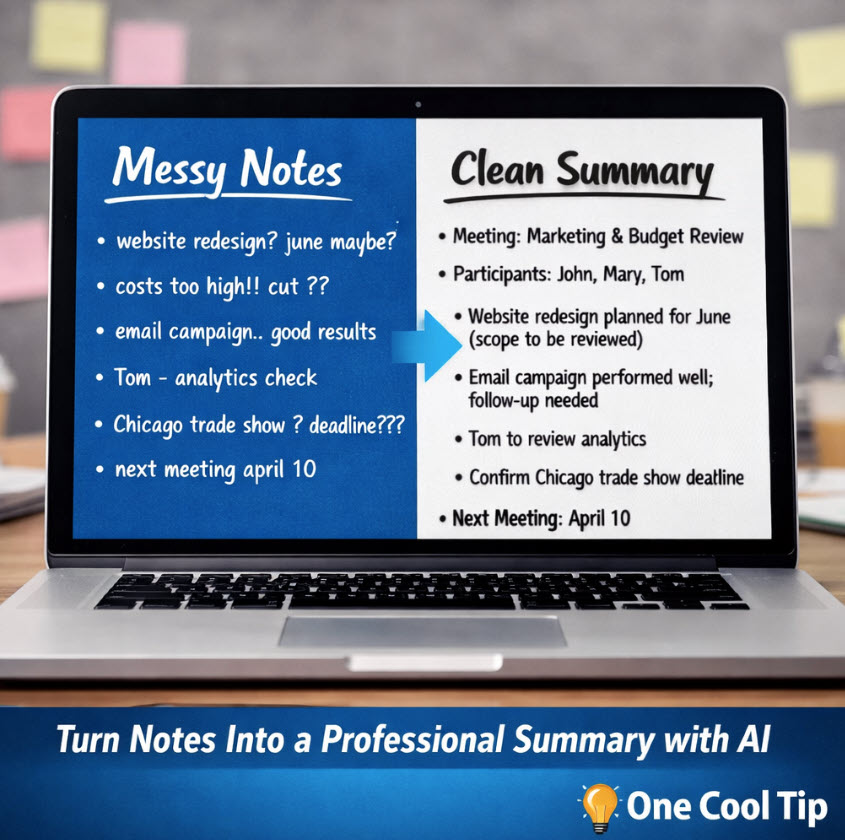
Turn Messy Meeting Notes Into a Clean Summary with AI


Capture rough meeting notes and turn them into clear, organized summaries using ChatGPT or similar AI tools in seconds.


Read the Full Cool Tip.


Read the Newsletter Version.

Looking for your next adventure?


Call Denise at Travel For You.

314.660.3039


Sign Up for the Monthly Newsletter


http://www.travelforyouvacations.com/


https://www.facebook.com/TRAVEL.FOR.U/


See You Tomorrow

Tomorrow's Cool Tip is waiting to amaze you.


Until then, go forth and conquer the tech world with your newfound knowledge!


Be sure to visit www.OneCoolTip.com for Cool Tech Tips for a Cooler Life!


And if you Like One Cool Tip, please support with TipJar!


Enjoy!


Rodger

Chief Cool Tipper

onecooltip.com@gmail.com


What Do You Think?

What do you think of today's OneCoolTip newsletter?
Positive        Neutral        Negative
X Share This Email
LinkedIn Share This Email

Connect with One Cool Tip!!

Facebook  X  Instagram  Web  Pinterest  YouTube  LinkedIn
 

As an Amazon Associate, One Cool Tip may earn a small commission from qualifying purchases.


Our media content is intended solely for informational purposes only. Please do not construe anything here as legal, tax, investment, financial, marital or other advice.


Copyright © 2026 | www.OneCoolTip.com | All Rights Reserved