|
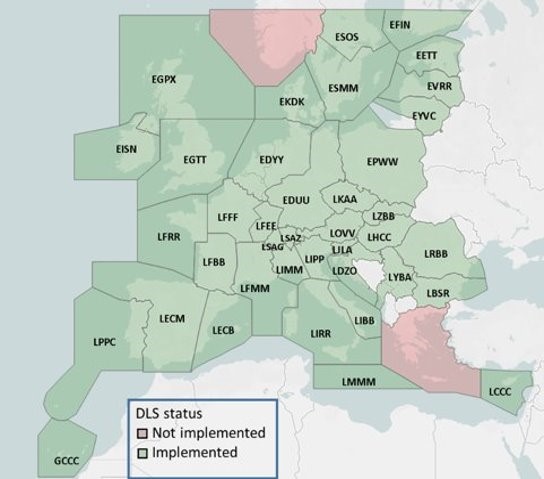
Active ATN Logon Addresses in European Airspace
Image Source: https://ext.eurocontrol.int/WikiLink/index.php/Deployment
How Do I Register My Aircraft?
Operators must register their aircraft on the Logon List Dashboard. Operators are also responsible for updating their aircraft profile on the Dashboard when changes and upgrades occur on the aircraft and if operator contact information has changed.
If you are a new user, request access to the Logon List Dashboard. Once you have gained access, the Dashboard offers video tutorials on how to submit a new aircraft request, how to edit an existing aircraft, and how to update operator contact information.
Please note that the Logon List is updated at every AIRAC cycle and applications must be received at least three weeks prior to the next AIRAC date.
Click here for a list of Ineligible Avionics.
The Logon List and the European DLS IR (ATN Mandate)
The European Data Link Services Implementing Rule (EU DLS IR) requires airspace users operating above FL285 to be equipped with ATN/VDL2 unless exempt. The Logon List is independent of the ATN Mandate; an aircraft can be ineligible or not registered for the Logon List and still be compliant with the EU DLS IR.
Flight Plan Filing Refresher - European ATN
Many business aircraft are both equipped with ATN and exempt from the EU DLS IR. What should you file, the “J1” code or the DAT/CPDLCX?
You should file based on crew training and intent (ATN Datalink: Flight Plan Filing Guidance Quick Guide):
- If the crew is trained and intends to use ATN for the flight, file “J1” in Field 10a
- If the crew is not trained or does not intend to use ATN for the flight, file "Z" in Field 10a and "DAT/CPDLCX" in Field 18.
-
Do not file both
Important: When filing the “J1” code, please ensure that the CODE/ subfield in Field 18 is populated with the original ICAO address (ADS-B Mode S address) for the aircraft. If “J1” is present and the CODE/ is missing, the flight plan will be rejected.
- Make sure that the CODE/ populated is the original ICAO address (ADS-B Mode S address) that matches the registration in the REG/ subfield or your ATN Logon will fail.
|