|
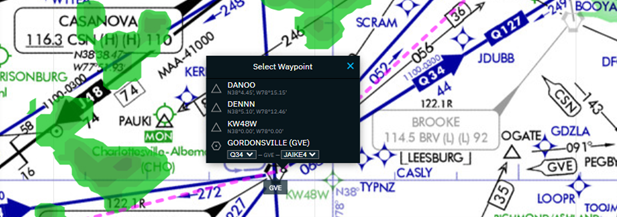
Dragging the route will show a dashed line to depict the movement of the route while dropping the route will provide the waypoint/airway selection menu. This new functionality allows you to build a route with better guidance of options for the next point or airway. Changes via the map populate the Custom Route box in real-time allowing you to save and compute your route when finished. Because the Custom Route box and map are integrated you also benefit from database and syntax validation just as you would if you edited a route via the Custom Route box.
More information about this enhancement can be found in the Rubberbanding Release Notes.
Get Access
Learn More
Need further assistance?
We are here to help. Please reach out to our 24x7 Izon Support Team at +1 410-266-2266 or via the embedded feedback button within Izon.
As the backbone of the new Collins business aviation digital experience, the Izon dashboard will continue to expand as additional integrated solutions are brought online. From all of us at ARINCDirect, we want to thank you for your continued support as we rise above business as usual.
|