Save Your Firm Money, and Save Yourself Headaches
Annual Renewals: Don't Get Caught Up a Tree!
This poor fellow was not paying attention to the time of year.
While we are all getting ready for things that go "bump" in the night to ring our doorbells on Wednesday, be sure to take a few minutes so that your firm's registration doesn't go "bump" in January! That's really scary...

Annual license and registration renewals take place effective January 1, 2019, but there are steps you need to take now to be ready. Below I will list the main items that I have seen firms miss, both when I was an examiner with Colorado Division of Securities and now as an independent compliance consultant. Click here for the full calendar if you want all the details.

The systems inside the Firm Gateway can be confusing, because they look much alike. CRD pertains to individual representative licensing, and IARD pertains to firm-level registrations. E-Bill is where your firm's funds for fees reside. You can switch back and forth with the links in the blue menu bar.

On Monday, November 12, you will be able to see your firm's preliminary statement for renewal fees in E-Bill. If this statement is accurate, you will know how much funding you need to have for renewal by December 17.

Mark
Make Sure You Are Only Paying for What You Need

What you need to do by Friday, November 9:
  1. Check your firm's states of registration in the IARD system. If you are under a state's de minimis requirement, consider withdrawing your registrations so that you won't get charged for 2019 registrations you aren't required to have.
  2. Run a Roster Report in CRD to make sure the right people are licensed to your firm. I have seen many cases of long-separated representatives still on a firm's books, so the firm continues to pay licensing fees (and technically, remains responsible for supervision)!

Make Sure You Have Funds in Your Account

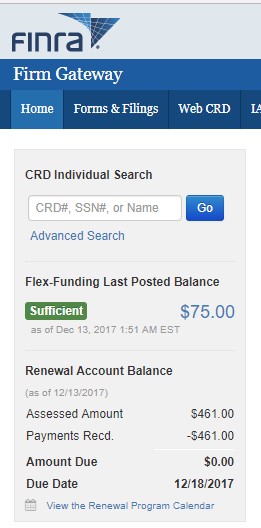
There are two accounts inside the E-Bill system. The Flex-Funding Account covers all fees charged throughout the year. The Renewal Account pays annual renewal charges. Beginning December 17, the system will automatically transfer funds from Flex-Funding into the Renewal Account if sufficient funds are available.

You will see your firm's balance(s) on the left-hand side of the home page in Firm Gateway.

What you need to do before Monday, December 17:
Check your E-Bill balance to be sure you have funds to cover the fees on your preliminary invoice.

Adding funds to the E-Bill accounts is relatively simple, and done by an ACH transfer from your firm's bank account. Payment requests submitted before 9 p.m. ET are processed that night and will be reflected in your account the next day. 

The image on the left (on desktop) or above (on mobile) shows a firm's Flex-Fund balance of $75 and Payments Recd in the Renewal Account of $461. The Amount Due of $0.00 in the Renewal Account is your goal!

Double-Check Your Renewals

If you flub something, you have a short window of time to fix it!

On Wednesday, January 2, 2019:
  • Check that your firm's registration and representative licenses have renewed, and that you don't see an Amount Due in the Renewal Account balance.
What Happens If I Don't Fund Renewals?

On January 21, 2019, your firm's registration and all associated representative licenses will terminate if renewal fees are not paid. The recovery process is much more laborious, involves re-submitting your applications, and often includes a telephone calls with your friendly neighborhood securities regulator. 
moonless_fireworks.jpg
These are the only New Year fireworks you want to see.
You are receiving this email because you are a listed regulatory contact for an RIA registered in the State of Colorado, or you have requested to receive these emails. If you do not want to receive these updates, please use the unsubscribe link below.

Tirador Compliance LLC is not affiliated with the Colorado Division of Securities.