Updates to Results Review (ALL)
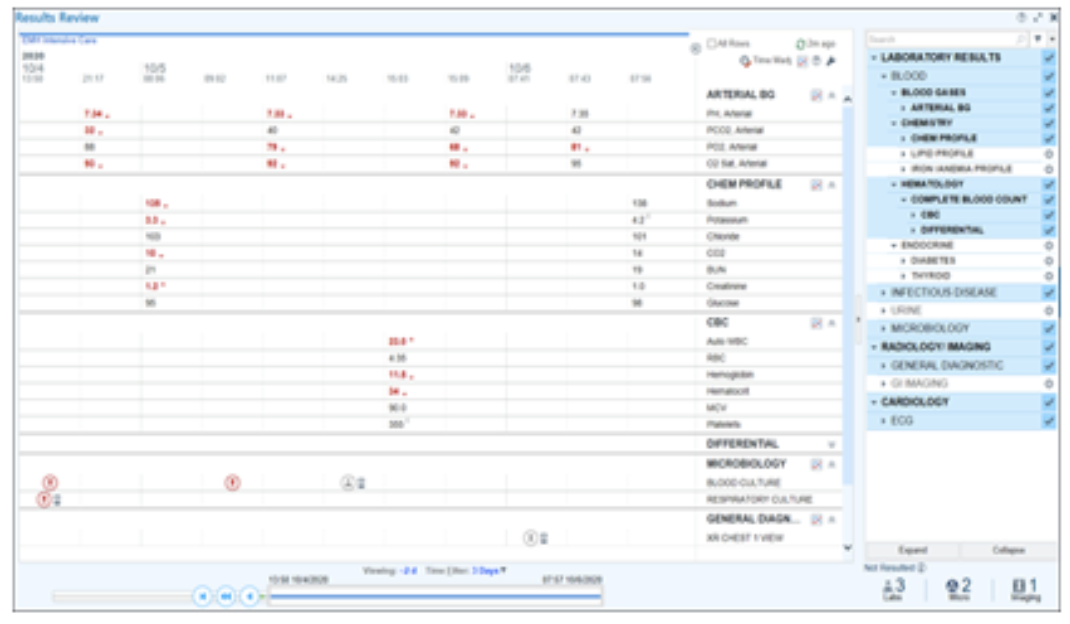
Updated Results Review will make it easier to find and learn more about results without looking elsewhere in the chart.
New results are highlighted and time-related tools are grouped so you can quickly navigate, change time filters and jump to specific dates.
|
|
Invite Patients and Proxies to a Video Visit (ALL CLINICAL)
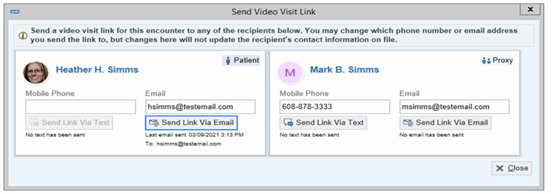
New functionality will allow you to invite Patients and Proxies to a Video Visit. If a patient is having trouble accessing their video visit from MyChart, or needs quick access to the visit, clicking Send Video Visit Link in the toolbar to send a link to their email or phone number that gives them or their proxy access to the video visit.
|
|
For more information, click here. |
|
Place and Sign Orders within the Visit Taskbar (AMB)
Orders will now be placed using the Visit Taskbar in Hospital Outpatient Departments.
For instructions on how to place and sign an order, click here.
|
|
Updated Look for Patient Instructions (INPT)
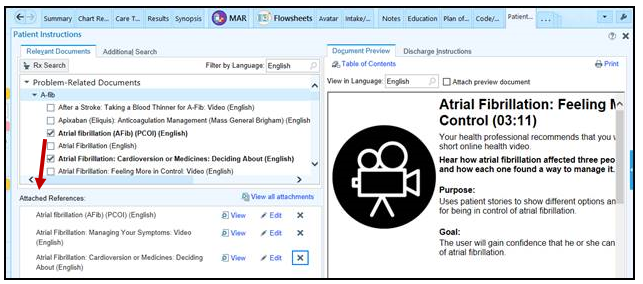
Patient Instructions has a new look and improved functionality.
You can add your own speed buttons to pull in commonly used instructions, add discharge instruction SmartTexts as attachments to the AVS, and search for clinical reference documents without having to open Clinical References.
|
|
Move Medications on the After Visit Summary (INPT)
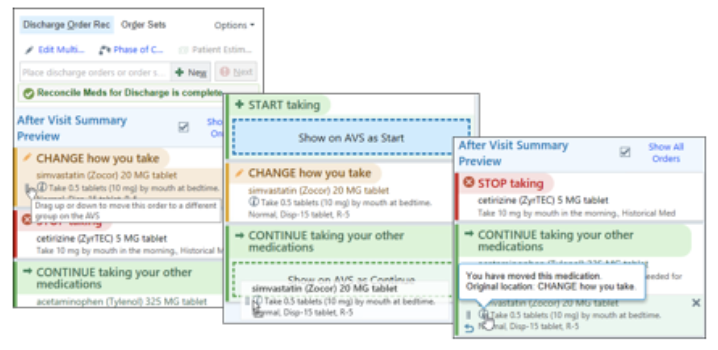
You can adjust how a patient's medications appear on the After Visit Summary (AVS) by dragging them to different sections in the sidebar or using the right-click menu when you're reconciling a patient's medications for discharge.
|
|
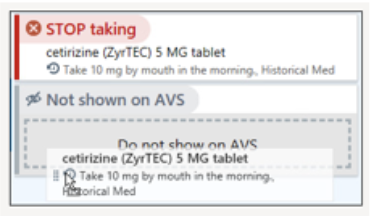
You can also hide stopped medications from the After Visit Summary. |
|
For a complete list of all changes impacting Providers click here.
|
|
Changes to “Signed and Held” Orders (INPT)
- Signed & Held orders will appear on the Storyboard.
- Signed and held orders written with a phase of care (pre, intra and post) will be expanded by default in the Signed & Held Orders activity.
|
|
For more information, click here. |
|
Changes to the Patient Instruction Activity (INPT)
When patient instructions are selected, they will populate the attached references section. This instruction will be automatically added to the AVS, no need for the extra click.
|
|
For more information, click here. |
|
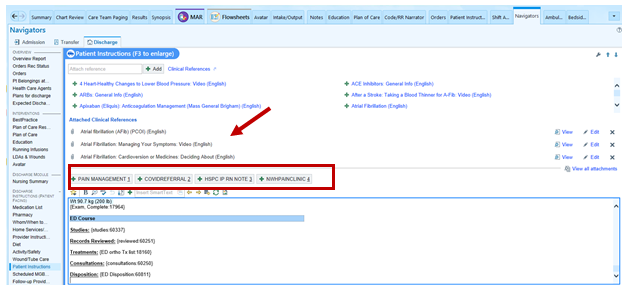
Changes to the Patient Instructions in the Discharge Navigator, Procedural Discharge Home Navigators, ED Disposition and the Ambulatory Wrap Up Activity (INPT)
- Clinicians can now search for Clinical References directly from the navigator section without having to open a separate activity.
-
Patient Instructions activity can still be accessed by clicking the Clinical References hyperlink.
- Clinicians can also make speed buttons in the Instructions section to quickly insert customized text
|
|
For more information, click here. |
|
For a complete list of changes impacting Nurses click here.
|
|
OTHER CLINICAL / ANCILLARY STAFF |
|
Vent Start/Vent Discontinued and History of Difficult Intubation BPAs (INPT)
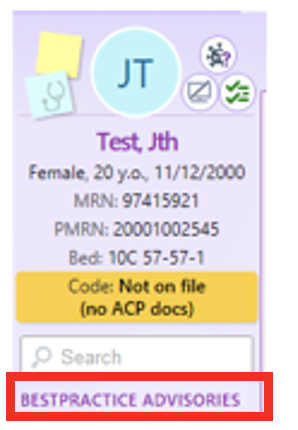
Two BPAs will appear to RTs in their storyboard under “BESTPRACTICE ADVISORIES” section (red highlighted).
- RT Vent to Non-Vent Documentation BPA
- Difficult Airway BPA
For more information, click here.
|
|
Work List Changes (INPT)
This tip sheet covers the following changes to the Work List:
- Identify patients and tasks
- View Patient Header Information in the Time or Unit View
- Change which patients will appear on the Work List
- Add Task functionality
- User Task has been renamed to Personal Task
For more information, click here.
|
|
For a complete list of changes impacting Other Clinical / Ancillary users click here.
|
|
Updates to Work List and Reporting Workbench Report Settings Windows
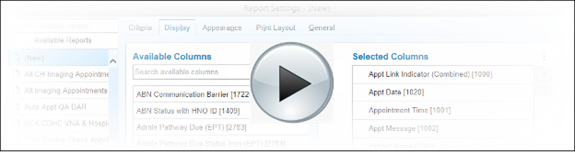
A number of changes will be made to Work List and Reporting Workbench Report Settings windows. Watch the brief video below for more information:
|
|
Changes to Virtual Visit Attestation (AMB)
Patient Location:
- Some payors will require Patient Location for Virtual Visits.
- The Virtual Visit Navigator will have a new field that will be required for patients with Cigna, Harvard Pilgrim, and some Tufts Medicaid/Medicare plans. This will be optional for patients with all other coverage plans for now.
- Patients will be asked during scheduling where they will be at the time of the visit: home, a medical facility (includes hospital, SNF, outpatient clinic, and home hospital). This will populate the Virtual Visit Attestation section. For patients who are admitted to an MGB institution at the time of the visit, location will update automatically. Medicare will likely require Patient Location starting in October 2022.
Time Requirement for Telephone (audio-only) Visits:
- This is not a new requirement, but there will now be a hard stop if time has not been entered for visits that are billed with E/M or Consult codes.
Important Attestation Reminder:
- Please clean up outdated boilerplate language from note templates that may conflict with the newer attestation language.
- Be sure to use either the VV Navigator section, which can be launched from a note using .VVATTESTATION, or use .VVATTESTATIONNOTE to complete attestation via F2.
For more information, click here.
|
|
Updates to Front End Payment Poster
Copays will now be collected using the a new Payments form during Check In instead of the Payment Collection button on the toolbar. The Payments form is replacing the current Copays form.
- When you click Payments, the screen shows the Payment Collection window and you’d follow the normal workflow for collecting the payments.
- Additionally, a new warning has been added if no copay is collected, or if a partial copay is collected, when you complete check in. The warning is asking for a reason for no copay collected. The option to document a reason for not collecting a copay has always existed, however the warning is new and the list of reasons has been reduced from 12 to 4.
For more information, click here.
|
|
For a complete list of changes impacting Admin / Revenue Cycle users click here.
|
|
Copyright © Brigham and Women's Hospital. All rights reserved. You are receiving this Support Update because you have been identified as an Epic user at Brigham and Women's Hospital.
PLEASE NOTE: By unsubscribing from this email, you will be removed from the PeC@BH All User distribution list and will no longer receive important Epic or other clinical systems updates. Please unsubscribe only if you are certain that you should no longer receive these updates.
|
|
|
|
|
|
|