Bytes and Insights Logo
 

Learn21's Weekly EdTech Update

October 12, 2023

Welcome to

Bytes & Insights

Re-Learning How to Focus: The Battle Against Smartphone Distractions

In the age of smartphones, our attention spans are being pulled in a million different directions. It feels like any task longer than three minutes is nearly impossible to concentrate on. From scrolling through social media feeds to checking notifications, our devices have become constant sources of distraction. As teachers and school administrators, we face the challenge of helping ourselves and our students regain the superpower of focus. So, let's explore some strategies to combat smartphone distractions and re-learn how to focus in this digital era.


Embrace Mindfulness: A Mental Reset Button

One powerful tool to combat distractions is mindfulness. Encouraging both ourselves and our students to practice short mindfulness exercises throughout the day can help us refocus our attention. By taking a moment to breathe and be present, we can create a mental reset button. Practicing mindfulness allows us to step away from the constant stimulation of digital devices, giving our brains the break they need to recharge and refocus. It's time to embrace the power of being present and find our zen amidst the digital chaos.


Designate a Distraction-Free Zone

Creating a distraction-free zone is essential in regaining focus. As teachers and school administrators, it's crucial to establish a designated space where phones and other distractions are strictly off-limits. By setting clear boundaries, we provide students an environment conducive to deep work and concentration. This sacred space allows them to immerse themselves in their tasks without getting sucked into the black hole of social media or notifications. Let's banish the FOMO and create zones that foster productivity and focus.


Breaking Tasks into Bite-sized Chunks

Long, overwhelming tasks can easily lead to loss of focus. To overcome this, we can break tasks into bite-sized chunks. By dividing larger assignments into smaller, manageable pieces, students can tackle them more effectively. Each mini-milestone accomplished fuels a sense of accomplishment and progress. This approach not only increases productivity but also boosts motivation and prevents overwhelm. 


Engage with Visual Aids

Visual aids are powerful tools to capture attention and enhance focus. By integrating charts, diagrams, and colorful infographics into our lessons, we make learning more engaging and memorable. Visuals stimulate the brain, creating a multi-sensory experience that helps retain information.


Foster Active Learning

Active learning is another effective strategy to combat distractions and improve focus. By encouraging students to actively participate in their learning through hands-on experiments, group projects, and lively discussions, we boost engagement and concentration. Active learning sparks curiosity, deepens understanding, and promotes critical thinking skills. 


Practice Digital Detoxes

Taking regular breaks from screens is essential to relearn how to focus. Encourage students (and ourselves) to engage in offline activities during these digital detoxes. Whether it's going for a nature walk, reading a book, or practicing a hobby, disconnecting from screens allows our brains to recharge and regain focus. Unplugging from the digital world even for short periods can have a profound impact on our ability to concentrate and tap into our creative thinking. Let's encourage our students to unplug and unleash their inner zen masters.


In this age of constant digital distractions, regaining our ability to focus is a skill worth relearning. By embracing mindfulness, creating distraction-free zones, breaking tasks into manageable pieces, utilizing visual aids, fostering active learning, and practicing digital detoxes, we can reclaim our superpower of focus. As educators, it's our responsibility to guide our students in this journey and equip them with the tools they need to succeed in an increasingly distracted world. Let's banish smartphone distractions, one mindful breath at a time!


Tips & Tricks

Add descriptions to folders and files in Google Drive to help search

Under information, you can add a description and search can use this information when you're trying to locate files and folders.

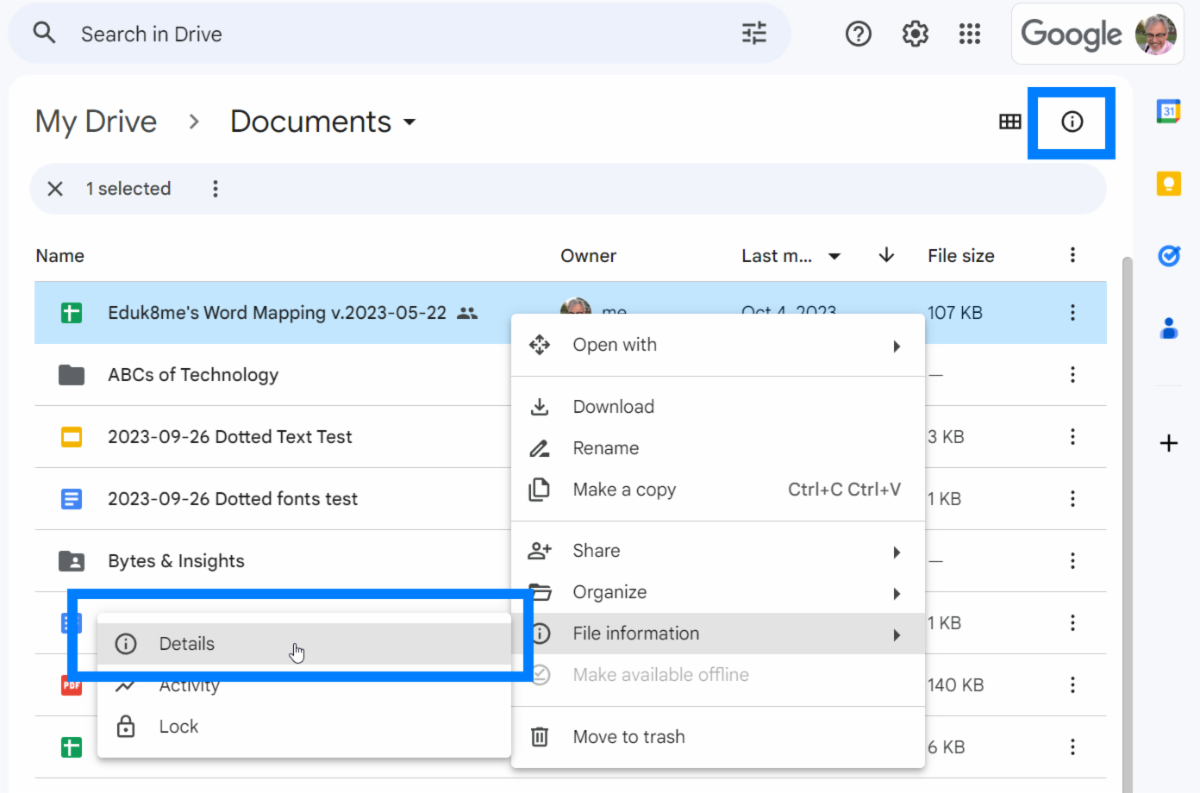
Find the document or folder that you want to add a description to and single click on it. Click on the i in a circle in the upper right or right-click on the file/folder and select File Information > Details:

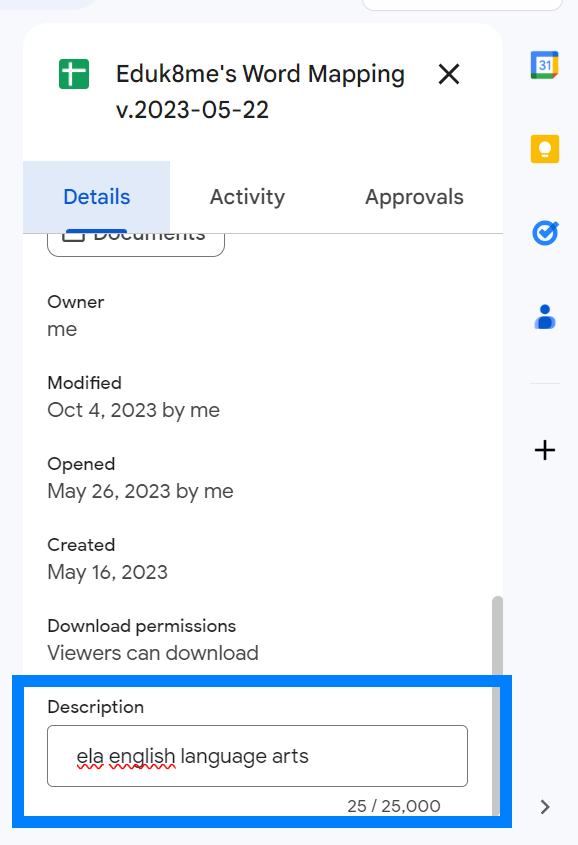
Scroll to the bottom of the information panel and you'll see a place to add a description. Write a description in this field:

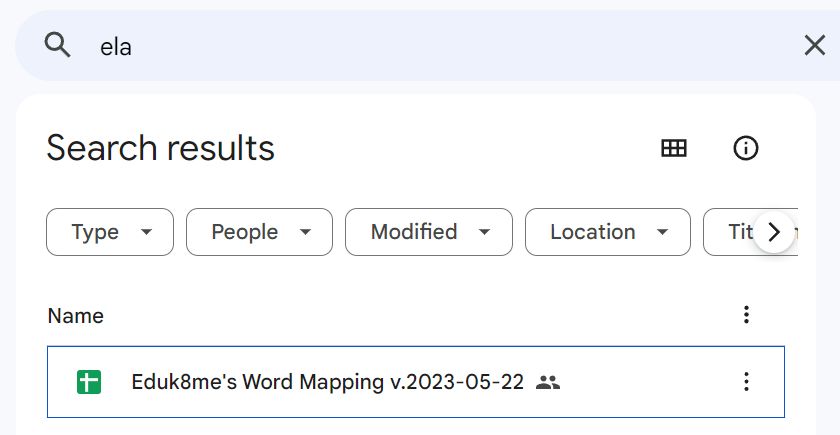
When you're finished typing, press the return key to save. Now you can search for files and Google Drive will also use information from the description field to help you locate the file.

This could be used to group your documents by subject matter or by project.


How to remember everyone you meet

When I meet someone, or someone is mentioned to me, one of the first things I do is add them to the contacts in my phone. I usually don't have much more information than a name, but I fill out the info as much as I can. In the notes field I will enter any information I know about them freeform. For business contacts it will usually be their company, what they do there, and what we talked about. For parents I'll list their children's names and any other information. I have one contact for a neighbor which only has his name and the note "lives in the blue house."


Later on if I want to recall a person's name or remember why I know them, I can search my contacts. The search will look through all of the fields, including notes, so for my above example I can search for "blue house" and find him.


Bonus points for taking a picture of the person, but that can feel a little too intrusive. Later on I can go to their LinkedIn, social media, or business and find a picture that I can place with their contact information. As I learn more information about them, I'll fill out more and more information. The hardest part is entering the information in the first place because I always think, I'll remember this person, and then 6 months later I'm racking my brain for their name.


Learn21 Update

Discover the Power of Tech Director Toolbox Asset Manager - Devices!


In a recent webinar, we unveiled the remarkable capabilities of the Tech Director Toolbox Asset Manager, an essential product in our toolbox designed to simplify device management for your organization. We're excited to share the highlights with you!


The Device tab took center stage as we explored the device management features. Insights at the top of your screen provide quick graphical views of your device fleet, allowing you to assess the health and status without running extensive reports. Adding devices ad hoc is a breeze, and bulk uploading devices is simplified through CSV templates and MDM Downloads.


We also demonstrated the power of the audit, which helps you compare and contrast data between the Asset Manager and Google Admin Console, ensuring data consistency.


Our bulk integration actions facilitate tasks like org unit migration and device disabling/enabling, streamlining your workflow. Similarly, we covered collecting and disbursing devices, further allowing districts to track their inventory efficiently. We've also integrated with Jamf and Absolute (just to name a few) for centralized device management.


Device profiles provide comprehensive information about each device, including MDM modules, past assignments, and incidents, ensuring complete transparency.


Our team unveiled Device Labels, a new feature that enables easy categorization and tracking of devices. We discussed several use cases, including labeling devices with special usages for easy identification, labeling locations, and many more! Users can add and remove labels through bulk CSV upload, or ad-hoc by editing a device.


We wrapped up the webinar with a look at the bulk status change feature, perfect for managing device statuses at scale.


Ready to simplify your device management? Dive into the Tech Director Toolbox Asset Manager and experience the difference today! For more details and in-depth guides, check out our Interactive Guide and Printable Guides located in the Tech Director Toolbox Help menu. And remember, our dedicated support team is here to assist you every step of the way. Get started with Tech Director Toolbox Asset Manager and unlock a new level of efficiency!


Extra Credit

Google announced a new branding for Chromebooks, the Chromebook Plus. A Chromebook Plus is a Chromebook with a faster processor, more memory, and more storage than what is normally in a Chromebook. Current Chromebook minimum specs include an Intel i3 12th gen (AMD Ryzen 3 7000 series), 8GB of RAM, 128GB of storage, a 1080P camera with temporal noise reduction, and a 1080 screen. These are the minimum specs, there will be Chromebook Pluses with higher end specs. The branding makes it easier for district to purchase machines for staff members knowing that the machines will be powerful enough to get the job done.


As Google giveth, it also taketh away. Google announced they are stopping development of Google Jamboard, both the software and the hardware. This is unfortunate because I know a lot of teachers have been creating a ton of content in Jamboard. Google is working with Figma, Lucid and Miro to provide a migration path for these Jams to Figjam, Lucidspark, and Miro. I've been experimenting with Figjam and it is a fantastic piece of software.


Most of what I've read about authors and AI is that authors DO NOT like their material being used for training the large language models such as those that power ChatGPT. But here is an author that doesn't really have a problem with it. He dives deep into the Author Guild's letter calling out the

AI industry and its exploitation of writers.


This video is a fascinating look into how people think in relation to time. When I was watching it I was struck by how the ideas about a person who thinks in present is very much a fixed mindset thinker, while those who are thinking in the future have a growth mindset.

Bytes and Insights is written by Eduk8me’s Ryan Collins who writes about education and educational technology. He’s also the Director of Technology for Kenton City Schools in Ohio. Sign up for his Of Bits and Bytes newsletter at https://eduk8.me.


Learn21 Logo

www.learn21.org