Learn21's Weekly EdTech Update

Welcome to

Bytes & Insight

Learn21 believes in giving back to the edtech community and is proud to share with you, free of charge, our new weekly edtech update. This update will be delivered weekly and include the following sections:


  • EdTech Article of the week
  • Tips & Tricks
  • Learn21 Update
  • Extra Credit


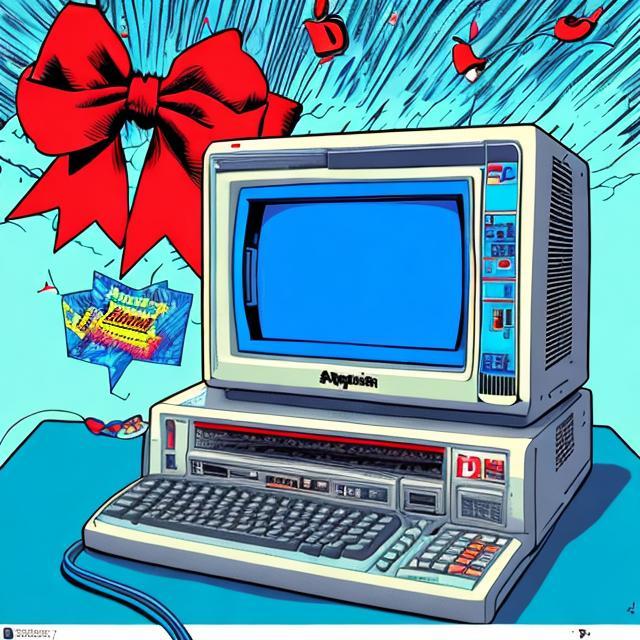
Happy 25th Birthday to Apple's iMac


Twenty-five years ago this past August Apple unveiled the first iMac, a computer that spawned many imitators along with making USB mainstream. Apple has been mocked for using the word courage in relation to removing things like the headphone jack, but many of the design decisions on the iMac were the very definition of courage.


One of the most revolutionary changes in computers

There were three things that made the iMac more than just an evolutionary upgrade of existing computers.

  • No floppy drive
  • Only USB for expansion
  • Colorful


Leaving floppy disks behind

The biggest gamble was dropping the floppy drive. Apple had such a belief in a floppy-less future that they didn't even offer a floppy drive as an option. In our current world, this seems like a logical outcome, but at the time it was a major deal. I wish I could have been there for the arguments because I have a feeling they got pretty heated.


One port to rule them all

The iMac dropped all legacy ports shared with Macintoshes up until this time, opting for a little known interface called Universal Serial Bus. When the iMac was announced in May of 1998, Microsoft had only added USB support to Windows 95 in the preceding November. Windows 98, which would support USB from day 1, wouldn't be released for a month. The USB ports replaced the Apple Desktop Bus which was used for keyboards & mice, the SCSI port which was used for external drives and scanners, and the serial ports which were used for printers, modems, and local networking.

Since the iMac already had a modem and network card built in, the biggest use of USB was for hooking up a printer. Second was probably a floppy disk drive. Yes, I see the irony in that.


True colors

While having a splash of color doesn't seem like it would be that revolutionary, it didn't take long before everyone was releasing computers and peripherals in a multitude of colors. Such a welcome change from the sea of beige that had existed throughout the 90s. Sure, Apple computers at the time were a lighter beige than most, and the Gateway 2000 computers were white, but isn't white just a very light beige?


No guts no glory

The release of the iMac brought renewed interest in the Macintosh line. It could be argued that it saved Apple, and all because there were people at Apple that had enough faith in the revolutionary design of the iMac to support its release. The iMac was so different that the Boston Globe predicted that it "is[sic] too odd to succeed".

The iMac doesn't include a floppy disk drive for doing file backups or sharing of data. It's an astonishing lapse from Jobs, who should have learned better.

The writer complains about the lack of a floppy disk drive for a majority of the review, ending his review wondering if a floppy drive will be added at the last minute. "It might not turn the iMac into a hit product, but it'd be good for more headlines." This is what a revolution looks like, one that doesn't hold on to antiquated technologies and techniques of the past. The success of the iMac helped Apple stay in business. Without the iMac, there may never have been smartphones as we have them today. Instead, we may have had things that look like the Blackberry and Palm Treo of old.

Tips & Tricks


Google Chrome Downloads

One of my favorite Chrome tips is how I handle the Downloads folder. Instead of leaving it at the default, I change the location of the folder to a Downloads folder in my Google Drive. On Chromebooks this works out of the box, while on macOS and Windows you will need to have the Google Drive App installed.

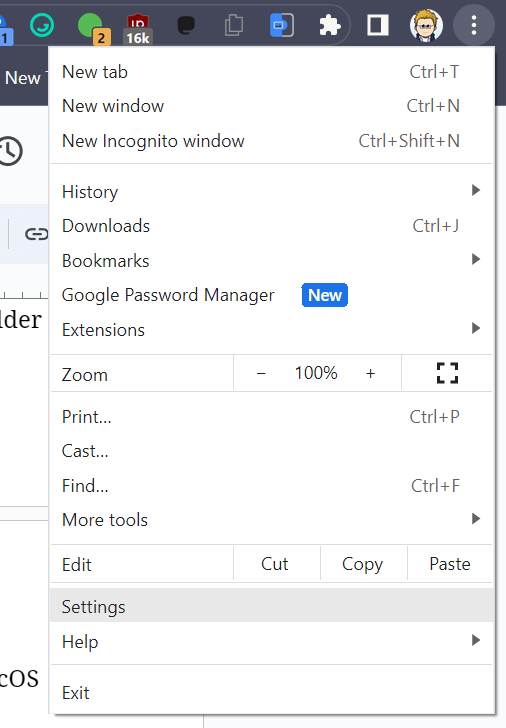
Navigate to your Google Drive and create a folder name Downloads. In Chrome, click on the three dot menu and select Settings


Screenshot of Google menu

On the left side, locate the Downloads setting and click it.

Screenshot of Google Chrome settings showing location of change link

Now you can click the Change button and set the location of Downloads to the folder you just created in Google Drive. From that time forward, you'll have access to your downloads no matter what machine you are on. Since I could be using a Chromebook, a laptop, or a desktop, this makes it easy to always be able to find the files no matter what device I'm using.


Unfortunately you have to set this on every device, but it's a pretty quick task.


Google Drive search

Since now you'll have the Google Drive app installed, you might as well learn how you can quickly search your Google Drive. To get started, hit control-alt G (command-option G on macOS) to open up the Google Drive search. Enter your search terms and you'll see a list of files in your Google Drive that match the terms. Clicking on the file (or hitting enter) will open the file in your default browser.


Screenshot showing Google Drive search from Chrome

Learn21 Update:

Discover the Enhanced Asset Management with

Tech Director Toolbox


Excitement is in the air as Tech Director Toolbox's (TDT) latest update takes center stage in our recent webinar. Focused on the TDT-Asset module, the webinar showcased a range of enhancements poised to revolutionize asset management for schools and districts. Tech Director Toolbox is a comprehensive suite designed to empower tech directors and educators alike.


During this webinar, our new branding, featuring the distinctive purple icon for the Asset Manager, was unveiled. Attendees got a sneak peek into the streamlined home screen and landing page, introducing them to the friendly and intuitive interface.


A key highlight was the Owner Management updates. This feature, previously residing in the admin tab, has been migrated to the Assign tab for easier access. The inclusion of insights provides at-a-glance visuals on student and staff count, plus created groups. Attendees discovered simplified filtering, enabling quick identification of specific groups or owner types, enhancing the user experience.


Bulk owner uploads took the spotlight, providing the convenience of adding, updating, or even removing owners without contacting support, streamlining administrative tasks.


Assignment workflows also received significant attention in the latest update. Attendees were guided through efficient methods of assigning devices to students, including single and multiple assignment modes. A crucial tip emphasized maintaining up-to-date inventory before bulk assignments, ensuring accurate asset matching.


The interactive session was rich with real-time insights and Q&A interactions, reflecting the dedicated support Tech Director Toolbox provides. As anticipation builds for the imminent release of these enhancements, the stage is set for more transformative webinars in the weeks ahead. For ongoing support, users were encouraged to access the interactive guide and utilize the help function located right inside TDT-Asset. With Tech Director Toolbox, the asset management landscape is evolving, promising greater ease and efficiency for educators and administrators alike.

Extra Credit


Last fall school districts reacted in a few different ways to the release of ChatGPT. Some districts were like, "whatever", and kind of didn't acknowledge ChatGPT's existence or thought about its repercussions. Then there were those districts that fully embraced the robotic overlord of the future and worked on ways to bring students and staff up to snuff with AI. Finally, there were those districts that banned early and banned often. It looks like the tide is turning with some districts are looking at getting rid of their bans and actually presenting professional development on how to use AI in the classrooms.


Adobe's Express product works really well. It looks a lot like Canva so it's pretty easy to get started with if you've used Canva. While Canva has had its generative AI tool for graphics for several months now, Adobe is rolling out it's generative AI tools for Adobe Express. The big difference between the two is that Adobe has trained their AI tools on licensed work, which means less copyright issues. A lot of the Large Language Models (LLM) and generative AI image generators have been trained on materials that may actually constitute copyright influence. While lawsuits are working their way through the courts, Adobe has sidestepped the issue by making sure they had a license for the works they used to train their model.


Kids who played organized sports and read had better thinking skills than those not involved in those activities. Like most things, this doesn't mean that kids should not have any unsupervised play activities, only that they need a good combination of supervised and unsupervised solo and group activities.


Alphabet Notes

Sample Alphabet Notes


Written by Eduk8me’s Ryan Collins who writes about education and educational technology. Sign up for the Of Bits and Bytes newsletter at https://eduk8.me.

www.learn21.org