Learn21's Weekly EdTech Update

February 8, 2024

Creating a fancy signature for Gmail

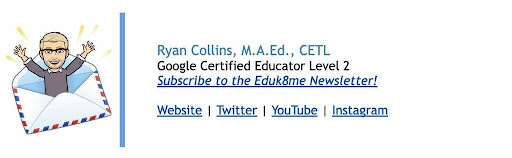
You have probably seen Gmail signatures that look a lot like this:

They have a graphic, a line, and then information about the sender. There are several online builders to create them. However, a lot of them stick additional links in the signature or have a lot of bells and whistles that aren't needed. Luckily, you have your own builder in Google Docs.


Laying out the signature in Google Docs

It is pretty easy to lay out a signature like this using a table in Google Docs. To get started, open a new Google Doc and insert a three column table. Resize the columns:

In the first cell we will paste our picture. This could be your headshot, school logo, bitmoji. Whatever tickles your fancy, you do you!


The second cell provides whitespace between the image and your information. Enter your information in the 3rd cell. Don't worry about the font right now, we'll have to change it in Gmail. 


Use the Insert menu to add links to the text in your signature.

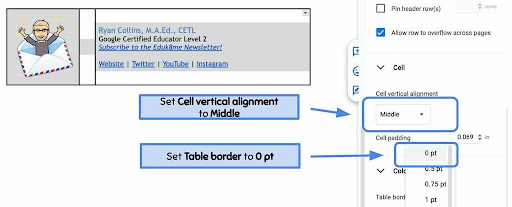
Once you have all of the information entered, we need to get rid of the table borders. Highlight the table and go to Format ➡ Table ➡ Table Properties and adjust the vertical alignment and size of the borders:

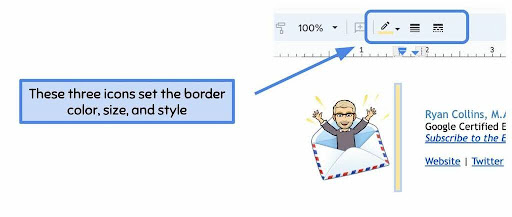
Finally, click on the border directly to the right of the graphic. In the toolbar you can select the color, size, and style of the selected border:

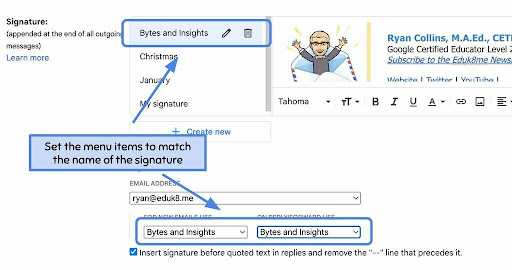
Your signature is done! Highlight the table and copy it. Switch over to Gmail. Click on the Gear in the upper right corner and See all settings. Scroll down to the signature section and click Create New. Give it a name and paste your signature into the box.


Sometimes Gmail will complain about the size of a graphic. If you get this error, resize the picture before pasting it into the table. A great online tool you can use to resize graphics is Squoosh.


Now you can change the font to one of the fonts offered by Gmail. To use your new signature by default, select it in the drop downs for FOR NEW EMAILS USE and ON REPLY/FORWARD USE:

Tips and Tricks

Google Chrome version 122 is expected to be released on February 14th and it is adding some features that I'm particularly excited about. The AI features aren't coming to managed school accounts anytime soon, so let's focus on things we can use. One of them is the ability to more easily find the tabs you have opened on other devices. If you have a Chrome profile on multiple devices, it can sync your settings, but it also will sync your tabs. You can reopen a tab from your laptop on your desktop. In version 122 Google is making it easier to find your tabs opened on other devices.


Google has already added AI tab management to version 121 that was released on January 23rd along with two other AI features. One can generate Chrome themes while the other is the Help me write feature. This feature is for use on the web when working on comments or reviews. None of these AI features can be used with your managed school Google accounts, but you can try them out with a personal account!


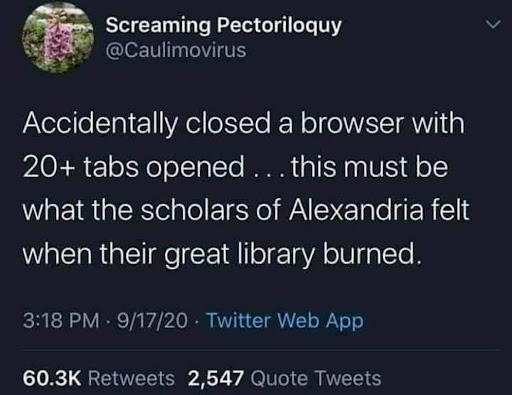
If you're a tab hoarder like I am, then you know the pain and agony of losing tabs.

It feels like that sometimes : adhdmeme


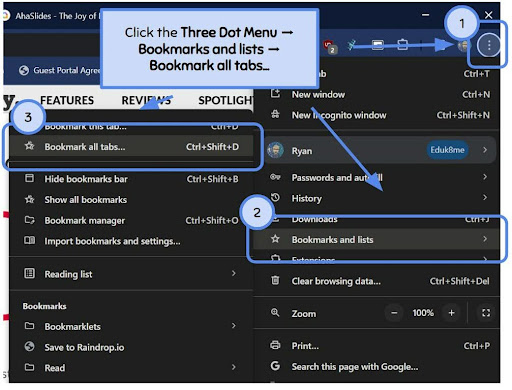
Sure, you can dig through your history, but all of your tabs WERE JUST RIGHT THERE! Luckily, there is a Google Chrome feature that you can use to alleviate some of the pain. The Bookmark all tabs... menu item does exactly what it says, allows you to bookmark all of the tabs in the current window. To use it, Click the Three Dot Menu ➡ Bookmarks and lists ➡ Bookmark all tabs…:

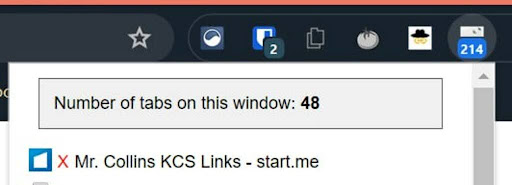
Chrome will ask you for the location to place a folder with all of the open tabs in that window. I wasn't kidding when I said I am a tab hoarder, my work PC currently has 214 tabs spread across 7 or 8 windows.

Learn21 Update


Bringing Joy and Making Connections: Our Unforgettable Time at the TCEA Conference


This week, the Learn21 team had the incredible opportunity to attend the TCEA conference, and what an adventure it turned out to be! We set out with a mission not just to share our educational and software solutions, but to spread joy and create lasting, positive connections. Our booth in the vendor hall became a haven of fun, drawing in attendees with laughter and shared moments that highlighted the essence of our community spirit.


We understand the importance of joy in education and we wanted our booth to be more than just informational. We aimed to create an experience that would leave a lasting impression, and our unique approach did just that. From rubber duck giveaways to teacher-created stickers, each element was designed with care to bring smiles and a touch of whimsy to the conference atmosphere.


But we didn't stop there. In a splash of creativity, we introduced duck pool floats, turning the hall into a mini race track. The challenge? Race with the floats to win a Star Wars-themed Amazon Echo device. The enthusiasm was palpable, with participants and onlookers cheering each other on, embodying the collaborative spirit that drives both Learn21 and the TCEA community at large.


Feedback from attendees was overwhelmingly positive. Many shared how the joy and energy at our booth not only brightened their day but also reminded them of the power of fun in fostering engagement and learning. It was a testament to our belief that when people come together in a spirit of joy, the connections formed are not only more meaningful but also more enduring.


This experience at TCEA reinforced a crucial message: joy is a powerful catalyst for connection. In the world of education, where challenges can sometimes feel overwhelming, finding moments of joy can be transformative. It reminds us of the passion that brought us into this field and the community that supports us. We believe that when educators are equipped with the right tools and a joyful mindset, they can create learning environments where students thrive.


As we reflect on our time at the TCEA conference, we're filled with gratitude for the connections made and the laughter shared. It was a vivid reminder of why we do what we do at Learn21. We're not just creating educational solutions; we're fostering a community where joy and learning go hand in hand.


Thank you to everyone who joined us at the conference, shared in our fun, and contributed to the incredible energy. Your enthusiasm and feedback fuels our mission to keep joy at the heart of education. Here's to more shared moments of joy, learning, and connection in the future!

Extra Credit

It seems that students can see right through how well AI writes. The consensus among students is that even though AI like ChatGPT can whip up an essay in the blink of an eye, the art of writing is still king. Why? Because AI can't replicate the unique voice, creativity, or emotional intelligence that comes from the human mind. While AI seems to make writing as simple as typing a prompt, it's not about to take over the writing world. Persuasive essays and creative stories are still very much in style.


Researchers in Denmark have discovered a simple 10 minute habit to remembering what you have learned. By exercising before and after learning new material, participants in the study were able to remember more than those who didn't exercise.


I'm pretty sure that researchers find out the importance of creative thinking and that employers just tag along for the ride (Archive). This year is no exception with 70% of employers saying that creative thinking is the most in-demand skill in 2024.

🙋‍♂️ Bytes and Insights is written by Eduk8me’s Ryan Collins who writes about education and educational technology. He is also the Director of Technology for Kenton City Schools in Ohio. Sign up for his Of Bits and Bytes newsletter at https://eduk8.me!


If you'd like to take a hiatus from Bytes & Insights, please use the Update Profile link below. This will allow you control over which emails you receive from Learn21.

www.learn21.org

LinkedIn        X        Instagram