Learn21's Weekly EdTech Update
November 9, 2023
| |
|
Serendipitous Moments
“Most discoveries even today are a combination of serendipity and of searching.” Siddhartha Mukherjee
Ah, serendipity, providing those unpredictable yet exhilarating moments in life. From unexpectedly bumping into an old friend in the supermarket aisle, to finding a $20 bill in the pocket of your winter coat on a chilly day, serendipity has a certain way of adding excitement to everyday life. It's the universe's version of a pop quiz, but the kind where everyone's a winner. Sometimes it is the perfect antidote to our carefully curated, algorithm-driven, GPS-tracked lives.
Our smartphones have inarguably become the spies of our social landscape, meticulously deducing every element of our lives. Whether we're yearning for a hot cup of coffee or craving a rendezvous with friends, technology takes us directly there, skipping all the unplanned yet delightful detours. Serendipity is getting a bit of the cold shoulder. The spontaneous friend encounters, the unexpected discoveries, the joy of getting gloriously lost and finding something wonderful? Technology, with its ceaseless location tracking and predictive algorithms, has taken the reins, leaving little room for such unscripted adventures. So, while tech enriches our lives in countless ways, the question remains: is it serendipity's party pooper or just an overzealous digital chaperone?
The issue of missed spontaneous connection can be lessened and there are ways to rekindle the serendipitous spark amidst our tech-saturated existence. The key, as it turns out, lies in not banishing our digital companions, but in training them to bring back the spice of spontaneity. Instead of using GPS to map out the quickest route, how about choosing the longest, asking it to not use highways and see where it takes you, throw a list of nearby coffee houses into a spreadsheet and randomly sort them. Then go through the list and see what you find. While we may not be able to completely unplug, we can definitely reprogram our digital lives to be less predictable, more spontaneous, and as a result, more rewarding. Yes, the sweet serendipity might have been sidelined, but with a bit of wit and innovation, we might just be able to invite it back to the party.
|  | |
|
Tips and Tricks
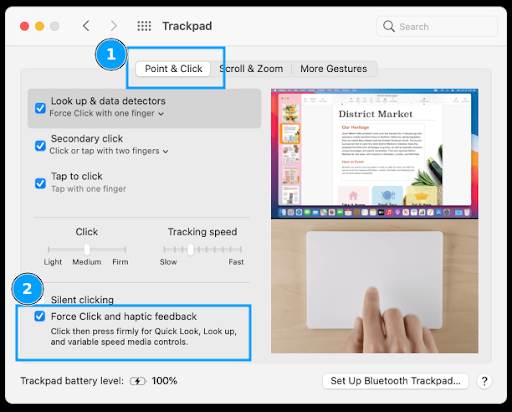
Get back control of your Macbook Trackpad by turning off Force Click. Have you had issues dragging with the trackpad on your Macbook? The problem may be Force Click. Apple's trackpad on the Macbooks is a technical marvel, when you push on to click, it may feel like you're pushing a physical button but in reality there is a feedback motor that makes it feel like a button when in fact there isn't. Along with this haptic feedback is Force Click. Pushing with a little bit of pressure produces a click, using a little more pressure produces a force click that you can feel as "two levels of button" (it's hard to explain, try it and you'll feel it). When you start dragging you may inadvertently activate Force Click, bringing up a menu and disrupting the drag.
To turn it off, go to Settings > Trackpad > Point & Click and toggle the setting off:
| |
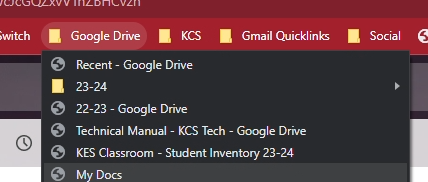
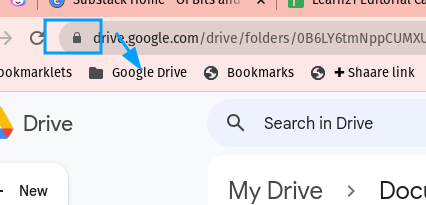
Fishing through your Google Drive for a folder or file can be a slow and arduous process, that's why I bookmark my most used Drive folders and documents. I have a folder in my bookmarks bar named Google Drive where I place links to the folders and documents. | |
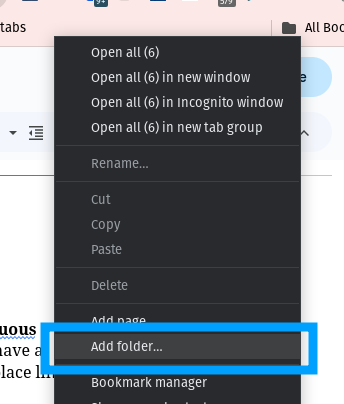
To get started, go into your settings and turn on your bookmarks toolbar if it's not already on. In Chrome you will find it under the three dot menu > Bookmarks > Show Bookmarks Bar. Now, right-click on the bar and select Add Folder. Create the folder and name it whatever you want. Google Drive is good, and so is using the folder emoji: 📂 | |
Now, navigate to your Google Drive and a folder that you use a lot. From there, grab the lock and drag it to the folder on the bookmark bar. | |
For any Google Documents, open it first and then drag the lock to your folder on the bookmark bar.
Bonus Tip: If you click on one of the bookmarks, it will replace the website already open in the current tab. However, there is a way to click on a bookmark in a new tab. On Windows hold the control key and then click on the bookmark (under macOS you would hold down the command key). The bookmark will automatically open in a new tab instead of the current tab. This technique works on any link on any page, it's not limited to your bookmarks. For the rare souls that use a mouse with a mouse wheel, you can do the same thing by clicking on the bookmark with the scroll wheel. Yes, the scroll wheel is a third button.
| |
|
Learn21 Update
Scary Apps 2023 Review
Boo! 👻 Did you catch our frightfully fun Scary Apps campaign last month? As a lead up to Halloween, we spotlighted popular education apps with spooky student privacy problems.
Each day we scared up an app whose policy raised the hairs on the back of our necks. From data sharing with third parties to targeted ads to lack of parental consent requirements, these apps’ terms were more chilling than any haunted house! 🏚️
We conjured a different bone-chilling app daily, like Chess.com, which says it's not for users under 18 but is clearly used by schools. Or Quizlet, which publicly displays students' classes they signed up for. *shudder*
The Weather App? Downright stormy conditions for data privacy! And Words with Friends wasn't playing when they admitted sharing identifiers with advertisers. We know - shriek! 😱
While highlighting risks, we also tipped our hats to apps trying to do better, like Canva signing the Student Privacy Pledge. But enabling external sharing still left them on our watchlist - at least until October 27th when the updated their sharing default!
Each day we stirred the pot, er...cauldron, brewing conversations about privacy, ethics, and responsible use of education technology. And you, our fearless defenders of student data privacy, joined the discussion with your own app nominations!
Did we give you chills? Share your fave “scary app” with us on social media! Together we can keep the focus on safe, secure educational experiences for all our student users.
And if you missed the Halloween hijinks, check out the full list of apps featured each day on our LinkedIn page. We may just make this an annual tradition to keep the student privacy conversation fresh as we evaluate new tools. 🧟
Stay vigilant out there, privacy protectors! Until next time, happy haunting! 👋😉
| |
|
Extra Credit
In schools we're all big on goal setting, but setting goals has a dark side. If you tell someone your goals, the chance of you achieving the goal is lower. Sivers' point is that announcing your goals prematurely can give you a false sense of accomplishment, and the praise you get from sharing might actually decrease your motivation to follow through.
Many organizations preach the gospel of a "growth mindset" and a "learning culture," but they often forget the importance of unlearning. Unlearning is difficult, but in the process we might discover new, more effective ways of doing things.
Here is the most surprising bit of research I've read in awhile, there is definitive evidence that executive function "usually matures by the time an individual turns 18 years old.” I don't know what this means for me because I don't think I'm there yet, and 18 happened during the late 1900s for me. They do add a caveat, "The ability to use executive function reliably improves with age and, at least in a laboratory setting, matures by 18 years of age."
How does your book ownership and organization compare to other Americans? The sad statistic? Fifteen percent polled don't own a single physical book. I organize my books by topic, which was the 2nd most used organization technique after no organization. However, a sizable portion of respondents organize by size or color... I'm not the most organized person in the world and I just can't get behind that.
| |
Bytes and Insights is written by Eduk8me’s Ryan Collins who writes about education and educational technology. He’s also the Director of Technology for Kenton City Schools in Ohio. Sign up for his Of Bits and Bytes newsletter at https://eduk8.me. | | | | |