Learn21's Weekly EdTech Update

January 25, 2024

Happy 40th Birthday Macintosh!

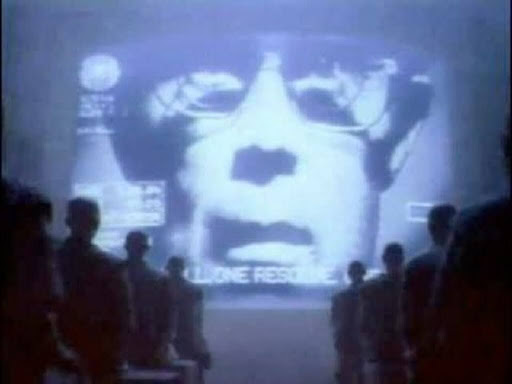
The seed for what happened on January 24th, 1984 was planted on December 31st, 1983. On KMVT, the station serving Twin Falls, Idaho, Apple's advertising firm aired Apple's “1984” commercial for the first time. “1984” was also aired three weeks later during the third quarter of Super Bowl XVIII to build anticipation for Apple's new Macintosh computer. Apple’s “1984” ad was a watershed event in advertising and has been ranked as the best television commercial ever made. You can watch the commercial here.

What the Macintosh did

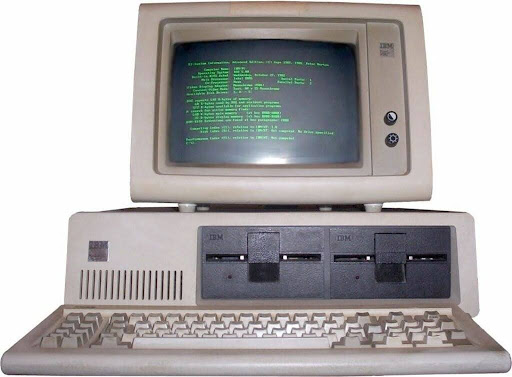
In order to understand the impact of Macintosh we first need to set the stage of what the pinnacle of high end personal computing was in 1984. If you worked in business, you were likely using an IBM Personal Computer with the green screen of glory.

Influence of the IBM PC on the personal computer market - Wikipedia


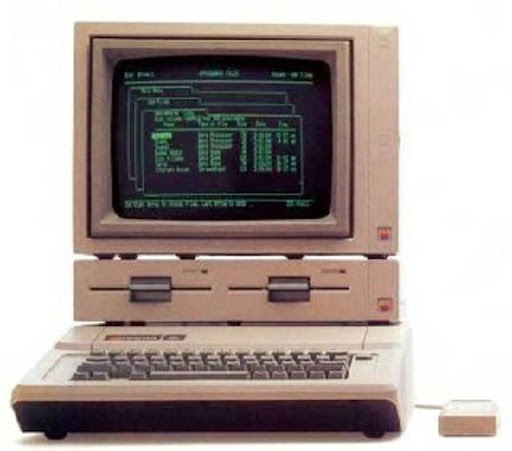
In the classroom, the Apple //e ruled the day. Fun fact, the 1983 release was

the first time Apple computers had lowercase letters.

[apple-history.com / Apple ][e](http://apple-history.com/aiie)


The release of the Macintosh brought forward a computer with a high resolution and bright screen, with graphics at the forefront instead of characters. To control the machine you would use a new fangled device called a "mouse" and use pull down menus to select features in your apps.


Launch troubles

True to Apple's standard operating procedure, the device was expensive, which hampered adoption by the masses. Steve Jobs was fired from the very company he co-founded with Steve Wozniak after the failed launch of the Lisa computer and the Macintosh. Despite a slow introduction to the market, the Macintosh slowly started to become a success. The Macintosh was the machine that all of the other computer companies tried to emulate.


1997 through today

Apple meandered through the 90s, coming close to dying. However, as Apple struggled to update its operating system, the company saw its solution in Steve Job's new company, NeXT. The purchase of NeXT not only brought Steve Jobs back to Apple but also introduced an operating system that would become the cornerstone of Macintosh computers, iPhones, iPads, and Apple Watches.

However, the NeXT operating system wasn't the first thing that the new Steve Jobs' Apple released. That would fall on to a little computer called the iMac. With its Bondi Blue color, lack of floppy drive, and a set of new fangled ports called USB, it was unlike any of its competitors. Companies sprouted up left and right to release peripherals in the same bondi blue.


This success led to the iPod, and then Mac OS X, and then to Apple's most influential and important product they ever released, the iPhone.


What Apple did to revolutionize the computer industry

I'm sure there will be people that will criticize me for gushing on and on about Apple, but I will stand by what I've written. Apple isn't perfect, but what they excel at is execution. Ideas are cheap and plentiful, taking those ideas and releasing a product is what separates the wheat from the chaff.

Here's a small sample of what Apple has done:

  • The Graphical User Interface (GUI) - There have been many words written on how Apple just stole the GUI from Xerox Parc research facility, but a lot of it isn't correct. Steve Jobs and Apple Engineers saw a GUI on a tour of Xerox Parc. What Xerox was working on and what Apple released with the Macintosh were two different beasts. For example, Apple invented pulldown menus at the top of the screen to make it easier for users to hit the menu since it was on the edge of the screen. Apple also came up with the concept of drag-and-drop for icons to make the user experience more enjoyable.
  • Computing for the masses - With time, computers were viewed less as only for the elite geek and more for the common person. As computing advanced people didn't have to learn to type commands, they could just point and click.
  • Music for $0.99 - Thanks to the success of the iPod, Steve Jobs was able to convince the record labels to sell songs ala carte for $0.99 a piece. At a time when you would buy a CD with one good song and eight fillers, this was amazing. The iTunes store showed the record companies that there is value in offering their music digitally, opening up the possibility of the streaming services we enjoy today.
  • The modern smartphone - At the dawn of the smartphones you had Handspring working on phones based on the Palm Pilot and the behemoth in the room, BlackBerry. BlackBerry was huge, so when Google started working on Android, all of the prototypes looked like a BlackBerry with a screen at the top and a physical keyboard at the bottom. Apple changed the phone game by offering a phone that is only a screen. 


The iPhone was introduced and the world of smartphones shifted overnight. Competitors were designing phones without keyboards to try to keep pace with the iPhone. The iPhone showed smartphone companies that you could use "tricks" to cover up features that technology couldn't provide yet. For example, BlackBerry execs were certain that the iPhone couldn't multitask like it was doing in the demo. Although BlackBerry was right it didn't matter because the Apple tricks didn't hurt the user experience.


Love 'em or hate 'em, Apple's influence cannot be dismissed.

Tips and Tricks

Keep the word count on screen in Google Docs. Click on the Tools menu and select Word Count. Google Docs will show the word count of the current document and other statistics. In the box, you can check Display word count while typing and Google Docs will show the current word count in the bottom left of the screen. This is also a menu which you can click on and get other statistics for your document.


Don't be afraid to archive your Gmail messages! There are quite a few Gmail users who leave everything in their inbox. This isn't an issue until it is, like missing an important email among the 10,000 other messages. However, you can archive those messages which will remove the emails. Where did they go? They actually didn't go anywhere, you just removed the Inbox label from the messages. To see those messages, and all of your email, look for the All Mail label on the left side. 


To find specific messages after the Inbox label is removed, use the search. Ironically, you've probably been using the search to find emails anyway if you have more than 50 in your inbox.


No ads on YouTube. To share a YouTube video to your students that will display without ads, use this trick. Insert a hyphen after the t in the youtube part of the URL. For example, if you want to share https://www.youtube.com/watch?v=YAx-Q1LIT_0 with your students but not have ads play, share https://www.yout-ube.com/watch?v=YAx-Q1LIT_0 instead.

Learn21 Update

Tech Director Toolbox: Maximize your one-to-one projects!

At Learn21, we understand that education's heartbeat is in seamless technology integration and support. Our groundbreaking Tech Director Toolbox (TDT) is not just a solution – it's the key to maximizing efficiencies in your one-to-one program that leads to educational excellence. Here are just a few of the ways TDT has your tech needs covered:


Seamless Integration for Enhanced Connectivity:

Integrate Student Information Systems (SIS) and Mobile Device Management (MDM) effortlessly into your educational ecosystem. Our Toolbox ensures that your devices seamlessly align with your institution's infrastructure, providing a unified and connected learning experience.


Comprehensive IT Asset Inventory & Management:

Maximize the potential of your educational technology investments with our Toolbox's robust IT asset management. Gain unparalleled insights into your assets from acquisition to retirement, promoting optimal utilization and longevity of devices.


Assignment & Incident Tracking – Past and Present:

Empower educators and IT administrators with real-time and historical data on device assignments and incidents. You can streamline workflows, optimize device distribution, and proactively address issues with our Toolbox's intuitive tracking features.


Repair Management & Parts Inventory:

Minimize downtime and disruption with our Repair Management capabilities. From identifying issues to managing parts inventory, our Toolbox ensures you can make swift and effective device repairs, guaranteeing uninterrupted learning experiences for students.


Automated Notification Workflows:

Efficiency meets responsiveness with our automated notification workflows. Stay ahead of potential issues, streamline communication, and enhance support with timely alerts and notifications, ensuring that your K-12 community is always informed and supported.


Elevate Your Institution with Innovation and Functionality:

The Learn21 Tech Director Toolbox is more than a solution; it's a commitment to educational excellence. We bring you a communication-focused powerhouse that aligns seamlessly with your institution's goals. Experience the future of K-12 education where innovation meets unparalleled functionality.


As a non-profit, founded and led by educators, we’ve made sure TDT is affordable and adds real value for all school types. Reach out to us to schedule a demo.

Extra Credit

Will AI live up to its hype? Tons of people have been writing, no, gushing about how great AI is and what it will do to your future. However, here is a more pessimistic look at AI. I can't say which future is the one that will unfold, but I can say it will probably be somewhere between the two views.


Last winter ChatGPT became "lazy," and for some reason it's happening again. No one knows why, with reasons varying from "no one works in December" to Chat GPT being tasked with new jobs that it's not good at yet. These new jobs are hypothesized to being part of the "hype cycle" or the more common phrase that when you only have a hammer everything looks like a nail.

🙋‍♂️ Bytes and Insights is written by Eduk8me’s Ryan Collins who writes about education and educational technology. He is also the Director of Technology for Kenton City Schools in Ohio. Sign up for his Of Bits and Bytes newsletter at https://eduk8.me!


If you'd like to take a hiatus from Bytes & Insights, please use the Update Profile link below. This will allow you control over which emails you receive from Learn21.

www.learn21.org

LinkedIn        X        Instagram