Learn21's Weekly EdTech Update

February 29, 2024

Securing your accounts with two-factor authentication


Turning on two-factor authentication (2FA) is one of the best things you can do to keep your accounts secured.


What is two-factor authentication?

It's pretty much a requirement for the computer to know who is at the keyboard for things to work. The first factor in authenticating your presence on a computer is through a username and password. That means anyone who has your first factor can now be “you” to the computer.


The solution to this issue is to add another factor to the authentication process through either another device like a smartphone, Yubikey, or other device. The other option is to authenticate through a biometric such as your face or your fingerprint.


How it works

Most people when starting out with 2FA will opt to receive a code over texts. After you authenticate with your username and password, the service will text you a code and ask you to enter that code. This stops anyone from signing in to the service with only your username and password.


A step up from the texting of codes is to use an authentication app such as Google Authenticator or Authy. Instead of receiving a code, you will open the app and a code will be there that you enter. These codes are time based and the math behind them is very cool, but that's for another day.


Some services use push notifications and an app on your phone. One of the most used is Google and the Gmail app. Once you have turned on 2FA in your Google account and installed the Gmail app, Google will send a push notification when you sign in, on which you need to press Yes to complete the sign in. This is usually faster than using codes and works well.


When two-factor authentication fails

Security is constant vigilance, and even when it's turned on there are ways you can be scammed.


With using codes from texts or an authentication app you must be very careful when you are signing in. If you are on a fake site asking you to log in, the site will accept your username and password, and then in the background it forwards that information to the correct site. If it asks for the code, the fake site will ask you for the code and also forward it to the real site, effectively signing in the attacker.


When using push notifications you won't get hit because the push notification will never come. However, if scammers get your username and password, they may try to get you on the phone and trick you into hitting yes when you get a push notification. Rule of thumb, if you are not logging in, don't hit yes.


The first step in keeping safe is to make sure you're on the site you think you're on. One of the advantages of using a password manager is that they won't fill in a username and password on a site they don't recognize, which should set off alarms for you to check the page you are using.


Getting started

Each service works a little differently, but once you set one up, it makes it easier to set up the others. Here are the links to Google's and Microsoft's directions to using 2FA.


And yes, it is a pain and yes, it is annoying.


"Everyone is all for security until they are inconvenienced." - Ryan Collins

I say that phrase at least once a week, and I totally understand the annoyances since all of my accounts have 2FA turned on. But right now it's one of the best ways to keep your account yours.

Tips and Tricks

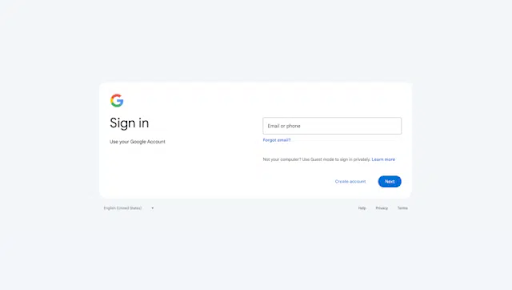
Heads up Google users, Google is changing the look of the sign-in page:

The change is for users on the web. If you are on a Chromebook, it has looked like this for a while. The change is rolling out to users now and is scheduled to be completed by March 4th.


There are several cool features in macOS Safari that make me fire it up when I'm on a Mac. One of them is the ability to take a website and make it into an App. These "apps" are self-contained, meaning that browsing history, cookies, website data, or settings belong to the app and not to Safari. They can be added to the dock, which will also use a badge to denote notifications.


The second feature I like speaks to the tab hoarder that I am, the ability to share all of the tabs you have open. For some reason I don't trust the browser history like I should, I'd rather keep all of my tabs open. But this tip comes in handy when I'm moving between machines, I can take my tabs with me!

Reader Tip of the Week 

We want to feature your tech tips and tricks! If you have any tips and tricks you would like to share with the Bytes and Insights crew please reply to this email (newsletters@learn21.org) and your tip may be featured in an upcoming newsletter!

Learn21 Update

Learn21’s PD that Doesn't Suck at DLAC!


This week the Learn21 team hit the road and shared their professional development that engages educators. The Digital Learning Annual Conference (DLAC) was a hub of innovation and collaboration. The conference brought together educators, technologists, and thought leaders from around the globe to share ideas and best practices in digital learning.


Transformative Teamwork: The Fusion of Curriculum & Technology Departments for Academic Excellence 

Presented by Stacy Hawthorne, Ed.D., Bill Fritz, and Jen Fry, this session explored how students win when schools successfully integrate their curriculum and technology departments. The presenters shared strategies for fostering collaboration between these traditionally separate units, leading to improved student outcomes and academic excellence.


Revolutionizing PD: Unleashing Engagement and Excitement in Educators! 

Carly Ghantous, Stacy Hawthorne, Ed.D., Kimberly McClain, Ed.D., and Erica Shumaker presented an engaging session on reimagining professional development. They shared Learn21’s approach to PD, which focuses on active engagement, practical application, and fostering a sense of excitement among educators.


Pushing Forward 

In her PechaKucha presentation, Stacy shared strategies on how educators can push forward and break through barriers to create exciting new opportunities in education. Stacy is well known for her ability to help others push forward and it was great to hear her secrets.


Pivot, Don’t Panic 

Carly Ghantous, Stacy Hawthorne, and Kimberly McClain led a session on resilience and adaptability in the face of change. They shared strategies for effectively managing transitions and maintaining a positive learning environment, even when faced with unexpected challenges.


Selling SEL: Strategies for Teachers and Students to Embrace and Enjoy Social and Emotional Learning 

Erica Shumaker’s presentation focused on the importance of Social and Emotional Learning (SEL) in the classroom. She shared practical strategies for integrating SEL into the curriculum and creating an environment where students can embrace and enjoy learning about themselves and others. 


5, 4, 3, 2, 1 Leveling Up SEL With Educational Technology 

In her PechaKucha, Erica Shumaker explored how educational technology can enhance SEL. She shared innovative ways to use technology to level up SEL instruction and engage students in meaningful learning experiences.


The enthusiastic feedback we received at DLAC 2024 underscores Learn21’s commitment to making professional development a meaningful and joyful endeavor. We’re proud of our team’s contributions and look forward to continuing to lead the way in education technology.

ETLA Conference Updates

Submissions Open through Friday, March 15

Registration is now open for the ETLA Conference! The conference will be held October 20-22 at the Nationwide Conference Center in Columbus Ohio.


We are also now accepting proposal submissions for the EdTech Leaders Alliance 2024 Conference! Formerly known as the Learn21 Ohio CoSN-ISTE Conference, our new name, ETLA, signifies our commitment to bringing together the best in educational leadership across the Midwest. We are excited to offer the same great Workshops and Presentations as years past with two new session types, OH Talks and L21 Talks. 


The portal to submit proposals is now open and will close Friday, March 15, 2024. 


Conference Details

When: Sunday, October 20 - Tuesday, October 22, 2024 

Who: Administrators, Instructional and Technology leaders, Teachers, Innovators

Where: Nationwide Conference Center Columbus, Ohio


Session Types

  • Workshops - 2.5 hour sessions on Monday, 10/21 only. These are hands-on opportunities to dive deep into a topic. Participants should be able to leave with something they can apply in their practice.
  • Presentations - 45 minute sessions offered on Monday, 10/21 and Tuesday, 10/22. More traditional conference-type sessions but instructional best practices are expected to apply.
  • OH Talks - 10-minute talks on the main stage at 4pm on Monday, 10/21 or online at a pre-conference session. These are an excellent opportunity for engaging speakers to pontificate on an educational topic about which they are passionate.
  • L21 Talks - 21 slides for 21 seconds (no exceptions) on Tuesday, 10/22. These talks are for the adventurous presenter.
Register
Submit a Proposal

Extra Credit

Google's Bard generative AI is now called Gemini and has been updated with new features. Unfortunately, generating images with humans has currently been turned off due to generating pretty biased, stereotypical, and racist imagery. Along with the name change they've introduced a new version, 1.5.


OpenAI, the company behind ChatGPT, demoed Sora which can create short videos based on text descriptions and the results are flat out phenomenal. You thought you could identify AI generated art? This is way beyond anything I've seen before.


Before the world wide web, a lot of the information and news was exposed to be curated by others. This curation helped us to find the needle in the haystack, but at the cost of the gatekeepers who ran the newspapers and magazines along with their biases. That's what made trust so important, if Walter Cronkite talked about it, you knew it was important because you trusted him.


We've moved beyond a lot of this curation which has since been replaced with algorithms. But, with the increase of AI generated data is human curation our last best hope of intelligent discourse?

🙋‍♂️ Bytes and Insights is written by Eduk8me’s Ryan Collins who writes about education and educational technology. He is also the Director of Technology for Kenton City Schools in Ohio. Sign up for his Of Bits and Bytes newsletter at https://eduk8.me!


If you'd like to take a hiatus from Bytes & Insights, please use the Update Profile link below. This will allow you control over which emails you receive from Learn21.

www.learn21.org

LinkedIn        X        Instagram