cpp logo
chrs banner
 
CHRiS Mascot

Hello Broncos! It’s CHRiS again - your guide as we prepare for the launch of the Common Human Resources System (CHRS) on March 23! Today, we’re focusing on an area that affects many employees across campus: Absence Management. 


Whether you’re tracking vacation or sick time, adjusting past entries, or reviewing your balances, CHRS provides a clearer and more consistent experience. Let’s take a look at the tools you’ll soon be using. 

Explore Your Absence Management Knowledge Articles

These step-by-step guides include screenshots and instructions to help you understand how absence-related tasks will look and function in CHRS. 


Please take a few minutes to browse each Knowledge Article below. 


Absence Management Knowledge Articles  


These articles show you exactly how CHRS handles absence entry, corrections, and approvals once the new system goes live. 

Upcoming CHRS Demo Schedule (February) 

Live Demo

To help you prepare for the CHRS go-live, a series of live system demos has been added to your calendar throughout the month of February. These demos are role-based, and you have only received calendar invitations for the sessions that apply to you. 


Scheduled CHRS Demos: 


  • All Employees - Personal Profile & Benefits - February 9 | 10 - 11:30 AM 
  • All Employees - Time and Labor - February 16 | 10 - 11:30 AM 
  • Faculty - Personal Profile (View Appointment) - February 17 | 10 - 11:30 AM 
  • All Employees - Absence Management - February 23 | 10 - 11:30 AM 
  • MPP & Timekeepers - Time and Labor & Absence Management - February 25 | 10 - 11:30 AM 


All demos will be recorded and posted to the CHRS website along with the presentation slides for future reference. 


If you prefer to attend an in-person information session with the same content presented in a condensed format, we will be hosting: 


  • March 2 - In-person session (English) 
  • March 9 - In-person session (Spanish) 


Registration links for the in-person sessions will be shared in a future email. 

CHRS Roadmap 

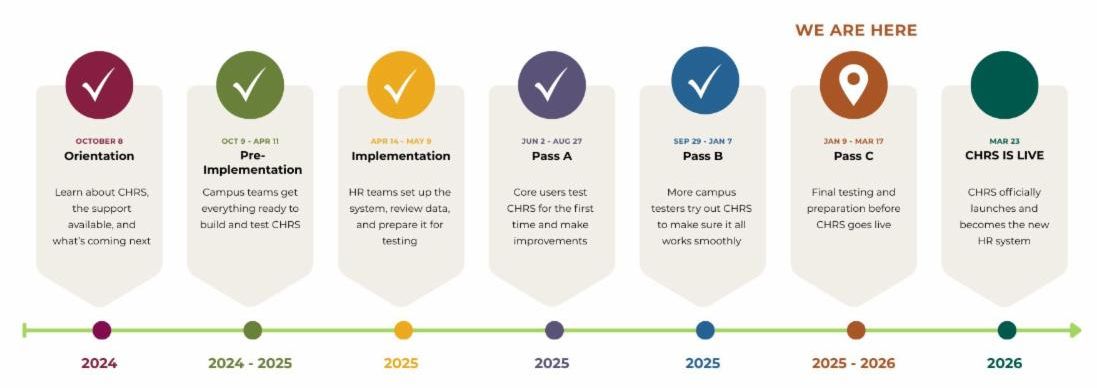
Here’s where we are in the CHRS transition timeline and what’s ahead as we move closer to launch. 

Timeline titled CHRS Timeline showing project phases from 2024 to 2026. Phases include Orientation on October 8 2024 Pre Implementation from October 9 2024 to April 11 2025 Implementation from April 14 to May 9 2025 Pass A from June 2 to August 27 2025 Pass B from September 29 2025 to January 7 2026 Pass C from January 9 to March 17 2026 marked as We are here and CHRS Is Live on March 23 2026 when CHRS officially launches as the new HR system.

Topics Checklist

Below is your learning checklist. We’ll continue checking off items together: 


  • Personal Profiles ✔️ 
  • Time & Labor ✔️ 
  • Absence Management ✔️
  • Benefits 

CHRS Bronco Knowledge Round-Up

CHRiS Thinking Mascot

Win $5 in Bronco Bucks by answering this week’s question. Review the Knowledge Articles listed above and submit your answer using the button below. The first three employees with the correct answer wins! 

When requesting an absence in CHRS, when does the Forecast button appear? 


A. Only when requesting Sick Leave 


B. Only for absences longer than one day 


C. Only if the absence type requires accrual and you must have enough hours 


D. It always appears, no matter the absence type 

Congratulations to the winner of last week's CHRS Bronco Knowledge Round-Up!

1st place

Bren Cruz

Note: All answers will be posted on the CHRS Website.

Helpful Links

Have questions? Submit them through the Inquiry Form and our team will follow up. 

Countdown to CHRS Launch 

48 days to go!

Thank you for staying engaged as we get closer to launch. More CHRS guidance is coming your way soon! 


Your CHRS Companion, 


CHRiS