cpp logo
chrs banner
CHRiS Mascot

Hello Broncos! It’s me - CHRiS, your friendly digital guide as we get ready to move from PeopleSoft to the new Common Human Resources System (CHRS). I’m so excited to continue this journey with you!


Today, I’m sharing some important tools that will help you feel comfortable and confident when CHRS officially launches. 

Explore Your Personal Profile Knowledge Articles 

To help you get familiar with how things will look and function in CHRS, we’re sharing a set of step-by-step Knowledge Articles. Each one includes screenshots and clear instructions so that, once CHRS goes live, you can easily follow along. 


For now, your action item is simple: Please take a few minutes to browse each Knowledge Article below. 


This will help you get familiar with the layout so that later, you will know exactly where to go when it’s time to complete these tasks inside the CHRS system. 


Personal Profile Knowledge Articles: 


These articles live in the CHRS Knowledge Base and will guide you step-by-step once the system opens! 

Action Item: Update Your Personal Details in PeopleSoft Now 

Action Items

Before your data transfers into CHRS, please make sure the following information in PeopleSoft is correct. 


This ensures your information is accurate once CHRS launches. 

Upcoming CHRS Demo Schedule (February) 

To help you prepare for the CHRS go-live, a series of live system demos will be added to your calendar throughout the month of February. These demos are role-based, and you will only receive calendar invitations for the sessions that apply to you


Scheduled CHRS Demos: 


  • All Employees - Personal Profile & Benefits - February 9 | 10:00–11:00 AM 
  • All Employees - Time and Labor - February 16 | 10:00–11:30 AM 
  • Faculty - Personal Profile (View Appointment) - February 17 | 10:00–11:30 AM 
  • All Employees - Absence Management - February 23 | 10:00–11:30 AM 
  • MPP & Timekeepers - Time and Labor & Absence Management - February 25 | 10:00–11:30 AM 


All demos will be recorded and posted to the CHRS website along with the presentation slides for future reference. 


If you prefer to attend an in-person information session with the same content presented in a condensed format, we will be hosting: 


  • March 2 - In-person session (English) 
  • March 9 - In-person session (Spanish) 


Registration links for the in-person sessions will be shared in a future email. 

CHRS Roadmap 

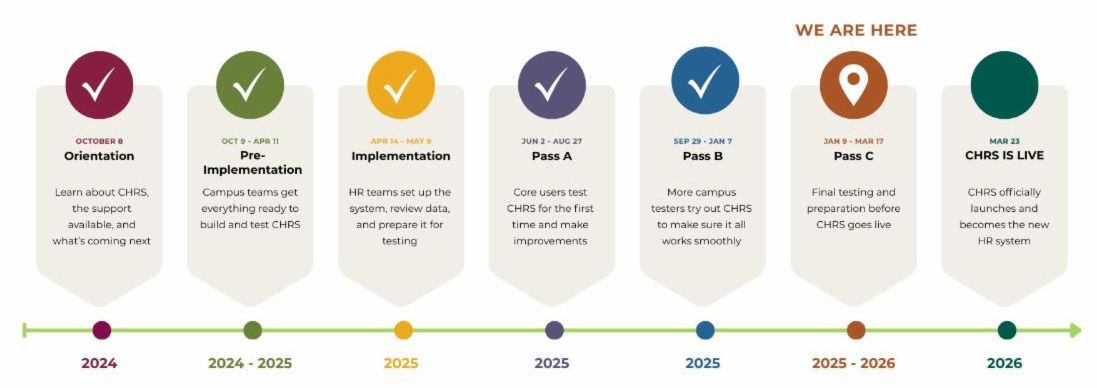
We’re steadily moving forward on the path to launch. Here’s where we are in the overall CHRS timeline and what’s ahead. 

Timeline titled CHRS Timeline showing project phases from 2024 to 2026. Phases include Orientation on October 8 2024 Pre Implementation from October 9 2024 to April 11 2025 Implementation from April 14 to May 9 2025 Pass A from June 2 to August 27 2025 Pass B from September 29 2025 to January 7 2026 Pass C from January 9 to March 17 2026 marked as We are here and CHRS Is Live on March 23 2026 when CHRS officially launches as the new HR system.

Topics Checklist

Below is your learning checklist. We’ll continue checking off items together: 


  • Personal Profiles ✔️ 
  • Time & Labor 
  • Absence Management 
  • Benefits 

CHRS Bronco Knowledge Round-Up

CHRiS Thinking Mascot

Win $5 in Bronco Bucks by answering this week’s question. Review the Knowledge Articles listed above and submit your answer using the button below. The first three employees with the correct answer wins! 

Where can employees update their personal address in CHRS/PeopleSoft? 


A. Benefits Enrollment tile  


B. CSU Personal Details tile  


C. Payroll tile  


D. My Tasks tile  

Helpful Links

Have questions? Submit them through the Inquiry Form and our team will follow up. 

Countdown to CHRS Launch 

69 days to go!

I’m so proud of all the progress we’re making together. Keep an eye out for more messages from me. I’ll be with you every step of the way as we get ready for CHRS! 


Your CHRS Companion, 


CHRiS