May 2024

EOY Reporting Resources

ECDS Pre-K Reporting Process


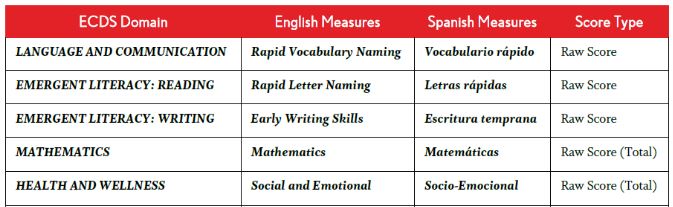
Texas school districts and charter schools will use the XML File Download Tool on CLI Engage to export pre-K data to upload into TEA’s Early Childhood Data System (ECDS). Texas districts are required to submit beginning-of-year (BOY) and end-of-year (EOY) child progress monitoring data by the June 27 due date.


Steps prior to exporting your XML files:

  • Use Student Results Export to download a file of the progress monitoring data
  • Ensure that all students have TSDS IDs
  • Ensure that any duplicate students have been removed
  • Update and adjust enrollment and withdrawal dates to exclude students who were not enrolled during your assessment window


Details related to your report submission:

  • Only includes data from BOY and EOY CIRCLE Progress Monitoring
  • XML report automatically includes required CPM measures for ECDS
  • TSDS ID numbers are required for students:
  • Reports include scores only for students with a valid 10-digit TSDS ID
  • Students with missing, invalid, or duplicate TSDS ID are not included
  • Assessment window dates are also required
  • Reports include scores for both active and inactive students with PK grade level
  • XML files will not include an overall composite score for “school readiness”
  • If your teachers assessed students in English and Spanish, be sure to export XML files for both languages

Learn more from the ECDS Uploads for Pre-K Data webpage and included video.

Accessing & Generating Reports


Learn about the various reports available on CLI Engage, and how to find how-to guides and support resources for individual students, classes, schools, and communities on our Accessing Reports page. Then download your report results from the link sent to your email or by using My Reports, located at the top of the dashboard. 

Report Options


  • Individual Student-Level
  • Class-Level
  • School-Level
  • Community/District-Level

Student Results Export Report


The Student Results Export can be generated for all assessments in CLI Engage. This report will provide individual scores for each student by item showing each task within a measure, or by results indicating on track, needs support, or monitoring. Administrators can use this report to filter and view their student results.


Review our Student Results Export Report how-to guide for step-by-step instructions.


Download Data Before Deletion


Communities/districts can generate the Student Results Export or other reports any time before the end of June to store collected assessment data they wish to save in their system for future reference or archiving. All 2023-2024 student assessment data will be deleted in July when the CLI Engage database rolls over for use in the next school year.


Download all data to be saved before June 30, the last day to access assessment data!

Reporting Due Dates to Remember


  • End of school year: Kindergarten Dyslexia Screeners for all students are due.
  • June 20: Grades K-2 ERI codes and student dyslexia risk codes due in PEIMS.
  • June 27: The Pre-K ECDS window closes for BOY and EOY submissions.
  • June 30: Last day to download student data before the annual database rollover when all student data will be removed from the platform to prepare the CLI Engage database for the 2024-2025 school year.


Find more information on these dates in the last issue of the EA Quarterly newsletter.

Family Resources

Family Engagement Resources


CLI’s family engagement resources support families in better understanding children’s development and engaging in fun, developmentally appropriate activities that not only build skills but strengthen the bonds between family members.


Download guides and tools, link to resources to share with families, and access free professional development for teachers.


Explore the toolkit and find family engagement resources to support your program!

CIRCLE Activity Collection: Family


The CIRCLE Activity Collection: Family translates child development research into practice by providing a variety of hands-on activities that families can do at home. This free collection provides fun, playful learning experiences for students which also support what they are learning in school.


Activities are available in English and Spanish and include:

  • a description of the activity, the learning areas the activity supports, and an appropriate age range
  • materials needed for the activity (usually common household objects)
  • activity instructions and phrases that help families begin the activity
  • helpful hints, including tips to make the activity easy to do, different ways the activity can be completed, and how to make it less or more challenging


Search the collection and share the web address cliengagefamily.org with your families!

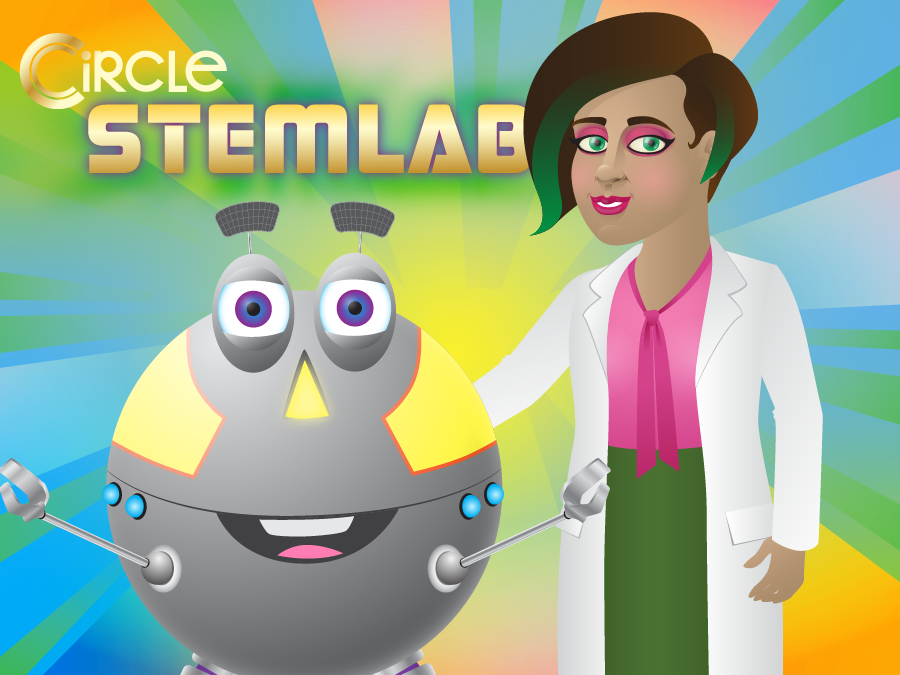
CIRCLE STEM Lab


To increase the quantity and scope of STEM (Science, Technology, Engineering, and Math) activities included in the CIRCLE Activity Collection, CLI formed a partnership with PBS. This collaboration resulted in the development of 20 child-directed, interactive lessons that use PBS LearningMedia video.


Presenting STEM content in a child-friendly and entertaining manner, the activities teach foundational STEM skills known to be important for 3- to 6-year-olds. Set in a virtual laboratory setting, the CIRCLE STEM Lab integrates the video segments with hands-on activities to be completed by the child. Each activity is designed to facilitate independent learning by individual students.

All activities include:

  • a short introduction to the topic
  • a video from PBS LearningMedia
  • a demonstration of the task
  • guided practice with feedback
  • practice opportunities without feedback
  • a recap of the images from the activity as the items are scored
  • a brief summary and explanation of the independent practice


Share the CIRCLE STEM Lab Family Guide when you send these activities home!

CLI Engage is part of the Children's Learning Institute at UTHealth Houston

www.cliengage.org

STAY CONNECTED
Facebook  Twitter